


Awesome web-browsable Web APIs.
Full documentation for the project is available at https://www.django-rest-framework.org/.
Overview
Django REST framework is a powerful and flexible toolkit for building Web APIs.
Some reasons you might want to use REST framework:
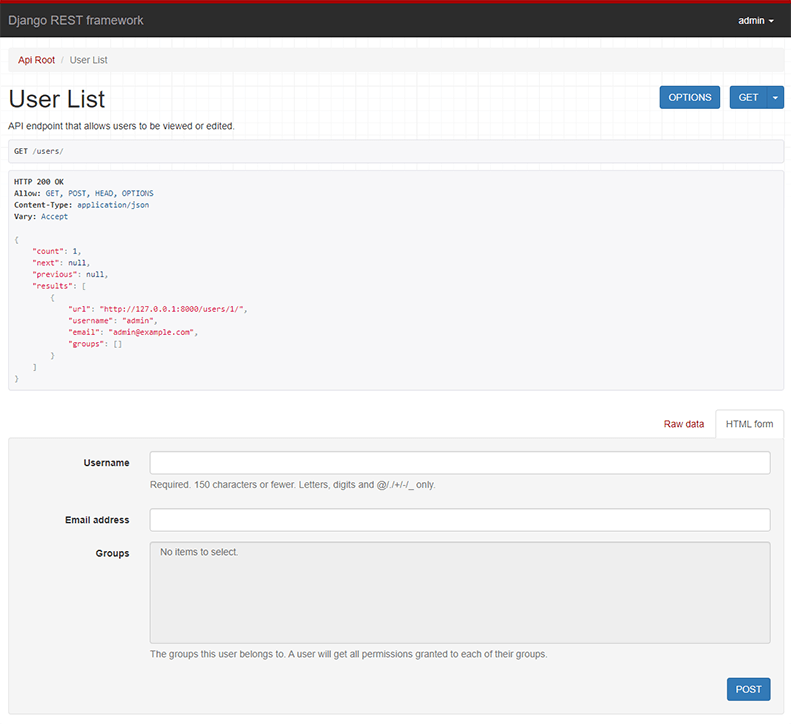
Below: Screenshot from the browsable API
Requirements
- Python 3.10+
- Django 4.2, 5.0, 5.1, 5.2, 6.0
We highly recommend and only officially support the latest patch release of
each Python and Django series.
Installation
Install using pip...
pip install djangorestframework
Add 'rest_framework' to your INSTALLED_APPS setting.
INSTALLED_APPS = [
"rest_framework",
]
Example
Let's take a look at a quick example of using REST framework to build a simple model-backed API for accessing users and groups.
Start up a new project like so...
pip install django
pip install djangorestframework
django-admin startproject example .
./manage.py migrate
./manage.py createsuperuser
Now edit the example/urls.py module in your project:
from django.contrib.auth.models import User
from django.urls import include, path
from rest_framework import routers, serializers, viewsets
class UserSerializer(serializers.HyperlinkedModelSerializer):
class Meta:
model = User
fields = ["url", "username", "email", "is_staff"]
class UserViewSet(viewsets.ModelViewSet):
queryset = User.objects.all()
serializer_class = UserSerializer
router = routers.DefaultRouter()
router.register(r"users", UserViewSet)
urlpatterns = [
path("", include(router.urls)),
path("api-auth/", include("rest_framework.urls", namespace="rest_framework")),
]
We'd also like to configure a couple of settings for our API.
Add the following to your settings.py module:
INSTALLED_APPS = [
"rest_framework",
]
REST_FRAMEWORK = {
"DEFAULT_PERMISSION_CLASSES": [
"rest_framework.permissions.DjangoModelPermissionsOrAnonReadOnly",
]
}
That's it, we're done!
./manage.py runserver
You can now open the API in your browser at http://127.0.0.1:8000/, and view your new 'users' API. If you use the Login control in the top right corner you'll also be able to add, create and delete users from the system.
You can also interact with the API using command line tools such as curl. For example, to list the users endpoint:
$ curl -H 'Accept: application/json; indent=4' -u admin:password http://127.0.0.1:8000/users/
[
    {
        "url": "http://127.0.0.1:8000/users/1/",
        "username": "admin",
        "email": "admin@example.com",
        "is_staff": true,
    }
]
Or to create a new user:
$ curl -X POST -d username=new -d email=new@example.com -d is_staff=false -H 'Accept: application/json; indent=4' -u admin:password http://127.0.0.1:8000/users/
{
    "url": "http://127.0.0.1:8000/users/2/",
    "username": "new",
    "email": "new@example.com",
    "is_staff": false,
}
Documentation & Support
Full documentation for the project is available at https://www.django-rest-framework.org/.
For questions and support, use the REST framework discussion group, or #restframework on libera.chat IRC.
Security
Please see the security policy.





