



Research
2025 Report: Destructive Malware in Open Source Packages
Destructive malware is rising across open source registries, using delays and kill switches to wipe code, break builds, and disrupt CI/CD.
By Kush Pandya - Dec 24, 2025
mkdocs-network-graph-plugin
Advanced tools
A MkDocs plugin to generate an interactive graph of your documentation.
Add an interactive knowledge network graph to your Material for MkDocs documentation project




A powerful Material for MkDocs plugin that generates beautiful, interactive graph visualizations of your documentation structure and relationships.
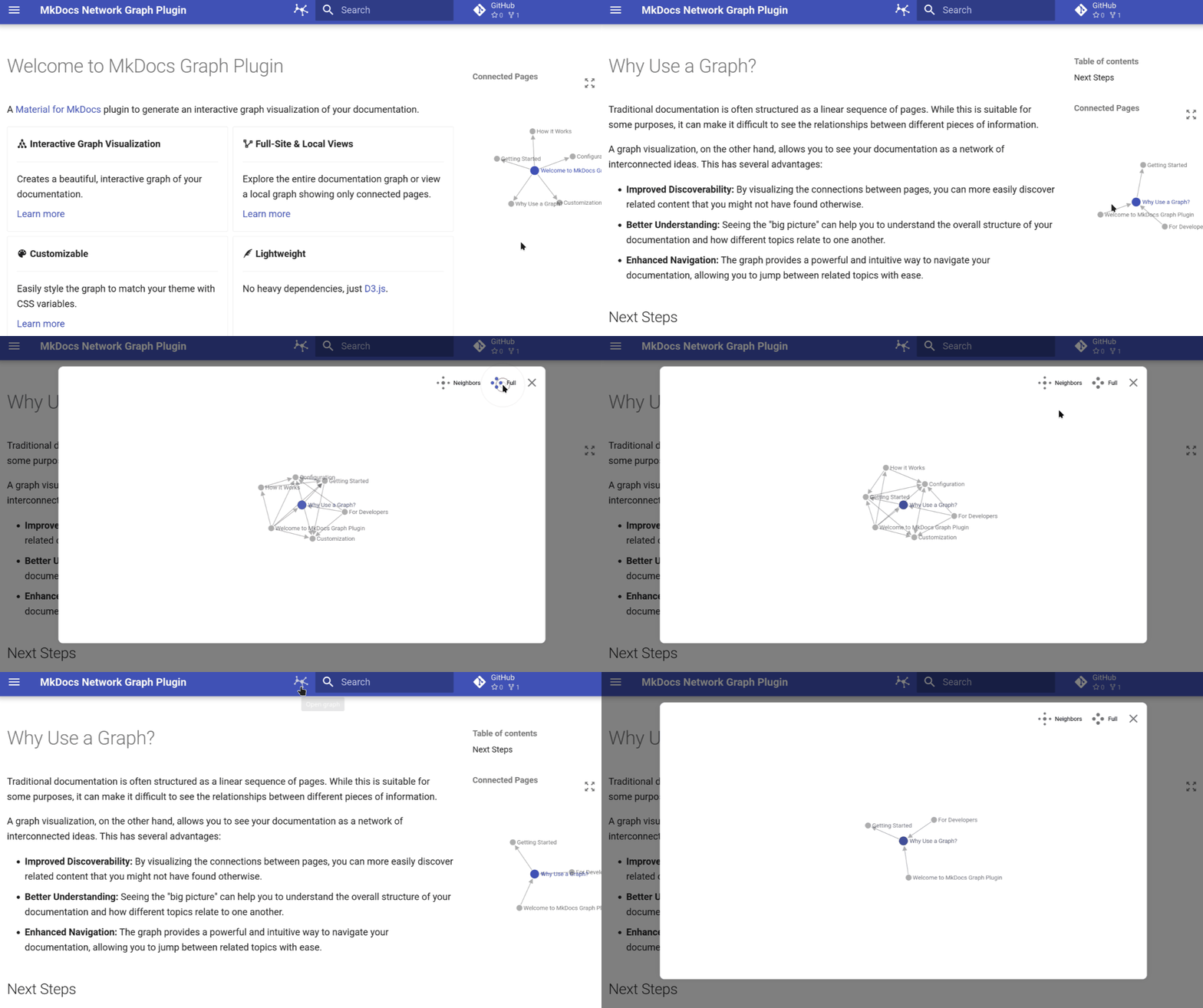
| Interactive Visualization | Smart Navigation | Fully Customizable | Lightweight |
|---|---|---|---|
| Interactive Graph Visualization of your documentation structure | Dual View Modes to switch between a full-site overview and local page connections | Theme Integration that seamlessly blends with Material for MkDocs | Performance Optimized with minimal impact on build times and a responsive design |
Get up and running in under 2 minutes:
pip install mkdocs-network-graph-plugin
mkdocs.ymlplugins:
- graph
mkdocs serve
That's it! Your documentation now includes an interactive graph visualization.
pip install mkdocs-network-graph-plugin
uv pip install mkdocs-network-graph-plugin
pipx install mkdocs-network-graph-plugin
For contributors, this is the recommended setup:
Clone the repository
git clone https://github.com/develmusa/mkdocs-network-graph-plugin.git
cd mkdocs-network-graph-plugin
Set up the development environment
# Sync with the lockfile
uv sync
# Install required Python versions for testing
uv python install 3.10 3.11 3.12 3.13
# Install in editable mode with dev dependencies
uv pip install -e '.[dev]'
# Install pre-commit hooks
uv run pre-commit install
For more details, see the developer guide.
plugins:
- graph:
name: "title" # Use page titles for node names
debug: false # Disable debug logging
plugins:
  - graph:
      name: "file_name"    # Use file names instead of titles
      debug: true          # Enable verbose logging for troubleshooting
| Option | Type | Default | Description |
|---|---|---|---|
name | string | "title" | Node naming strategy: "title" or "file_name" |
debug | boolean | false | Enable debug logging for development |
Customize the graph appearance using CSS variables in your extra.css:
:root {
  /* Node styling */
  --md-graph-node-color: #1976d2;
  --md-graph-node-color--hover: #1565c0;
  --md-graph-node-color--current: #ff5722;

  /* Link styling */
  --md-graph-link-color: #757575;

  /* Text styling */
  --md-graph-text-color: #212121;
}
| Variable | Description | Default |
|---|---|---|
--md-graph-node-color | Default node color | Theme primary |
--md-graph-node-color--hover | Node hover color | Darker primary |
--md-graph-node-color--current | Current page node color | Theme accent |
--md-graph-link-color | Connection line color | Theme text (muted) |
--md-graph-text-color | Node label text color | Theme text |
Comprehensive documentation is available at develmusa.github.io/mkdocs-network-graph-plugin
We welcome contributions! For a complete guide on how to contribute, please see the developer guide.
To get started, set up your environment by following the Development Installation instructions. From there, you can run tests and linting using nox:
# Run tests
uv run nox -s tests

# Run linting
uv run nox -s lint
This project is licensed under the MIT License - see the LICENSE file for details
Explore other tools with Markdown documentation graph visualization:
Star this project if you find it useful!
Made with AI and ❤️ by develmusa
FAQs
A MkDocs plugin to generate an interactive graph of your documentation.
We found that mkdocs-network-graph-plugin demonstrated a healthy version release cadence and project activity because the last version was released less than a year ago. It has 1 open source maintainer collaborating on the project.
Did you know?

Socket for GitHub automatically highlights issues in each pull request and monitors the health of all your open source dependencies. Discover the contents of your packages and block harmful activity before you install or update your dependencies.
Research
Destructive malware is rising across open source registries, using delays and kill switches to wipe code, break builds, and disrupt CI/CD.

Security News
Socket CTO Ahmad Nassri shares practical AI coding techniques, tools, and team workflows, plus what still feels noisy and why shipping remains human-led.

Research
/Security News
A five-month operation turned 27 npm packages into durable hosting for browser-run lures that mimic document-sharing portals and Microsoft sign-in, targeting 25 organizations across manufacturing, industrial automation, plastics, and healthcare for credential theft.