🦾 Nidam: Self-Hosting LLMs Made Easy





Nidam allows developers to run any open-source LLMs (Llama 3.3, Qwen2.5, Phi3 and more) or custom models as OpenAI-compatible APIs with a single command. It features a built-in chat UI, state-of-the-art inference backends, and a simplified workflow for creating enterprise-grade cloud deployment with Docker, Kubernetes, and jileCloud.
Understand the design philosophy of Nidam.
Get Started
Run the following commands to install Nidam and explore it interactively.
pip install nidam
nidam hello
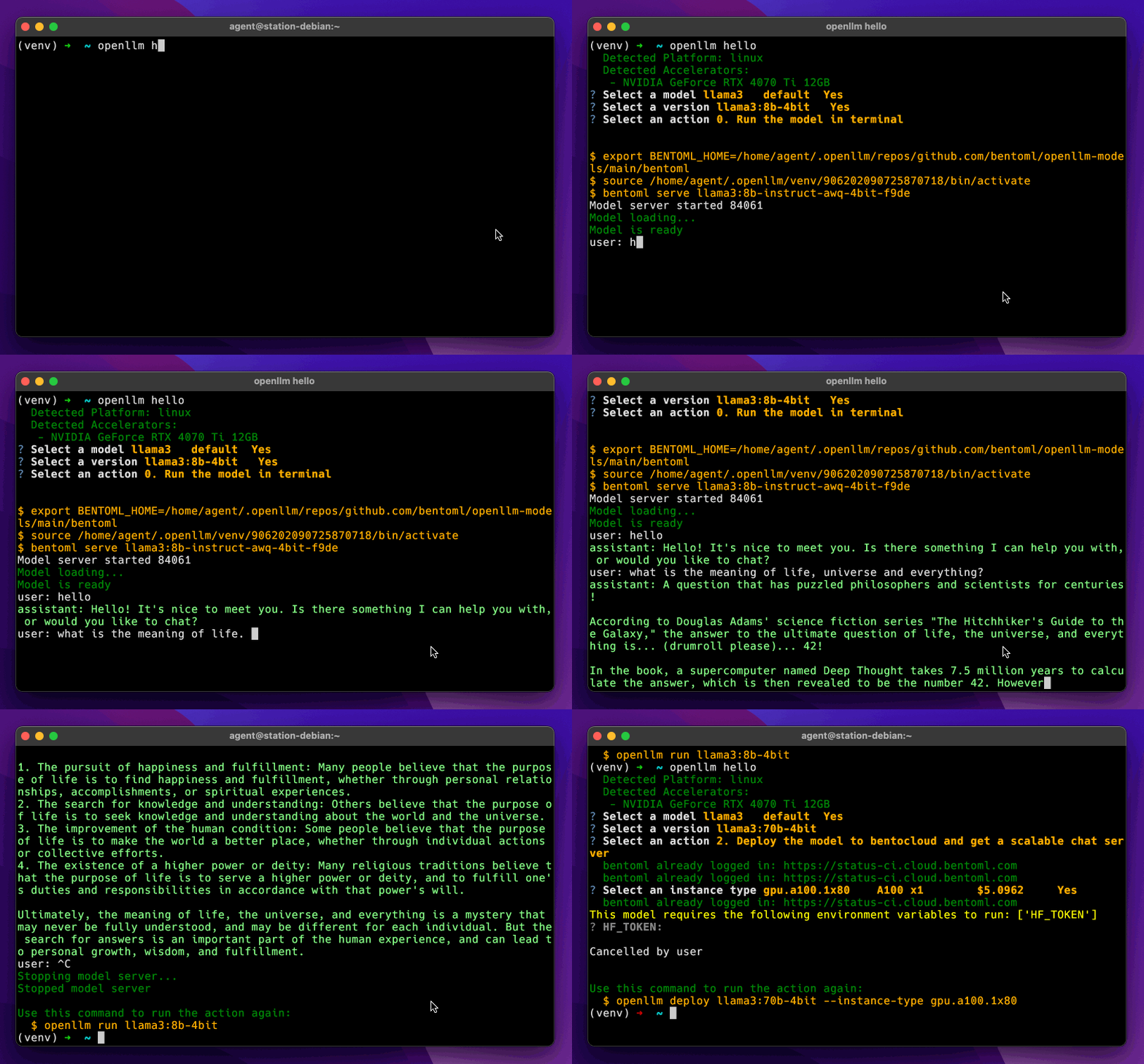
Supported models
Nidam supports a wide range of state-of-the-art open-source LLMs. You can also add a model repository to run custom models with Nidam.
| Llama 3.3 | 70B | - | 80Gx2 | nidam serve llama3.3:70b |
| Llama 3.2 | 3B | - | 12G | nidam serve llama3.2:3b |
| Llama 3.2 Vision | 11B | - | 80G | nidam serve llama3.2:11b-vision |
| Mistral | 7B | - | 24G | nidam serve mistral:7b |
| Qwen 2.5 | 1.5B | - | 12G | nidam serve qwen2.5:1.5b |
| Qwen 2.5 Coder | 7B | - | 24G | nidam serve qwen2.5-coder:7b |
| Gemma 2 | 9B | - | 24G | nidam serve gemma2:9b |
| Phi3 | 3.8B | - | 12G | nidam serve phi3:3.8b |
...
For the full model list, see the Nidam models repository.
Start an LLM server
To start an LLM server locally, use the nidam serve command and specify the model version.
[!NOTE]
Nidam does not store model weights. A Hugging Face token (HF_TOKEN) is required for gated models.
nidam serve llama3:8b
The server will be accessible at http://localhost:3000, providing OpenAI-compatible APIs for interaction. You can call the endpoints with different frameworks and tools that support OpenAI-compatible APIs. Typically, you may need to specify the following:
- The API host address: By default, the LLM is hosted at http://localhost:3000.
- The model name: The name can be different depending on the tool you use.
- The API key: The API key used for client authentication. This is optional.
Here are some examples:
OpenAI Python client
from openai import OpenAI
client = OpenAI(base_url='http://localhost:3000/v1', api_key='na')
chat_completion = client.chat.completions.create(
model="meta-llama/Meta-Llama-3-8B-Instruct",
messages=[
{
"role": "user",
"content": "Explain superconductors like I'm five years old"
}
],
stream=True,
)
for chunk in chat_completion:
print(chunk.choices[0].delta.content or "", end="")
LlamaIndex
from llama_index.llms.openai import OpenAI

llm = OpenAI(api_bese="http://localhost:3000/v1", model="meta-llama/Meta-Llama-3-8B-Instruct", api_key="dummy")
...
Chat UI
Nidam provides a chat UI at the /chat endpoint for the launched LLM server at http://localhost:3000/chat.

Chat with a model in the CLI
To start a chat conversation in the CLI, use the nidam run command and specify the model version.
nidam run llama3:8b
Model repository
A model repository in Nidam represents a catalog of available LLMs that you can run. Nidam provides a default model repository that includes the latest open-source LLMs like Llama 3, Mistral, and Qwen2, hosted at this GitHub repository. To see all available models from the default and any added repository, use:
nidam model list
To ensure your local list of models is synchronized with the latest updates from all connected repositories, run:
nidam repo update
To review a model’s information, run:
nidam model get llama3:8b
Add a model to the default model repository
You can contribute to the default model repository by adding new models that others can use. This involves creating and submitting a jile of the LLM. For more information, check out this example pull request.
Set up a custom repository
You can add your own repository to Nidam with custom models. To do so, follow the format in the default Nidam model repository with a jiles directory to store custom LLMs. You need to build your jiles with jileML and submit them to your model repository.
First, prepare your custom models in a jiles directory following the guidelines provided by jileML to build jiles. Check out the default model repository for an example and read the Developer Guide for details.
Then, register your custom model repository with Nidam:
nidam repo add <repo-name> <repo-url>
Note: Currently, Nidam only supports adding public repositories.
Deploy to jileCloud
Nidam supports LLM cloud deployment via jileML, the unified model serving framework, and jileCloud, an AI inference platform for enterprise AI teams. jileCloud provides fully-managed infrastructure optimized for LLM inference with autoscaling, model orchestration, observability, and many more, allowing you to run any AI model in the cloud.
Sign up for jileCloud for free and log in. Then, run nidam deploy to deploy a model to jileCloud:
nidam deploy llama3:8b
[!NOTE]
If you are deploying a gated model, make sure to set HF_TOKEN in enviroment variables.
Once the deployment is complete, you can run model inference on the jileCloud console:

Nidam is actively maintained by the jileML team. Feel free to reach out and join us in our pursuit to make LLMs more accessible and easy to use 👉 Join our Slack community!
Contributing
As an open-source project, we welcome contributions of all kinds, such as new features, bug fixes, and documentation. Here are some of the ways to contribute:
Acknowledgements
This project uses the following open-source projects:
We are grateful to the developers and contributors of these projects for their hard work and dedication.





