Progresspanel
The Progresspanel is a custom tkinter widget that displays a progress bar and
buttons (Start/Resume, Pause, Terminate) to control a user-defined task that
runs in a separate thread. The widget is implemented in progresspanel.py.
Installation
You can install Progresspanel using pip for the Python environment:
pip install progresspanel
Usage
To use the Progress Panel, you need to create an instance of the Progresspanel
class and pass it a parent widget, a total number of iterations, and a task
function to be run in a loop.
Here below is an example code that creates a window with a progress bar and
buttons to control the task as shown in the GIF:
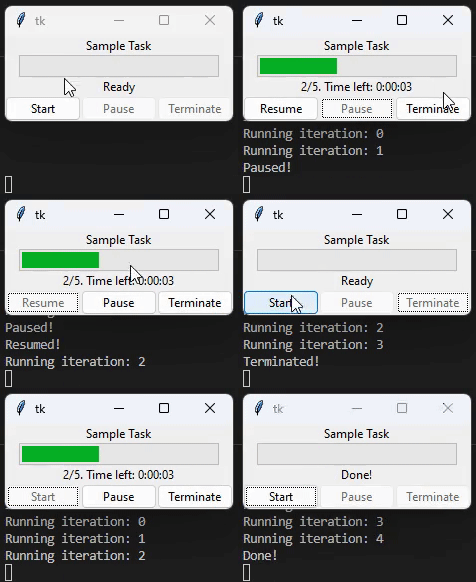
import tkinter as tk
from progresspanel import Progresspanel
from time import sleep

root = tk.Tk()
panel = Progresspanel(root, title="Sample Task")
panel.pack()

def sample_task():
    total = 5
    panel.set_total(total)
    for i in range(total):
        panel.update(i)
        print("Running iteration: {}".format(i))
        sleep(1)

panel.set_task(sample_task)
root.mainloop()
The task function simply sleeps for one second five times and updates the
progress bar each time.
You can customize the task function to do whatever you want. You can also
customize the title of the progress panel and enable/disable verbose mode to
print status updates to the console. There're also advanced features that let
you pause execution in between time-consuming methods in your own task, and
features that let you repeat the last iteration right after resuming from a
pausing. Check below APIs for more details.
API
Progresspanel(parent, total=1, task=None, title=None, verbose=True)
Create a new Progresspanel widget.
- parent: the parent widget.
- total: the total number of iterations for the task.
- task: the task function to be run in a loop.
- title: the title of the progress panel.
- display_time_left: a bool to determine whether to display the remaining time
in the status label, default to True.
- verbose: whether to print status updates to the console.
set_total(total)
Set the total number of iterations for the task.
set_task(task)
Set the task function.
update(i)
Update the progress bar with the current iteration number.
set_verbose(verbose)
Enable/disable verbose mode to print status updates to the console.
is_pausing_or_terminating()
Check if the task is in a pausing or terminating state. This is useful for user
to stop promptly before running other time-consuming operations in user-defined
task after user clicks pause or terminate button.
is_pause_resumed()
Check whether the task was just resumed after a pause. It returns True if the
progress is just resumed after it was paused, until the next iteration in which
it returns False again. It also returns False in all other cases. This is useful
if user wants to repeat current iteration after the work was resumed from pause,
especially when the user configured to jump over some customized time-comsuming
operations in task() using is_pausing_or_terminating() after the pause button
was clicked.
after_started()
Placeholder for user-defined function to be run when the task is started.
after_resumed()
Placeholder for user-defined function to be run when the task is resumed.
after_paused()
Placeholder for user-defined function to be run when the task is paused.
after_terminated()
Placeholder for user-defined function to be run when the task is terminated.
after_completed()
Placeholder for user-defined function to be run when the task is completed.
License
Progresspanel is released under the MIT License. See LICENSE for more
information.





