.. image:: https://raw.githubusercontent.com/dbfixtures/pytest-mongo/master/logo.png
:width: 100px
:height: 100px
pytest-mongo
.. image:: https://img.shields.io/pypi/v/pytest-mongo.svg
:target: https://pypi.python.org/pypi/pytest-mongo/
:alt: Latest PyPI version
.. image:: https://img.shields.io/pypi/wheel/pytest-mongo.svg
:target: https://pypi.python.org/pypi/pytest-mongo/
:alt: Wheel Status
.. image:: https://img.shields.io/pypi/pyversions/pytest-mongo.svg
:target: https://pypi.python.org/pypi/pytest-mongo/
:alt: Supported Python Versions
.. image:: https://img.shields.io/pypi/l/pytest-mongo.svg
:target: https://pypi.python.org/pypi/pytest-mongo/
:alt: License
What is this?
This is a pytest plugin that helps you test code that relies on a running MongoDB database.
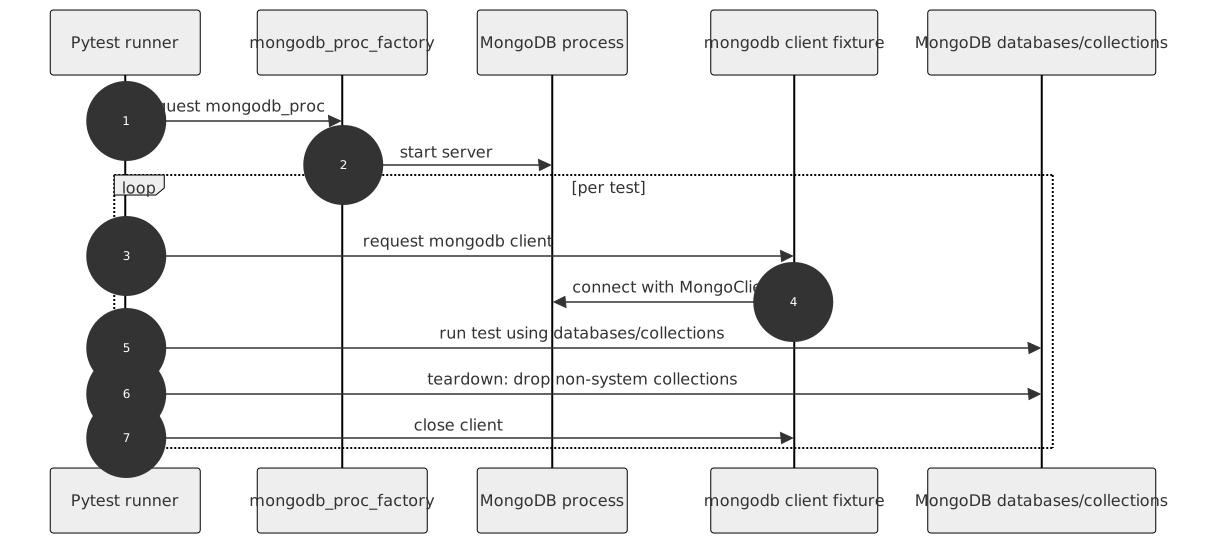
It provides fixtures for a MongoDB process and client.
.. image:: https://raw.githubusercontent.com/dbfixtures/pytest-mongo/main/docs/images/architecture.svg
:alt: Project Architecture Diagram
:align: center
How to use
Runtime requirements are defined in pyproject.toml.
The plugin contains three fixtures:
- mongodb - a function-scoped client fixture that cleans MongoDB at the end of each test.
- mongo_proc - a session-scoped fixture that starts a MongoDB instance on first use and stops it at the end of the test session.
- mongo_noproc - a no-process fixture that connects to an already
running MongoDB instance.
For example, on dockerized test environments or CI providing MongoDB services.
Simply include one of these fixtures in your test or fixture list.
You can also create additional MongoDB client and process fixtures if you need to:
.. code-block:: python
from pytest_mongo import factories

mongo_my_proc = factories.mongo_proc(port=None)
mongo_my = factories.mongodb('mongo_my_proc')
.. note::
Each MongoDB process fixture can be configured in a different way than the others through the fixture factory arguments.
Connecting to an existing MongoDB database
Some projects use already running MongoDB servers (e.g., on docker instances).
To connect to them, use the mongo_noproc fixture.
Authentication/URI options are not yet supported (see issue #747).
.. code-block:: python
mongo_external = factories.mongodb('mongo_noproc')
By default, the mongo_noproc fixture connects to a MongoDB instance on port 27017.
Standard configuration options apply to it.
The following configuration options apply to the mongo_noproc fixture as well:
Configuration
You can define settings in three ways: fixture factory argument, command line option, and pytest.ini configuration option.
You can pick which you prefer, but remember that these settings are handled in the following order:
* ``Fixture factory argument``
* ``Command line option``
* ``Configuration option in your pytest.ini file``
.. list-table:: Configuration options
:header-rows: 1
-
- MongoDB server option
- Fixture factory argument
- Command line option
- pytest.ini option
- Applies to
mongo_noproc
- Default
-
- Path to mongodb exec
- executable
- --mongo-exec
- mongo_exec
- no
- /usr/bin/mongod
-
- MongoDB host
- host
- --mongo-host
- mongo_host
- 127.0.0.1
- 127.0.0.1
-
- MongoDB port
- port
- --mongo-port
- port
- 27017
- random
-
- Port search count
- --mongo-port-search-count
- mongo_port_search_count
-
- 5
-
- Additional parameters
- params
- --mongo-params
- mongo_params
- no
-
- MongoDB client's time zone awareness (override with --mongo-tz-aware/--no-mongo-tz-aware)
- tz_aware
- --mongo-tz-aware, --no-mongo-tz-aware
- mongo_tz_aware
- no
- False
Example usage:
-
pass it as an argument in your own fixture
.. code-block:: python
mongo_proc = factories.mongo_proc(port=8888)
-
pass additional mongod parameters via a single string
.. code-block:: python
  mongo_proc = factories.mongo_proc(
      params="--quiet --setParameter diagnosticDataCollectionEnabled=false"
  )
-
use --mongo-port command line option when you run your tests
.. code-block:: sh
pytest tests --mongo-port=8888
-
specify your port as mongo_port in your pytest.ini file.
To do so, put a line like the following under the [pytest] section of your pytest.ini:
.. code-block:: ini
  [pytest]
  mongo_port = 8888
Compatibility (tested)
CI covers MongoDB 7.0 and 8.0; other versions may work but aren't tested.
Package resources