


Security News
The Nightmare Before Deployment
Season’s greetings from Socket, and here’s to a calm end of year: clean dependencies, boring pipelines, no surprises.
By Ahmad Nassri - Dec 16, 2025
shekar
Advanced tools




Simplifying Persian NLP for Modern Applications
Shekar (meaning 'sugar' in Persian) is an open-source Python library for Persian natural language processing, named after the influential satirical story "فارسی شکر است" (Persian is Sugar) published in 1921 by Mohammad Ali Jamalzadeh. The story became a cornerstone of Iran's literary renaissance, advocating for accessible yet eloquent expression. Shekar embodies this philosophy in its design and development.
It provides tools for text preprocessing, tokenization, part-of-speech(POS) tagging, named entity recognition(NER), embeddings, spell checking, and more. With its modular pipeline design, Shekar makes it easy to build reproducible workflows for both research and production applications.
Documentation: https://lib.shekar.io/
You can install Shekar with pip. By default, the CPU runtime of ONNX is included, which works on all platforms.
$ pip install shekar
This works on Windows, Linux, and macOS (including Apple Silicon M1/M2/M3).
If you have an NVIDIA GPU and want hardware acceleration, you need to replace the CPU runtime with the GPU version.
Prerequisites
$ pip install shekar && pip uninstall -y onnxruntime && pip install onnxruntime-gpu


The built-in Normalizer class provides a ready-to-use pipeline that combines the most common filters and normalization steps, offering a default configuration that covers the majority of use cases.
from shekar import Normalizer

normalizer = Normalizer()

text = "«فارسی شِکَر است» نام داستان ڪوتاه طنز    آمێزی از محمد علی جمالــــــــزاده ی گرامی می   باشد که در سال 1921 منتشر  شده است و آغاز   ڱر تحول بزرگی در ادَبێات معاصر ایران 🇮🇷 بۃ شمار میرود."
print(normalizer(text))

text = "می دونی که نمیخاستم ناراحتت کنم."
print(normalizer(text))

text = "خونه هاشون خیلی گرون تر شده"
print(normalizer(text))
«فارسی شکر است» نام داستان کوتاه طنزآمیزی از محمدعلی جمالزادهی گرامی میباشد که در سال ۱۹۲۱ منتشر شدهاست و آغازگر تحول بزرگی در ادبیات معاصر ایران به شمار میرود.
میدونی که نمیخاستم ناراحتت کنم.
خونههاشون خیلی گرونتر شده
For advanced customization, Shekar offers a modular and composable framework for text preprocessing. It includes components such as filters, normalizers, and maskers, which can be applied individually or flexibly combined using the Pipeline class with the | operator.
A comprehensive list of operators is available at https://lib.shekar.io/tutorials/preprocessing/
You can combine any of the preprocessing components using the | operator:
from shekar.preprocessing import EmojiRemover, PunctuationRemover

text = "ز ایران دلش یاد کرد و بسوخت! 🌍🇮🇷"
pipeline = EmojiRemover() | PunctuationRemover()
output = pipeline(text)
print(output)
ز ایران دلش یاد کرد و بسوخت
The WordTokenizer class in Shekar is a simple, rule-based tokenizer for Persian that splits text based on punctuation and whitespace using Unicode-aware regular expressions.
from shekar import WordTokenizer
tokenizer = WordTokenizer()
text = "چه سیبهای قشنگی! حیات نشئهٔ تنهایی است."
tokens = list(tokenizer(text))
print(tokens)
["چه", "سیبهای", "قشنگی", "!", "حیات", "نشئهٔ", "تنهایی", "است", "."]
The SentenceTokenizer class is designed to split a given text into individual sentences. This class is particularly useful in natural language processing tasks where understanding the structure and meaning of sentences is important. The SentenceTokenizer class can handle various punctuation marks and language-specific rules to accurately identify sentence boundaries.
Below is an example of how to use the SentenceTokenizer:
from shekar.tokenization import SentenceTokenizer
text = "هدف ما کمک به یکدیگر است! ما میتوانیم با هم کار کنیم."
tokenizer = SentenceTokenizer()
sentences = tokenizer(text)
for sentence in sentences:
print(sentence)
هدف ما کمک به یکدیگر است!
ما میتوانیم با هم کار کنیم.
Shekar offers two main embedding classes:
WordEmbedder: Provides static word embeddings using pre-trained FastText models.ContextualEmbedder: Provides contextual embeddings using a fine-tuned ALBERT model.Both classes share a consistent interface:
embed(text) returns a NumPy vector.transform(text) is an alias for embed(text) to integrate with pipelines.WordEmbedder supports two static FastText models:
fasttext-d100: A 100-dimensional CBOW model trained on Persian Wikipedia.fasttext-d300: A 300-dimensional CBOW model trained on the large-scale Naab dataset.from shekar.embeddings import WordEmbedder
embedder = WordEmbedder(model="fasttext-d100")
embedding = embedder("کتاب")
print(embedding.shape)
similar_words = embedder.most_similar("کتاب", top_n=5)
print(similar_words)
ContextualEmbedder uses an ALBERT model trained with Masked Language Modeling (MLM) on the Naab dataset to generate high-quality contextual embeddings.
The resulting embeddings are 768-dimensional vectors representing the semantic meaning of entire phrases or sentences.
from shekar.embeddings import ContextualEmbedder
embedder = ContextualEmbedder(model="albert")
sentence = "کتابها دریچهای به جهان دانش هستند."
embedding = embedder(sentence)
print(embedding.shape) # (768,)
The Stemmer is a lightweight, rule-based reducer for Persian word forms. It trims common suffixes while respecting Persian orthography and Zero Width Non-Joiner usage. The goal is to produce stable stems for search, indexing, and simple text analysis without requiring a full morphological analyzer.
from shekar import Stemmer
stemmer = Stemmer()
print(stemmer("نوهام"))
print(stemmer("کتابها"))
print(stemmer("خانههایی"))
print(stemmer("خونههامون"))
نوه
کتاب
خانه
خانه
The Lemmatizer maps Persian words to their base dictionary form. Unlike stemming, which only trims affixes, lemmatization uses explicit verb conjugation rules, vocabulary lookups, and a stemmer fallback to ensure valid lemmas. This makes it more accurate for tasks like part-of-speech tagging, text normalization, and linguistic analysis where the canonical form of a word is required.
from shekar import Lemmatizer
lemmatizer = Lemmatizer()
print(lemmatizer("رفتند"))
print(lemmatizer("کتابها"))
print(lemmatizer("خانههایی"))
print(lemmatizer("گفته بودهایم"))
رفت/رو
کتاب
خانه
گفت/گو
The POSTagger class provides part-of-speech tagging for Persian text using a transformer-based model (default: ALBERT). It returns one tag per word based on Universal POS tags (following the Universal Dependencies standard).
Example usage:
from shekar import POSTagger
pos_tagger = POSTagger()
text = "نوروز، جشن سال نو ایرانی، بیش از سه هزار سال قدمت دارد و در کشورهای مختلف جشن گرفته میشود."
result = pos_tagger(text)
for word, tag in result:
print(f"{word}: {tag}")
نوروز: PROPN
،: PUNCT
جشن: NOUN
سال: NOUN
نو: ADJ
ایرانی: ADJ
،: PUNCT
بیش: ADJ
از: ADP
سه: NUM
هزار: NUM
سال: NOUN
قدمت: NOUN
دارد: VERB
و: CCONJ
در: ADP
کشورهای: NOUN
مختلف: ADJ
جشن: NOUN
گرفته: VERB
میشود: VERB
.: PUNCT
The NER module offers a fast, quantized Named Entity Recognition pipeline using a fine-tuned ALBERT model. It detects common Persian entities such as persons, locations, organizations, and dates. This model is designed for efficient inference and can be easily combined with other preprocessing steps.
Example usage:
from shekar import NER
from shekar import Normalizer

input_text = (
    "شاهرخ مسکوب به سالِ ۱۳۰۴ در بابل زاده شد و دوره ابتدایی را در تهران و در مدرسه علمیه پشت "
    "مسجد سپهسالار گذراند. از کلاس پنجم ابتدایی مطالعه رمان و آثار ادبی را شروع کرد. از همان زمان "
    "در دبیرستان ادب اصفهان ادامه تحصیل داد. پس از پایان تحصیلات دبیرستان در سال ۱۳۲۴ از اصفهان به تهران رفت و "
    "در رشته حقوق دانشگاه تهران مشغول به تحصیل شد."
)

normalizer = Normalizer()
normalized_text = normalizer(input_text)

albert_ner = NER()
entities = albert_ner(normalized_text)

for text, label in entities:
    print(f"{text} → {label}")
شاهرخ مسکوب → PER
سال ۱۳۰۴ → DAT
بابل → LOC
دوره ابتدایی → DAT
تهران → LOC
مدرسه علمیه → LOC
مسجد سپهسالار → LOC
دبیرستان ادب اصفهان → LOC
در سال ۱۳۲۴ → DAT
اصفهان → LOC
تهران → LOC
دانشگاه تهران → ORG
فرانسه → LOC
The SentimentClassifier module enables automatic sentiment analysis of Persian text using transformer-based models. It currently supports the AlbertBinarySentimentClassifier, a lightweight ALBERT model fine-tuned on Snapfood dataset to classify text as positive or negative, returning both the predicted label and its confidence score.
Example usage:
from shekar import SentimentClassifier
sentiment_classifier = SentimentClassifier()
print(sentiment_classifier("سریال قصههای مجید عالی بود!"))
print(sentiment_classifier("فیلم ۳۰۰ افتضاح بود!"))
('positive', 0.9923112988471985)
('negative', 0.9330866932868958)
The toxicity module currently includes a Logistic Regression classifier trained on TF-IDF features extracted from the Naseza (ناسزا) dataset, a large-scale collection of Persian text labeled for offensive and neutral language. The OffensiveLanguageClassifier processes input text to determine whether it is neutral or offensive, returning both the predicted label and its confidence score.
from shekar.toxicity import OffensiveLanguageClassifier
offensive_classifier = OffensiveLanguageClassifier()
print(offensive_classifier("زبان فارسی میهن من است!"))
print(offensive_classifier("تو خیلی احمق و بیشرفی!"))
('neutral', 0.7651197910308838)
('offensive', 0.7607775330543518)
The shekar.keyword_extraction module provides tools for automatically identifying and extracting key terms and phrases from Persian text. These algorithms help identify the most important concepts and topics within documents.
from shekar import KeywordExtractor
extractor = KeywordExtractor(max_length=2, top_n=10)
input_text = (
"زبان فارسی یکی از زبانهای مهم منطقه و جهان است که تاریخچهای کهن دارد. "
"زبان فارسی با داشتن ادبیاتی غنی و شاعرانی برجسته، نقشی بیبدیل در گسترش فرهنگ ایرانی ایفا کرده است. "
"از دوران فردوسی و شاهنامه تا دوران معاصر، زبان فارسی همواره ابزار بیان اندیشه، احساس و هنر بوده است. "
)
keywords = extractor(input_text)
for kw in keywords:
print(kw)
فرهنگ ایرانی
گسترش فرهنگ
ایرانی ایفا
زبان فارسی
تاریخچهای کهن
The SpellChecker class provides simple and effective spelling correction for Persian text. It can automatically detect and fix common errors such as extra characters, spacing mistakes, or misspelled words. You can use it directly as a callable on a sentence to clean up the text, or call suggest() to get a ranked list of correction candidates for a single word.
from shekar import SpellChecker

spell_checker = SpellChecker()
print(spell_checker("سسلام بر ششما ددوست من"))
print(spell_checker.suggest("درود"))
سلام بر شما دوست من
['درود', 'درصد', 'ورود', 'درد', 'درون']
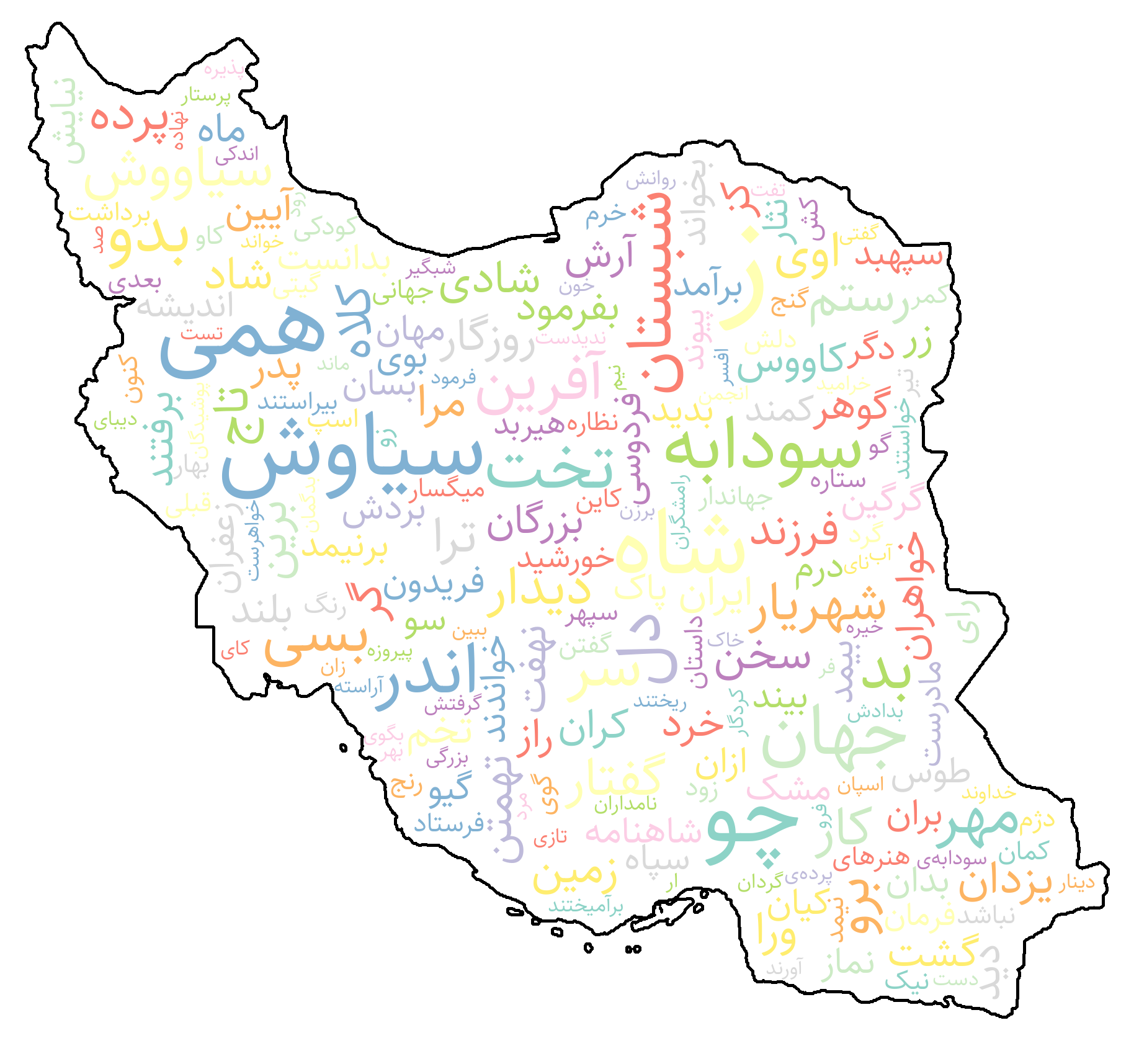
The WordCloud class offers an easy way to create visually rich Persian word clouds. It supports reshaping and right-to-left rendering, Persian fonts, color maps, and custom shape masks for accurate and elegant visualization of word frequencies.
import requests
from collections import Counter

from shekar import WordCloud
from shekar import WordTokenizer
from shekar.preprocessing import (
  HTMLTagRemover,
  PunctuationRemover,
  StopWordRemover,
  NonPersianRemover,
)
preprocessing_pipeline = HTMLTagRemover() | PunctuationRemover() | StopWordRemover() | NonPersianRemover()


url = f"https://shahnameh.me/p.php?id=F82F6CED"
response = requests.get(url)
html_content = response.text
clean_text = preprocessing_pipeline(html_content)

word_tokenizer = WordTokenizer()
tokens = word_tokenizer(clean_text)

word_freqs = Counter(tokens)

wordCloud = WordCloud(
        mask="Iran",
        width=640,
        height=480,
        max_font_size=220,
        min_font_size=6,
        bg_color="white",
        contour_color="black",
        contour_width=5,
        color_map="greens",
    )

# if shows disconnect words, try again with bidi_reshape=True
image = wordCloud.generate(word_freqs, bidi_reshape=False)
image.show()
Shekar includes a command-line interface (CLI) for quick text processing and visualization.
You can normalize Persian text or generate wordclouds directly from files or inline strings.
Usage
shekar [COMMAND] [OPTIONS]
Examples
# Normalize a text file and save output
shekar normalize -i ./corpus.txt -o ./normalized_corpus.txt

# Normalize inline text
shekar normalize -t "درود پرودگار بر ایران و ایرانی"
If Shekar Hub is unavailable, you can manually download the models and place them in the cache directory at home/[username]/.shekar/
| Model Name | Download Link |
|---|---|
| FastText Embedding d100 | Download (50MB) |
| FastText Embedding d300 | Download (500MB) |
| SentenceEmbedding | Download (60MB) |
| POS Tagger | Download (38MB) |
| NER | Download (38MB) |
| Sentiment Classifier | Download (38MB) |
| Offensive Language Classifier | Download (8MB) |
| AlbertTokenizer | Download (2MB) |
If you find Shekar useful in your research, please consider citing the following paper:
@article{Amirivojdan_Shekar,
author = {Amirivojdan, Ahmad},
doi = {10.21105/joss.09128},
journal = {Journal of Open Source Software},
month = oct,
number = {114},
pages = {9128},
title = {{Shekar: A Python Toolkit for Persian Natural Language Processing}},
url = {https://joss.theoj.org/papers/10.21105/joss.09128},
volume = {10},
year = {2025}
}
With ❤️ for IRAN
FAQs
Simplifying Persian NLP for Modern Applications
We found that shekar demonstrated a healthy version release cadence and project activity because the last version was released less than a year ago. It has 1 open source maintainer collaborating on the project.
Did you know?

Socket for GitHub automatically highlights issues in each pull request and monitors the health of all your open source dependencies. Discover the contents of your packages and block harmful activity before you install or update your dependencies.
Security News
Season’s greetings from Socket, and here’s to a calm end of year: clean dependencies, boring pipelines, no surprises.

Research
/Security News
Impostor NuGet package Tracer.Fody.NLog typosquats Tracer.Fody and its author, using homoglyph tricks, and exfiltrates Stratis wallet JSON/passwords to a Russian IP address.

Security News
Deno 2.6 introduces deno audit with a new --socket flag that plugs directly into Socket to bring supply chain security checks into the Deno CLI.