Speculos

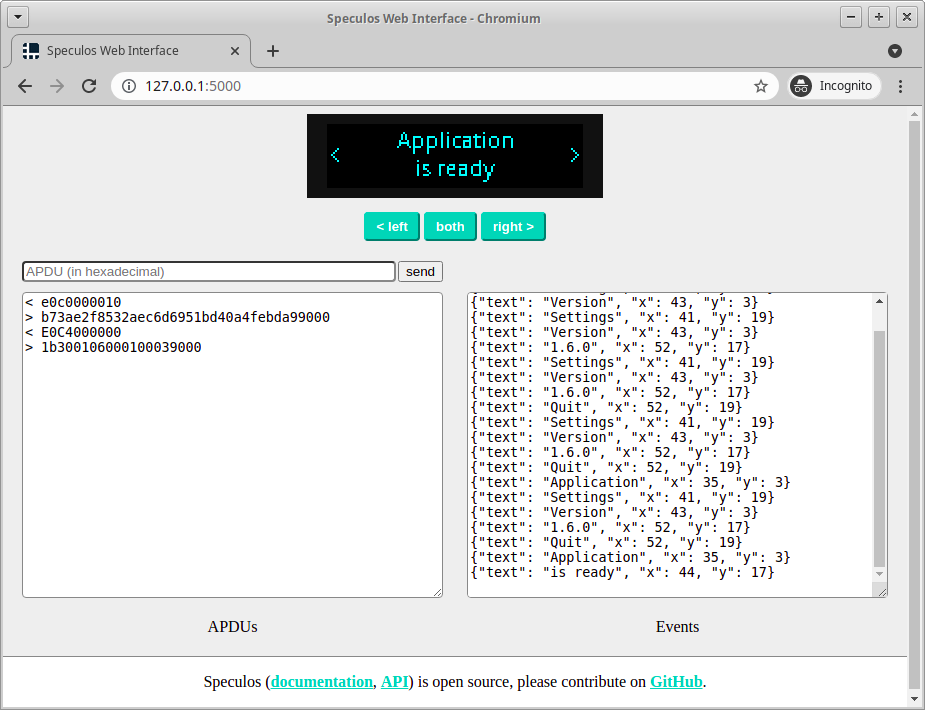
The goal of this project is to emulate Ledger Nano S+, Nano X, Apex+, Flex and Stax apps on
standard desktop computers, without any hardware device. More information can
be found here in the
documentation website (or in the
docs/ folder directly).
Usage example:
./speculos.py apps/btc.elf --model nanosp
# ... and open a browser on http://127.0.0.1:5000
Installation
From Python pypi packages
The easiest, stable way to install Speculos is with pip:
pip install speculos
It is advised to use Python virtualenv, otherwise admin rights will probably be
necessary.
From sources
Installing Speculos from sources is a bit heavier and, depending on the platform,
complex, due to all the dependency needed for compiling the emulator.
On Debian (10 or later) or Ubuntu (18.04 or later):
sudo apt install \
    git cmake gcc-arm-linux-gnueabihf libc6-dev-armhf-cross gdb-multiarch \
    python3-pyqt6 python3-construct python3-flask-restful python3-jsonschema \
    python3-mnemonic python3-pil python3-pyelftools python3-requests \
    qemu-user-static libvncserver-dev

# from the root directory of the source repository
pip install .
Dependency management will vary on other platforms; using Docker images and/or WSL
should facilitate the installation.
Bugs and contributions
Feel free to open issues and create pull requests on this GitHub repository.
The master branch is protected to disable force pushing. Contributions should
be made through pull requests, which are reviewed by @LedgerHQ members before
being merged to master:
- @LedgerHQ members can create branches directly on the repository (if member of
a team with write access to the repository)
- External contributors should fork the repository
Limitations
There is absolutely no guarantee that apps will have the same behavior on
hardware devices and Speculos, though the differences are limited.
Syscalls
The emulator handles only a few syscalls made by common apps. For instance,
syscalls related to app install, firmware update or OS info can't be
implemented.
Memory alignment
Attempts to perform unaligned accesses when not allowed (eg. dereferencing a
misaligned pointer) will cause an alignment fault on a Ledger Nano S+ device but
not on Speculos. Note that such unaligned accesses are supported by other
Ledger devices.
Following code crashes on LNS device, but not on Speculos nor on other devices.
uint8_t buffer[20];
for (int i = 0; i < 20; i++) {
    buffer[i] = i;
}
uint32_t display_value = *((uint32_t*) (buffer + 1));
PRINTF("display_value: %d\n", display_value);
Watchdog
NanoX, Flex, Apex+ and Stax devices use an internal watchdog enforcing usage of regular
calls to io_seproxyhal_io_heartbeat();. This watchdog is not emulated on
Speculos.
Security
Apps can make arbitrary Linux system calls (and use QEMU
semihosting features), thus don't run Speculos on
untrusted apps.
It's worth noting that the syscall implementation (src/) doesn't expect
malicious input. By the way, in Speculos, there is no privilege separation
between the app and the syscalls. This doesn't reflect the security of the
firmware on hardware devices where app and OS isolation is enforced.
Speculos is not part of Ledger bug bounty program.
Are you developing a Nano App as an external developer?
For a smooth and quick integration:





