GoTracer
Welcome to GoTracer! A package for tracing Go applications, re-invented with all recent insights on metrics collection and tracing.
It is a spiritual successor of xlab/statsd_metrics, but with omitted "metrics" part to fully focus on tracing.
GoTracer is built around go.opentelemetry.io/otel package and its Tracer interface. Any Otel-compatible pipeline can be used to collect and aggregate the traces collected by this tool.
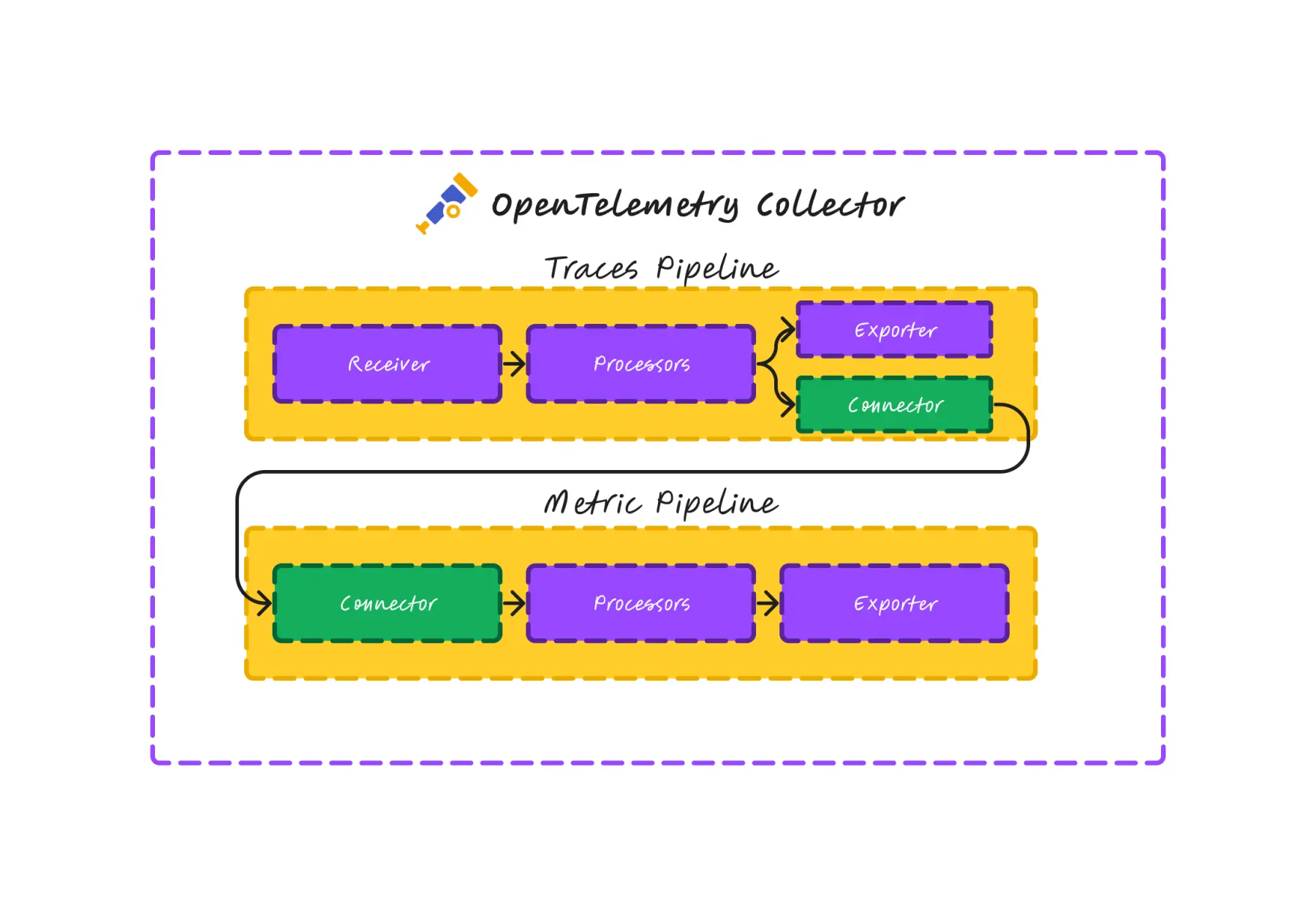
We anticipate to use the following OTel receivers:
There are certain ways to transform traces into metrics, a great article on this topic:
https://newrelic.com/blog/nerdlog/transforming-traces
Basic Usage
import "upd.dev/xlab/gotracer"
type MyService struct {
svcTags gotracer.Tags
}
func NewMyService() *MyService {
return &MyService{
svcTags: gotracer.NewTag("svc", "myService"),
}
}
func (s *MyService) SomeFunc(ctx context.Context) error {
defer gotracer.Trace(&ctx, s.svcTags)()
s.SomeOtherFunc(ctx)
err := db.Query(ctx, "SELECT * FROM users")
if err != nil {
gotracer.TraceError(ctx, err)
return err
}
return nil
}
func (s *MyService) SomeOtherFunc(ctx context.Context) {
defer gotracer.Trace(&ctx, s.svcTags)()
}
Key points here
gotracer.Trace is used to initiate a span within a service methodgotracer.TraceError is used to end span, add the error and mark span as failedgotracer.Tags is used to add tags to the trace spangotracer.NewTag is a shortcut for gotracer.NewTagsgotracer.WithTags can add more tags to the existing span.
The line defer gotracer.Trace(&ctx)() unfolds into the following runtime actions:
Trace() returns a type SpanEnderFn func() that ends span with a success and records the duration.- The end function is called when the method returns, so it's
deferred.
- We pass a pointer to the context inteface (
*context.Context), so the context can be updated with the span data in-place.
- The context is enriched with the span reference, so we can call
gotracer.TraceError on the same context later.
- Ending the span with
TraceError will mark it as failed and add the error to the span, but also tombstone the context.
- If the span ended with an error (and context is tombstoned), execution of the deferred
SpanEnderFn function will be no-op.
- If user calls
TraceError on a tombstoned context, it will emit a warning with a stacktrace in the logs, considered a programming error.
- If user calls
TraceError on a an empty or nil context, it will create a virtual span, e.g. via TraceError(nil, err, tags)
- Passing
nil context into Trace will emit a warning with a stacktrace in the logs, considered a programming error. Falls back to Traceless (see below).
- We avoid panics to make sure a smooth transition from the old
metrics package.
The trick with context in-place update
ctx := context.Background()
fmt.Printf("pointer to context: %p\n", &ctx)
defer gotracer.Trace(&ctx)()
fmt.Printf("pointer to a new context: %p\n", &ctx)
It allows to keep a single return value of gotracer.Trace that can be used to end the span only.
Summary about the basic usage
- API surface must be minimal, user must only care about when methiod begins and when method fails.
- Only 1 call to gotracer is needed to measure method duration and status.
- Additional 1 call per erroring branch of code.
- User needs to pass the context to be able to trace the sequence of calls.
Usage with additional tags
gotracer.Tags provides a way to add additional tags to the span. Note that tags for the span are managed before span is created.
svcTags := gotracer.NewTag("svc", "myService")

additionalTags := svcTags.WithTags(gotracer.NewTag("block_height", 3245674))

defer gotracer.Trace(&ctx, additionalTags)()
Sometimes tags only known at certain point of the span execution, so we can use WithTags to add them.
svcTags := gotracer.Tags{
"svc": "myService",
}
defer gotracer.Trace(&ctx, svcTags)()
additionalTags := gotracer.NewTag("block_height", 3245674)
gotracer.WithTags(ctx, additionalTags)
Usage with Closures (anonymous functions)
Sometimes, especially with Goroutines, we need to trace anonymous functions. There is a helper function gotracer.TraceWithName that can be used to trace a function and give it a name explicitly.
func SomeFunc(ctx context.Context) {
defer gotracer.Trace(&ctx, "SomeFunc")()
go func() {
defer gotracer.TraceWithName(&ctx, "SomeOtherFuncGoroutine")()
}()
gotracer.WithTags(ctx, gotracer.NewTag("is_goroutine", false))
}
The trickiest of all tricks here is that the root context is captured as a value, so the reference to the context inside the goroutine closure will update only that child context with a value. The parent context of SomeFunc will hold the original value of the SomeFunc span.
While this sounds scary, a typical usage pattern is to just avoid overthinking and keep placing the gotracer.Trace* calls in the beginning of the most functions.
Usage without Context
While spans are generated from the context, it's possible to create a span without it. This is still useful because the actual call stack can be deducted from the stack dump. This is the same as getting the function name from the latest stack frame, but instead, we get all the parent function names as well and construct a trace path out of many virtual spans.
Unfortunately, there is no way to get the timing of the parent spans. So, only the latest span will have the duration. We assume that there aren't many functions that lack a context.
import "upd.dev/xlab/gotracer"
type MyService struct {
svcTags gotracer.Tags
}
func NewMyService() *MyService {
return &MyService{
svcTags: gotracer.NewTag("svc", "myService"),
}
}
func (s *MyService) SomeFuncWithoutContext() error {
defer gotracer.Traceless(nil, s.svcTags)()
s.SomeOtherFuncWithoutContext()
return nil
}
func (s *MyService) SomeOtherFuncWithoutContext() {
defer gotracer.Traceless(nil, s.svcTags)()
}
Usage with No Context, No Name
For the sake of API completeness, there is a TracelessWithName. But we discourage doing that.
func (s *MyService) SomeFuncWithoutContext() error {
defer gotracer.Traceless(nil, s.svcTags)()
go func() {
ctx := context.Background()
defer gotracer.TracelessWithName(&ctx, "SomeOtherFuncGoroutine", s.svcTags)()
gotracer.WithTags(ctx, gotracer.NewTag("is_goroutine", true))
}()
return nil
}
Traceless won't care about the context that is nil. It will just create a span without prior context. If the context is set, it will be used to:
- Fetch an existing span from the context, if span exists,
gotracer.Traceless will act the same way as gotracer.Trace.
- If span doesn't exist, it will create a new span sequence from the runtime call stack.
- If the context is nil, it will not update the context with the span reference. Otherwise current span is set in the context.
Summary
gotracer.Trace is used to trace a method with a context.gotracer.Traceless is used to trace a method without a context.gotracer.TraceWithName is used to trace an anonymous closure with a given name.gotracer.TracelessWithName is used to trace an anonymous closure without a context, with a given name.gotracer.Tags is used to add tags to the span.gotracer.NewTags is used to create a new set of tags.gotracer.NewTag is a shortcut for gotracer.NewTagsgotracer.WithTags can add more tags to the existing span.gotracer.TraceError is used to end span, set the error and mark span as failed.
All tracing functions are here to collect as much info about call stack, associate tags and measure timing of function execution.
They're designed to have very little overhead in terms of line code and runtime performance.
If tracing is disabled, all tracing functions are no-op and should not affect the runtime performance. Including the tags management - tag joins are heavy on GC if used in hot paths. So WithTags will no-op.
When enbled, the tracing info will be processed with OTal config and client and will be sent to the collecting backend.
Example
Refer to the example's main.go for more details. The example will output the traces to local SigNoz instance.
cd example && go run main.go

[Hello!] We expect some SigNoz OTEL collector listening on DSN localhost:4317
...
Tracing Config for OTel
cfg := &gotracer.Config{
Enabled: true,
CollectorDSN: "localhost:4317",
CollectorSecureSSL: false,
CollectorHeaders: map[string]string{
"authorization": "Bearer <token>",
},
EnvName: "local",
ServiceName: "my-service",
ServiceVersion: "dev",
ClusterID: "svc-us-east",
}
gotracer.Enable(cfg, otel.InitExporter)
exporters/otel.InitExporter uses sdktrace.WithBatcher(exporter), so the OpenTelemetry Go SDK batch span processor defaults apply unless you override them with standard OTEL env vars:
OTEL_BSP_MAX_QUEUE_SIZE: default 2048 spans buffered in memory before new spans start getting dropped.OTEL_BSP_MAX_EXPORT_BATCH_SIZE: default 512 spans sent in one export batch.OTEL_BSP_SCHEDULE_DELAY: default 5000 ms between scheduled exports.OTEL_BSP_EXPORT_TIMEOUT: default 30000 ms export timeout.
So, with the defaults used by this repository, up to 2048 finished spans can sit in memory in the internal OTEL queue waiting to be exported, and they are normally flushed in batches of up to 512.
License
MIT




