🌍 react-native-localize
A toolbox for your React Native app localization.








Support
This library follows the React Native releases support policy.
It is supporting the latest version, and the two previous minor series.
Setup
$ npm install --save react-native-localize
$ yarn add react-native-localize
Don't forget to run pod install after that !
Web support
This package supports react-native-web. Follow their official guide to configure webpack.
Kepler support
To use the package, follow the instructions below:
Add the JavaScript library dependency in your application's package.json:
"dependencies": {
     ...
     "@amazon-devices/react-native-localize": "~2.0.0"
}
Debugging
As this library uses synchronous native methods, remote debugging (e.g. with Chrome) is no longer possible.
Instead, you should use Flipper 🐬.
Basic usage example
import { getCurrencies, getLocales } from "react-native-localize";

console.log(getLocales());
console.log(getCurrencies());
API
getLocales()
Returns the user preferred locales, in order.
Method type
type getLocales = () => Array<{
  languageCode: string;
  scriptCode?: string;
  countryCode: string;
  languageTag: string;
  isRTL: boolean;
}>;
Usage example
import { getLocales } from "react-native-localize";
console.log(getLocales());
getNumberFormatSettings()
Returns number formatting settings.
Method type
type getNumberFormatSettings = () => {
  decimalSeparator: string;
  groupingSeparator: string;
};
Usage example
import { getNumberFormatSettings } from "react-native-localize";
console.log(getNumberFormatSettings());
getCurrencies()
Returns the user preferred currency codes, in order.
Method type
type getCurrencies = () => string[];
Usage example
import { getCurrencies } from "react-native-localize";
console.log(getCurrencies());
getCountry()
Returns the user current country code (based on its device locale, not on its position).
Method type
type getCountry = () => string;
Usage example
import { getCountry } from "react-native-localize";
console.log(getCountry());
Note
Devices using Latin American regional settings will return "UN" instead of "419", as the latter is not a standard country code.
getCalendar()
Returns the user preferred calendar format.
Method type
type getCalendar = () =>
  | "gregorian"
  | "buddhist"
  | "coptic"
  | "ethiopic"
  | "ethiopic-amete-alem"
  | "hebrew"
  | "indian"
  | "islamic"
  | "islamic-umm-al-qura"
  | "islamic-civil"
  | "islamic-tabular"
  | "iso8601"
  | "japanese"
  | "persian";
Usage example
import { getCalendar } from "react-native-localize";
console.log(getCalendar());
getTemperatureUnit()
Returns the user preferred temperature unit.
Method type
type getTemperatureUnit = () => "celsius" | "fahrenheit";
Usage example
import { getTemperatureUnit } from "react-native-localize";
console.log(getTemperatureUnit());
getTimeZone()
Returns the user preferred timezone (based on its device settings, not on its position).
Method type
type getTimeZone = () => string;
Usage example
import { getTimeZone } from "react-native-localize";
console.log(getTimeZone());
uses24HourClock()
Returns true if the user prefers 24h clock format, false if they prefer 12h clock format.
Method type
type uses24HourClock = () => boolean;
Usage example
import { uses24HourClock } from "react-native-localize";
console.log(uses24HourClock());
usesMetricSystem()
Returns true if the user prefers metric measure system, false if they prefer imperial.
Method type
type usesMetricSystem = () => boolean;
Usage example
import { usesMetricSystem } from "react-native-localize";
console.log(usesMetricSystem());
usesAutoDateAndTime()
Tells if the automatic date & time setting is enabled on the phone. Android only
Method type
type usesAutoDateAndTime = () => boolean | undefined;
Usage example
import { usesAutoDateAndTime } from "react-native-localize";
console.log(usesAutoDateAndTime());
usesAutoTimeZone()
Tells if the automatic time zone setting is enabled on the phone. Android only
Method type
type usesAutoTimeZone = () => boolean | undefined;
Usage example
import { usesAutoTimeZone } from "react-native-localize";

console.log(usesAutoTimeZone());
findBestLanguageTag()
Returns the best language tag possible and its reading direction (⚠️ it respects the user preferred languages list order, see explanations). Useful to pick the best translation available.
Method type
type findBestLanguageTag = (
  languageTags: string[],
) => { languageTag: string; isRTL: boolean } | void;
Usage example
import { findBestLanguageTag } from "react-native-localize";
console.log(findBestLanguageTag(["en-US", "en", "fr"]));
Browse the files in the /example directory.
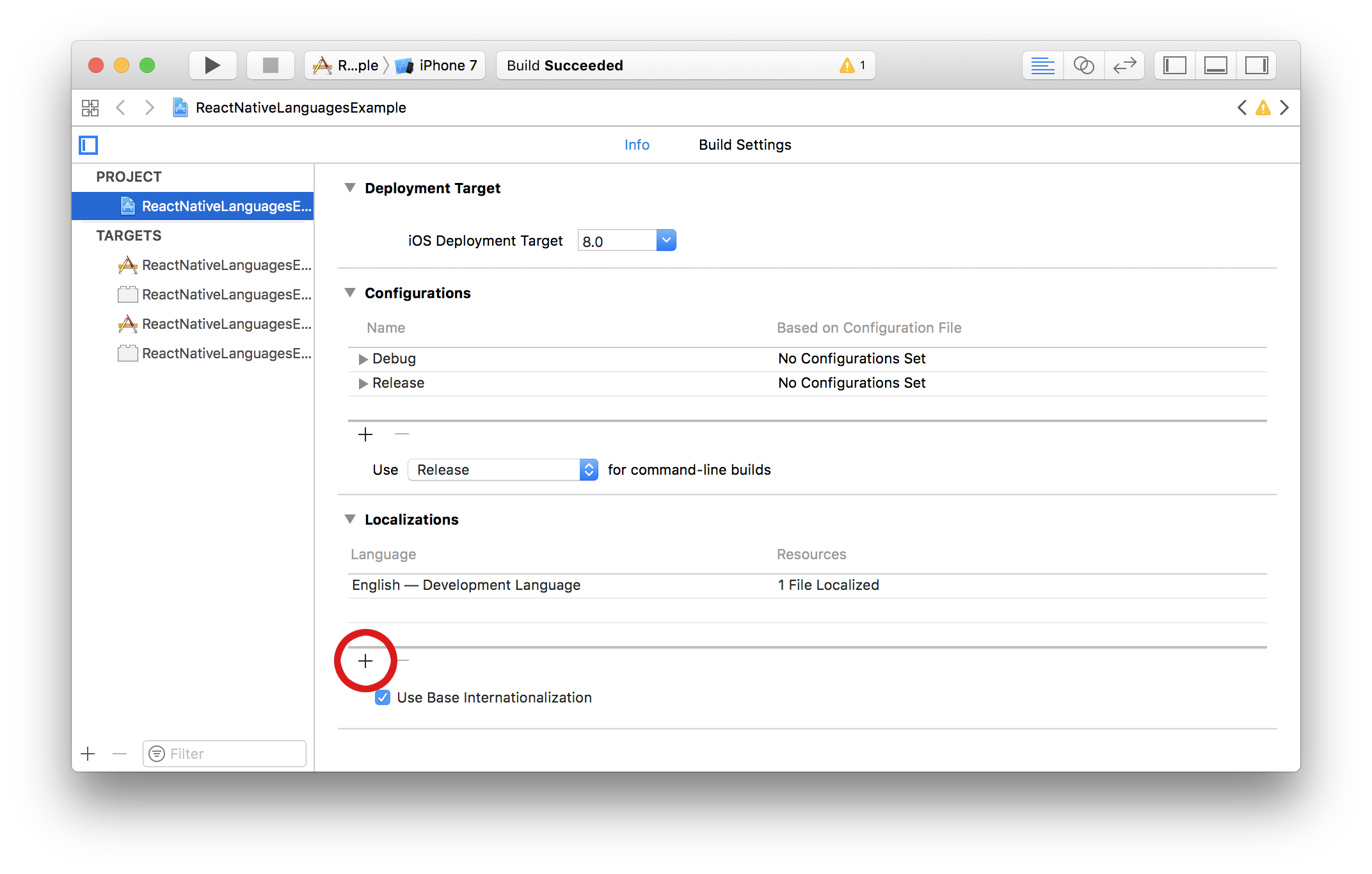
How to update supported localizations (iOS)
You can add / remove supported localizations in your Xcode project infos:
How to test your code
Because it's a native module, you need to mock this package.
The package provides a default mock you may use in your __mocks__/react-native-localize.js or jest.setup.js.
import localizeMock from "react-native-localize/mock";

jest.mock("react-native-localize", () => localizeMock);
This module is provided as is, I work on it in my free time.
If you or your company uses it in a production app, consider sponsoring this project 💰. You also can contact me for premium enterprise support: help with issues, prioritize bugfixes, feature requests, etc.