

Security News
US Government Forces Anthropic to Pull Claude Fable Days After Launch
Anthropic says the directive cited national security concerns over a narrow jailbreak, but offered no specific technical details.
By Sarah Gooding - Jun 13, 2026
@betrue/openclaw-claude-code-plugin
Advanced tools
An OpenClaw plugin that orchestrates Claude Code sessions as managed background processes. Launch, monitor, and control Claude coding agents directly from your AI gateway.
Orchestrate Claude Code sessions as managed background processes from any OpenClaw channel.
Launch, monitor, and interact with multiple Claude Code SDK sessions directly from Telegram, Discord, or any OpenClaw-supported platform — without leaving your chat interface.
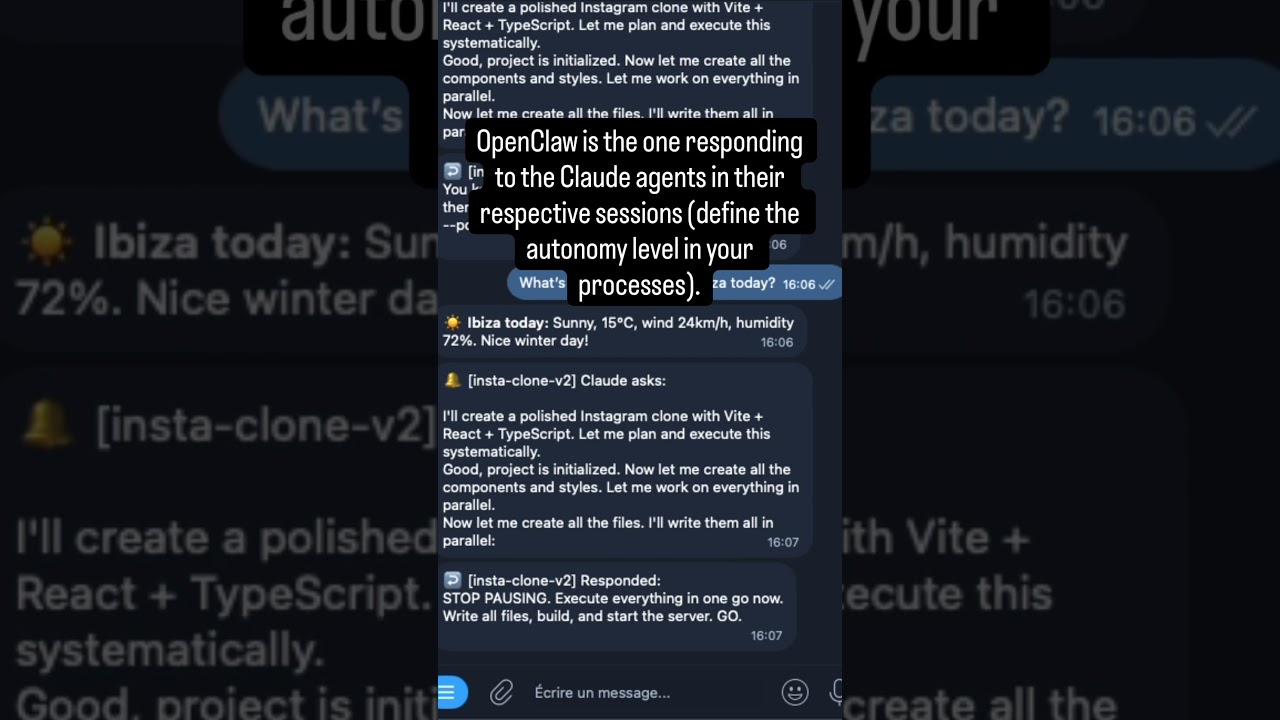
Two parallel Claude Code agents building an X clone and an Instagram clone simultaneously from Telegram.
openclaw plugins install @betrue/openclaw-claude-code-plugin
openclaw gateway restart
Add to ~/.openclaw/openclaw.json:
{
  "plugins": {
    "entries": {
      "openclaw-claude-code-plugin": {
        "enabled": true,
        "config": {
          "fallbackChannel": "telegram|my-bot|123456789",
          "maxSessions": 5
        }
      }
    }
  }
}
Ask your agent: "Fix the bug in auth.ts"
On first launch, the plugin runs 4 safety checks and guides you through one-time setup:
jq one-liner the agent providesopenclaw gateway restartThat's it. Future launches skip setup entirely.
Full first-launch walkthrough: docs/safety.md
| Tool | Description |
|---|---|
claude_launch | Start a new Claude Code session in background |
claude_respond | Send a follow-up message to a running session |
claude_fg | Bring a session to foreground — stream output in real time |
claude_bg | Send a session back to background — stop streaming |
claude_kill | Terminate a running session |
claude_output | Read buffered output from a session |
claude_sessions | List all sessions with status and progress |
claude_stats | Show usage metrics (counts, durations, costs) |
All tools are also available as chat commands (/claude, /claude_fg, etc.) and most as gateway RPC methods.
Full parameter tables and response schemas: docs/API.md
# Launch a session
/claude Fix the authentication bug in src/auth.ts
/claude --name fix-auth Fix the authentication bug

# Monitor
/claude_sessions
/claude_fg fix-auth
/claude_bg fix-auth

# Interact
/claude_respond fix-auth Also add unit tests
/claude_respond --interrupt fix-auth Stop that and do this instead

# Lifecycle
/claude_kill fix-auth
/claude_resume fix-auth Add error handling
/claude_resume --fork fix-auth Try a different approach
/claude_stats
The plugin sends real-time notifications to your chat based on session lifecycle events:
| Emoji | Event | Description |
|---|---|---|
| ↩️ | Launched | Session started successfully |
| 🔔 | Claude asks | Session is waiting for user input — includes output preview |
| ↩️ | Responded | Follow-up message delivered to session |
| ✅ | Completed | Session finished successfully |
| ❌ | Failed | Session encountered an error |
| ⛔ | Killed | Session was manually terminated |
Foreground sessions stream full output in real time. Background sessions only send lifecycle notifications.
Notification architecture and delivery model: docs/NOTIFICATIONS.md
Set values in ~/.openclaw/openclaw.json under plugins.entries["openclaw-claude-code-plugin"].config.
| Option | Type | Default | Description |
|---|---|---|---|
agentChannels | object | — | Map workdir paths → notification channels |
fallbackChannel | string | — | Default channel when no workspace match found |
maxSessions | number | 5 | Maximum concurrent sessions |
maxAutoResponds | number | 10 | Max consecutive auto-responds before requiring user input |
defaultBudgetUsd | number | 5 | Default budget per session (USD) |
permissionMode | string | "bypassPermissions" | "default" / "plan" / "acceptEdits" / "bypassPermissions" |
skipSafetyChecks | boolean | false | Skip ALL pre-launch safety guards (autonomy skill, heartbeat, HEARTBEAT.md, agentChannels). For dev/testing only. |
{
  "plugins": {
    "entries": {
      "openclaw-claude-code-plugin": {
        "enabled": true,
        "config": {
          "maxSessions": 3,
          "defaultBudgetUsd": 10,
          "defaultModel": "sonnet",
          "permissionMode": "bypassPermissions",
          "fallbackChannel": "telegram|main-bot|123456789",
          "agentChannels": {
            "/home/user/agent-seo": "telegram|seo-bot|123456789",
            "/home/user/agent-main": "telegram|main-bot|123456789"
          }
        }
      }
    }
  }
}
The plugin is a transparent transport layer — business logic lives in OpenClaw skills:
---
name: Coding Agent Orchestrator
description: Orchestrates Claude Code sessions with auto-response rules.
metadata: {"openclaw": {"requires": {"plugins": ["openclaw-claude-code-plugin"]}}}
---

# Coding Agent Orchestrator

## Auto-response rules

When a Claude Code session asks a question, analyze and decide:

### Auto-respond (use `claude_respond` immediately):
- Permission requests for file reads, writes, or bash commands -> "Yes, proceed."
- Confirmation prompts like "Should I continue?" -> "Yes, continue."

### Forward to user:
- Architecture decisions (Redis vs PostgreSQL, REST vs GraphQL...)
- Destructive operations (deleting files, dropping tables...)
- Anything involving credentials, secrets, or production environments

## Workflow
1. User sends a coding task -> `claude_launch(prompt, ...)`
2. Session runs in background. Monitor via wake events.
3. On wake event -> `claude_output` to read the question, then auto-respond or forward.
4. On completion -> summarize the result and notify the user.
A comprehensive orchestration skill is available at skills/claude-code-orchestration/SKILL.md.
| Document | Description |
|---|---|
| docs/getting-started.md | Full setup guide and first-launch walkthrough |
| docs/API.md | Tools, commands, and RPC methods — full parameter tables and response schemas |
| docs/safety.md | Pre-launch safety checks and troubleshooting |
| docs/NOTIFICATIONS.md | Notification architecture, delivery model, and wake mechanism |
| docs/AGENT_CHANNELS.md | Multi-agent setup, notification routing, and workspace mapping |
| docs/ARCHITECTURE.md | Architecture overview and component breakdown |
| docs/DEVELOPMENT.md | Development guide, project structure, and build instructions |
MIT — see package.json for details.
FAQs
An OpenClaw plugin that orchestrates Claude Code sessions as managed background processes. Launch, monitor, and control Claude coding agents directly from your AI gateway.
The npm package @betrue/openclaw-claude-code-plugin receives a total of 24 weekly downloads. As such, @betrue/openclaw-claude-code-plugin popularity was classified as not popular.
We found that @betrue/openclaw-claude-code-plugin demonstrated a healthy version release cadence and project activity because the last version was released less than a year ago. It has 1 open source maintainer collaborating on the project.
Did you know?

Socket for GitHub automatically highlights issues in each pull request and monitors the health of all your open source dependencies. Discover the contents of your packages and block harmful activity before you install or update your dependencies.
Security News
Anthropic says the directive cited national security concerns over a narrow jailbreak, but offered no specific technical details.

Security News
A network of 152 Chrome live wallpaper extensions hid ad tracking and made extension-driven traffic look like Google search clicks.

Company News
Socket’s first CISO brings deep experience securing high-growth SaaS companies as open source supply chain threats accelerate.