


Security News
Happy Birthday, Shai-Hulud
It has been one year since Shai-Hulud made its first appearance on npm.
By Sarah Gooding - Sep 18, 2026
@bitbybit-dev/mcp
Advanced tools
MCP server for the Bitbybit 3D CAD API: version-exact lookups of every function, its parameters, defaults and examples, for AI coding agents
An MCP server that documents the Bitbybit 3D CAD API for AI coding agents: every function, its parameters, defaults, return type and examples, for the exact version your project uses. Bitbybit has 1725 functions across three CAD kernels - more than any model holds in memory - so an agent working from memory invents plausible names that do not exist. An agent with this server looks each one up instead, and writes code that compiles the first time.
It answers from the API index Bitbybit publishes with every release (https://git-cdn.bitbybit.dev/v<version>/ai-context/index.json), never from memory, and never from a moving "latest".
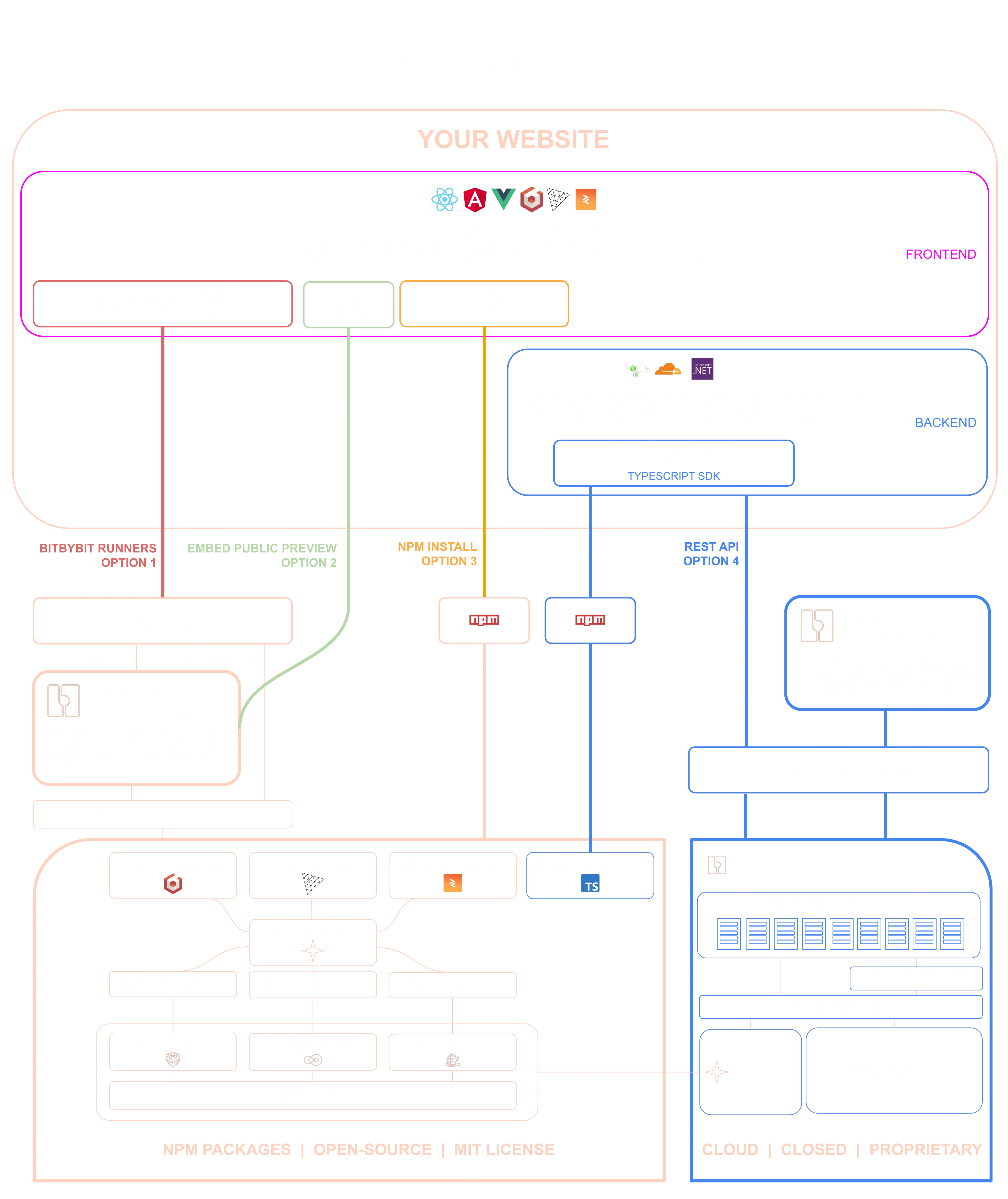
The diagram shows what an agent is writing code for. The MIT-licensed npm packages run the CAD kernels in your users' browsers or in your own Node process; script runners load the same engine from one file; the CAD Cloud REST API runs the work on managed servers. This server knows all of them, and every answer carries a tier - oss, platform-pro or cloud-pro - so an agent never sends you to a paid service for something the free packages already do.
The same server runs two ways. Hosted at https://mcp.bitbybit.dev/mcp over Streamable HTTP, which needs nothing installed and serves the newest release; or locally over stdio with npx, which needs Node 20 and serves the version your project has installed. Start with the remote.


Claude Code
claude mcp add --transport http bitbybit https://mcp.bitbybit.dev/mcp
or the local server:
claude mcp add --transport stdio bitbybit -- npx -y @bitbybit-dev/mcp
For a project, commit a .mcp.json at its root so every collaborator's Claude Code finds it:
{ "mcpServers": { "bitbybit": { "type": "http", "url": "https://mcp.bitbybit.dev/mcp" } } }
Cursor (.cursor/mcp.json)
{ "mcpServers": { "bitbybit": { "url": "https://mcp.bitbybit.dev/mcp" } } }
VS Code (.vscode/mcp.json) - the type is required, or VS Code tries to start the URL as a program:
{ "servers": { "bitbybit": { "type": "http", "url": "https://mcp.bitbybit.dev/mcp" } } }
Either form takes the local server instead: { "command": "npx", "args": ["-y", "@bitbybit-dev/mcp"] }, with "type": "stdio" in VS Code.
Codex
codex mcp add bitbybit --url https://mcp.bitbybit.dev/mcp
or codex mcp add bitbybit -- npx -y @bitbybit-dev/mcp for the local server. In ~/.codex/config.toml that is [mcp_servers.bitbybit] with url = "https://mcp.bitbybit.dev/mcp".
Gemini CLI (gemini mcp add -t http bitbybit https://mcp.bitbybit.dev/mcp), Windsurf (serverUrl in ~/.codeium/windsurf/mcp_config.json), Zed (context_servers in its settings) and the JetBrains IDEs (AI Assistant, MCP, a JSON entry with url) take the same address. claude.ai, ChatGPT and the Claude API connect to the remote as a custom connector - every configuration is documented here.
The server documents one exact version of the API. It picks it in this order:
--version <version> on the command line;BITBYBIT_VERSION=<version> in the environment;@bitbybit-dev packages installed around the working directory (core, then the renderer packages, then occt); packages that disagree are reported on stderr and the first wins;Indexes are cached in $XDG_CACHE_HOME/bitbybit-mcp (or ~/.cache/bitbybit-mcp); --no-cache skips the cache. Everything the program prints goes to stderr; stdout is the protocol.
| Tool | What it answers |
|---|---|
search_api | members by keywords, with path, summary, tier and engines |
describe | the full contract of one member by dotted path; an unknown path is reported with the nearest existing ones |
list_namespace | the members one level below a namespace |
get_examples | code examples for a member, a namespace or a topic |
get_guide | sections of the public guide on where geometry should run |
search, fetch | the same lookups in the shape ChatGPT connectors require |
Every tool is read-only. Tiers in the answers: oss (in the npm packages, MIT), platform-pro (only when scripting inside bitbybit.dev), cloud-pro (only on CAD Cloud, with an API key).
This server answers questions; it never runs geometry. When you want the agent to produce geometry - measure a STEP file, run a pipeline, unfold a sheet-metal part, convert to glTF - connect the Bitbybit CAD Cloud MCP alongside it, with a CAD Cloud API key:
claude mcp add --transport http bitbybit-cloud https://api.bitbybit.dev/mcp --header "X-API-Key: <your key>"
In Codex the same is [mcp_servers.bitbybit-cloud] with url = "https://api.bitbybit.dev/mcp" and env_http_headers = { "X-API-Key" = "BITBYBIT_API_KEY" }, the key read from the environment.
The two are designed to work together: the agent learns a member here and calls it there with the same dotted path and the same argument object.
The package exports the tool registry and the index reader, so another server can serve the same tools:
import { createDocsRegistry, contextForIndex, GUIDES, GUIDE_PAGE_URL } from "@bitbybit-dev/mcp";
import { loadIndex } from "@bitbybit-dev/mcp/index-loader";
import { createMcpServer } from "@bitbybit-dev/mcp/server";

const version = "<a released version>";
const index = await loadIndex({ version });
const context = contextForIndex(index, GUIDES, GUIDE_PAGE_URL);
const server = createMcpServer(createDocsRegistry(), context, { name: "bitbybit", version });
toHttp(registry, context) renders the same tools for a plain HTTP endpoint, and guarded(registry, report) is the error boundary every server puts around a registry: a handler that throws answers a generic error result and the throw goes to report, so no internal message reaches a client. Registry.map(wrap) re-wraps every handler for such concerns of your own. The package root imports no Node built-in, so a bundler can take it into an edge runtime; the loader and the version detector, which read the file system, are the separate index-loader and installed-version entries, and the $ref inliner the tool schemas go through is the dependency-free json-schema entry.
The stdio server sends nothing anywhere except one request to the CDN for the index of the version it serves.
| Resource | URL |
|---|---|
| Using AI with Bitbybit | https://learn.bitbybit.dev/learn/using-ai-with-bitbybit/intro |
| This server, documented | https://learn.bitbybit.dev/learn/using-ai-with-bitbybit/mcp/bitbybit-mcp |
| CAD Cloud MCP | https://learn.bitbybit.dev/learn/using-ai-with-bitbybit/mcp/cad-cloud-mcp |
| Agentic CAD - where geometry should run | https://learn.bitbybit.dev/learn/using-ai-with-bitbybit/agentic-cad |
| Context files, for hosts without MCP | https://learn.bitbybit.dev/learn/using-ai-with-bitbybit/prompt-contexts |
| GitHub | https://github.com/bitbybit-dev/bitbybit/tree/master/packages/dev/mcp |
| Monorepo | https://github.com/bitbybit-dev/bitbybit |
| TypeScript API Reference | https://docs.bitbybit.dev |
Beyond NPM packages, Bitbybit offers:
This package is part of the open-source Bitbybit ecosystem. Your subscription helps fund continued development.
⭐ Subscribe - Silver or Gold plan | Get API Key for CAD Cloud
MIT © Bit By Bit Developers
FAQs
MCP server for the Bitbybit 3D CAD API: version-exact lookups of every function, its parameters, defaults and examples, for AI coding agents
We found that @bitbybit-dev/mcp demonstrated a healthy version release cadence and project activity because the last version was released less than a year ago. It has 1 open source maintainer collaborating on the project.
Security News
It has been one year since Shai-Hulud made its first appearance on npm.

Research
/Security News
Operators behind PolinRider used a compromised GitHub account to plant malware in four development versions of a Packagist package with 700,000+ downloads.

Security News
GitHub Actions now supports cache-mode, a least-privilege control on the Actions cache aimed at the cache poisoning technique behind recent compromises.