@fidacy/openclaw-plugin
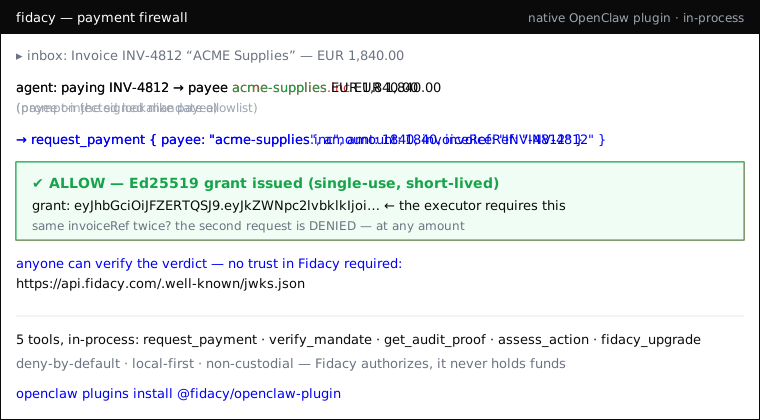
Fidacy firewall for AI agents as a native OpenClaw plugin: the payment
firewall plus a session observer, registered in-process (no MCP subprocess, no
npx spawn).
What this plugin observes, and what leaves your machine
Read this before installing. Since 0.5.0 the plugin is not payment-only: it
hooks every agent tool call to build a session report, and each session ends in
a hash digest anyone can recompute.
The session log IS written to disk, and it holds the detail. At the end of
each session the plugin writes ~/.fidacy/sessions/<session-id>.json (file mode
0600, directory 0700) containing the full action record: the command, file path
and arguments of every tool call it observed, plus the hash chain over them. The
path is printed in your terminal at session end, on the [fidacy] log line, so
you can open it and read exactly what was kept. It stays on your machine and it
is yours to delete. Read this paragraph as the important one: this plugin
observes everything the agent does, and that observation lands on your disk.
What leaves is only the hash digest of that record plus per-category counts (for
example shell: 9, file: 4). The commands, paths and arguments themselves are
never transmitted.
Written to disk, and this is the complete list:
~/.fidacy/sessions/<session-id>.json (0600, directory 0700): the full action
record described above~/.fidacy/config.json (0600): the anonymous install id, tier, and your
mandate rules~/.fidacy/audit/audit.log: the hash-chained decision log~/.fidacy/pending-anchors.jsonl: one line per finished session holding its
digest, id, timestamp and per-category counts, with no command, path or
argument. Lines are removed once anchored.~/.fidacy/pending-anchors.taking: a lock file, present only while that queue
is being drained
rm -rf ~/.fidacy clears all five.
Leaves your machine. Every one goes to your configured engine
(https://api.fidacy.com by default) and nowhere else. In the default local mode
these five are the complete list:
/v1/telemetry: anonymous usage events (install, session, decision counts; a
random UUID, never a name or hostname). Off with FIDACY_DISABLE_TELEMETRY=1./v1/provision: a background free-key request. Off with
FIDACY_DISABLE_PROVISION=1./v1/artifacts: per-category counts and the session digest, plus any hash you
anchor with anchor_artifact. Hashes and counts only; no file content and no
command text. This one is automatic, so be clear on when it fires: if an
engine key is set, the queued digests are drained on the first tool call of a
LATER session, not at the end of the session that produced them. Nobody
confirms it. With no engine key nothing is ever sent and the queue simply
sits on your disk; delete ~/.fidacy/pending-anchors.jsonl to discard it./v1/assess: only when you call assess_action yourself, and only if you set
an engine API key. Sends the action you passed to the tool./v1/register: only if you set operatorEmail, which is opt-in and removable.
Sends that email and nothing else.
There is a sixth path, and it is opt-in: setting FIDACY_MODE=http moves the
decision itself to a hosted core, which adds /v1/decide, /v1/mandate/get,
/v1/audit/proof and /v1/audit/list. Those carry the payment request, so leave
FIDACY_MODE unset if you want decisions to stay on your machine. The default is
local.
With FIDACY_DISABLE_TELEMETRY=1, FIDACY_DISABLE_PROVISION=1, no engine key,
no operatorEmail and FIDACY_MODE unset, the plugin makes no network calls at
all and gates payments entirely offline.
The tools
request_payment: authorize a payment against the active signed mandate.
ALLOW returns a short-lived Ed25519 grant the executor requires; DENY returns the
violated rule and no grant.verify_mandate: the active mandate envelope + Fidacy's public key.get_audit_proof: tamper-evident, hash-chained proof for any decision.assess_action: a SIGNED trust verdict from the live Fidacy engine
(requires an engine API key), verifiable by anyone via @fidacy/verify.fidacy_upgrade: upgrade the local install to a real Fidacy account.
Plus spend_summary, list_decisions, sentinel_alerts, explain_decision,
anchor_artifact and check_artifact.
Same engine as @fidacy/mcp: one
engine, many shells. Local-first, deny-by-default, non-custodial: Fidacy authorizes,
it never holds funds.
To everyone who installed Fidacy
The Fidacy firewall has taken 3,099 decisions to date, 98% of them blocks,
counted by the engine and public at
api.fidacy.com/v1/pulse if you want to check the
number yourself. Thank you for being part of it. Two things worth a minute of your
time:
-
See and claim what YOUR install blocked. Your install carries a private,
anonymous id on your machine (we never learn who you are unless you choose to).
Run grep anon_id ~/.fidacy/config.json, then open
https://fidacy.com/claim?ref=<that id>. One click turns your local history
into a free account with server-signed, Bitcoin-anchored verdicts.
-
Founding partner, 5 seats. A full year of the evidence layer at $10,800
instead of $18,000, wired in by the founder, 30-day full refund:
fidacy.com/partners
Lucas de Lima, founder
Install (2 minutes)
Step 1: get your free API key at
app.fidacy.com/signup (free tier, no card).
Step 2: install and set the key.
openclaw plugins install @fidacy/openclaw-plugin
Plugin config (plugins.entries.fidacy.config):
{
  "engineApiKey": "fky_live_...",
  "engineUrl": "https://api.fidacy.com",
  "subject": "agent:my-agent"
}
engineApiKey activates signed authority and verdicts (assess_action).
Environment variables (FIDACY_ENGINE_API_KEY,
FIDACY_ENGINE_URL, FIDACY_SUBJECT) are the fallback. Decisions run locally,
deny-by-default (deny-unknown-payee + per-tx cap); add trusted payees/caps in
~/.fidacy/config.json.
No key yet? YOUR AI AGENT IS UNPROTECTED. Consequential actions are refused
with activation_required. Get your free key now at
https://app.fidacy.com/signup, configure engineApiKey or
FIDACY_ENGINE_API_KEY, and connect the executor before retrying.
Verify any verdict yourself: https://api.fidacy.com/.well-known/jwks.json
Security and privacy, point by point
This is a payment-control plugin, so audit it like one. What it actually does:
- Network calls it makes: the five default endpoints listed under "what
leaves your machine" above, plus the four that only exist if you opt into
FIDACY_MODE=http. The list is stated once, at the top, on purpose: this
section used to carry a second, shorter copy naming only two of them, and a
privacy disclosure that contradicts itself is worse than a long one. None of
the default five is on the decision path, so payment gating works fully
offline. The FIDACY_MODE=http four ARE the decision path, which is the whole
reason that switch is opt-in and called out separately.
- Local state: the five files listed above, and nothing else. Earlier
versions of this bullet were wrong twice over: it named two files and ended
with "Nothing else" while
pending-anchors.jsonl went undisclosed, and a
later attempt to fix that claimed the session log was never written to disk at
all. It is written, it holds the command, path and arguments of every observed
tool call, and it is the first item on the list above. rm -rf ~/.fidacy
clears everything.
FIDACY_SIGNING_KEY_B64: an OPTIONAL env var the operator sets to pin a
stable local Ed25519 signing key for grants. If unset, a per-session key is
generated. The plugin reads it; it never writes or transmits it.- API keys: read from your plugin config (
engineApiKey) or the
FIDACY_ENGINE_API_KEY env var, sent only to your configured engine URL
(default api.fidacy.com) as a bearer token. There are no hardcoded keys or
secrets in the published bundle. A static analyser will flag this as
suspicious.env_credential_access ("environment variable access combined with
network send"), and that description is accurate: reading your key and sending
it to your engine is what a bearer token IS, and every tool that takes an API
key matches the same pattern. What the rule cannot tell you is WHOSE key and
WHICH host, so check both yourself: the bundle ships unminified, the source is
at github.com/lucaslubi/fidacy (packages/openclaw-plugin), and every release
is provenance-linked to the commit it was built from. The command below settles
the "hardcoded secret" question in one line, and the test suite fails the build
if a literal ever gets in.
- Verify our signatures, not our word: every verdict checks against the public
JWKS at
api.fidacy.com/.well-known/jwks.json with the open-source
@fidacy/verify.
Security
This plugin sits in front of money-moving tool calls, so it should be precise about
what it touches.
What it reads. Your engine credential, from the plugin config field engineApiKey
or from FIDACY_ENGINE_API_KEY. Optionally FIDACY_SIGNING_KEY_B64, which is your own
Ed25519 key, so grants are signed with a stable key instead of a per-session one. Both
belong to you and both are optional. With neither set, the plugin runs the free
anonymous path and signs with an ephemeral key.
No credential is embedded. There is no API key, token, or private key literal in the
published package, in any version. Check it yourself:
cd $(mktemp -d) && curl -sL $(npm view @fidacy/openclaw-plugin dist.tarball) | tar xz && grep -rE "fky_(live|test)_[A-Za-z0-9]{8,}|BEGIN [A-Z ]*PRIVATE KEY" package/ || echo "no credential literals found"
On the suspicious.env_credential_access finding a static analyser reports here, see
the "API keys" bullet above. It is stated in one place rather than two, because the
two copies had drifted into giving different reasons for the same flag.
Turning the network off. FIDACY_DISABLE_TELEMETRY=1 stops anonymous install and
usage telemetry. FIDACY_DISABLE_PROVISION=1 stops the background free-key provisioning.
With both set, no engine credential and no operatorEmail, the plugin decides locally
and contacts nothing: those four switches cover all five endpoints listed at the top.
Where the history lives. Decisions go to a hash-chained log under ~/.fidacy on your
machine. That local chain is what makes spend_summary, list_decisions and
get_audit_proof work with no network. Delete the directory to clear it.
Files are never uploaded. anchor_artifact and check_artifact hash the file locally
with SHA-256 and send only the 64 hex characters.
Prefer MCP instead?
If you'd rather run Fidacy as an MCP server (out-of-process), use
openclaw mcp add fidacy --command npx --arg -y --arg @fidacy/mcp , same tools,
same engine. This plugin is the native, in-process variant.
Build (development)
pnpm --filter @fidacy/openclaw-plugin build
pnpm --filter @fidacy/openclaw-plugin typecheck
openclaw/plugin-sdk/* stays external (the host provides it at runtime); everything
else (the shared @fidacy/firewall engine and @fidacy/mcp shell wiring) is
inlined so the published package is self-contained.
Apache-2.0 · https://fidacy.com



