

Security News
Suno Breached via Shai-Hulud Worm, Leaked Code Exposes AI Music Scraping
A Shai-Hulud infection exposed Suno's source code, which shows the AI music startup stream-ripped tracks to train its models.
By Sarah Gooding - Jul 16, 2026
@josxa/opencode-pty
Advanced tools
OpenCode plugin for interactive PTY management - run background processes, send input, read output with regex filtering, and capture terminal snapshots
A plugin for OpenCode that provides interactive PTY (pseudo-terminal) management, enabling the AI agent to run background processes, send interactive input, and read output on demand.
OpenCode's built-in bash tool runs commands synchronously -- the agent waits for completion. This works for quick commands, but not for:
npm run dev, cargo watch)npm test -- --watch)This plugin gives the agent full control over multiple terminal sessions, like tabs in a terminal app.
grep)Add the plugin to your OpenCode config:
{
  "$schema": "https://opencode.ai/config.json",
  "plugin": ["@josxa/opencode-pty"]
}
That's it. OpenCode will automatically install the plugin on next run.
OpenCode automatically checks for and installs plugin updates on startup. You don't need to do anything manually!
If you ever need to force a clean reinstall, you can clear the cache:
rm -rf ~/.cache/opencode/packages/@josxa+opencode-pty*
opencode
| Tool | Description |
|---|---|
pty_spawn | Create a new PTY session (command, args, workdir, env, title, notifyOnExit) |
pty_write | Send input to a PTY (text, escape sequences like \x03 for Ctrl+C) |
pty_read | Read PTY output buffer as chat-safe text with pagination and regex filtering |
pty_snapshot | Capture parsed terminal screen as clean text with cursor, size, and hash |
pty_snapshot_foreground_colors | Capture rendered foreground colors as a label grid with legend |
pty_snapshot_background_colors | Capture rendered background colors as a label grid with legend |
pty_snapshot_wait | Block until screen matches a regex or content stabilizes |
pty_list | List all PTY sessions with status, PID, line count |
pty_kill | Terminate a PTY, optionally cleanup the buffer |
This plugin provides slash commands that can be used in OpenCode chat:
| Command | Description |
|---|---|
/pty-open-background-spy | Open the PTY web server interface in the browser |
/pty-show-server-url | Show the URL of the running PTY web server instance |
This plugin includes a modern React-based web interface for monitoring and interacting with PTY sessions.
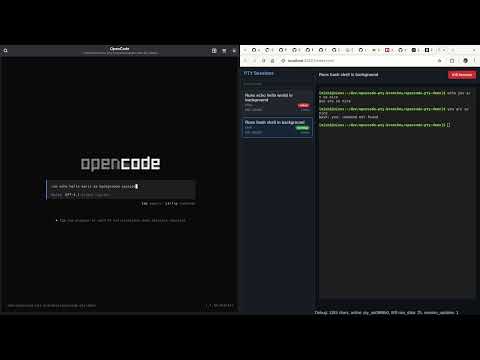
If you instruct the coding agent to run something in background, you have to name it "session",
i.e. "run xy as a background SESSION".
If you name it "task" or "process" or anything else, the agent will sometimes run it as background subprocess using &.
/pty-open-background-spy.This will start the background sessions observer cockpit server and launch the browser with web UI.
The web server provides a REST API for session management:
| Method | Endpoint | Description |
|---|---|---|
GET | /api/sessions | List all PTY sessions |
POST | /api/sessions | Create a new PTY session |
GET | /api/sessions/:id | Get session details |
POST | /api/sessions/:id/input | Send input to a session |
DELETE | /api/sessions/:id | Kill a session (without cleanup) |
DELETE | /api/sessions/:id/cleanup | Kill and cleanup a session |
GET | /api/sessions/:id/buffer/plain | Get session output buffer (returns { plain: string, byteLength: number }) |
GET | /api/sessions/:id/buffer/raw | Get session output buffer (raw data) |
DELETE | /api/sessions | Clear all sessions |
GET | /health | Server health check with metrics |
curl -X POST http://localhost:[PORT]/api/sessions \
  -H "Content-Type: application/json" \
  -d '{
    "command": "bash",
    "args": ["-c", "echo hello && sleep 10"],
    "description": "Test session"
  }'
Replace [PORT] with the actual port number shown in the server console output.
Connect to /ws for real-time updates:
const ws = new WebSocket('ws://localhost:[PORT]/ws')

ws.onmessage = (event) => {
  const data = JSON.parse(event.data)
  if (data.type === 'raw_data') {
    console.log('New output:', data.rawData)
  } else if (data.type === 'session_list') {
    console.log('Session list:', data.sessions)
  }
}
Replace [PORT] with the actual port number shown in the browser when running the slash command output.
Future implementation will include:
bun vite with an environment variable set to the server URLThis will ease the development on the client.
pty_spawn: command="npm", args=["run", "dev"], title="Dev Server"
→ Returns: pty_a1b2c3d4
pty_read: id="pty_a1b2c3d4", limit=50
→ Shows last 50 lines of output
pty_read: id="pty_a1b2c3d4", pattern="error|ERROR", ignoreCase=true
→ Shows only lines matching the pattern
pty_write: id="pty_a1b2c3d4", data="\x03"
→ Sends interrupt signal
pty_kill: id="pty_a1b2c3d4", cleanup=true
→ Terminates process and frees buffer
pty_spawn: command="npm", args=["run", "build"], title="Build", notifyOnExit=true
→ Returns: pty_a1b2c3d4
The AI agent will receive a notification when the build completes:
<pty_exited>
ID: pty_a1b2c3d4
Title: Build
Exit Code: 0
Output Lines: 42
Last Line: Build completed successfully.
</pty_exited>

Use pty_read to check the full output.
This eliminates the need for polling -- perfect for long-running processes like builds, tests, or deployment scripts. If the process fails (non-zero exit code), the notification will suggest using pty_read with the pattern parameter to search for errors.
pty_read returns buffer lines in a chat-safe text form. Non-printable control bytes are escaped so the tool output does not break the UI, but TUI programs still remain hard to interpret because cursor movement and screen control sequences are only shown literally. For TUI apps (interactive UIs with cursor movement, colors, screen clearing), pty_snapshot solves this:
pty_snapshot: id="pty_a1b2c3d4"
→ Returns clean screen text with cursor position, size, seq number, and content hash

pty_snapshot: id="pty_a1b2c3d4", interleavedColors="background"
→ Returns the same text snapshot, but inserts a matching background-color run row under each visible text row
When a TUI uses highlighting, inverse video, or colored selections, plain text snapshots can miss what the user would actually see. These tools expose the rendered color layers as compact label grids, one for foreground and one for background:
pty_snapshot_foreground_colors: id="pty_a1b2c3d4"
→ Returns a compact whole-screen map like `01-10: 120A` with a legend such as `A=default  B=palette:12  C=#ffcc00`

pty_snapshot_background_colors: id="pty_a1b2c3d4"
→ Returns the matching background map, collapsing repeated rows into ranges so selected rows still stand out without losing layout context
This is especially useful for ctrl+p style menus where the selected item differs mostly by highlight color rather than by text. If you want the text and highlight rows together in one response, use pty_snapshot with interleavedColors="background", which preserves horizontal alignment while making long flat spans cheaper to read.
Every snapshot gets a monotonically increasing sequence number (seq) that increments only when the screen content actually changes. Pass since to get only the lines that changed:
pty_snapshot: id="pty_a1b2c3d4", since=5
→ Returns only changed/added/removed lines since seq 5
Use pty_snapshot_wait to block until a condition is met instead of polling:
pty_snapshot_wait: id="pty_a1b2c3d4", search="error|Error", timeout=30000
→ Resolves when the regex matches the full rendered screen text

pty_snapshot_wait: id="pty_a1b2c3d4", searchAbsent="esc interrupt", timeout=30000
→ Resolves when that text is no longer visible on the rendered screen

pty_snapshot_wait: id="pty_a1b2c3d4", hashStableMs=2000, timeout=30000
→ Resolves when screen content is unchanged for 2 seconds
When multiple conditions are given, the first to match wins. since only changes the response to a diff against that seq and does not affect when the wait resolves.
One compelling use case is running OpenCode inside OpenCode to observe TUI behavior during development. The agent can interact with the inner instance, send prompts, open menus, and watch exactly how the screen updates:
# 1. Launch OpenCode as a background TUI process
pty_spawn: command="opencode", args=["path/to/project"], title="Inner OpenCode"
→ pty_abc123

# 2. Wait for it to render, get initial screen state
pty_snapshot_wait: id="pty_abc123", hashStableMs=2000, timeout=15000
→ seq=2, shows OpenCode banner + input field

# 3. Type a prompt and submit
pty_write: id="pty_abc123", data="explain this codebase"
pty_write: id="pty_abc123", data="\n"

# 4. Watch the response stream in, frame by frame
pty_snapshot_wait: id="pty_abc123", hashStableMs=300, since=2
→ seq=15, diff shows partial response text appearing

pty_snapshot_wait: id="pty_abc123", hashStableMs=300, since=15
→ seq=28, more text streamed in

pty_snapshot_wait: id="pty_abc123", hashStableMs=3000, since=28
→ seq=46, response complete (stable for 3s)

# 5. Open the command palette
pty_write: id="pty_abc123", data="\x10"

# 6. See all available commands
pty_snapshot: id="pty_abc123", since=46
→ Shows command palette overlay with menu items

# 7. Toggle the sidebar
pty_write: id="pty_abc123", data="show sidebar\r"
pty_snapshot: id="pty_abc123", since=48
→ Sidebar appears with session info, MCP connections, context usage
This works because pty_snapshot maintains a headless terminal emulator (xterm.js) alongside each PTY session, producing the same parsed screen a human would see -- without any ANSI escape sequence noise.
| Variable | Default | Description |
|---|---|---|
PTY_MAX_BUFFER_LINES | 50000 | Maximum lines to keep in output buffer per session |
PTY_WEB_HOSTNAME | ::1 | Hostname for the web server to bind to |
This plugin respects OpenCode's permission settings for the bash tool. Commands spawned via pty_spawn are checked against your permission.bash configuration.
{
  "$schema": "https://opencode.ai/config.json",
  "permission": {
    "bash": {
      "npm *": "allow",
      "git push": "deny",
      "terraform *": "deny"
    }
  }
}
[!IMPORTANT] Limitations compared to built-in bash tool:
- "ask" permissions are treated as "deny": Since plugins cannot trigger OpenCode's permission prompt UI, commands matching an "ask" pattern will be denied. A toast notification will inform you when this happens. Configure explicit "allow" or "deny" for commands you want to use with PTY.
- "external_directory" with "ask" is treated as "allow": When the working directory is outside the project and
permission.external_directoryis set to "ask", this plugin allows it (with a log message). Set to "deny" explicitly if you want to block external directories.
{
  "$schema": "https://opencode.ai/config.json",
  "permission": {
    "bash": {
      "npm run dev": "allow",
      "npm run build": "allow",
      "npm test *": "allow",
      "cargo *": "allow",
      "python *": "allow"
    }
  }
}
notifyOnExit is true, sends a message to the session when the process exitsspawn → running → [exited | killed]
↓
(stays in list until cleanup=true)
Sessions remain in the list after exit so the agent can:
Use pty_kill with cleanup=true to remove completely.
git clone https://github.com/shekohex/opencode-pty.git
cd opencode-pty
bun ci          # install packages from bun.lock
bun lint        # Runs Biome linting checks
bun format      # Runs Biome formatting checks
bun typecheck   # Runs TypeScript type checking
bun build:dev   # Build the React app for development
bun test        # Runs the unit tests
bun test:e2e    # Runs the e2e tests
To load a local checkout in OpenCode:
{
  "$schema": "https://opencode.ai/config.json",
  "plugin": ["file:///absolute/path/to/opencode-pty/index.ts"]
}
sequenceDiagram
    participant User as Human User
    participant Chat as OpenCode Chat
    participant Core as OpenCode Core
    participant Plugin as PTY Plugin
    participant Manager as PTY Manager (in Plugin)
    participant WS as WebSocket Server (in Plugin)
    participant Browser as Web Browser

    Note over Plugin,WS: Plugin starts/owns the WS server and Manager

    User->>Chat: Types /pty-open-background-spy
    Chat->>Core: Slash command received
    Core->>Plugin: Dispatches to registered command handler
    Plugin->>Browser: open(server.url.origin)
    activate Browser
    Browser->>WS: Connects → ws://.../ws
    WS->>Manager: Queries for current sessions (manager.list())
    Manager-->>WS: Returns session data
    WS-->>Browser: Sends session_list + subscribes to updates
    Browser-->>User: PTY monitor UI appears (sessions + terminals)
sequenceDiagram
    participant User
    participant Chat as OpenCode Chat
    participant Agent as AI Agent
    participant Plugin as PTY Plugin
    participant Manager as PTY Manager
    participant PTY as bun-pty Process
    participant WS as WebSocket Server
    participant UI as PTY Web UI (optional)

    User->>Chat: "start vite dev server in background"
    Chat->>Agent: User message
    Agent->>Plugin: Calls pty_spawn(command="vite", args=["dev"], ...)
    Plugin->>Manager: spawn(options)
    Manager->>PTY: Launches real process
    activate PTY
    PTY-->>Manager: stdout/stderr chunks
    Manager->>Manager: Appends to RingBuffer
    Manager->>WS: Publishes raw_data + session_update
    alt UI already open
        WS-->>UI: Real-time terminal output
        UI-->>User: Live xterm.js view
    end
    Plugin-->>Agent: Returns session info
    Agent-->>Chat: "Dev server started (ID: pty_abc123)"
    Chat-->>User: Confirmation message
sequenceDiagram
    participant User
    participant UI as PTY Web UI
    participant WS as WebSocket Server
    participant Manager as PTY Manager
    participant PTY as bun-pty Process

    %% Variant A: Human typing in browser (most common)
    User->>UI: Types "rs<Enter>" or pastes text
    UI->>WS: Sends {type:"input", sessionId, data:"rs\n"}
    WS->>Manager: write(sessionId, data)
    Manager->>PTY: process.write(data)
    PTY-->>Manager: New output (restart message, etc.)
    Manager->>WS: Publishes raw_data
    WS-->>UI: Updates xterm.js live

    %% Variant B: AI sending input
    Note over User,UI: Alternative path – AI controlled
    Agent->>Plugin: pty_write(id, "\x03")  // e.g. Ctrl+C
    Plugin->>Manager: write(id, data)
    Manager->>PTY: process.write("\x03")
sequenceDiagram
    participant User
    participant Chat
    participant Agent as AI Agent
    participant Plugin as PTY Plugin
    participant Manager as PTY Manager
    participant Buffer as RingBuffer

    User->>Chat: "show me the last 200 lines of the dev server"
    Chat->>Agent: User question
    Agent->>Plugin: pty_read(id, offset?, limit=200, pattern?)
    Plugin->>Manager: read / search request
    Manager->>Buffer: read(offset, limit) or search(pattern)
    Buffer-->>Manager: Matching / paginated lines
    Manager-->>Plugin: Raw or formatted lines
    Plugin-->>Agent: Text response
    Agent-->>Chat: "Here are the logs:\n\n1 | [vite] ... \n..."
    Chat-->>User: Logs displayed in chat
sequenceDiagram
    participant User
    participant UI as PTY Web UI
    participant HTTP as HTTP Server
    participant Manager as PTY Manager
    participant PTY as bun-pty Process
    participant WS as WebSocket Server

    Note over PTY: Assuming PTY is active (running process)<br>notifyOnExit = false (no chat notification,<br>but WS/UI always gets status updates)

    activate PTY

    User->>UI: Clicks "Kill" / "×" on session
    UI->>HTTP: DELETE /api/sessions/:id  (or /cleanup)
    HTTP->>Manager: kill(id, cleanup?)
    Manager->>PTY: Sends SIGTERM (if running)
    PTY-->>Manager: onExit event (code, signal)
    deactivate PTY
    Manager->>WS: Publishes session_update (status: killed/exited)
    WS-->>UI: UI updates → shows "exited" or removes entry
sequenceDiagram
    participant User
    participant Chat as OpenCode Chat
    participant Agent as AI Agent
    participant Plugin as PTY Plugin
    participant Manager as PTY Manager
    participant PTY as bun-pty Process
    participant WS as WebSocket Server
    participant UI as PTY Web UI (optional)

    Note over PTY: Assuming PTY is active (running process)<br>notifyOnExit = false (no chat notification,<br>but WS/UI always gets status updates)

    activate PTY

    User->>Chat: "kill the dev server"
    Chat->>Agent: User request
    Agent->>Plugin: pty_kill(id, cleanup=true)
    Plugin->>Manager: kill(id, true)
    Manager->>PTY: SIGTERM + remove from list (if cleanup)
    PTY-->>Manager: onExit event (code, signal)
    deactivate PTY
    Manager->>WS: Broadcast session_update (status: killed/exited)
    alt UI open
        WS-->>UI: UI updates → shows "exited" or removes entry
    end
    Plugin-->>Agent: Success response
    Agent-->>Chat: "Session killed"
    Chat-->>User: Confirmation in chat
sequenceDiagram
    participant PTY as bun-pty Process
    participant Manager as PTY Manager
    participant Plugin as PTY Plugin
    participant Chat as OpenCode Chat
    participant Agent as AI Agent
    participant User

    %%{init: {'sequence': {'messageAlign': 'left'}}}%%

    activate PTY
    Note over PTY: Long-running process (dev server, tests, etc.)
    PTY-->>Manager: Process exits → exitCode
    deactivate PTY
    alt notifyOnExit was true when spawned
        Manager->>Plugin: Triggers exit notification
        Plugin->>Chat: Sends formatted message via SDK<br><pty_exited><br>ID: pty_abc123<br>Exit: 0<br>Lines: 342<br>Last: Server running at http://localhost:5173<br></pty_exited>
        Chat-->>User: Notification appears in chat
        Chat->>Agent: Triggers agent with exit message
    end
    Manager->>WS: Publishes final session_update (status: exited)
    alt UI open
        WS-->>UI: UI shows red "exited" badge / stops live output
    end
MIT
Contributions are welcome! Please open an issue or submit a PR.
FAQs
OpenCode plugin for interactive PTY management - run background processes, send input, read output with regex filtering, and capture terminal snapshots
The npm package @josxa/opencode-pty receives a total of 73 weekly downloads. As such, @josxa/opencode-pty popularity was classified as not popular.
We found that @josxa/opencode-pty demonstrated a healthy version release cadence and project activity because the last version was released less than a year ago. It has 1 open source maintainer collaborating on the project.
Did you know?

Socket for GitHub automatically highlights issues in each pull request and monitors the health of all your open source dependencies. Discover the contents of your packages and block harmful activity before you install or update your dependencies.
Security News
A Shai-Hulud infection exposed Suno's source code, which shows the AI music startup stream-ripped tracks to train its models.

Security News
Vercel is formalizing a monthly release program for Next.js. The change follows React2Shell and a sharp rise in AI-assisted vulnerability discovery.

Research
/Security News
11 malicious NuGet tools pose as game cheats to deploy Windows payloads, track hosts, and use Google Sheets for telemetry and control.