RAGMap MCP (Local)
Find and filter RAG-capable MCP servers in seconds. This package is the local stdio MCP bridge to the hosted RAGMap subregistry API.
Why teams use it
- Zero glue code: run via
npx, speak MCP, done.
- Agent-first: small, stable tool contracts with predictable output.
- Production by default: connects to the hosted API out of the box.
- Read-only: no keys required.
What you get
- Primary use: MCP stdio transport for Claude Desktop, Cursor, and any MCP host.
- Tools:
rag_find_servers, rag_get_server, rag_list_categories, rag_explain_score.
For agents (zero config): GET https://ragmap-api.web.app/.well-known/agent.json for discovery; use apiEndpoints to call the REST API or mcpInstall to run this package. See AGENT-USAGE.md in the repo.
MapRag (RAGMap)
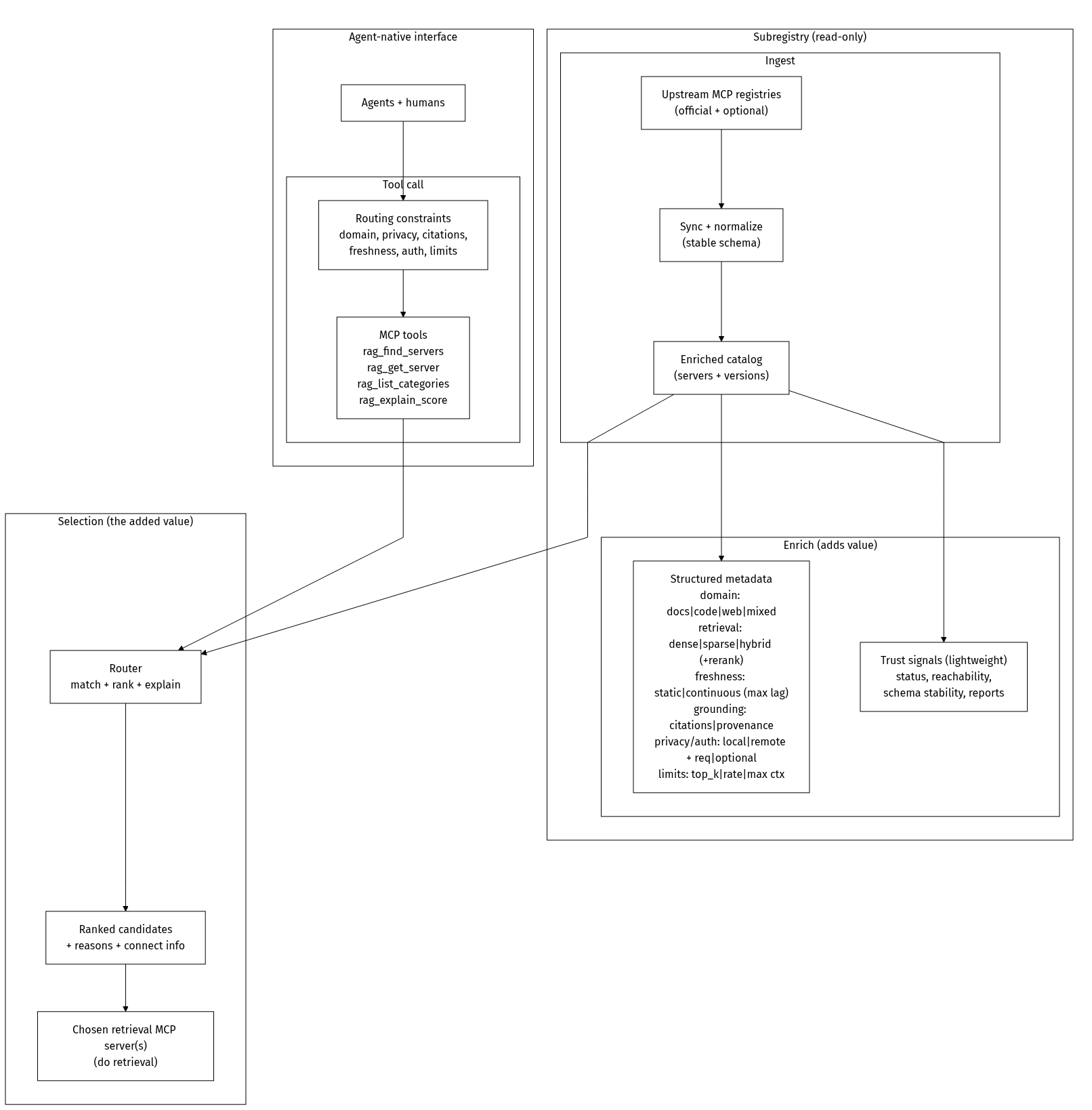
MapRag is a discovery + routing layer for retrieval.
It indexes RAG-capable MCP servers, enriches them with structured metadata, and helps agents (and humans) quickly find the right retrieval server for a task under constraints like citations, freshness, privacy, domain, and latency.
MapRag does not do RAG itself.
It helps you choose the best RAG tool/server to do the retrieval.
Status (v1.0)
- Ingests the official MCP Registry (read-only) and enriches server records for retrieval use-cases.
- Semantic + keyword search when the API has embeddings enabled (OpenAI key); otherwise keyword-only.
- Enrichment:
categories, ragScore, reasons, hasRemote, and reachability metadata for remote transports.
- Filters:
query, categories, minScore, transport, registryType, hasRemote, reachable, and reachableMaxAgeHours.
- Exposes two programmable interfaces: registry-compatible REST API (subregistry) + MCP servers (remote HTTP + local stdio).
Roadmap
- Richer capability model (domain, grounding/citations, freshness, privacy/residency, auth, limits).
- Trust signals (reachability, schema stability, latency/uptime).
- Human UI for browsing/filtering/comparing servers.
Full overview: https://github.com/khalidsaidi/ragmap/blob/main/docs/OVERVIEW.md
Architecture (at a glance)
Quick start (60 seconds)
MCP_AGENT_NAME=local-test \
npx -y @khalidsaidi/ragmap-mcp@latest
By default it uses the hosted API base https://ragmap-api.web.app.
For local dev:
RAGMAP_API_BASE_URL=http://localhost:3000 \
npx -y @khalidsaidi/ragmap-mcp@latest
Install (optional)
If you prefer a global install:
npm i -g @khalidsaidi/ragmap-mcp
ragmap-mcp
Smoke test (one command)
printf '%s\n' \
'{"jsonrpc":"2.0","id":1,"method":"initialize","params":{"protocolVersion":"0.1","capabilities":{},"clientInfo":{"name":"quick","version":"0.0.1"}}}' \
'{"jsonrpc":"2.0","id":2,"method":"tools/list","params":{}}' \
'{"jsonrpc":"2.0","id":3,"method":"tools/call","params":{"name":"rag_find_servers","arguments":{"query":"rag","limit":3}}}' \
| npx -y @khalidsaidi/ragmap-mcp@latest
Claude Desktop config
{
  "mcpServers": {
    "ragmap": {
      "command": "npx",
      "args": ["-y", "@khalidsaidi/ragmap-mcp@latest"],
      "env": {
        "MCP_AGENT_NAME": "claude-desktop",
        "RAGMAP_API_BASE_URL": "https://ragmap-api.web.app"
      }
    }
  }
}
Remote MCP (no install)
If you prefer MCP over streamable HTTP (no local install), use the hosted endpoint:
claude mcp add --transport http ragmap https://ragmap-api.web.app/mcp
Tools
rag_find_servers - search/filter RAG-capable MCP serversrag_get_server - fetch a server record by name (latest version)rag_list_categories - list known RAG categoriesrag_explain_score - explain the RAG score for a server
Notes:
- Tool responses are returned as JSON text (so any MCP host can display them verbatim).
- Filtering is done server-side via the RAGMap API.
Example tool calls
- Find remote (streamable-http) servers that look RAG-y:
rag_find_servers({ query: "rag", minScore: 30, transport: "streamable-http", hasRemote: "true", limit: 10 })
- Find servers published via a specific registry type:
rag_find_servers({ query: "qdrant", registryType: "pypi" })
- List categories:
rag_list_categories({})
- Get RAGMap’s own record or explain its score (use the published registry name):
rag_get_server({ name: "io.github.khalidsaidi/ragmap" }), rag_explain_score({ name: "io.github.khalidsaidi/ragmap" })
Example: “privacy-first docs RAG with citations”
This is the kind of query MapRag is designed for. Today, you can approximate it with categories and transport filters:
{
  "tool": "rag_find_servers",
  "input": {
    "query": "docs rag citations",
    "categories": ["documents"],
    "minScore": 30,
    "transport": "stdio",
    "hasRemote": "true",
    "limit": 5
  }
}
Environment variables
RAGMAP_API_BASE_URL | No | REST API base (default: https://ragmap-api.web.app) |
API_BASE_URL | No | Alias for RAGMAP_API_BASE_URL |
MCP_AGENT_NAME | No | Client identifier (added as X-Agent-Name to API calls) |
SERVICE_VERSION | No | Version string reported to MCP hosts |
Troubleshooting (fast)
- No results
- Try a broader query like
rag, retrieval, vector, qdrant.
- Lower
minScore or omit it.
- Connection errors
- Confirm
RAGMAP_API_BASE_URL is reachable from your environment.
- For the hosted API, try opening
https://ragmap-api.web.app/health in a browser.
Links
- Docs/OpenAPI:
https://ragmap-api.web.app/docs
- Agent card:
https://ragmap-api.web.app/.well-known/agent.json
- MCP remote (HTTP):
https://ragmap-api.web.app/mcp
- Repo:
https://github.com/khalidsaidi/ragmap




