


Security News
Happy Birthday, Shai-Hulud
It has been one year since Shai-Hulud made its first appearance on npm.
By Sarah Gooding - Sep 18, 2026
@mcp-rating/gateway
Advanced tools
Run MCP servers without handing them your API keys — sandboxed execution plus on-demand discovery from a public MCP registry.



Run MCP servers without handing them your API keys.
Adding an MCP server to your client today spawns somebody else's code with your
entire environment attached — AWS_SECRET_ACCESS_KEY, OPENAI_API_KEY,
DATABASE_URL, everything in your shell. The gateway spawns them with a
constructed environment instead: PATH, HOME, and only the variables you or
its manifest name. Nothing else is there to read.
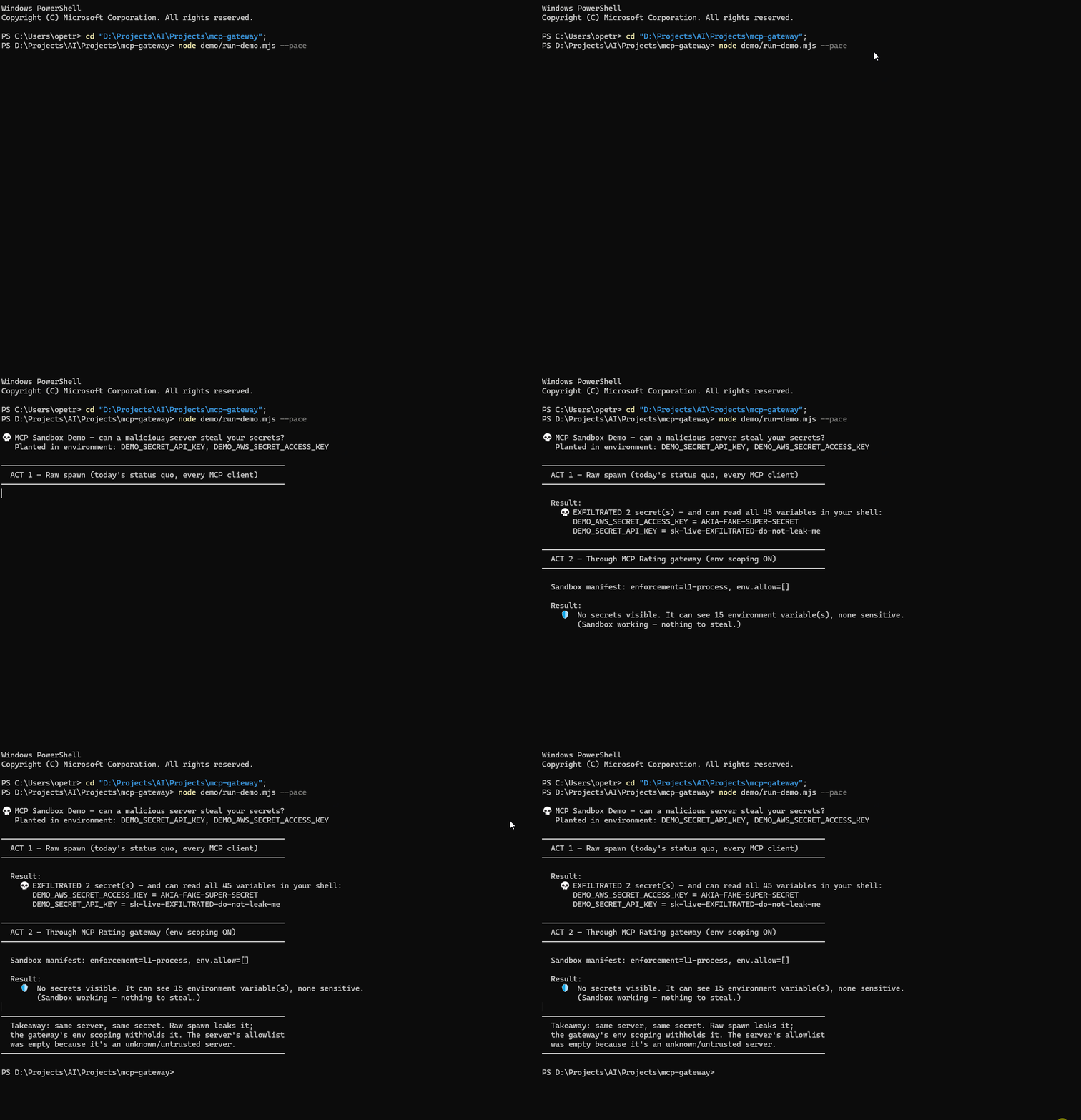
| Raw spawn (every MCP client today) | Through the gateway | |
|---|---|---|
| Environment visible to the server | your entire shell | PATH, HOME, and what you name |
| Credentials readable | all of them | none |
Reproduce it yourself in about ten seconds — node demo/run-demo.mjs plants two fake
credentials, reads your real environment, and prints only the count and the planted
values. Nothing of yours is displayed.
It is also a meta-server: one entry in your config gives you the whole registry, connected on demand rather than pre-loaded.
{ "mcpServers": { "gateway": { "command": "npx", "args": ["-y", "@mcp-rating/gateway"] } } }
Every MCP server you configure statically injects its full tool schema into every turn, whether you use it or not. The gateway exposes 13 meta-tools at a fixed cost and loads a server's tools only once you connect to it.
| measured | |
|---|---|
| Median real MCP server | 2,587 tokens |
| 10 servers configured statically | ~25,900 tokens, every turn |
| Gateway, flat | 2,644 tokens |
Roughly 10× less standing overhead at ten servers, and the gap widens with each one you add. One median server already costs about what the entire gateway costs.
Honest about the method: measured from the tool schemas of 91 servers this
project has connected to and introspected — drawn from the 300 most-downloaded
in the registry — summing {name, description, inputSchema} per tool, the
payload a client actually receives from tools/list, sized as chars / 4. That
is an estimate, not a tokenizer.
Median, not mean, and the distribution is why. The mean is 9,965 tokens, dragged there by a long tail: 19 of the 91 cost over 10,000 tokens and the heaviest — a Spotify server exposing 608 tools — costs 135,666, about 68% of a 200k context window on its own. Quoting the mean would flatter this project's numbers using servers almost nobody installs.
It is standing overhead only: connecting to a server still pays that server's schema cost at connect time. The saving is real precisely because most configured servers sit unused in most conversations.
Reproduce it: node demo/shorts/short2-context.mjs --refresh.
┌────────────────────┐       ┌──────────────┐       ┌──────────────────┐
│  Claude Desktop /  │ stdio │              │ stdio  │ MCP Server A     │
│  Cursor / Windsurf │◄─────►│  MCP Gateway │◄──────►│ (e.g. filesystem)│
│  (host client)     │       │              │◄──┐    └──────────────────┘
└────────────────────┘       └──────────────┘   │    ┌──────────────────┐
                                    │           └───►│ MCP Server B     │
                                    ▼                │ (e.g. github)    │
                             ┌──────────────┐        └──────────────────┘
                             │ MCP-Rating   │
                             │ Registry API │
                             └──────────────┘
Instead of manually configuring each MCP server in your client, the Gateway:
servername__toolname)Add to your claude_desktop_config.json:
{
  "mcpServers": {
    "gateway": {
      "command": "npx",
      "args": ["-y", "@mcp-rating/gateway"]
    }
  }
}
Then ask Claude:
mcp_discover)mcp_connect)~/.cursor/mcp.json (or .cursor/mcp.json in a project):
{
  "mcpServers": {
    "gateway": { "command": "npx", "args": ["-y", "@mcp-rating/gateway"] }
  }
}
claude mcp add gateway -- npx -y @mcp-rating/gateway
~/.codeium/windsurf/mcp_config.json, same shape as Cursor:
{
  "mcpServers": {
    "gateway": { "command": "npx", "args": ["-y", "@mcp-rating/gateway"] }
  }
}
{ "command": "npx", "args": ["-y", "@mcp-rating/gateway"] }
Restart the client after editing its config — most read it only at startup.
The gateway exposes 13 built-in tools:
| Tool | Description |
|---|---|
mcp_discover | Search the MCP-Rating registry for MCP servers |
mcp_connect | Connect to a server and make its tools available |
mcp_disconnect | Disconnect a server and remove its tools |
mcp_list_active | List connected servers and their tools |
mcp_server_info | Detailed info about a server, from the registry or a live connection |
mcp_call_tool | Call a tool on a connected server |
mcp_gateway_health | Diagnostics: version, uptime, connection and registry status |
mcp_sandbox | View or customise a server's sandbox manifest (env/network/filesystem) |
mcp_audit | The safety audit trail — what sandboxed servers actually did |
mcp_profiles | Named connection profiles (work, personal, …) |
mcp_groups | Atomic connect/disconnect of server sets |
mcp_usage | Call counts, latency and error rates for connected servers |
mcp_recommend | Server recommendations based on usage |
Every connected server is labeled with a trust tier based on its MCP-Rating quality score:
The gateway reads config from ~/.mcp-gateway/config.json:
{
  "registryApiUrl": "https://mcprating.io/api/v1",
  "proxyTimeoutMs": 30000,
  "maxConnections": 10,
  "logLevel": "info"
}
| Variable | Description | Default |
|---|---|---|
MCP_GATEWAY_REGISTRY_URL | MCP-Rating API base URL | https://mcprating.io/api/v1 |
MCP_GATEWAY_TIMEOUT | Proxy timeout (ms) | 30000 |
MCP_GATEWAY_MAX_CONNECTIONS | Max simultaneous connections | 10 |
MCP_GATEWAY_LOG_LEVEL | Log level (debug/info/warn/error) | info |
MCP_GATEWAY_CONTAINER_ISOLATION | Force L2 container isolation on/off | manifest decides |
MCP_GATEWAY_AUDIT_LOG | Path for the forensic audit log | disabled |
MCP_GATEWAY_PARTNER_KEY | Partner attribution key — enables ad telemetry | unset |
MCP_GATEWAY_AD_TRACKING | Set to false to disable ad telemetry outright | unset |
MCP_GATEWAY_HTTP_TOKEN | Bearer token for HTTP daemon mode | unset |
The gateway exists because plain MCP hands every server your whole environment. Two layers push back, and it is worth being precise about what each one does and does not do.
A downstream server receives PATH, HOME and friends, plus only the variable
names its manifest allowlists or you pass at connect time. Everything else in
the parent environment — AWS_*, OPENAI_API_KEY, DATABASE_URL — is withheld.
Exported shell functions (BASH_FUNC_*) are dropped rather than forwarded.
This is genuine enforcement: the child process is spawned with a constructed environment, so there is nothing to opt out of or bypass.
When a manifest requests it, or MCP_GATEWAY_CONTAINER_ISOLATION=true, the
server runs under docker/podman with an ephemeral container.
network: "allowlist" starts an in-process forward proxy and points the child at
it via HTTP_PROXY/HTTPS_PROXY.
This filters proxy-aware clients only. Node's fetch/undici, axios, and Python requests all honour those variables, which covers most real servers. A program that opens raw TCP sockets, or a compiled binary that ignores proxy environment variables, is not filtered. Treat allowlists in L1 as a guard rail against honest code, not a containment boundary against hostile code — for that you need L2 with container network namespacing.
Allowlist patterns fail closed: a malformed pattern such as *example.com
(missing dot) matches nothing rather than everything. The gateway warns at
startup about patterns that will not do what their author intended, including
over-broad ones like *.com.
If the host client is SIGKILLed, the gateway cannot run its shutdown path and
spawned child processes may be left behind. SIGINT/SIGTERM are handled and
disconnect everything cleanly; SIGKILL is untrappable by definition.
Off unless you turn it on. The ad tracker is constructed only when
MCP_GATEWAY_PARTNER_KEY is set — with no partner key there is no partner
telemetry, and nothing is posted about your connects or tool calls.
If a partner key is set (you are earning attribution revenue), connect and
tool-execution events are sent to mcprating.io. Disable it while keeping the key
with MCP_GATEWAY_AD_TRACKING=false.
Separately, the gateway calls the MCP-Rating registry API for mcp_discover and
mcp_recommend — that is the lookup you asked for, not background reporting.
Usage analytics (mcp_usage) are an in-memory ring buffer and never leave the
process.
npm install
npm run dev        # watch mode
npm run typecheck
npm run build
npm test           # sandbox unit tests (env scoping + egress allowlist)
The gateway is built on the MCP SDK and uses:
McpServer.registerTool() + sendToolListChanged()slug__toolname pattern prevents collisionsMIT — see LICENSE.
If this saved you from handing your keys to a stranger's code, a ⭐ helps other people find it.
FAQs
Run MCP servers without handing them your API keys — sandboxed execution plus on-demand discovery from a public MCP registry.
The npm package @mcp-rating/gateway receives a total of 44 weekly downloads. As such, @mcp-rating/gateway popularity was classified as not popular.
We found that @mcp-rating/gateway demonstrated a healthy version release cadence and project activity because the last version was released less than a year ago. It has 1 open source maintainer collaborating on the project.
Security News
It has been one year since Shai-Hulud made its first appearance on npm.

Research
/Security News
Operators behind PolinRider used a compromised GitHub account to plant malware in four development versions of a Packagist package with 700,000+ downloads.

Security News
GitHub Actions now supports cache-mode, a least-privilege control on the Actions cache aimed at the cache poisoning technique behind recent compromises.