🐢 Node-Secure CLI 🚀
a Node.js CLI to deeply analyze the dependency tree of a given NPM package or Node.js local app





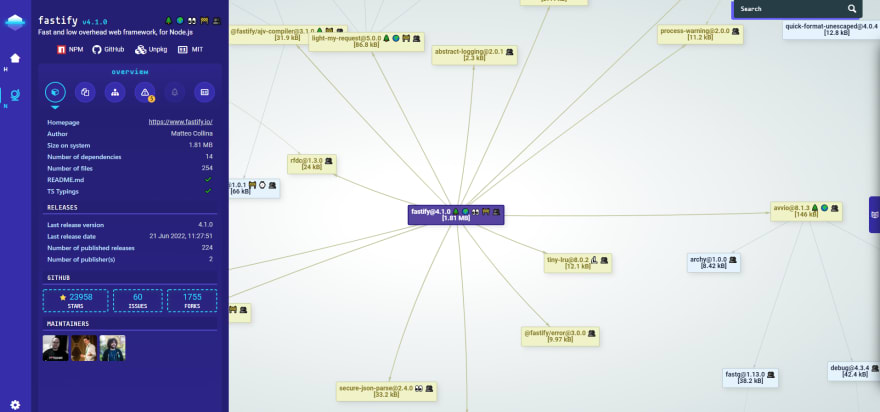
📜 Features
- Run a static scan on every JavaScript files and sort out warnings (unsafe-regex, unsafe-import etc) and the complete list of required expr and statements (files, node.js module, etc.).
- Return complete composition for each packages (extensions, files, tarball size, etc).
- Packages metadata from the npm registry API (number of releases, last publish date, maintainers etc).
- Search for licenses files in the tarball and return the SPDX expression conformance of each detected licenses.
- Link vulnerabilities from the multiple sources like GitHub Advisory, Sonatype or Snyk using Vulnera.
- Add flags (emojis) to each packages versions to identify well known patterns and potential security threats easily.
- First-class support of open source security initiatives like OpenSSF Scorecard.
🚧 Requirements
💃 Getting Started
$ npm install @nodesecure/cli -g
or
$ git clone https://github.com/NodeSecure/cli.git
$ cd cli
$ npm install
$ npm run build
$ npm link
Then the nsecure binary will be available in your terminal. Give a try with the popular express package. This will automatically open the webpage in your default system browser.
$ nsecure auto express
[!TIP]
Setup an npm token to avoid hiting the maximum request limit of the npm registry API.
👀 Usage example
To show the complete list of commands
$ nsecure --help
$ nsecure cwd
$ nsecure from mocha
Then a nsecure-result.json will be writted at the current CLI location. To open it on a web page just run
$ nsecure open
$ nsecure open --port 8080
Available options
| --port | -p | | Define the running port, can also be define through the environment variable PORT |
The auto command can be used to chain cwd/from and open commands automatically.
$ nsecure auto jest
$ nsecure auto
👀 By default with the auto command the .json file is deleted when the http server is closed. It's possible to disable this behavior by using the CLI option --keep, -k.
Some options are available on both cwd, from and auto commands. The output option is not available for the auto command.
| --depth | -d | 4 | the maximum depth we must walk (when we fetch the whole tree). |
| --output | -o | nsecure-result | the name that the outputted .json file will have |
$ nsecure from express -d 10 -o express-security-report
Private registry / Verdaccio
NodeSecure allow you to fetch stats on private npm packages by setting up a NODE_SECURE_TOKEN env variable (which must contains an npm token).
[!TIP]
If you npm link the package by yourself you can create a .env file at the root of the project too.
NodeSecure is capable to work behind a custom private npm registry too by searching the default registry URL in your local npm configuration.
$ npm config get registry
$ npm config set "http://your-registry/"
API
Our back-end scanner package is available here.
Flags legends
Flags and emojis legends are documented here.
Searchbar filters
Since version 0.6.0 of Node-secure the UI include a brand new searchbar that allow to search anything on the tree (graph) by multiple criteria (filters). The current available filters are:
- package (the default filter if there is none).
- version (take a semver range as an argument).
- flag (list of available flags in the current payload/tree).
- license (list of available licenses in the current payload/tree).
- author (author name/email/url).
- ext (list of available file extensions in the current payload/tree).
- builtin (available Node.js core module name).
- size (see here).
Exemple of query:
version: >=1.2 | 2, ext: .js, builtin: fs
FAQ
Why some nodes are red in the UI ?
Nodes are red when the project/package has been flagged with 🔬 hasMinifiedCode or ⚠️ hasWarnings.
Why the node-secure package size is so different from Bundlephobia ?
Node-secure will analyze the complete size of the npm tarball with no filters or particular optimization. Bundlephobia on the
other side will bundle and remove most of the useless files from the tarball (Like the documentation, etc.).
Why some packages don't have OSSF Scorecard ?
See Scorecard Public Data:
We run a weekly Scorecard scan of the 1 million most critical open source projects judged by their direct dependencies and publish the results in a BigQuery public dataset.
Contributors guide
If you are a developer wishing to contribute to the project, you must first read the CONTRIBUTING guide.
If you have already cloned and installed the project with npm locally, you still need to build and bundle front-end assets using the npm build script:
$ npm run build
[!IMPORTANT]
Restart this command when modifying files in the public root folder
Once you have finished your development, check that the tests (and linter) are still good by running the following script:
$ npm test
[!CAUTION]
If you add a feature, try adding tests for it along.
Workspaces
Click on one of the links to access the documentation of the workspace:
These packages are available in the Node Package Repository and can be easily installed with npm or yarn.
$ npm i @nodesecure/documentation-ui
$ yarn add @nodesecure/documentation-ui
Contributors ✨

Thanks goes to these wonderful people (emoji key):
This project follows the all-contributors specification. Contributions of any kind welcome!
License
MIT






