🐼 onPanda: Steer Your LLMs and Agents at the Token Level
A web app for token visualization and control, model inspection, data annotation, and more.
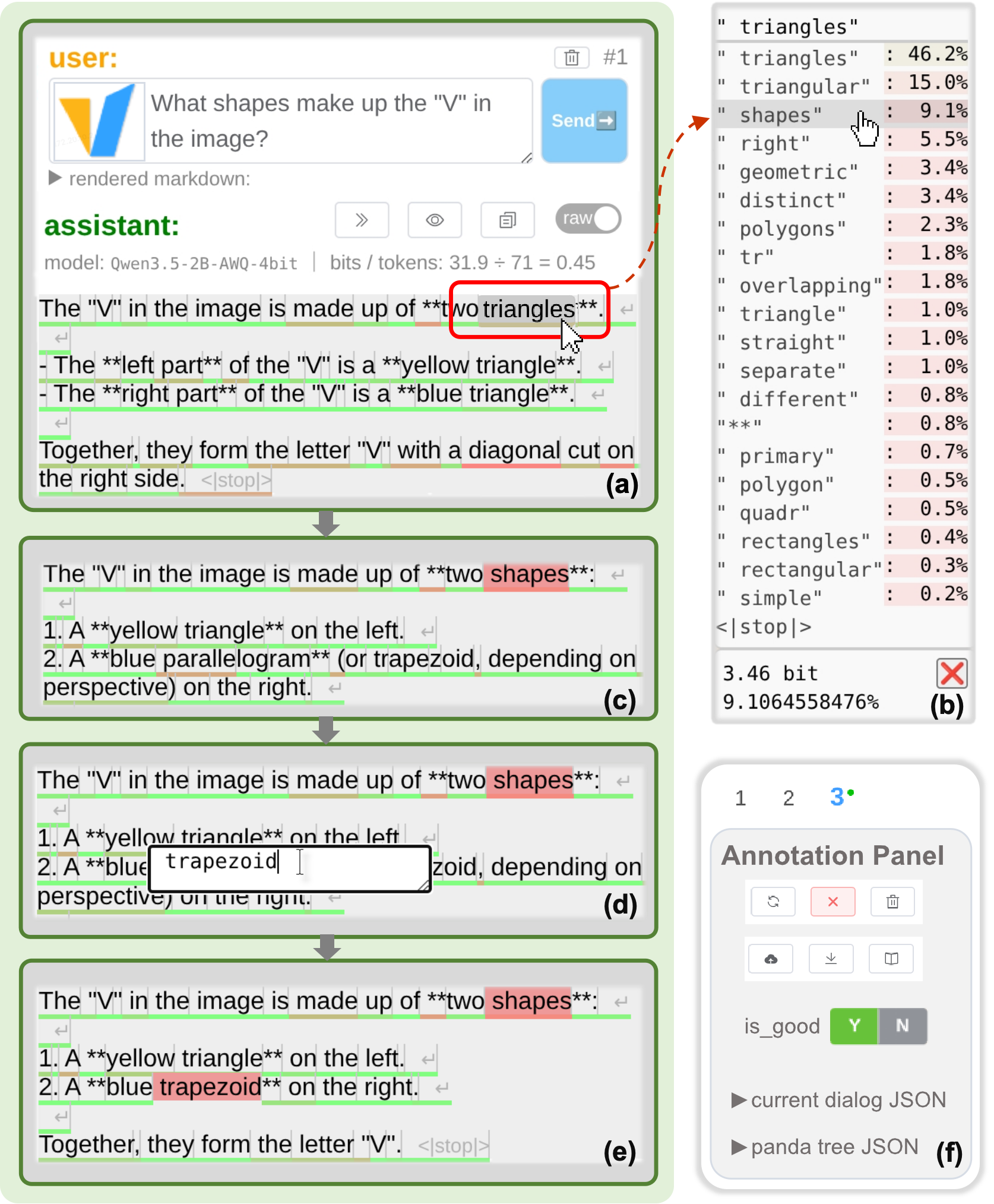
The token-level correction interface of onPanda
Features
onPanda is designed for geeks, power users, curious minds, and engineers. Its UI is built for deep exploration and efficient data annotation.
- The core loop is simple: hover over a token → click an alternative or edit freely → continue generation. You can edit every part of model output exposed by onPanda, including reasoning and tool calls.
- Edit prompts directly, branch tool calls, and use a tree structure to record branch history. This makes onPanda useful for model inspection and prompt engineering.
- Support multiple modalities, including images, video, and audio; use tool calls and connect MCP servers to perform tasks in real environments.
- Connect popular harnesses such as Claude Code, Codex, and OpenCode to execute tasks. Explore and compare their tool sets, system prompts, skills, and memory mechanisms.
- onPanda includes browser-agent, an agent that runs in the user's browser without installation. It uses the browser as its harness and provides JavaScript execution, information retrieval, interface interaction, multimedia I/O, local file access, and persistent memory.
- onPanda stands for on-Policy Alignment Data Annotator. Read the paper on onPanda's data annotation approach:
Try it online (works on mobile): https://onpanda.diyer22.com/
Self-hosting
Requires Node.js and npm.
npx -y @on-panda/serve --port 8080 --web_config web_config.json5
The optional --web_config flag provides preset LLM API configurations to the onPanda UI.
Example web_config.json5:
{
apiConfigs: [
{
endpoint_name: 'my-api',
tag_name: 'my-model',
client_config: {
base_url: 'https://vllm-test-api.diyer22.com/v1',
api_key: 'YOUR_API_KEY',
},
chat_config: {
model: 'your-model-name',
top_logprobs: 20,
},
},
]
}
You can also add an API configuration through Custom API Config in the onPanda UI. Custom configurations are stored in browser local storage.
Resources
License
MIT



