@power-seo/analytics
Merge Google Search Console data with audit results, compute Pearson correlations, analyze trends, detect anomalies, and build dashboard-ready aggregated outputs.





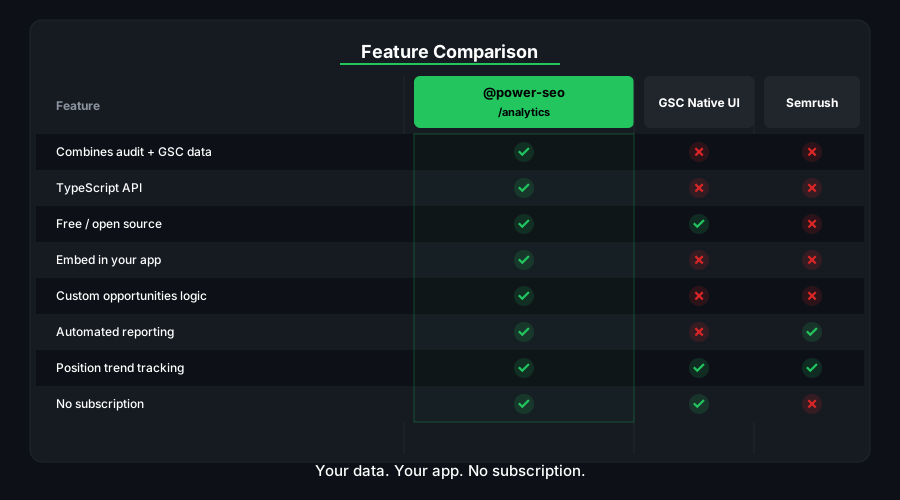
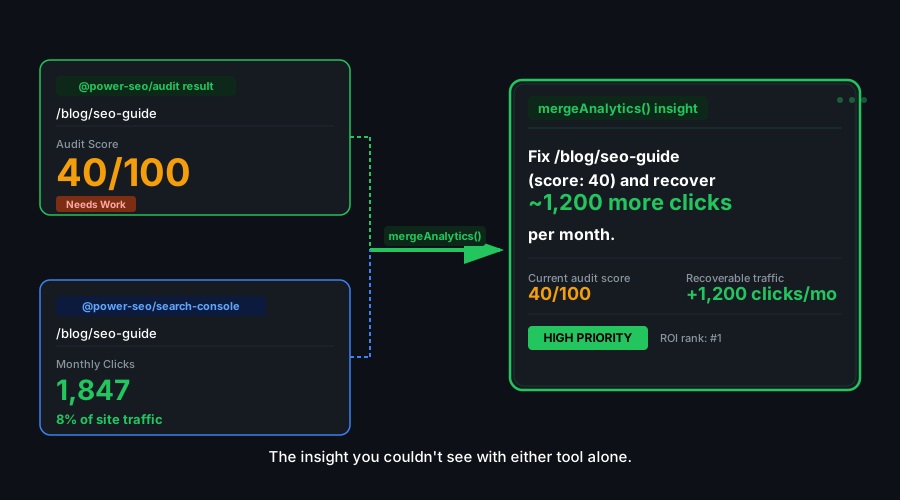
@power-seo/analytics is the data intelligence layer of the @power-seo ecosystem. It answers the question that every SEO practitioner asks but most tools cannot answer well: does improving the SEO audit score of a page actually increase its organic traffic? By merging Google Search Console performance data with audit results — keyed on normalized URLs — and computing the Pearson correlation between audit scores and click counts, you can verify the relationship empirically across your own site.
Beyond correlation, the package provides a full trend analysis pipeline: time-series data flows through analyzeTrend (direction, rate of change, confidence) → buildTrendLines (chart-ready data points) → detectAnomalies (statistically significant spikes and drops). The ranking module groups your queries into position buckets (1–3, 4–10, 11–20, 21–50, 50+) matching how SEO professionals think about ranking tiers, and trackPositionChanges produces a before/after diff across two snapshots. Everything culminates in buildDashboardData, which aggregates all of the above into a single structured object ready to be consumed by any charting library or reporting UI.
Zero runtime dependencies — pure TypeScript computation; no external API calls.
Why @power-seo/analytics?
| GSC + audit correlation | ❌ Two separate tools | ✅ Merged by URL with Pearson correlation |
| Trend analysis | ❌ Manual spreadsheet | ✅ Direction, rate, confidence in one call |
| Anomaly detection | ❌ Manual review | ✅ Statistical spike/drop flagging |
| Ranking tiers | ❌ Raw position data | ✅ Bucket groups (1–3, 4–10, 11–20...) |
| Position tracking | ❌ Manual comparison | ✅ Before/after diff with trackPositionChanges |
| Dashboard output | ❌ Build from scratch | ✅ Structured DashboardData ready for any chart library |
| TypeScript support | ❌ Untyped data | ✅ Full type coverage for all data structures |

Features
- GSC + audit data merge —
mergeGscWithAudit joins Google Search Console page performance data (clicks, impressions, CTR, position) with @power-seo/audit results by normalized URL, producing PageInsight objects with both dimensions
- Pearson correlation —
correlateScoreAndTraffic computes the Pearson correlation coefficient between audit scores and click counts across all merged page insights, returning the coefficient and a significance indicator
- Trend direction analysis —
analyzeTrend detects whether a time series is trending up, down, or stable, with a rate-of-change value and a confidence score based on the linearity of the data
- Chart-ready trend lines —
buildTrendLines converts raw data points into smoothed time-series arrays suitable for direct consumption by Recharts, Chart.js, or any other charting library
- Anomaly detection —
detectAnomalies flags statistically significant spikes and drops in a time series using a configurable standard deviation threshold, returning annotated anomaly objects with timestamps and delta values
- Position bucket analysis —
analyzeQueryRankings groups queries into four standard SERP ranking tiers: 1–3 (top spots), 4–10 (first page), 11–20 (second page), 21–100 (deep pages)
- Position change tracking —
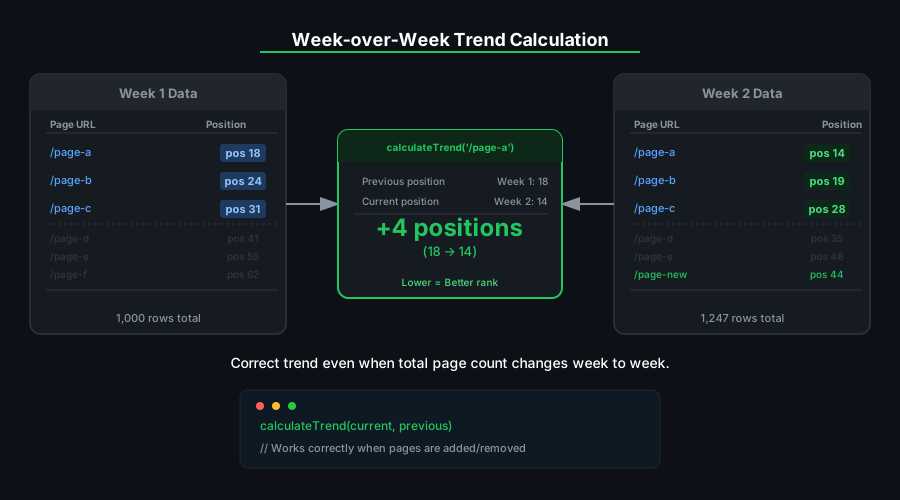
trackPositionChanges compares two ranking snapshots and produces a list of PositionChange objects showing which queries improved, declined, or are new/dropped
- Dashboard aggregation —
buildDashboardData accepts raw GSC pages, GSC queries, and audit results and returns a structured DashboardData object containing: overview metrics, top pages by traffic, top queries by clicks, trend lines, and a prioritized issue list
- Normalized URL matching — URL normalization handles trailing slashes, protocol differences, and query string variations so that GSC URLs and audit URLs match correctly even when they are not identical strings
- Zero runtime dependencies — pure TypeScript computation
- Type-safe throughout — complete TypeScript types for all data structures
Comparison
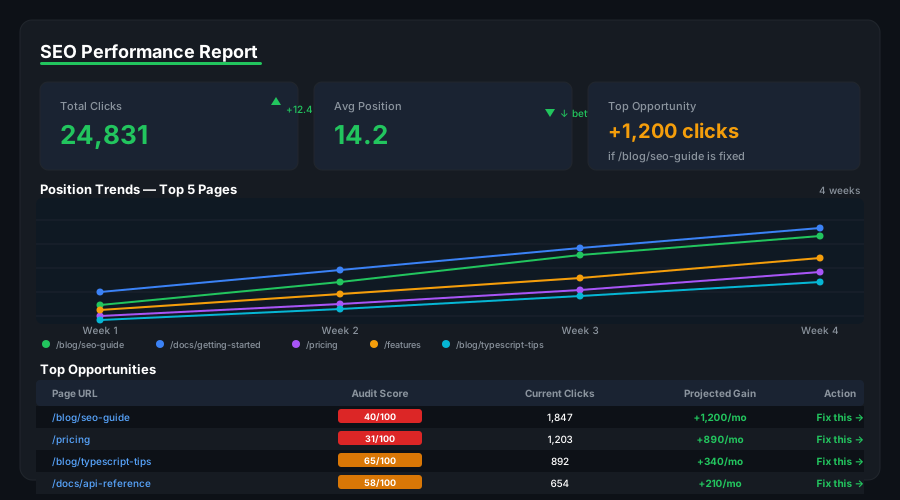
| GSC + audit data merge | ✅ | ❌ | ❌ | Manual |
| Pearson correlation | ✅ | ❌ | ❌ | Manual |
| Trend direction analysis | ✅ | Partial | Partial | Manual |
| Anomaly detection | ✅ | ❌ | Partial | Manual |
| Position change tracking | ✅ | ❌ | ❌ | Manual |
| Ranking bucket grouping | ✅ | ❌ | ❌ | Manual |
| Dashboard-ready output | ✅ | ✅ | Partial | Manual |
| Zero external dependencies | ✅ | ❌ | ❌ | — |
| TypeScript-first | ✅ | ❌ | ❌ | — |
Installation
npm install @power-seo/analytics
yarn add @power-seo/analytics
pnpm add @power-seo/analytics
Quick Start
import { mergeGscWithAudit, buildDashboardData } from '@power-seo/analytics';
const dashboard = buildDashboardData({
gscPages: [
{ url: '/blog/react-seo', clicks: 1240, impressions: 18500, ctr: 0.067, position: 4.2 },
{ url: '/blog/meta-tags', clicks: 380, impressions: 9200, ctr: 0.041, position: 8.7 },
{ url: '/blog/seo-audit', clicks: 55, impressions: 3100, ctr: 0.018, position: 19.1 },
],
gscQueries: [
{ query: 'react seo guide', clicks: 820, impressions: 9400, ctr: 0.087, position: 3.1 },
{ query: 'meta tags react', clicks: 290, impressions: 5800, ctr: 0.05, position: 7.4 },
],
auditResults: [
{ url: '/blog/react-seo', score: 88, issues: [] },
{ url: '/blog/meta-tags', score: 71, issues: [] },
{ url: '/blog/seo-audit', score: 44, issues: [] },
],
});
console.log(dashboard.overview.totalClicks);
console.log(dashboard.overview.averagePosition);
console.log(dashboard.overview.averageAuditScore);
console.log(dashboard.topPages[0].url);
Usage
Merge GSC and Audit Data
mergeGscWithAudit normalizes and joins GSC page data with audit results. Pages that exist in one set but not the other are included with null values for the missing dimension.
import { mergeGscWithAudit } from '@power-seo/analytics';
import type { GscPageData, AuditSnapshot, PageInsight } from '@power-seo/analytics';

const gscPages: GscPageData[] = [
  {
    url: 'https://example.com/blog/post-1',
    clicks: 850,
    impressions: 12000,
    ctr: 0.071,
    position: 5.3,
  },
  {
    url: 'https://example.com/blog/post-2',
    clicks: 220,
    impressions: 6500,
    ctr: 0.034,
    position: 12.1,
  },
];

const auditResults = [
  { url: '/blog/post-1', score: 91, categories: { performance: 88, seo: 91 }, recommendations: [] },
  {
    url: '/blog/post-2',
    score: 63,
    categories: { performance: 55, seo: 63 },
    recommendations: ['Improve meta description', 'Add more internal links'],
  },
];

const insights: PageInsight[] = mergeGscWithAudit(gscPages, auditResults);

insights.forEach(({ url, clicks, position, auditScore }) => {
  console.log(`${url}: ${clicks} clicks @ pos ${position}, score=${auditScore ?? 'N/A'}`);
});
Correlation Analysis
correlateScoreAndTraffic answers the core question: does better audit score correlate with more traffic?
import { mergeGscWithAudit, correlateScoreAndTraffic } from '@power-seo/analytics';
const insights = mergeGscWithAudit(gscPages, auditResults);
const result = correlateScoreAndTraffic(insights);
console.log(`Pearson r: ${result.correlation.toFixed(3)}`);
if (result.correlation > 0.5) {
console.log('Strong positive relationship: improving audit scores tends to increase traffic');
}
console.log(
'Quick wins:',
result.topOpportunities.map((p) => p.url),
);
Trend Analysis
import { analyzeTrend, buildTrendLines } from '@power-seo/analytics';
import type { TrendPoint, TrendAnalysis } from '@power-seo/analytics';
const weeklyClicks: TrendPoint[] = [
{ date: '2026-01-05', value: 1200 },
{ date: '2026-01-12', value: 1350 },
{ date: '2026-01-19', value: 1280 },
{ date: '2026-01-26', value: 1480 },
{ date: '2026-02-02', value: 1620 },
{ date: '2026-02-09', value: 1590 },
];
const trend: TrendAnalysis = analyzeTrend(weeklyClicks);
console.log(trend.trend);
console.log(trend.change);
console.log(trend.metric);
const auditSnapshots: AuditSnapshot[] = [
{ date: '2026-01-01', url: '/page', score: 75, categories: { performance: 85, seo: 72 } },
];
const trendLines = buildTrendLines(auditSnapshots);
Anomaly Detection
import { detectAnomalies } from '@power-seo/analytics';
const dailyImpressions: TrendPoint[] = [
{ date: '2026-02-01', value: 8500 },
{ date: '2026-02-02', value: 8900 },
{ date: '2026-02-03', value: 8700 },
{ date: '2026-02-04', value: 8600 },
{ date: '2026-02-05', value: 24800 },
{ date: '2026-02-06', value: 9100 },
{ date: '2026-02-07', value: 2100 },
{ date: '2026-02-08', value: 8800 },
];
const anomalies = detectAnomalies(dailyImpressions, 2.0);
anomalies.forEach(({ date, value }) => {
const mean = dailyImpressions.reduce((s, p) => s + p.value, 0) / dailyImpressions.length;
const delta = value - mean;
const type = delta > 0 ? 'spike' : 'drop';
console.log(`${date}: ${type} anomaly — value=${value}, delta=${delta.toFixed(0)} from baseline`);
});
Ranking Analysis
import { analyzeQueryRankings } from '@power-seo/analytics';
import type { GscQueryData, RankingAnalysis } from '@power-seo/analytics';
const queries: GscQueryData[] = [
{ query: 'react seo', clicks: 820, impressions: 9400, ctr: 0.087, position: 2.1 },
{ query: 'seo audit tool', clicks: 340, impressions: 6200, ctr: 0.055, position: 6.8 },
{ query: 'meta tags guide', clicks: 180, impressions: 4800, ctr: 0.038, position: 14.3 },
{ query: 'sitemap generator', clicks: 30, impressions: 2100, ctr: 0.014, position: 28.7 },
{ query: 'seo typescript', clicks: 5, impressions: 1200, ctr: 0.004, position: 67.2 },
];
const analysis: RankingAnalysis = analyzeQueryRankings(queries);
analysis.buckets.forEach((bucket) => {
console.log(`Position ${bucket.range}: ${bucket.count} queries`);
});
const quickWins = analysis.strikingDistance.filter((q) => q.impressions > 2000);
console.log(
'Quick-win queries:',
quickWins.map((q) => q.query),
);
Position Change Tracking
import { trackPositionChanges } from '@power-seo/analytics';
import type { PositionChange } from '@power-seo/analytics';
const previousSnapshot: GscQueryData[] = [
{ query: 'react seo guide', clicks: 320, impressions: 8200, ctr: 0.039, position: 8.4 },
{ query: 'seo audit', clicks: 45, impressions: 1900, ctr: 0.024, position: 22.0 },
];
const currentSnapshot: GscQueryData[] = [
{ query: 'react seo guide', clicks: 580, impressions: 9800, ctr: 0.059, position: 5.1 },
{ query: 'seo audit', clicks: 88, impressions: 2200, ctr: 0.04, position: 14.3 },
{ query: 'seo typescript', clicks: 12, impressions: 800, ctr: 0.015, position: 31.0 },
];
const changes: PositionChange[] = trackPositionChanges(currentSnapshot, previousSnapshot);
changes.forEach(({ query, previousPosition, currentPosition, change }) => {
const direction = change > 0 ? '↑' : change < 0 ? '↓' : '→';
console.log(`${direction} "${query}": ${previousPosition} → ${currentPosition}`);
});
Dashboard Data
import { buildDashboardData } from '@power-seo/analytics';
import type { DashboardInput, DashboardData } from '@power-seo/analytics';
const dashboard: DashboardData = buildDashboardData({
gscPages: allGscPages,
gscQueries: allGscQueries,
auditResults: allAuditResults,
auditHistory: allAuditSnapshots,
});
console.log(dashboard.overview.totalClicks);
console.log(dashboard.overview.totalImpressions);
console.log(dashboard.overview.averageCtr);
console.log(dashboard.overview.averagePosition);
console.log(dashboard.overview.averageAuditScore);
dashboard.topPages.forEach(({ url, clicks, auditScore }) =>
console.log(`${url}: ${clicks} clicks, score=${auditScore ?? 'N/A'}`),
);
dashboard.topQueries.forEach(({ query, clicks, position }) =>
console.log(`"${query}": ${clicks} clicks @ position ${position.toFixed(1)}`),
);
dashboard.trendLines;
dashboard.issues.forEach((issue) => console.log(`Issue: ${issue}`));
API Reference
mergeGscWithAudit(gscData, auditResults)
gscData | GscPageData[] | required | Google Search Console page performance data |
auditResults | AuditData[] | required | Audit results with URL, score, categories, recommendations |
Returns PageInsight[] — merged records keyed by normalized URL with opportunities identified.
correlateScoreAndTraffic(insights)
insights | PageInsight[] | required | Merged page insights with both audit score and click data |
Returns { correlation: number; topOpportunities: PageInsight[] } — Pearson correlation coefficient and highest-opportunity pages (high traffic, low score).
analyzeTrend(points, metric?)
points | TrendPoint[] | required | Time-ordered { date: string; value: number } array |
metric | string | 'value' | Name of the metric being analyzed |
Returns TrendAnalysis: { metric: string; trend: TrendDirection; change: number; points: TrendPoint[] }. Trend is determined by linear regression slope; change is percentage difference from first to last value.
buildTrendLines(snapshots)
snapshots | AuditSnapshot[] | required | Audit snapshots with date, score, and category data |
Returns Record<string, TrendAnalysis> — includes 'overall' trend plus per-category trends (e.g., 'performance', 'seo').
detectAnomalies(points, threshold?)
points | TrendPoint[] | required | Time-ordered data points |
threshold | number | 2.0 | Standard deviation multiplier for anomaly detection |
Returns TrendPoint[] — data points that exceed the threshold (standard deviation multiple of the mean). Caller can determine if spike or drop based on mean.
analyzeQueryRankings(queries)
queries | GscQueryData[] | required | GSC query data with position values |
Returns RankingAnalysis: { totalQueries: number; buckets: RankingBucket[]; strikingDistance: GscQueryData[] }. Buckets are: 1–3, 4–10, 11–20, 21–100 (positions). Striking distance identifies 4–20 ranked queries with highest impressions for quick-win targeting.
trackPositionChanges(current, previous)
current | GscQueryData[] | required | Ranking snapshot from the later period |
previous | GscQueryData[] | required | Ranking snapshot from the earlier period |
Returns PositionChange[]: { query: string; previousPosition: number; currentPosition: number; change: number; impressionChange: number }. Positive change indicates improvement (lower position number).
buildDashboardData(input)
input.gscPages | GscPageData[] | [] | GSC page performance data |
input.gscQueries | GscQueryData[] | [] | GSC query performance data |
input.auditResults | AuditData[] | [] | Audit results for correlation and issue aggregation |
input.auditHistory | AuditSnapshot[] | [] | Audit history for trend analysis |
Returns DashboardData: aggregated overview, top pages/queries, trend lines per category, and recommended issues.
Types
import type {
GscPageData,
GscQueryData,
AuditSnapshot,
TrendPoint,
TrendDirection,
TrendAnalysis,
PageInsight,
RankingBucket,
RankingAnalysis,
PositionChange,
DashboardInput,
DashboardOverview,
DashboardData,
} from '@power-seo/analytics';
Use Cases
- SEO dashboards — feed
buildDashboardData output directly into Recharts, Chart.js, or any admin UI
- Monthly reporting — automate correlation analysis to demonstrate SEO ROI to stakeholders
- Quick-win identification — use position bucket analysis to prioritize pages ranked 11–20 for content updates
- Algorithm update monitoring — use anomaly detection to flag traffic drops aligned with Google algorithm updates
- Site migration tracking — compare position snapshots before and after migration with
trackPositionChanges
Architecture Overview
- Pure TypeScript — no compiled binary, no native modules
- Zero external runtime dependencies — pure computational logic; no external API calls
- Framework-agnostic — works in any JavaScript environment: Next.js, Remix, Node.js, Edge
- SSR compatible — no browser-specific APIs; safe for server-side or CLI usage
- Edge runtime safe — no Node.js-specific APIs; runs in Cloudflare Workers, Vercel Edge
- Tree-shakeable —
"sideEffects": false with named exports per function
- Dual ESM + CJS — ships both formats via tsup for any bundler or
require() usage
Supply Chain Security
- No install scripts (
postinstall, preinstall)
- No runtime network access
- No
eval or dynamic code execution
- CI-signed builds — all releases published via verified
github.com/CyberCraftBD/power-seo workflow
- Safe for SSR, Edge, and server environments
All 17 packages are independently installable — use only what you need.
@power-seo/core | npm i @power-seo/core | Framework-agnostic utilities, types, validators, and constants |
@power-seo/react | npm i @power-seo/react | React SEO components — meta, Open Graph, Twitter Card, breadcrumbs |
@power-seo/meta | npm i @power-seo/meta | SSR meta helpers for Next.js App Router, Remix v2, and generic SSR |
@power-seo/schema | npm i @power-seo/schema | Type-safe JSON-LD structured data — 23 builders + 22 React components |
@power-seo/content-analysis | npm i @power-seo/content-analysis | Yoast-style SEO content scoring engine with React components |
@power-seo/readability | npm i @power-seo/readability | Readability scoring — Flesch-Kincaid, Gunning Fog, Coleman-Liau, ARI |
@power-seo/preview | npm i @power-seo/preview | SERP, Open Graph, and Twitter/X Card preview generators |
@power-seo/sitemap | npm i @power-seo/sitemap | XML sitemap generation, streaming, index splitting, and validation |
@power-seo/redirects | npm i @power-seo/redirects | Redirect engine with Next.js, Remix, and Express adapters |
@power-seo/links | npm i @power-seo/links | Link graph analysis — orphan detection, suggestions, equity scoring |
@power-seo/audit | npm i @power-seo/audit | Full SEO audit engine — meta, content, structure, performance rules |
@power-seo/images | npm i @power-seo/images | Image SEO — alt text, lazy loading, format analysis, image sitemaps |
@power-seo/ai | npm i @power-seo/ai | LLM-agnostic AI prompt templates and parsers for SEO tasks |
@power-seo/analytics | npm i @power-seo/analytics | Merge GSC + audit data, trend analysis, ranking insights, dashboard |
@power-seo/search-console | npm i @power-seo/search-console | Google Search Console API — OAuth2, service account, URL inspection |
@power-seo/integrations | npm i @power-seo/integrations | Semrush and Ahrefs API clients with rate limiting and pagination |
@power-seo/tracking | npm i @power-seo/tracking | GA4, Clarity, PostHog, Plausible, Fathom — scripts + consent management |
CyberCraft Bangladesh is a Bangladesh-based enterprise-grade software development and Full Stack SEO service provider company specializing in ERP system development, AI-powered SaaS and business applications, full-stack SEO services, custom website development, and scalable eCommerce platforms. We design and develop intelligent, automation-driven SaaS and enterprise solutions that help startups, SMEs, NGOs, educational institutes, and large organizations streamline operations, enhance digital visibility, and accelerate growth through modern cloud-native technologies.




© 2026 CyberCraft Bangladesh · Released under the MIT License





