@power-seo/react

Declarative React components for SEO meta tag management — title templates, Open Graph, Twitter Cards, canonical URLs, robots directives, hreflang, and breadcrumbs with JSON-LD, all from a single composable API that renders directly to the DOM.





Zero third-party dependencies — only react and @power-seo/core as peers.
Why @power-seo/react?
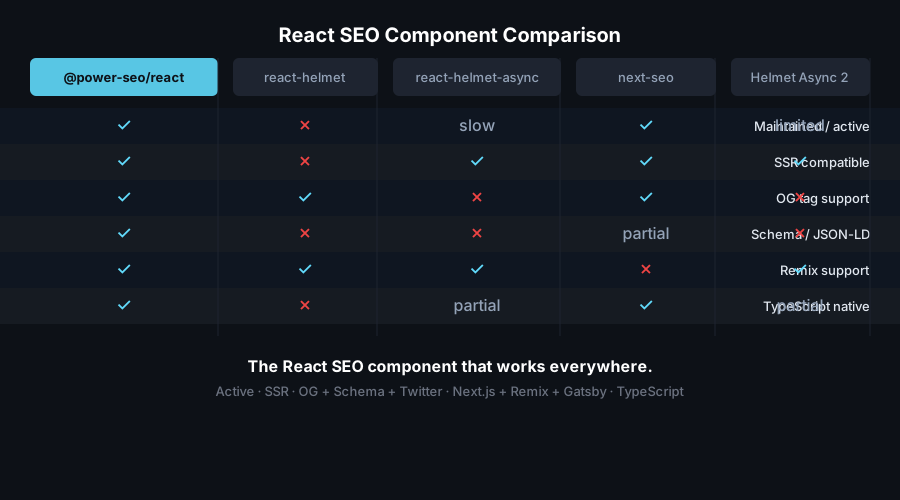
| Title management | ❌ Ad-hoc <title> tags per page | ✅ <DefaultSEO> enforces site-wide title template |
| Open Graph | ❌ Missing or inconsistent og:* tags | ✅ Typed <OpenGraph> and <SEO openGraph={...}> |
| Twitter Cards | ❌ Hand-coded twitter:* strings | ✅ Typed <TwitterCard> with all card types |
| Robots directives | ❌ Raw content strings with typos | ✅ Boolean and enum props — no raw string errors |
| Canonical URLs | ❌ Omitted or duplicated | ✅ <Canonical> and <SEO canonical={...}> |
| Hreflang | ❌ Manual <link> tags per locale | ✅ <Hreflang> renders all alternates + x-default |
| Breadcrumbs | ❌ HTML nav only, no structured data | ✅ <Breadcrumb> renders nav + BreadcrumbList JSON-LD |
| Framework support | ❌ Locked to next-seo or react-helmet | ✅ Next.js Pages Router, Vite, Gatsby, React 18/19 |

Features
<SEO> all-in-one component — renders title, meta description, canonical, robots, Open Graph, and Twitter Card from a single component<DefaultSEO> context-based defaults — set site-wide title template, default OG image, and global robots directives at the app root; pages override selectively<Robots> full directive support — all 10 directives including noindex, nofollow, noarchive, nosnippet, noimageindex, notranslate, max-snippet, max-image-preview, max-video-preview, unavailable_after<OpenGraph> all OG properties — og:title, og:description, og:type, og:url, og:image (with width/height/alt), og:site_name, og:locale, og:article:* properties<TwitterCard> all card types — summary, summary_large_image, app, player; with site, creator, title, description, image<Canonical> link tag — renders <link rel="canonical"> with proper href; supports base URL resolution and trailing slash control<Hreflang> i18n alternate links — renders <link rel="alternate" hreflang="..."> tags for multi-language sites including x-default<Breadcrumb> with JSON-LD — renders visible breadcrumb navigation plus embedded application/ld+json BreadcrumbList structured datarenderMetaTags / renderLinkTags utilities — convert @power-seo/core tag arrays into React elements- React 19 native hoisting —
<title>, <meta>, and <link> tags hoist to <head> automatically in React 19; works with framework Head components in React 18
- TypeScript-first — full
.d.ts declarations, all props fully typed
- Tree-shakeable — import only the components you use
Comparison
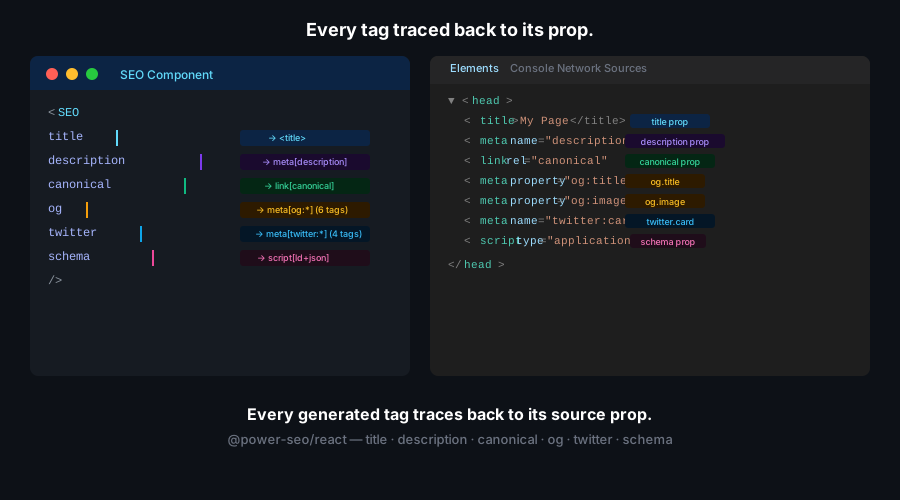
| Typed robots directives | ✅ | ✅ | ❌ | ❌ |
| DefaultSEO context pattern | ✅ | ✅ | ❌ | ❌ |
| Hreflang support | ✅ | ✅ | ❌ | ❌ |
| Breadcrumb with JSON-LD | ✅ | ✅ | ❌ | ❌ |
max-snippet / max-image-preview | ✅ | ✅ | ❌ | ❌ |
| No third-party runtime deps | ✅ | ❌ | ❌ | ❌ |
| React 19 native head hoisting | ✅ | ❌ | ❌ | ❌ |
| TypeScript-first API | ✅ | ✅ | ⚠️ | ⚠️ |
| Tree-shakeable | ✅ | Partial | ❌ | ❌ |
| Works in Next.js Pages Router | ✅ | ✅ | ✅ | ✅ |
| Works in Vite / Gatsby / CRA | ✅ | ❌ | ✅ | ✅ |
Installation
npm install @power-seo/react @power-seo/core
yarn add @power-seo/react @power-seo/core
pnpm add @power-seo/react @power-seo/core
Quick Start
import { DefaultSEO, SEO } from '@power-seo/react';

function App() {
  return (
    <DefaultSEO
      titleTemplate="%s | My Site"
      defaultTitle="My Site"
      description="The best site on the internet."
      openGraph={{ type: 'website', siteName: 'My Site' }}
      twitter={{ site: '@mysite', cardType: 'summary_large_image' }}
    >
      <Router>
        <Routes />
      </Router>
    </DefaultSEO>
  );
}

function BlogPage({ post }) {
  return (
    <>
      <SEO
        title={post.title}
        description={post.excerpt}
        canonical={`https://example.com/blog/${post.slug}`}
        openGraph={{
          type: 'article',
          images: [{ url: post.coverImage, width: 1200, height: 630, alt: post.title }],
        }}
      />
      <article>{/* content */}</article>
    </>
  );
}
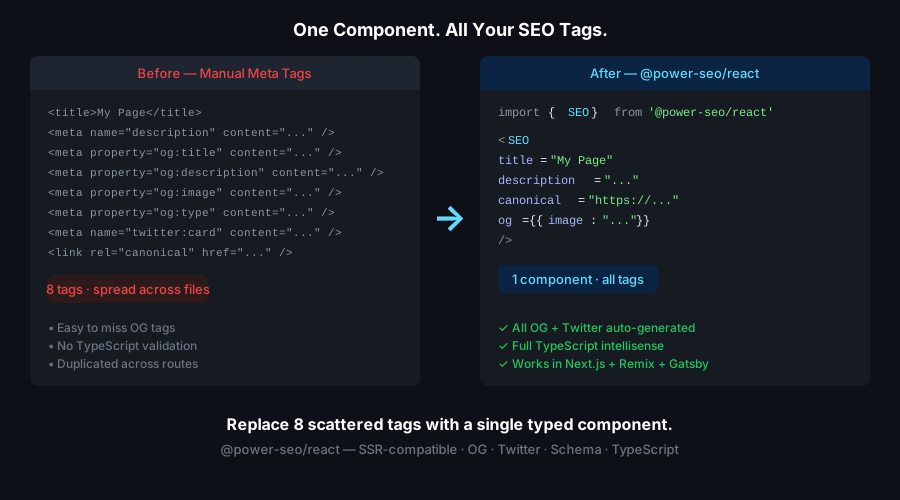
What you get in the DOM <head>:
<title>My Post Title | My Site</title>- Correct
og:image, twitter:card, and link rel="canonical" tags on every page
Usage
Site-Wide Defaults with <DefaultSEO>
Place <DefaultSEO> once at your app root. It stores the config in React context so every nested <SEO> component can merge against it.
import { DefaultSEO } from '@power-seo/react';

function App({ children }) {
  return (
    <DefaultSEO
      titleTemplate="%s | Acme Corp"
      defaultTitle="Acme Corp"
      description="Enterprise software built for scale."
      openGraph={{
        type: 'website',
        siteName: 'Acme Corp',
        images: [{ url: 'https://acme.com/og-default.jpg', width: 1200, height: 630 }],
      }}
      twitter={{ site: '@acmecorp', cardType: 'summary_large_image' }}
    >
      {children}
    </DefaultSEO>
  );
}
Per-Page SEO with <SEO>
<SEO> merges the page-level config with the <DefaultSEO> context. Only provide the props that differ from the site defaults.
import { SEO } from '@power-seo/react';

function ProductPage({ product }) {
  return (
    <>
      <SEO
        title={product.name}
        description={product.summary}
        canonical={`https://acme.com/products/${product.slug}`}
        openGraph={{
          type: 'website',
          images: [{ url: product.image, width: 1200, height: 630, alt: product.name }],
        }}
      />
      <main>{/* page content */}</main>
    </>
  );
}
Robots Directives
Use the <Robots> component directly, or pass a robots object to <SEO>. All 10 standard directives are supported via typed props.
import { Robots } from '@power-seo/react';
<Robots index={false} follow={true} />
<Robots
index={true}
follow={true}
maxSnippet={150}
maxImagePreview="large"
unavailableAfter="2026-12-31T00:00:00Z"
/>
Use buildRobotsContent from @power-seo/core if you need the raw robots string outside a component:
import { buildRobotsContent } from '@power-seo/core';
buildRobotsContent({ index: false, follow: true, maxSnippet: 150 });
Open Graph Tags
Use <OpenGraph> for standalone OG tag rendering, or pass openGraph to <SEO>.
import { OpenGraph } from '@power-seo/react';

<OpenGraph
  type="article"
  title="How to Build a React SEO Pipeline"
  description="A step-by-step guide to SEO in React applications."
  url="https://example.com/blog/react-seo"
  images={[
    { url: 'https://example.com/react-seo-og.jpg', width: 1200, height: 630, alt: 'React SEO' },
  ]}
  article={{
    publishedTime: '2026-01-15T00:00:00Z',
    authors: ['https://example.com/author/jane'],
    tags: ['react', 'seo', 'typescript'],
  }}
/>;
Use <TwitterCard> for standalone Twitter/X card tag rendering, or pass twitter to <SEO>.
import { TwitterCard } from '@power-seo/react';

<TwitterCard
  cardType="summary_large_image"
  site="@mysite"
  creator="@author"
  title="How to Build a React SEO Pipeline"
  description="A step-by-step guide to SEO in React applications."
  image="https://example.com/twitter-card.jpg"
  imageAlt="React SEO guide"
/>;
Canonical URL
import { Canonical } from '@power-seo/react';
<Canonical url="https://example.com/blog/react-seo" />
<Canonical url="/blog/react-seo" baseUrl="https://example.com" />
Hreflang for Multi-Language Sites
import { Hreflang } from '@power-seo/react';

<Hreflang
  alternates={[
    { hrefLang: 'en', href: 'https://example.com/en/page' },
    { hrefLang: 'fr', href: 'https://example.com/fr/page' },
    { hrefLang: 'de', href: 'https://example.com/de/page' },
  ]}
  xDefault="https://example.com/en/page"
/>;
Breadcrumb Navigation with JSON-LD
<Breadcrumb> renders both the visible <nav> element and an embedded application/ld+json BreadcrumbList script for Google rich results.
import { Breadcrumb } from '@power-seo/react';

<Breadcrumb
  items={[{ name: 'Home', url: '/' }, { name: 'Blog', url: '/blog' }, { name: 'React SEO Guide' }]}
/>;
Customize the separator and styling:
<Breadcrumb
  items={breadcrumbItems}
  separator=" › "
  className="breadcrumb-nav"
  linkClassName="breadcrumb-link"
  activeClassName="breadcrumb-active"
  includeJsonLd={true}
/>
Noindexing Entire Environments
<DefaultSEO
robots={{ index: false, follow: false }}
titleTemplate="%s | Staging"
defaultTitle="Staging"
>
{children}
</DefaultSEO>
Using renderMetaTags and renderLinkTags
If you generate tag arrays via @power-seo/core utilities directly, use these helpers to convert them to React elements:
import { buildMetaTags, buildLinkTags } from '@power-seo/core';
import { renderMetaTags, renderLinkTags } from '@power-seo/react';

const metaTags = buildMetaTags({ description: 'My page', noindex: true });
const linkTags = buildLinkTags({ canonical: 'https://example.com/page' });

return (
  <>
    {renderMetaTags(metaTags)}
    {renderLinkTags(linkTags)}
  </>
);
API Reference
Components
<DefaultSEO> | App-root defaults — title template, global OG, global Twitter, global robots; wraps children with SEO context |
<SEO> | All-in-one per-page SEO component — title, description, canonical, robots, OG, Twitter |
<Robots> | Renders <meta name="robots"> with all supported directives |
<OpenGraph> | Renders Open Graph og:* meta tags |
<TwitterCard> | Renders Twitter Card twitter:* meta tags |
<Canonical> | Renders <link rel="canonical"> |
<Hreflang> | Renders <link rel="alternate" hreflang="..."> tags |
<Breadcrumb> | Renders breadcrumb nav + embedded BreadcrumbList JSON-LD |
SEO Props
title | string | — | Page title (applied to title template if DefaultSEO is present) |
defaultTitle | string | — | Fallback title when no title prop is provided |
titleTemplate | string | — | Template string; %s is replaced by title (e.g. "%s | Site") |
description | string | — | Meta description |
canonical | string | — | Canonical URL |
robots | RobotsDirective | — | Robots directive config object |
openGraph | OpenGraphConfig | — | Open Graph configuration |
twitter | TwitterCardConfig | — | Twitter Card configuration |
noindex | boolean | false | Shorthand for robots.index = false |
nofollow | boolean | false | Shorthand for robots.follow = false |
languageAlternates | HreflangEntry[] | — | Hreflang entries for i18n |
additionalMetaTags | MetaTag[] | — | Additional custom meta tags |
additionalLinkTags | LinkTag[] | — | Additional custom link tags |
DefaultSEO Props
<DefaultSEO> accepts all SEO props plus:
children | ReactNode | — | App subtree that inherits the SEO context defaults |
Robots Props
index | boolean | true | true → index, false → noindex |
follow | boolean | true | true → follow, false → nofollow |
noarchive | boolean | false | Prevent cached version in search results |
nosnippet | boolean | false | Prevent text/video snippet in results |
noimageindex | boolean | false | Prevent image indexing on this page |
notranslate | boolean | false | Prevent Google Translate offer |
maxSnippet | number | — | Max text snippet length (e.g. 150) |
maxImagePreview | 'none' | 'standard' | 'large' | — | Max image preview size in results |
maxVideoPreview | number | — | Max video preview duration in seconds |
unavailableAfter | string | — | ISO 8601 date after which to remove page from results |
Canonical Props
url | string | — | Required. The canonical URL |
baseUrl | string | — | Base URL for resolving relative url values |
trailingSlash | boolean | false | Append trailing slash to the resolved URL |
Hreflang Props
alternates | HreflangConfig[] | — | Required. Array of { hrefLang: string; href: string } objects |
xDefault | string | — | URL for the x-default alternate link tag |
Breadcrumb Props
items | BreadcrumbItem[] | — | Required. Array of { name: string; url?: string } objects |
separator | string | ' / ' | Visual separator between breadcrumb items |
className | string | — | CSS class for the outer <nav> element |
linkClassName | string | — | CSS class for each <a> link element |
activeClassName | string | — | CSS class for the last (current) item <span> |
includeJsonLd | boolean | true | Whether to render the BreadcrumbList JSON-LD script |
Utility Functions
renderMetaTags | (tags: MetaTag[]) => ReactElement | Converts @power-seo/core MetaTag array to React elements |
renderLinkTags | (tags: LinkTag[]) => ReactElement | Converts @power-seo/core LinkTag array to React elements |
Hooks
useDefaultSEO | () => SEOConfig | null | Returns the current DefaultSEO config from React context |
Types
SEOProps | Alias of SEOConfig from @power-seo/core |
DefaultSEOProps | SEOConfig & { children?: ReactNode } |
RobotsProps | Alias of RobotsDirective from @power-seo/core |
OpenGraphProps | Alias of OpenGraphConfig from @power-seo/core |
TwitterCardProps | Alias of TwitterCardConfig from @power-seo/core |
CanonicalProps | { url: string; baseUrl?: string; trailingSlash?: boolean } |
HreflangProps | { alternates: HreflangConfig[]; xDefault?: string } |
BreadcrumbProps | See Breadcrumb Props table above |
BreadcrumbItem | { name: string; url?: string } |
Use Cases
- Next.js Pages Router sites — per-page SEO with site-wide defaults via
_app.tsx
- Vite + React SPAs — manage head tags in single-page apps without a full meta framework
- Gatsby sites — declarative SEO components alongside Gatsby's static rendering
- SaaS marketing sites — consistent OG cards and title templates across every landing page
- Blog platforms — article Open Graph with
og:article:publishedTime and author tags
- E-commerce listings — product canonical URLs and Twitter Cards at scale
- Multi-language sites — hreflang alternate link management across locale variants
- Staging environments — easily
noindex entire environments with a single <DefaultSEO robots={{ index: false }} />
- Breadcrumb navigation — visible breadcrumbs with embedded JSON-LD for Google rich results
Architecture Overview
- Pure React — no compiled binary, no native modules, no third-party head management library
- Zero runtime dependencies — only
react and @power-seo/core as peer dependencies
- React 19 native hoisting —
<title>, <meta>, and <link> elements hoist to <head> automatically in React 19; wrap with a framework Head component in React 18
- Context-based defaults —
<DefaultSEO> uses React.createContext so defaults flow through the tree without prop drilling
- DOM-targeting — renders directly to the browser DOM (does NOT require
react-helmet or react-helmet-async); for Next.js App Router use @power-seo/meta instead
- Tree-shakeable —
"sideEffects": false with named exports per component
- Dual ESM + CJS — ships both formats via tsup for any bundler or
require() usage
- Full TypeScript — all component props, config types, and utility function signatures are exported
Supply Chain Security
- No install scripts (
postinstall, preinstall)
- No runtime network access
- No
eval or dynamic code execution
- CI-signed builds — all releases published via verified
github.com/CyberCraftBD/power-seo workflow
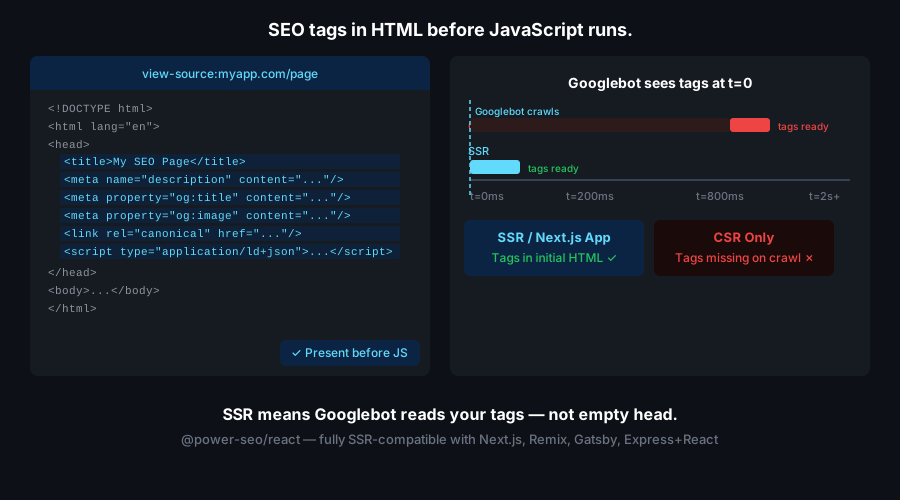
- Safe for SSR, Edge-adjacent, and server environments
All 17 packages are independently installable — use only what you need.
@power-seo/core | npm i @power-seo/core | Framework-agnostic utilities, types, validators, and constants |
@power-seo/react | npm i @power-seo/react | React SEO components — meta, Open Graph, Twitter Card, breadcrumbs |
@power-seo/meta | npm i @power-seo/meta | SSR meta helpers for Next.js App Router, Remix v2, and generic SSR |
@power-seo/schema | npm i @power-seo/schema | Type-safe JSON-LD structured data — 23 builders + 21 React components |
@power-seo/content-analysis | npm i @power-seo/content-analysis | Yoast-style SEO content scoring engine with React components |
@power-seo/readability | npm i @power-seo/readability | Readability scoring — Flesch-Kincaid, Gunning Fog, Coleman-Liau, ARI |
@power-seo/preview | npm i @power-seo/preview | SERP, Open Graph, and Twitter/X Card preview generators |
@power-seo/sitemap | npm i @power-seo/sitemap | XML sitemap generation, streaming, index splitting, and validation |
@power-seo/redirects | npm i @power-seo/redirects | Redirect engine with Next.js, Remix, and Express adapters |
@power-seo/links | npm i @power-seo/links | Link graph analysis — orphan detection, suggestions, equity scoring |
@power-seo/audit | npm i @power-seo/audit | Full SEO audit engine — meta, content, structure, performance rules |
@power-seo/images | npm i @power-seo/images | Image SEO — alt text, lazy loading, format analysis, image sitemaps |
@power-seo/ai | npm i @power-seo/ai | LLM-agnostic AI prompt templates and parsers for SEO tasks |
@power-seo/analytics | npm i @power-seo/analytics | Merge GSC + audit data, trend analysis, ranking insights, dashboard |
@power-seo/search-console | npm i @power-seo/search-console | Google Search Console API — OAuth2, service account, URL inspection |
@power-seo/integrations | npm i @power-seo/integrations | Semrush and Ahrefs API clients with rate limiting and pagination |
@power-seo/tracking | npm i @power-seo/tracking | GA4, Clarity, PostHog, Plausible, Fathom — scripts + consent management |
CyberCraft Bangladesh is a Bangladesh-based enterprise-grade software development and Full Stack SEO service provider company specializing in ERP system development, AI-powered SaaS and business applications, full-stack SEO services, custom website development, and scalable eCommerce platforms. We design and develop intelligent, automation-driven SaaS and enterprise solutions that help startups, SMEs, NGOs, educational institutes, and large organizations streamline operations, enhance digital visibility, and accelerate growth through modern cloud-native technologies.




© 2026 CyberCraft Bangladesh · Released under the MIT License





