╦╔╗ ╦═╗
║╠╩╗╠╦╝
╩╚═╝╩╚═
Interface Built Right
End-to-end design tool for AI coding agents.
Design, build, and validate interfaces — iOS, macOS, and web. Guided builds, deterministic rules, sensor-driven scans.



IBR is an end-to-end design tool for AI coding agents. It guides UI builds with Design Director planning, web and iOS archetype routing, Calm Precision principles, and platform-specific best practices. Built-in visual validation scans live pages, runs interaction assertions, matches mockups, and verifies design intent — Chrome and Safari.
Built on a custom CDP engine — no Playwright. Works from terminal, Codex, Claude Code slash commands, or code. Zero config.
Design Workflow
/ibr:build <topic> orchestrates the full design-to-validation flow:
- Preamble — Platform, scope, design mode, archetype hints, UI template, references, density
- Optional imagegen concepts — Generates visual concepts only when useful, then requires approval before any concept becomes a
visual-target
- Design Director — Produces
design-intent.json, specialist planning passes, target roles, and validation criteria
- Brainstorm & Plan — Guided exploration with platform-specific design rules and a concrete implementation plan
- Implement — Build with design guidance: Calm Precision, web/iOS/macOS routers, component patterns, data-viz guidance when needed
- Validate — Scan, match wireframe/visual targets, test interactions, iterate until passing
Design Director
The design-director skill is the primary planning layer for page, flow, app, dashboard, and reference-heavy UI work. It selects guidance in a deterministic order, resolves Mockup Gallery references into roles (wireframe-target, visual-target, inspiration, data-reference), and writes specialist planning artifacts under .ibr/builds/<topic>/specialists/.
Specialist passes are used for flow, visual system, interaction states, content states, Mockup Gallery targets, data visualization, and validation. IBR does not create separate tiny agents for buttons, fonts, or individual visual atoms; those stay inside component patterns and design tokens.
Imagegen Concepts
IBR can use imagegen as an upstream concept pass for mood, style, hero/product imagery, and hi-fi variants. Generated concepts are saved under .ibr/builds/<topic>/references/imagegen/ when they are project-bound. They remain inspiration until the user explicitly approves one as a visual-target.
Imagegen does not replace wireframes, accessibility semantics, interaction requirements, or validation. IBR still validates the rendered implementation with scan, interaction, match, and native tools.
Web Design Routing
The web-design-router skill classifies web interfaces into archetypes: SaaS dashboard, data/research tool, editor/workbench, AI agent chat, commerce/checkout, content/publication, and internal admin. Each archetype sets defaults for navigation, density, primary content, mobile behavior, and validation focus.
iOS Design System
The ios-design-router skill classifies apps into 6 archetypes, each with pre-set defaults for navigation, color, typography, motion, and more. Domain reference files provide comprehensive option catalogs:
| Navigation | 1_navigation_structure.md | Tab bars, transitions, sheets, page hierarchy |
| Content | 2_lists_cards_content.md | Lists, cards, swipe actions, content resilience |
| Interactions | 3_buttons_touch_interactions.md | Buttons, haptics, toggles, forms |
| Visual | 4_color_surface_typography.md | Color, gradients, dark mode, typography |
| Motion & States | 5_motion_states_identity.md | Loading, onboarding, celebrations, profiles |
| Task Economy | 6_task_economy.md | Step counting, flow validation |
Two-Tier Architecture
IBR scans return structured data, not just raw element dumps. Two layers run on every scan:
Tier 1 — Deterministic Rule Engine (no LLM)
Runs pure algorithms against the runtime data. Zero tokens. Returns structured verdicts with evidence.
wcag-contrast | Text contrast ratios, AA and AAA | WCAG 2.1 relative luminance |
touch-targets | Interactive element sizing | 44px mobile (WCAG 2.5.5), 24px desktop (WCAG 2.5.8) |
calm-precision | Gestalt, Signal-to-Noise, Fitts, Hick, Content-Chrome, Cognitive Load | Principle-based checks |
Enable via .ibr/rules.json:
{
  "extends": ["wcag-contrast", "touch-targets", "calm-precision"]
}
Or one-off via CLI:
ibr scan http://localhost:3000 --rules wcag-contrast,touch-targets
Output in scanResult.issues with ruleId, severity, message, element, and fix fields.
ibr ask — focused verdicts (v3 thesis M1)
Where scan returns the whole tree, ask returns one verdict + minimal evidence. ~600 bytes vs ~19KB for the same page.
ibr ask http://localhost:3000 'is the touch-target compliant'
ibr -v mobile ask http://localhost:3000 'do status indicators follow signal-to-noise'
ibr ask http://localhost:3000 'is design-system token compliance okay'
Closed question vocabulary today (3 questions); unknown questions return verdict: UNCERTAIN with the supported list. Returns {verdict, findings[], meta} with bounds and a fix per finding. Designed for LLM agents — the agent reads a verdict, optionally drills into one finding's evidence, instead of parsing the full DOM.
Tier 2 — Sensor Layer (structured summaries)
Pre-computed summaries that let the model focus on judgment instead of re-discovering patterns:
visualPatterns | Groups elements by style fingerprint per category (button, link, input, heading) | Replaces N element dumps with M pattern groups |
componentCensus | Tag/role counts + orphan cursor:pointer elements with no handler | Replaces grep across pages |
interactionMap | Handler coverage — which interactive-looking elements actually have handlers | Pre-computed from handler detection |
contrast | WCAG pass/fail grouped, only failures listed | Model skips passing elements |
navigation | Link structure with depth and counts | Replaces reading Sidebar.tsx |
semanticState | Wraps existing semantic classifier: page intent, states, available actions | Summary form |
oneLiners | 5-second scannable summary lines | Read first, then drill down |
Access in scanResult.sensors. Get summaries-only (cuts ~60% tokens):
ibr scan http://localhost:3000 --output summary
Hydration Waiting
SPAs (Next.js, React, Vue) often render after networkidle fires. IBR's waitForHydration() runs after network idle:
- Fast-path marker detection:
window.__NEXT_DATA__, React DevTools hook, #__next / #root population
- AX tree fingerprint polling until stable for 500ms with at least one interactive element
- Settle time (200ms default) to absorb async effects
This eliminates the common "0 elements" result on modern SPAs.
Live Sessions with Auto-Capture
Sessions now auto-capture pre/post interaction by default:
ibr session start http://localhost:3000
ibr session interact --action click --target "Submit"
ibr session close
Each ActionRecord includes:
navigated: boolean — did the click cause a URL change?urlBefore / urlAfteractionErrors: string[] — console errors that appeared during this action
Opt out with --no-auto-capture on session start.
Architecture
IBR runs on a custom CDP browser engine — direct Chrome DevTools Protocol over WebSocket. No Playwright, no Puppeteer, no heavyweight browser automation dependencies.
LLM-native features built into the engine:
| queryAXTree-first resolution | Find elements by semantic name+role (not fragile CSS selectors). 4-tier: CDP-native search → Jaro-Winkler fuzzy → vision fallback |
| DOM chunking | Filter to interactive/leaf elements, chunk for LLM context windows. 60-70% fewer tokens |
| Adaptive modality | Scores AX tree quality. High → use text data. Low → include screenshot. Vision only when needed |
| Resolution cache | Caches intent→element mappings. Same query twice = instant. Clears on navigation |
| observe() | Preview available actions without executing. Returns serializable descriptors |
| extract() | Pull structured data from AX tree using schemas |
What's New in v1.4.0
| Native macOS layout-fill / gap analysis | scanMacOS returns layoutFill[]; surfaced as layout-fill: WARNINGs in issues[] | Per-container largest empty horizontal AND vertical band as pixels + % of container extent. Catches the centered-narrow-content bug class (e.g. terminal at 440px centered in 1074px → 317px / 29.5% leading band) that passes screenshot + a11y + touch-target checks. Threshold default 0.12; configurable via MacOSScanOptions.layoutFill.threshold |
Swift extractor --analyze-layout | ibr-ax-extract --pid N --analyze-layout | Same algorithm in-Swift; emits LAYOUT_FINDINGS:<json> on stderr. Stdout JSON contract unchanged |
| Drop-in Swift templates | assets/native/swift-templates/LayoutProbe.swift + RenderSwiftUI.swift | In-process layout dump + wedge-proof cacheDisplay PNG when AX/screencapture are wedged. Off-screen SwiftUI → PNG renderer. Pure AppKit/SwiftUI, zero deps |
What's New in v0.7.0
| Interact (MCP + CLI) | ibr interact / MCP interact | Click, type, fill elements by accessible name. LLM-native interaction |
| Observe (MCP + CLI) | ibr observe / MCP observe | Preview all clickable/fillable elements before interacting |
| Extract (MCP + CLI) | ibr extract / MCP extract | Read page headings, buttons, inputs, links as structured data |
| Interact & Verify (MCP) | MCP interact_and_verify | Act + capture before/after state diff (elements added/removed) |
| Interaction assertions | ibr test-interact | Click, type, verify — act→verify→screenshot pipeline |
| Mockup matching | ibr match | Compare design mockup PNG against live page (SSIM) |
| Design verification | ibr record-change / ibr verify-changes | Capture design intent, verify against reality |
| Test generation | ibr generate-test | Auto-generate .ibr-test.json from page observation |
| Test runner | ibr test | Run declarative test files |
| Python scripting | ibr run-script | Execute Python test scripts with sandboxed resources |
| Fix-and-iterate | ibr iterate | Convergence detection for test-fix cycles |
| Safari support | --browser safari | Cross-browser via safaridriver + macOS AX API |
| Cross-browser diff | ibr compare-browsers | Side-by-side Chrome vs Safari comparison |
| AX tree coverage | Built into ibr scan | Reports AX tree capture %, shadow DOM piercing |
| Flow testing | ibr test-search/form/login | Built-in flows exposed as CLI commands |
| Playwright removed | -- | Zero Playwright dependency, custom CDP engine only |
See docs/QUICK-START.md for full usage guide.
What's New in v1.0.0
| End-to-end design tool | Positioning update | From "visual testing platform" to design + build + validate |
| Design Director | /ibr:build | Primary design-agent layer with design intent, specialist planning passes, target roles, and validation criteria |
| Web design router | skill: web-design-router | 7 web archetypes covering dashboards, research tools, workbenches, AI chat, checkout, content, and admin |
| Data visualization guidance | skill: data-visualization | Chart-worthiness gate, chart routing, attribution, accessibility, and validation rules |
| iOS design system | /ibr:build with platform=iOS | 6-archetype router, 7 domain reference files covering navigation, lists, buttons, color, motion, task economy |
| apple-platform skill | Loaded during iOS builds | Architecture, SwiftData, concurrency, CI/CD, TestFlight — integrated from standalone apple-dev |
| Deterministic rule engine | ibr scan --rules wcag-contrast,touch-targets | WCAG AA/AAA contrast, touch target sizes. No LLM tokens |
| Sensor layer | scanResult.sensors | Visual patterns, component census, interaction map, contrast report, navigation, one-liners |
| Summary output mode | ibr scan --output summary | Returns sensors + verdict, cuts ~60% of tokens |
| Hydration wait | Built into ibr scan | Fixes "0 elements" on SPAs; polls AX tree stability + detects Next.js/React markers |
| Auto-capture sessions | Default on | Pre/post scan with URL-change detection and console error surfacing |
What's New in v0.9.0-alpha
| Build command | /ibr:build <topic> | Guided UI build — brainstorm, plan, implement, verify in one flow |
| Capture command | /ibr:capture <url> | Capture a named baseline snapshot for any URL |
| UI guidance | /ibr:ui-guidance | On-demand design guidance using IBR scan data |
| UI brainstorm preamble | skill: ui-brainstorm-preamble | Pre-build exploration — explore directions before implementing |
| UI guidance library | skill: ui-guidance-library | Reusable UI guidance patterns and decision aids |
| Mockup gallery bridge | skill: mockup-gallery-bridge | Bridge mockup gallery reviews to IBR scan verification |
| Mobile web UI | skill: mobile-web-ui | Mobile web patterns — responsive design, touch targets, viewport handling |
| iOS Design | skill: ios-design | iOS-specific patterns — SwiftUI conventions, safe areas, haptics |
| macOS UI | skill: macos-ui | macOS-specific patterns — AppKit/SwiftUI, menu bar, window chrome |
The Problem
User says "make the buttons blue with 16px Inter font." You build it. But did it work?
- Screenshots — you're guessing hex codes from pixels
- Manual inspection — slow, error-prone, not automatable
- IBR scan — returns
backgroundColor: "rgb(59, 130, 246)", fontSize: "16px", fontFamily: "Inter". Done.
How It Works
npx ibr scan http://localhost:3000/page --json
IBR returns structured data per element:
- computedStyles — backgroundColor, fontSize, fontFamily, padding, grid, flexbox, etc.
- bounds — exact x, y, width, height
- interactive — hasOnClick, hasHref, hasReactHandler, isDisabled
- a11y — role, ariaLabel, ariaDescribedBy
- page-level — pageIntent, auth state, loading state, console errors
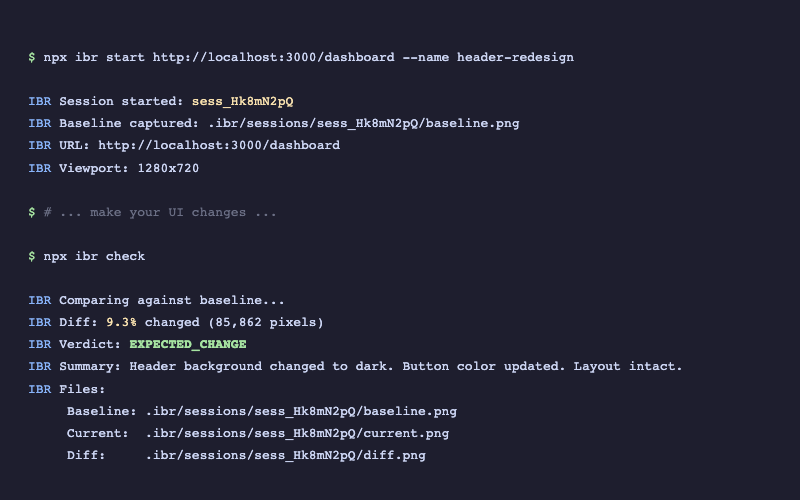
For regression, capture before and compare after:
npx ibr start http://localhost:3000
npx ibr check
Verdicts: MATCH, EXPECTED_CHANGE, UNEXPECTED_CHANGE, LAYOUT_BROKEN
See terminal output
Quick Start
npm install @tyroneross/interface-built-right
That's it. .ibr/ is auto-added to your .gitignore on install.
Validate UI (primary workflow):
npx ibr scan http://localhost:3000 --json
Regression check:
npx ibr start http://localhost:3000
npx ibr check
Sandbox-friendly browser attach
Use connect mode when the agent can reach a Chrome DevTools endpoint but should not spawn Chrome itself.
npx ibr scan http://localhost:3000 \
  --browser-mode connect \
  --cdp-url http://127.0.0.1:9222
You can also provide a browser WebSocket directly:
npx ibr scan http://localhost:3000 \
  --browser-mode connect \
  --ws-endpoint ws://127.0.0.1:9222/devtools/browser/<id>
Environment variables are supported for sandboxed agents and wrappers:
IBR_BROWSER_MODE=connect
IBR_CDP_URL=http://127.0.0.1:9222
IBR_WS_ENDPOINT=ws://127.0.0.1:9222/devtools/browser/<id>
IBR_CHROME_PATH=/path/to/chrome
--headed is now the preferred flag for a visible browser window. --sandbox remains as a deprecated alias for backwards compatibility.
Setup as Agent Plugins
IBR works standalone and ships plugin metadata for both Claude Code and Codex. Claude Code gets slash commands, hooks, and the design-validator agent; Codex gets compact routing skills plus MCP/session tools for the same scan, navigation, search, and validation contract.
Claude Code
1. Add the marketplace (one-time):
/plugin marketplace add tyroneross/interface-built-right
2. Install the plugin:
/plugin install ibr@interface-built-right
3. Use in conversation:
/ibr:build <topic> | Guided UI build: preamble → brainstorm → plan → implement → validate |
/ibr:scan <url> | Full page scan with sensor summaries and optional rule checks |
/ibr:snapshot / /ibr:compare | Before/after regression check |
/ibr:interact | Click, type, fill by accessible name |
/ibr:match | Compare rendered UI against a mockup (SSIM) |
/ibr:native-scan | Scan iOS/watchOS/macOS apps |
/ibr:ui | Open the web dashboard at localhost:4200 |
Example:
"Build a daily focus timer for iOS" -> /ibr:build classifies it as a Utility archetype -> routes to iOS design references -> implements with apple-platform patterns -> scans the result, reports any WCAG / touch target / hydration issues.
The plugin hooks run automatic pre/post scans around UI file edits and surface console errors immediately when interactions trigger them.
Codex
Codex consumes .codex-plugin/plugin.json, compact skills under .codex-plugin/skills/, and .codex-plugin/mcp.json. The Codex-compatible agent approach is skills plus MCP tools; Claude-style files under commands/, hooks/, and agents/ are retained for Claude Code and should not be treated as Codex-loaded routing.
Install this checkout as a local Codex plugin:
npm run build
npm run plugin:install-codex
This syncs a slim Codex bundle to ~/plugins/ibr and registers it in ~/.agents/plugins/marketplace.json. Restart Codex after installing. See Codex Plugin Setup for validation steps and failure modes.
Starter prompts:
$ibr Plan this UI with IBR.
$ibr Scan this UI with IBR.
$ibr Validate this design intent.
Use MCP sessions when the agent needs to navigate the current UI state:
{
  "tool": "flow_search",
  "sessionId": "<session id>",
  "query": "pricing plan",
  "userIntent": "Find the plan a buyer would choose",
  "aiValidation": true
}
What IBR Does For You (Plugin Hooks)
When installed as a Claude Code plugin, IBR provides:
- Design validation reminders — after UI file edits, nudges to run
npx ibr scan to verify against user intent
- Scan + screenshot guidance — suggests also running IBR scan for precise property data alongside visual checks
- Session end check — reminds if UI work was done but not validated
- Bash safety — blocks destructive commands (
rm -rf /, git push --force, etc.)
- Sensitive path protection — prevents writes to
~/.ssh, ~/.aws, /etc/
Hooks are command-based and live in hooks/hooks.json. They call the repo-local shell scripts under hooks/, which are designed to fail softly when no UI work, no config, or no reachable dev server is present.
What IBR Scan Returns
Element Data (per interactive element)
selector:        Unique CSS path
tagName:         button, a, input, etc.
text:            Visible text content
bounds:          { x, y, width, height } — exact position and size
computedStyles:  backgroundColor, color, fontSize, fontFamily, fontWeight,
                 padding, margin, borderRadius, display, gap, flexDirection,
                 alignItems, justifyContent, gridTemplateColumns, etc.
interactive:     { hasOnClick, hasHref, hasReactHandler, isDisabled, cursor }
a11y:            { role, ariaLabel, ariaDescribedBy, ariaHidden }
Page-Level Data
pageIntent:      auth | form | listing | detail | dashboard | error | landing
state.auth:      { authenticated, username, confidence }
state.loading:   { loading, type: spinner|skeleton|progress }
state.errors:    { hasErrors, errors[], severity }
console:         { errors[], warnings[] }
verdict:         PASS | ISSUES | FAIL
Scan Data vs Screenshots
Each approach catches things the other misses. The best validation uses both.
Where IBR scan wins
| Is this exactly #3b82f6? | Guess from pixels | backgroundColor: "rgb(59, 130, 246)" |
| Is the font 16px Inter? | "Looks about right" | fontSize: "16px", fontFamily: "Inter" |
| Is the button wired up? | Can't tell | hasOnClick: true, hasReactHandler: true |
| Are ARIA labels present? | Can't see | ariaLabel: "Submit form", role: "button" |
| Any console errors? | Can't see | console.errors: [] |
Where screenshots win
| Does the page look right? | Can't judge | Visual coherence at a glance |
| Any rendering glitches? | Computed styles can be correct but render wrong | Sees clipping, overlap, z-index issues |
| Canvas/SVG/WebGL content? | Not in the DOM | Sees everything rendered |
| Font rendering quality? | Reports font-family, not rendering | Sees anti-aliasing, kerning |
| Unexpected visual artifacts? | Only checks what you ask | Catches things you didn't think to check |
Best practice: combine both
npx ibr scan http://localhost:3000 --json
For AI agents, scan data is best for precise verification (exact values, handler detection, a11y). Screenshots are best for holistic visual checks. Together they give more confidence than either alone.
CLI Reference
Core Commands
npx ibr scan <url> --json | Validate UI — returns structured data |
npx ibr start <url> | Capture baseline for regression |
npx ibr check | Compare current state against baseline |
npx ibr serve | Open web UI at localhost:4200 |
npx ibr list | List all sessions |
npx ibr update | Accept current as new baseline |
npx ibr clean --older-than 7d | Clean old sessions |
Interactive Sessions
For pages that need clicks, typing, or navigation before validating:
npx ibr session:start http://localhost:3000 --name "search-test"
npx ibr session:type <id> "input[name=search]" "quantum computing"
npx ibr session:click <id> "button[type=submit]"
npx ibr session:wait <id> ".search-results"
npx ibr session:screenshot <id>
All interactive commands
session:start <url> | Start browser session |
session:click <id> <selector> | Click an element |
session:type <id> <selector> <text> | Type into an element |
session:press <id> <key> | Press keyboard key |
session:scroll <id> <direction> | Scroll page |
session:screenshot <id> | Capture screenshot |
session:wait <id> <selector> | Wait for element |
session:navigate <id> <url> | Navigate to URL |
session:html <id> | Get page HTML |
session:text <id> <selector> | Extract text content |
session:close <id|all> | Close session |
Memory (Design Specs)
Store design preferences that IBR enforces during every scan:
npx ibr memory add "Primary buttons are blue" --category color --property background-color --value "#3b82f6"
npx ibr memory add "Body font is Inter 16px" --property font-family --value "Inter"
npx ibr memory list
Authenticated Pages
npx ibr login http://localhost:3000/login
npx ibr scan http://localhost:3000/dashboard --json
npx ibr logout
Verdicts
After ibr check, you get one of four results:
MATCH | Nothing changed | You're done |
EXPECTED_CHANGE | Changes look intentional | Review and continue |
UNEXPECTED_CHANGE | Something changed that shouldn't have | Investigate |
LAYOUT_BROKEN | Major structural issues | Fix before continuing |
Programmatic API
import { compare } from '@tyroneross/interface-built-right';
const result = await compare({
url: 'http://localhost:3000/dashboard',
baselinePath: './baselines/dashboard.png',
});
console.log(result.verdict);
console.log(result.diffPercent);
console.log(result.summary);
Engine API (advanced)
import { EngineDriver, CompatPage } from '@tyroneross/interface-built-right/engine';
const driver = new EngineDriver();
await driver.launch({ headless: true, viewport: { width: 1920, height: 1080 } });
await driver.navigate('http://localhost:3000', { waitFor: 'stable' });
const elements = await driver.discover({
filter: 'interactive',
serialize: true,
maxTokens: 4000,
});
const button = await driver.find('Submit', { role: 'button' });
const understanding = await driver.assessUnderstanding();
if (understanding.needsScreenshot) {
const screenshot = await driver.screenshot({ fullPage: true });
}
const data = await driver.extract({
title: { role: 'heading', extract: 'text' },
isLoggedIn: { role: 'button', label: 'logout', extract: 'exists' },
});
await driver.close();
Session-based workflow
import { InterfaceBuiltRight } from '@tyroneross/interface-built-right';
const ibr = new InterfaceBuiltRight({
baseUrl: 'http://localhost:3000',
outputDir: './.ibr',
threshold: 1.0,
});
const { sessionId } = await ibr.startSession('/dashboard', {
name: 'dashboard-update',
});
const report = await ibr.check(sessionId);
console.log(report.analysis.verdict);
await ibr.close();
Configuration
Optional — create .ibrrc.json in your project root:
{
  "baseUrl": "http://localhost:3000",
  "outputDir": "./.ibr",
  "viewport": "desktop",
  "threshold": 1.0,
  "fullPage": true
}
Available viewports: desktop, laptop, tablet, mobile, iphone-14, iphone-14-pro-max
Mobile and device emulation (1.1.0+)
IBR emulates mobile and tablet devices end-to-end via CDP (no Playwright dependency). Three things happen on driver.launch(), in order, BEFORE the first navigate:
Emulation.setUserAgentOverride — so the initial HTML response sees a mobile UAEmulation.setDeviceMetricsOverride — width, height, DPR, mobile: trueEmulation.setTouchEmulationEnabled — so navigator.maxTouchPoints > 0 and CSS @media (pointer: coarse) matches
--viewport presets
npx ibr scan https://example.com --viewport mobile --json
desktop | 1920 x 1080 | 1 | false |
desktop-lg | 2560 x 1440 | 1 | false |
desktop-sm | 1440 x 900 | 1 | false |
laptop | 1366 x 768 | 1 | false |
tablet | 820 x 1180 (iPad Air baseline) | 2 | true |
tablet-landscape | 1180 x 820 | 2 | true |
mobile | 390 x 844 (iPhone 14 baseline) | 3 | true |
mobile-lg | 430 x 932 | 3 | true |
Pre-1.1.0 --viewport mobile parsed cleanly but rendered desktop (375 x 667 with no mobile flag and no UA override). If you previously worked around this by passing custom widths, you can switch to the preset.
--device <name> — canonical profiles
--device carries a full CDP profile (viewport + DPR + mobile + UA + touch). It wins over --viewport when both are given.
npx ibr scan http://localhost:3000 --device iphone-14 --json
npx ibr session:start http://localhost:3000 --device pixel-7
iphone-14 | 390 x 844 | 3 | iOS 17 Safari |
iphone-14-pro-max | 430 x 932 | 3 | iOS 17 Safari |
pixel-7 | 412 x 915 | 2.625 | Android 14 Chrome |
ipad-air | 820 x 1180 | 2 | iPad iOS 17 Safari |
ipad-pro-11 | 834 x 1194 | 2 | iPad iOS 17 Safari |
desktop-1440 | 1440 x 900 | 1 | (default Chrome) |
Unknown --device names fail loudly: Error: Unknown --device "iphone-99". Known devices: iphone-14, .... Add more profiles in src/devices.ts.
Library use
import { EngineDriver, resolveDevice, deviceToViewport } from '@tyroneross/interface-built-right'

const profile = resolveDevice('iphone-14')
const driver = new EngineDriver()
await driver.launch({ headless: true, viewport: deviceToViewport(profile) })
await driver.navigate('https://example.com')
Troubleshooting
Command not found: ibr | Use npx ibr --help |
| Chrome not found | Install Google Chrome, or pass chromePath option |
| Auth state expired | npx ibr login <url> |
| Session not found | npx ibr list to see available sessions |
--viewport mobile renders desktop (pre-1.1.0) | Upgrade to >= 1.1.0; mobile presets now set the CDP mobile flag + UA + touch |
Unknown --device "..." | Run npx ibr scan --help to see the canonical device list, or add a profile to src/devices.ts |
Requirements
- Node.js 22+ (uses built-in WebSocket for CDP)
- Google Chrome installed (uses system Chrome, no downloads needed)
License
MIT




