Github Workflows Plugin
The Github Workflows plugin enables manual triggering and monitoring of GitHub Actions workflows directly from Backstage components.
Features
- Complete Workflow Listing: View all workflows in your repository with status, branch filtering, and execution history
- On-Demand Workflows: Configure specific workflows via annotations in your
catalog-info.yaml
- Workflow Parameters: Support for workflows with input parameters
- Detailed Logs: View workflow execution details, job steps, and logs
- Multiple Views: Table view for full listings or card view for overview pages
💬 Join Us
Join our community to resolve questions about our Plugins. We look forward to welcoming you!
Check our Community 🚀
Prerequisites
Before installing the plugin, ensure you have:
- A working Backstage project (for static installation) or a Backstage instance compatible with dynamic plugins (VeeCode DevPortal or Red Hat Developer Hub)
- Backend Plugin: The GitHub Workflows backend plugin must be installed and configured. See the backend plugin documentation
- GitHub integration configured with a
Personal Access Token or GitHub App. See Backstage GitHub Integration
- GitHub authentication configured. See GitHub Auth Provider
⚠️ Important: This is a frontend plugin that requires the corresponding backend plugin to function. The GitHub token/app configuration is used by the backend plugin.
Installation
This plugin supports both static linking (traditional Backstage) and dynamic plugin loading (VeeCode DevPortal and Red Hat Developer Hub).
⚠️ Backend Plugin Required: Before installing the frontend plugin, ensure the GitHub Workflows backend plugin is installed. See the backend plugin documentation for installation instructions.
Static Installation
Add the frontend plugin package to your Backstage app:
yarn workspace app add @veecode-platform/backstage-plugin-github-workflows
⚠️ Note: The new Backstage frontend system is not yet supported (Work in Progress). The plugin currently uses the legacy frontend system.
Dynamic Installation
Dynamic plugin installation is available for both VeeCode DevPortal and Red Hat Developer Hub (RHDH).
VeeCode DevPortal
The plugin is bundled in the file system and ready to use. Enable it in dynamic-plugins.yaml:
plugins:
  - package: ./dynamic-plugins/dist/veecode-platform-backstage-plugin-github-workflows-dynamic
    disabled: false
Red Hat Developer Hub (RHDH)
RHDH can download the plugin at runtime using NPM. Add it to dynamic-plugins.yaml:
plugins:
  - package: '@veecode-platform/backstage-plugin-github-workflows-dynamic@^1.0.0'
    disabled: false
    integrity: sha512-XXXXXXXXXXXXXXXXXXXXXXXXXXXXXXXXXXXXXXXXXX
    pluginConfig:
      dynamicPlugins:
        frontend:
          veecode-platform.backstage-plugin-github-workflows:
            appIcons:
              - name: githubWorkflowsIcon
                module: GithubWorkflowsPlugin
                importName: GithubWorkflowsIcon
💡 Tip: Check the npm registry for the latest version and integrity hash.
Configuration
Configuration is divided into two parts: Static Configuration (required for all installations) and Dynamic Configuration (specific to dynamic plugin loading).
Static Configuration
These settings are required regardless of installation method and must be configured in your app-config.yaml.
💡 Note: The GitHub integration settings below are used by the backend plugin. Ensure the backend plugin is properly installed and configured.
GitHub Integration
Configure GitHub integration with either a Personal Access Token or GitHub App credentials (used by the backend plugin):
Option 1: Personal Access Token
integrations:
github:
- host: github.com
token: ${GITHUB_TOKEN}
⚠️ Note: This method is subject to GitHub rate limits. For production use, consider using a GitHub App. See GitHub Access Configuration.
Option 2: GitHub App (Recommended for production)
auth:
  environment: production
  providers:
    github:
      production:
        clientId: ${AUTH_GITHUB_CLIENT_ID}
        clientSecret: ${AUTH_GITHUB_CLIENT_SECRET}
See Add GitHub Auth Provider for detailed setup instructions.
GitHub Workflows Setup
To enable manual triggering, add workflow_dispatch: to your GitHub workflow files:
name: Deploy Application
on:
push:
branches: ["main"]
workflow_dispatch:
inputs:
environment:
description: 'Target environment'
required: true
type: choice
options:
- development
- staging
- production
💡 Workflow Parameters: The plugin automatically detects and renders input forms for workflows with parameters. Required parameters must be provided before triggering.
Catalog Annotations
Add the required annotation to your component's catalog-info.yaml:
apiVersion: backstage.io/v1alpha1
kind: Component
metadata:
name: my-service
annotations:
github.com/project-slug: owner/repository
spec:
type: service
owner: team-a
lifecycle: production
CSP Configuration (Optional)
To display GitHub user avatars, allow the GitHub avatars domain:
backend:
  csp:
    connect-src: ["'self'", 'http:', 'https:']
    script-src: ["'self'", "'unsafe-eval'"]
    img-src: ["'self'", 'data:', 'https://avatars.githubusercontent.com/']
Dynamic Configuration
When using dynamic plugin loading, additional configuration may be needed depending on your platform.
VeeCode DevPortal Configuration
No additional configuration is required beyond enabling the plugin in dynamic-plugins.yaml. The plugin uses the static configuration from app-config.yaml.
plugins:
  - package: ./dynamic-plugins/dist/veecode-platform-backstage-plugin-github-workflows-dynamic
    disabled: false
Red Hat Developer Hub (RHDH) Configuration
RHDH may require additional mountpoint configuration:
plugins:
  - package: '@veecode-platform/backstage-plugin-github-workflows-dynamic@^1.0.0'
    disabled: false
    integrity: sha512-XXXXXXXXXXXXXXXXXXXXXXXXXXXXXXXXXXXXXXXXXX
    pluginConfig:
      dynamicPlugins:
        frontend:
          veecode-platform.backstage-plugin-github-workflows:
            dynamicRoutes:
              - path: /github-workflows
                importName: GithubWorkflowsPage
                menuItem:
                  text: 'GitHub Workflows'
                  icon: githubWorkflowsIcon
            appIcons:
              - name: githubWorkflowsIcon
                module: GithubWorkflowsPlugin
                importName: GithubWorkflowsIcon
            mountPoints:
              - mountPoint: entity.page.ci/cards
                importName: EntityGithubWorkflowsCard
                config:
                  layout:
                    gridColumnEnd:
                      lg: 'span 4'
                      md: 'span 6'
                      xs: 'span 12'
              - mountPoint: entity.page.ci
                importName: EntityGithubWorkflowsContent
                config:
                  if:
                    allOf:
                      - isGithubActionsAvailable
Usage (Static Installation)
Note: This section applies only to static installations. For dynamic installations, use the mountpoint configuration shown in the Dynamic Configuration section above.
Exported Components
The plugin exports the following components:
Current Components
EntityGithubWorkflowsContent - Full workflow listing with table view and routing support for details pages (use in entity tabs)EntityGithubWorkflowsCard - Workflow summary card for overview pages (use in entity overview)isGithubActionsAvailable - Conditional function to check if the entity has GitHub Actions configured
Legacy Components (Deprecated)
The following exports are maintained for backward compatibility but are deprecated:
GithubWorkflowsContent → Use EntityGithubWorkflowsContentGithubWorkflowsOverviewContent → Use EntityGithubWorkflowsCardGithubWorkflowsTabContent → Use EntityGithubWorkflowsContent
Adding to Entity Pages
Edit your packages/app/src/components/catalog/EntityPage.tsx:
Table View (CI/CD Tab)
Add a complete workflow listing to a dedicated CI/CD tab:
import {
EntityGithubWorkflowsContent,
isGithubActionsAvailable
} from '@veecode-platform/backstage-plugin-github-workflows';
import { EntitySwitch } from '@backstage/plugin-catalog';
import { EmptyState } from '@backstage/core-components';
const cicdContent = (
<EntitySwitch>
<EntitySwitch.Case if={isGithubActionsAvailable}>
<EntityGithubWorkflowsContent />
</EntitySwitch.Case>
<EntitySwitch.Case>
<EmptyState
title="No CI/CD available for this entity"
missing="info"
description="Add the github.com/project-slug annotation to your component to enable CI/CD."
/>
</EntitySwitch.Case>
</EntitySwitch>
);
const serviceEntityPage = (
<EntityLayout>
{/* ... other tabs ... */}
<EntityLayout.Route path="/ci-cd" title="CI/CD">
{cicdContent}
</EntityLayout.Route>
</EntityLayout>
);
Card View (Overview Page)
Add workflow cards to the entity overview page:
import {
  EntityGithubWorkflowsCard,
  isGithubActionsAvailable
} from '@veecode-platform/backstage-plugin-github-workflows';
import { EntitySwitch } from '@backstage/plugin-catalog';
import { Grid } from '@material-ui/core';

const overviewContent = (
  <Grid container spacing={3}>
    <Grid item md={6}>
      <EntityAboutCard />
    </Grid>

    <EntitySwitch>
      <EntitySwitch.Case if={isGithubActionsAvailable}>
        <Grid item lg={8} xs={12}>
          <EntityGithubWorkflowsCard />
        </Grid>
      </EntitySwitch.Case>
    </EntitySwitch>

    {/* ... other cards ... */}
  </Grid>
);
Workflow Annotations
The plugin supports filtering which workflows to display using the github.com/workflows annotation.
Basic Usage
Filter specific workflows by filename:
apiVersion: backstage.io/v1alpha1
kind: Component
metadata:
name: my-service
annotations:
github.com/project-slug: owner/repo
github.com/workflows: deploy.yml
spec:
type: service
owner: team-a
Multiple Workflows
List multiple workflows separated by commas:
apiVersion: backstage.io/v1alpha1
kind: Component
metadata:
  name: my-service
  annotations:
    github.com/project-slug: owner/repo
    github.com/workflows: deploy.yml,test.yml,build.yml
spec:
  type: service
  owner: team-a
Custom Labels and Tooltips
Customize card labels and tooltips using JSON format:
apiVersion: backstage.io/v1alpha1
kind: Component
metadata:
  name: my-service
  annotations:
    github.com/project-slug: owner/repo
    github.com/workflows: |
      [
        {
          "workflow": "deploy-prod.yml",
          "label": "Deploy to Production",
          "tooltip": "Trigger production deployment"
        },
        {
          "workflow": "deploy-staging.yml",
          "label": "Deploy to Staging",
          "tooltip": "Trigger staging deployment"
        }
      ]
spec:
  type: service
  owner: team-a
💡 Note: If no github.com/workflows annotation is provided, all workflows in the repository will be displayed.
Features Overview
Workflow Table View
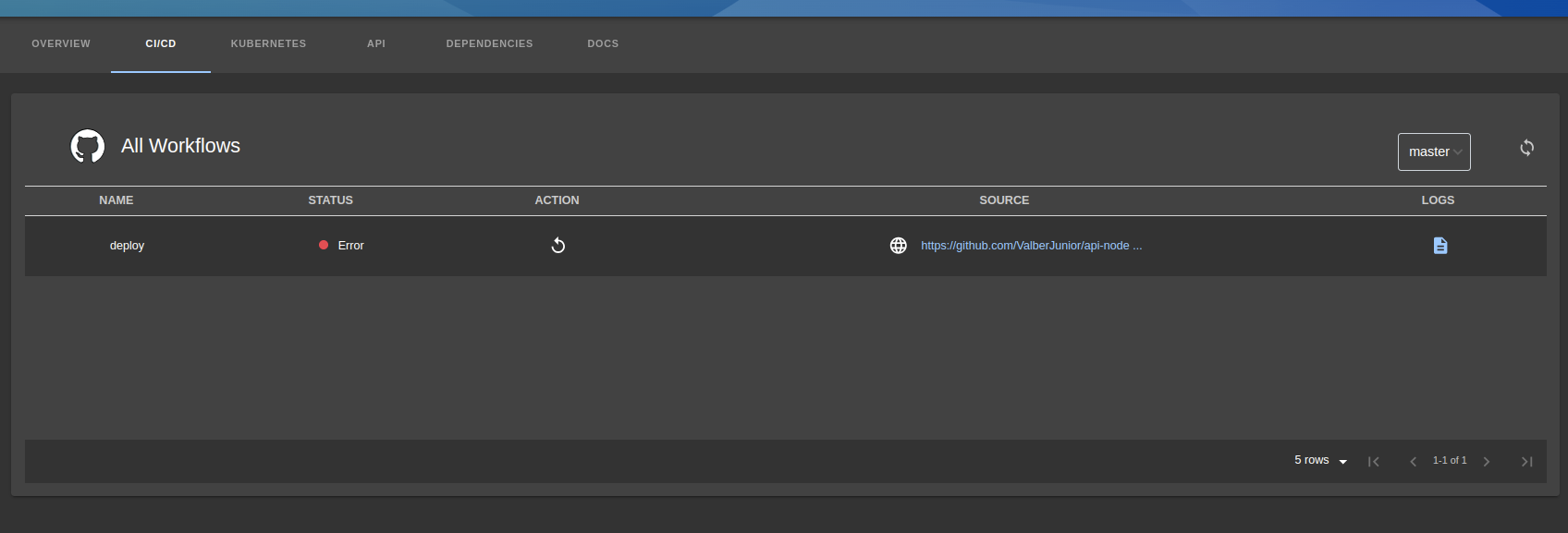
The table view provides:
- Complete list of all workflows in the repository
- Branch selector to view workflows on different branches
- Refresh button to update workflow states
- Status indicators for each workflow
- Action buttons to trigger workflow execution
- Direct links to GitHub repository
Workflow Parameters
For workflows requiring input parameters, a modal dialog is automatically displayed:

Workflow Execution Status
Status updates in real-time as workflows execute:

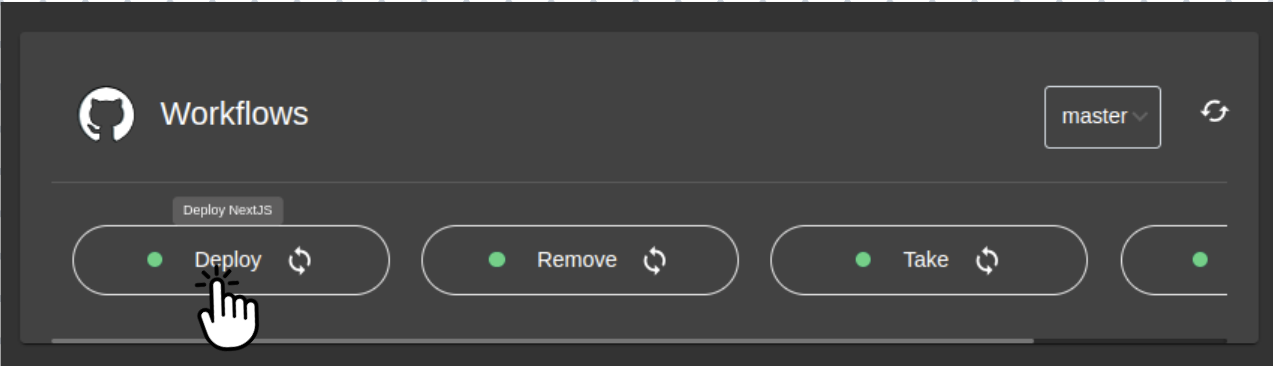
Workflow Card View

Card view features:
- Branch selector and refresh button
- Status indicators for each workflow
- Custom labels and tooltips
- Action buttons for workflow execution
Parameter Input for Cards


Workflow Status Updates

Workflow Details & Logs
Access detailed workflow information by clicking:
- Table View: Click the workflow name or logs icon in the table
- Card View: Click anywhere on the workflow card

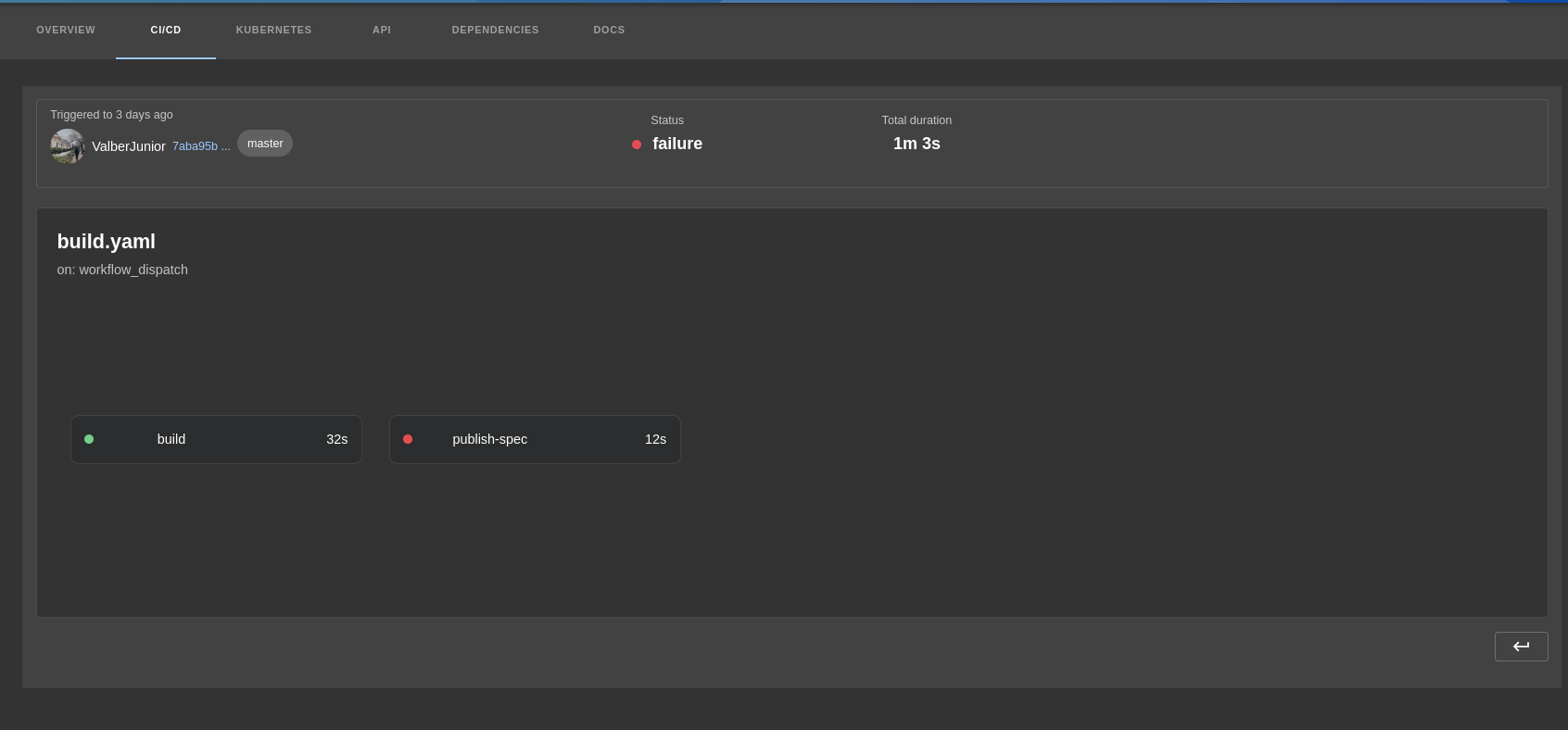
Workflow Run Details
The details page displays comprehensive information about the workflow execution:
- Commit author with avatar
- Commit ID with link to GitHub
- Workflow status and duration
- Workflow name and file path
- Trigger event information
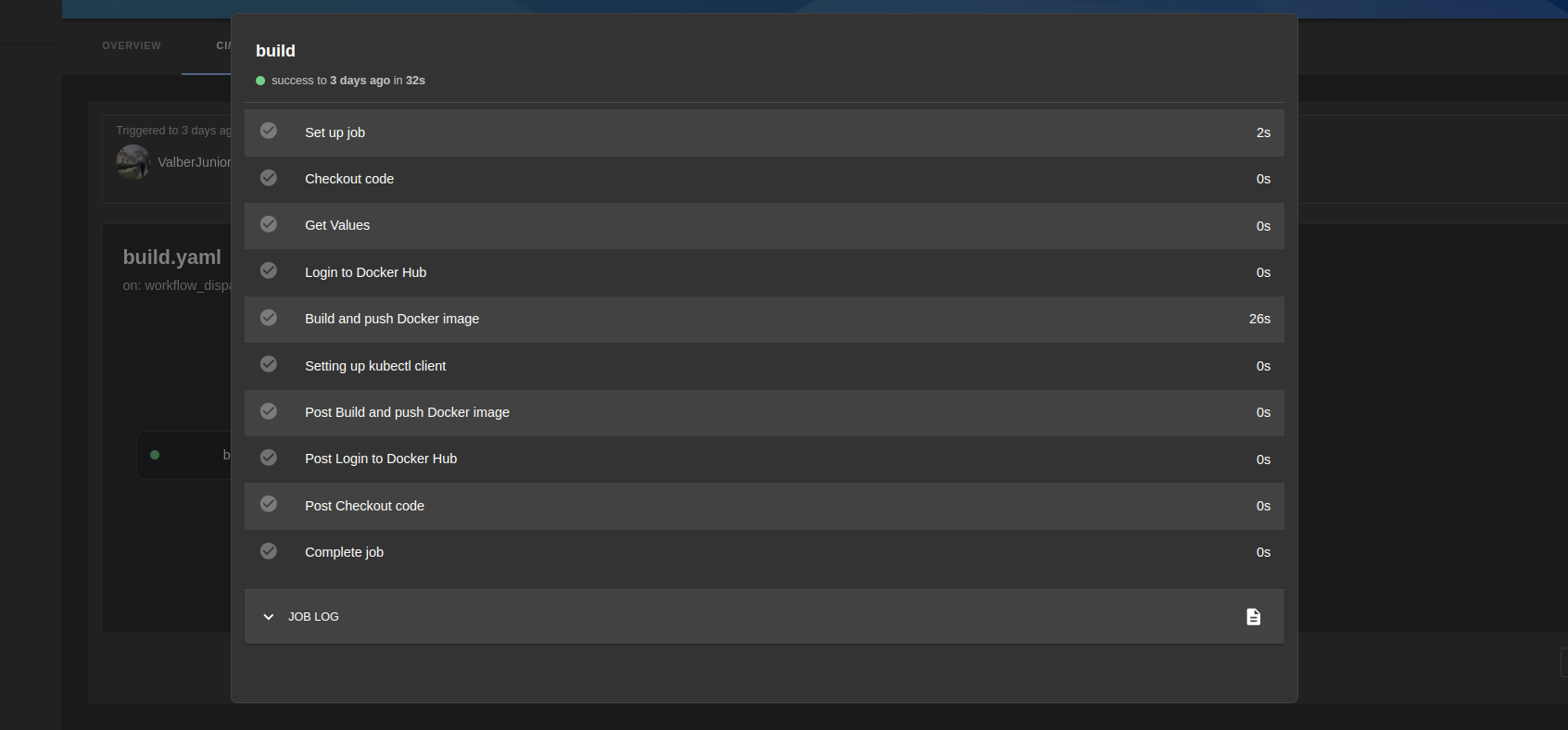
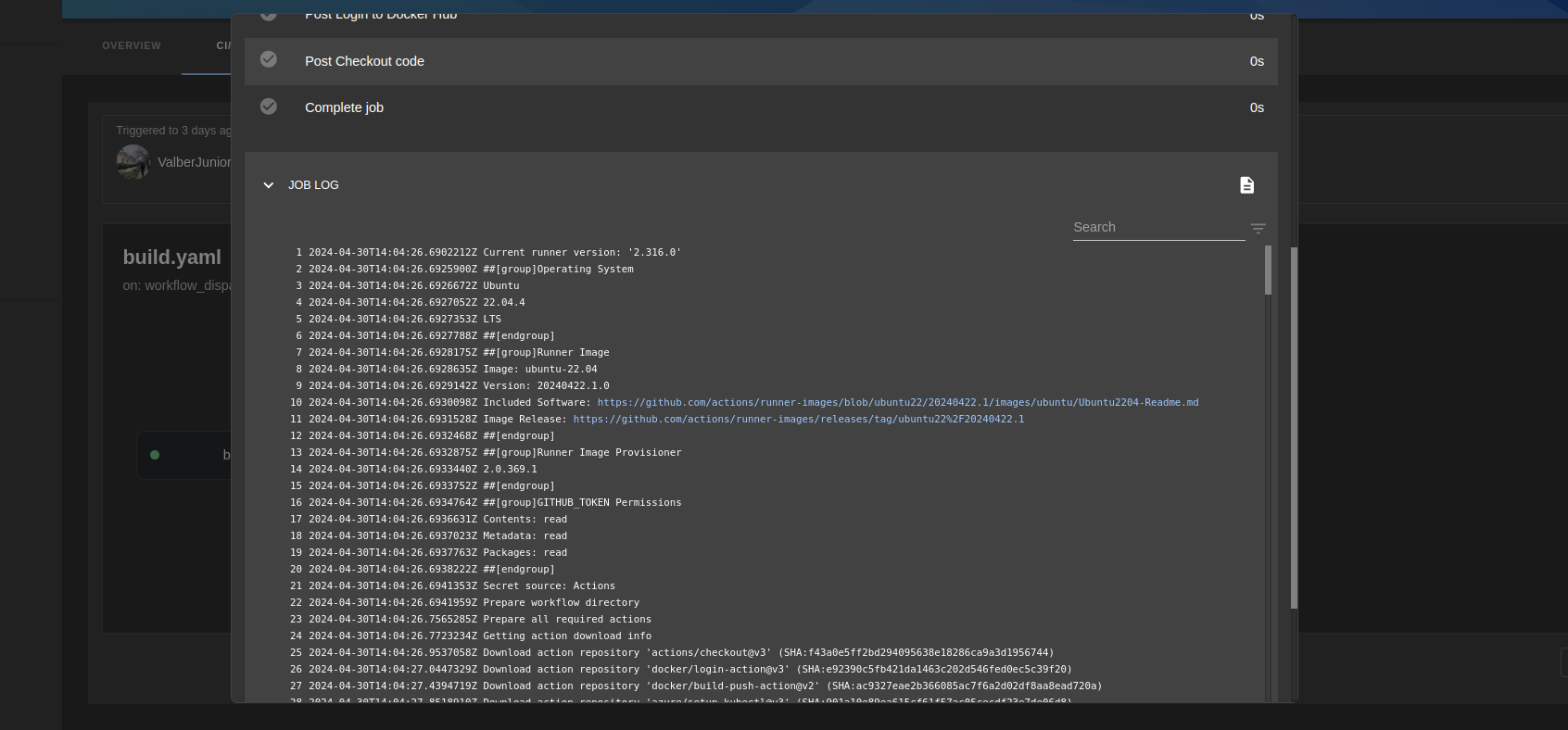
Job Steps and Logs
Each job shows:
- Individual step execution status
- Step duration
- Complete job logs (viewable inline or in expanded modal)

Troubleshooting
GitHub Avatars Not Displaying
If GitHub user avatars are not rendering, ensure the CSP configuration allows GitHub's avatar domain (see CSP Configuration above).
Support
For questions, issues, or feature requests:
License
This plugin is licensed under the Apache License 2.0. See the LICENSE file for details.





