@verino/vanilla
Vanilla JS adapter for Verino. Reliable OTP inputs from a single core.





Overview
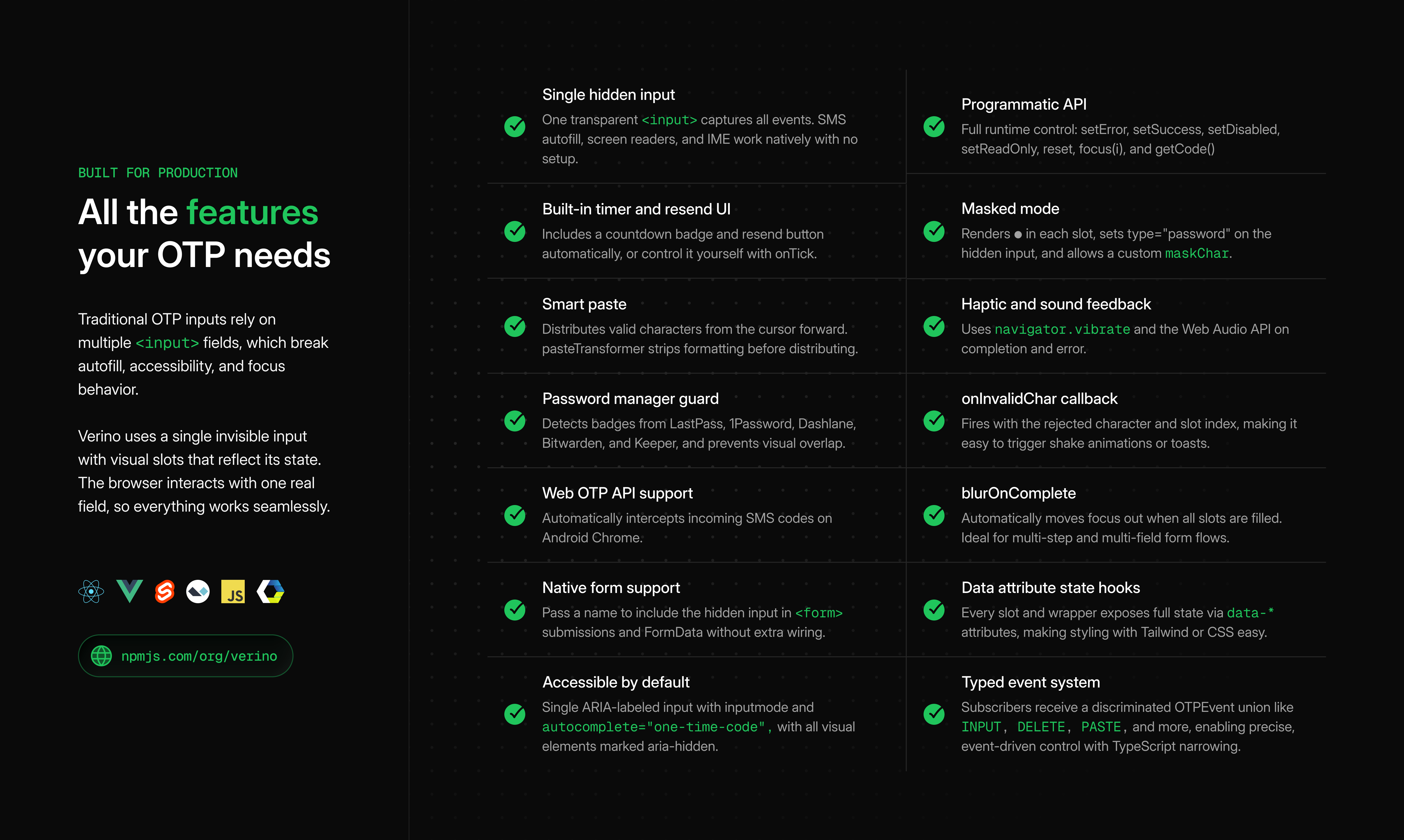
@verino/vanilla is the DOM adapter for @verino/core. It takes the pure state machine and provides everything needed to run it in the browser: slot rendering, hidden input wiring, data-* attribute management, CSS custom properties, and an optional plugin system.
initOTP(target, options) mounts a fully accessible OTP field into any container element (CSS selector or DOM node) and returns a VerinoInstance[] — one instance per matched element. Call instance.destroy() to remove all event listeners, stop active timers, and clean up any DOM elements added by plugins.
The adapter includes three tree-shakeable plugins as separate entry points. Import only what you need:
timerUIPlugin — renders a live countdown badge and a cooldown-aware resend button inside the field.webOTPPlugin — intercepts incoming SMS OTPs via the Web OTP API (navigator.credentials.get) and fills the slots automatically.pmGuardPlugin — detects credential badge overlays injected by password managers (LastPass, 1Password, Dashlane, Bitwarden, Keeper) and repositions them to avoid covering the slot group.
Why Use This Adapter?
- No framework required. Works in plain HTML, server-rendered apps, and bundled projects.
- Plugin system. Tree-shakeable plugins for timer UI, Web OTP API, and password manager guards.
- CDN-ready. A pre-built IIFE bundle works without any build tooling.
- Fully programmatic. Control state with
setError, setSuccess, setDisabled, reset, focus, and getCode.
Installation
npm i @verino/vanilla
pnpm add @verino/vanilla
yarn add @verino/vanilla
Peer dependency: @verino/core installs automatically.
CDN
<script src="https://unpkg.com/@verino/vanilla/dist/verino.min.js"></script>
The IIFE bundle exposes window.Verino. Call Verino.init(...) directly.
Quick Start
<div class="verino-wrapper"></div>

<script type="module">
  import { initOTP } from '@verino/vanilla'

  const [otp] = initOTP('.verino-wrapper', {
    length:     6,
    type:       'numeric',
    onComplete: (code) => console.log('Done:', code),
  })
</script>
Note: verify(code) and similar functions used in examples are placeholders — replace them with your own API calls or application logic.
initOTP returns VerinoInstance[]. Call instance.destroy() to clean up event listeners and DOM elements.
Common Patterns
| SMS / email OTP | type: 'numeric', timer: 60, onResend |
| TOTP / 2FA with separator | separatorAfter: 3 |
| PIN entry | masked: true, blurOnComplete: true |
| Alphanumeric code | type: 'alphanumeric', pasteTransformer |
| Invite / referral code | separatorAfter: [3, 6], pattern: /^[A-Z0-9]$/ |
| Hex activation key | pattern: /^[0-9A-F]$/ |
| Async verification lock | setDisabled(true / false) around the API call |
| Native form submission | name: 'otp_code' |
| Pre-fill on mount | defaultValue: '123456' |
| Display-only / read-only | readOnly: true |
Usage
haptic and sound are mount-configured in the vanilla adapter. If you need to change feedback behavior at runtime, destroy and re-initialise the instance with the new options.
Async verification
const [otp] = initOTP('.verino-wrapper', {
  length: 6,
  onComplete: async (code) => {
    otp.setDisabled(true)
    const ok = await api.verify(code)
    otp.setDisabled(false)
    ok ? otp.setSuccess(true) : otp.setError(true)
  },
})
Timer and resend
Pass timer and onResend — the adapter renders the countdown badge and resend button automatically:
const [otp] = initOTP('.verino-wrapper', {
  length:   6,
  timer:    60,
  onResend: () => requestNewCode(),
  onExpire: () => showExpiredMessage(),
})
Provide an onTick callback to drive a custom timer UI and disable the built-in footer:
const [otp] = initOTP('.verino-wrapper', {
  timer:    60,
  onTick:   (remaining) => (timerEl.textContent = `0:${String(remaining).padStart(2, '0')}`),
  onExpire: () => showResendButton(),
  onResend: () => { otp.resend(); hideResendButton() },
})
Masked input
initOTP('.verino-wrapper', {
masked: true,
maskChar: '●',
})
Or via attribute: <div class="verino-wrapper" data-masked>.
Paste transformer
Strip formatting from real-world OTP SMS messages before distributing to slots:
initOTP('.verino-wrapper', {
pasteTransformer: (raw) => raw.replace(/[\s-]/g, ''),
})
Plugins
Plugins are separate entry points — import only what you need:
import { initOTP }        from '@verino/vanilla'
import { timerUIPlugin }  from '@verino/vanilla/plugins/timer-ui'
import { webOTPPlugin }   from '@verino/vanilla/plugins/web-otp'
import { pmGuardPlugin }  from '@verino/vanilla/plugins/pm-guard'
timerUIPlugin | @verino/vanilla/plugins/timer-ui | Renders countdown badge + cooldown-aware resend button |
webOTPPlugin | @verino/vanilla/plugins/web-otp | Intercepts SMS OTP via navigator.credentials.get and auto-fills |
pmGuardPlugin | @verino/vanilla/plugins/pm-guard | Repositions LastPass, 1Password, Dashlane, Bitwarden, Keeper badge overlays |
CDN usage
<script src="https://unpkg.com/@verino/vanilla/dist/verino.min.js"></script>
<div class="verino-wrapper"></div>
<script>
  Verino.init('.verino-wrapper', {
    length:     6,
    onComplete: (code) => console.log(code),
  })
</script>
data-* state attributes
Each slot element receives data-* attributes reflecting the current state of the machine. Style the field entirely with CSS, no JavaScript class management required
Slot attributes
Slot-level attributes use string values ("true" / "false"):
data-active | Logical cursor is at this slot (set even when the field is blurred) |
data-focus | Browser focus is on the hidden input |
data-filled | Slot contains a character |
data-empty | Slot is unfilled (complement of data-filled) |
data-invalid | Error state is active |
data-success | Success state is active (mutually exclusive with data-invalid) |
data-disabled | Field is disabled |
data-readonly | Field is in read-only mode |
data-complete | All slots are filled |
data-masked | Masked mode is active |
data-first | This is the first slot 0 |
data-last | This is the last slot |
data-slot | Zero-based position of the slot as a string ("0", "1", …) |
Wrapper attributes
Set on the wrapper element as boolean presence attributes (no value):
data-complete | All slots are filled |
data-invalid | Error state is active |
data-success | Success state is active |
data-disabled | Field is disabled |
data-readonly | Field is read-only |
[data-active="true"][data-focus="true"] { border-color: #2A2A2A; }
[data-filled="true"] { background: #FFFFFF; }
[data-empty="true"] { background: #FAFAFA; }
[data-invalid="true"] { border-color: #FF3846; }
[data-success="true"] { border-color: #00C65B; }
[data-disabled="true"] { opacity: 0.45; pointer-events: none; }
[data-readonly="true"] { cursor: default; }
[data-masked="true"] { letter-spacing: 0.15em; }
[data-complete="true"] { border-color: #00C65B; }
.verino-wrapper[data-complete] { outline: 2px solid #00C65B; }
.verino-wrapper[data-invalid] { outline: 2px solid #FF3846; }
.verino-wrapper[data-disabled] { opacity: 0.6; }
[data-first="true"] { border-radius: 8px 0 0 8px; }
[data-last="true"] { border-radius: 0 8px 8px 0; }
[data-first="false"][data-last="false"] { border-radius: 0; }
[data-slot="0"] { font-weight: 700; }
Verino automatically adds these CSS classes to the rendered DOM:
.verino-slot — each slot.verino-caret — blinking caret.verino-separator — group separator
Footer (added by timerUIPlugin):
.verino-timer — countdown container.verino-timer-badge — timer badge.verino-resend — resend container.verino-resend-btn — resend button
State is always exposed via data-* attributes, not class names.
CSS Custom Properties
Style the field using --verino-* CSS custom properties on the wrapper element:
.verino-wrapper {
--verino-size: 56px;
--verino-gap: 12px;
--verino-radius: 10px;
--verino-font-size: 24px;
--verino-bg: #FAFAFA;
--verino-bg-filled: #FFFFFF;
--verino-color: #0C0C0C;
--verino-border-color: #DBDBDB;
--verino-active-color: #2A2A2A;
--verino-error-color: #FF3846;
--verino-success-color: #00C65B;
--verino-caret-color: #2A2A2A;
--verino-placeholder-color: #888888;
--verino-placeholder-size: 16px;
--verino-separator-color: #B2B2B2;
--verino-separator-size: 18px;
--verino-masked-size: 16px;
}
Accessibility
- Single ARIA-labelled input — the hidden input carries
aria-label="Enter your N-digit code" (or N-character code for non-numeric types). Screen readers announce one field, not multiple slots.
- Visual slots stay hidden from assistive technology — the real input remains the single editing control.
- Purposeful timer announcements — ticking uses
role="timer" with live updates off; expiry exposes one polite resend status.
- State wiring —
aria-invalid and aria-describedby follow validation and timer/resend state.
inputMode — set to "numeric" or "text" based on type, triggering the correct mobile keyboard.autocomplete="one-time-code" — enables native SMS autofill on iOS and Android.- Anti-interference —
spellcheck="false", autocorrect="off", and autocapitalize="off" prevent unwanted browser input behavior.
maxLength — constrains the hidden input to length, preventing overflow from IME and composition events.type="password" in masked mode — enables secure input and triggers the password keyboard on mobile.- Native form integration — the
name option includes the hidden input in <form> submission and FormData.
- Keyboard navigation — full support for
←, →, Backspace, Delete, and Tab.
API Reference
initOTP(target, options?)
function initOTP(
  target: string | HTMLElement,
  options?: VanillaOTPOptions
): VerinoInstance[]
target can be a CSS selector string or a DOM element.
VanillaOTPOptions
All OTPOptions from @verino/core, plus:
separatorAfter | number | number[] | — | Insert a visual separator after these slot indices |
separator | string | '—' | Separator character |
masked | boolean | false | Show mask glyph in filled slots |
maskChar | string | '●' | Glyph used in masked mode |
onChange | (code: string) => void | — | Fires on every input change |
resendAfter | number | 30 | Resend button cooldown in seconds |
otpTransport | OTPTransport | false | Web OTP | Custom automatic-code receiver, or disable retrieval |
otpTransportTimeout | number | 300000 | Automatic-code timeout in milliseconds |
messages | Partial<OTPUIStrings> | English | Built-in labels, timer, and resend copy |
VerinoInstance methods
timer | Live TimerController (pause, resume, snapshots, deadline updates, and subscriptions) |
getCode() | Return the current assembled value |
reset() | Clear all slots, restart timer, re-focus |
resend() | Reset + fire onResend callback |
setError(v) | Toggle error state |
setSuccess(v) | Toggle success state; stops timer |
setDisabled(v) | Lock or unlock the field |
setReadOnly(v) | Toggle read-only mode |
focus(i?) | Focus slot i (defaults to first empty slot) |
destroy() | Remove all event listeners and clean up DOM |
Compatibility
@verino/core | Same monorepo release |
| Browsers | All evergreen; IE not supported |
| Node.js (SSR) | ≥ 18 (DOM-free core only) |
| TypeScript | ≥ 5.0 |
| Module format | ESM (no CJS build for vanilla) |
Integration with Core
@verino/vanilla calls createOTP() from @verino/core internally. Character filtering, cursor logic, paste normalization, and event routing live in core; countdown, feedback, scheduling, and toolkit helpers come from @verino/core/toolkit. The vanilla adapter handles DOM construction, attribute management, and plugin lifecycle.
See the @verino/core README for the full state machine and event reference.
Contributing
This package lives in the verino monorepo. See CONTRIBUTING.md for guidelines.
git clone https://github.com/boastack/verino.git
cd verino && pnpm i
pnpm --filter @verino/vanilla build && pnpm test
Ecosystem
License
MIT © 2026 Olawale Balo



