claude-code-statusline


English | 繁體中文 | 日本語
Custom status line for Claude Code — model info, context usage gradient bar, token stats, cost, git status, and usage limits.
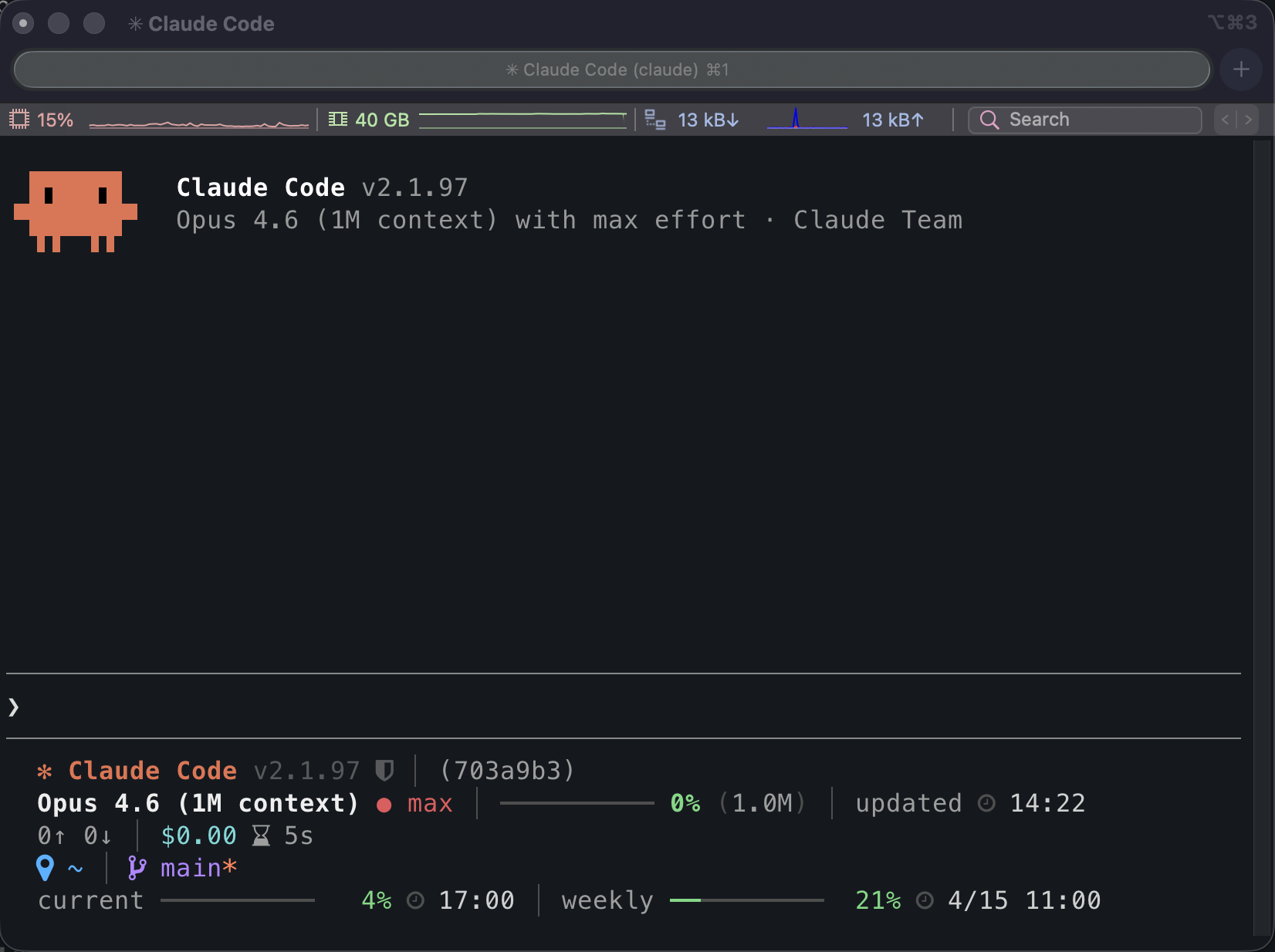
Inside Claude Code
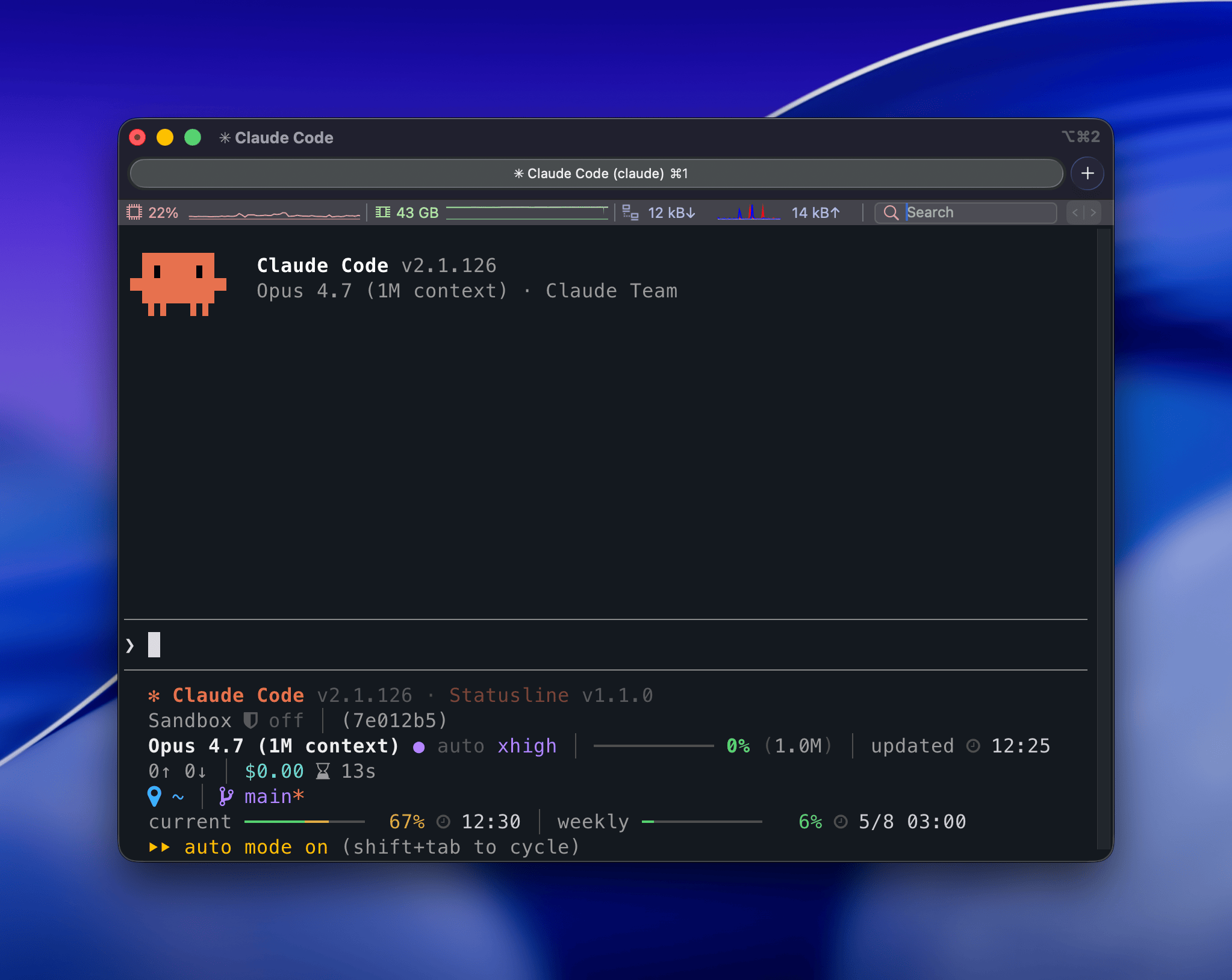
User Guide
Features
- Context usage gradient bar — 4-zone color spectrum from green to red
- Token and cost tracking — input/output tokens, cache hit ratio, session cost
- Session timing — wall-clock and API duration side by side
- Git integration — branch, dirty flag, worktree indicator, diff stats vs main
- Usage limit monitoring — current (5h) and weekly (7d) usage with reset times
- Sandbox indicator — shows whether sandbox mode is off, on, or auto
- Path compression — long paths auto-shorten to fit within 80 columns
- Zero runtime dependencies — Node.js built-ins only
Installation
The Claude Code plugin is the recommended path. The npm install is an alternative. Both write the same statusLine entry to ~/.claude/settings.json.
Claude Code plugin (recommended)
claude plugin marketplace add z80020100/claude-code-statusline
claude plugin install claude-code-statusline@claude-code-statusline
The slash command installs the latest @z80020100/claude-code-statusline from npm and writes the same command: "claude-code-statusline" entry. If npm's global bin directory is not on your PATH, the CLI prints a warning with instructions. Run it inside Claude Code:
/claude-code-statusline:setup
To remove the statusLine entry:
/claude-code-statusline:setup --uninstall
To fully uninstall the plugin and marketplace:
claude plugin uninstall claude-code-statusline@claude-code-statusline
claude plugin marketplace remove claude-code-statusline
npm (alternative)
npm install -g @z80020100/claude-code-statusline
claude-code-statusline setup
This writes command: "claude-code-statusline" (relies on PATH):
{
  "statusLine": {
    "type": "command",
    "command": "claude-code-statusline"
  }
}
To remove:
claude-code-statusline setup --uninstall
Icon Mode
Icons default to plain Unicode symbols for broad terminal compatibility.
Plugin slash command (recommended)
/claude-code-statusline:icons
/claude-code-statusline:icons nerd
/claude-code-statusline:icons unicode
CLI (alternative)
claude-code-statusline icons
claude-code-statusline icons nerd
claude-code-statusline icons unicode
Both write ~/.claude/claude-code-statusline.json. CLAUDE_STATUSLINE_ICONS still takes precedence when set.
Update Check
The banner always shows both Claude Code and Statusline current versions. The update check toggles only control whether → vX.Y.Z appears next to a version when the npm latest tag is newer. Both checks are off by default; each runs in a detached background process at most once per hour and caches the result under ~/.claude/.cache/.
- Claude Code update check — watches
@anthropic-ai/claude-code.
- Statusline self-update check — watches
@z80020100/claude-code-statusline.
Plugin slash command (recommended)
/claude-code-statusline:update-check
/claude-code-statusline:update-check on
/claude-code-statusline:update-check off
/claude-code-statusline:update-check claude on
/claude-code-statusline:update-check claude off
/claude-code-statusline:update-check statusline on
/claude-code-statusline:update-check statusline off
CLI (alternative)
claude-code-statusline update-check
claude-code-statusline update-check on
claude-code-statusline update-check off
claude-code-statusline update-check claude on
claude-code-statusline update-check claude off
claude-code-statusline update-check statusline on
claude-code-statusline update-check statusline off
Both write ~/.claude/claude-code-statusline.json under the updateCheck key. CLAUDE_STATUSLINE_UPDATE_CHECK (1 or true to enable both checks, otherwise disable) still takes precedence when set.
When the indicator surfaces a newer release, upgrade through the path you used to install:
- Claude Code plugin —
claude plugin update claude-code-statusline@claude-code-statusline and restart Claude Code.
- npm —
npm install -g @z80020100/claude-code-statusline@latest.
Display Layout
All fields at maximum width:

The status line renders up to 7 lines — each constrained to 80 visible columns:
| 1 | Version banner: Claude Code and Statusline versions, plus → vX.Y.Z per target when check is on |
| 2 | Sandbox mode, session name and ID |
| 3 | Model name, effort level, context usage bar with percentage, last updated time |
| 4 | Token counts (in/out), cache hit %, cost, session/API duration, lines added/removed, 200K warning |
| 5 | Project directory, git branch, dirty flag, worktree indicator, diff vs main |
| 6 | Current working directory (only when different from project root) |
| 7 | Usage limits — current (5h) and weekly (7d) with reset times |
Color Zones
Context and usage limit bars use a 4-zone gradient:
| 0–49% | Green | Normal |
| 50–69% | Gold | Moderate |
| 70–89% | Coral | Elevated |
| 90–100% | Red | Critical |
Requirements
| Node.js | >= 20 | 18 |
| Claude Code | >= 2.1.80 (for rate_limits field) | |
Developer Guide
How It Works
Claude Code pipes a JSON object to the statusLine command via stdin on each render cycle. The JSON contains the current session state (model, tokens, cost, workspace, usage limits, etc.). This tool parses it and returns ANSI-colored lines to stdout.
Design decisions:
- Zero dependencies — only Node.js built-ins (
fs, path, os, child_process)
- Git caching — branch and diff stats are cached for 5 seconds to avoid repeated subprocess calls
- Settings caching — effort level and sandbox mode use mtime-based caching to skip redundant file reads
- 80-column constraint — enforced by automated tests; long paths are compressed automatically
- 256-color ANSI — consistent rendering across terminals; Claude brand orange uses 24-bit true color
Development
Dev tooling (ESLint 10, lint-staged 16) requires Node >= 20.19. See .nvmrc.
git clone https://github.com/z80020100/claude-code-statusline.git
cd claude-code-statusline
npm install
npm run check
npm run fix
npm test
npm run lint
npm run simulate
CLAUDE_STATUSLINE_ICONS=nerd npm run simulate
npm run ci:local
License
MIT




