流程
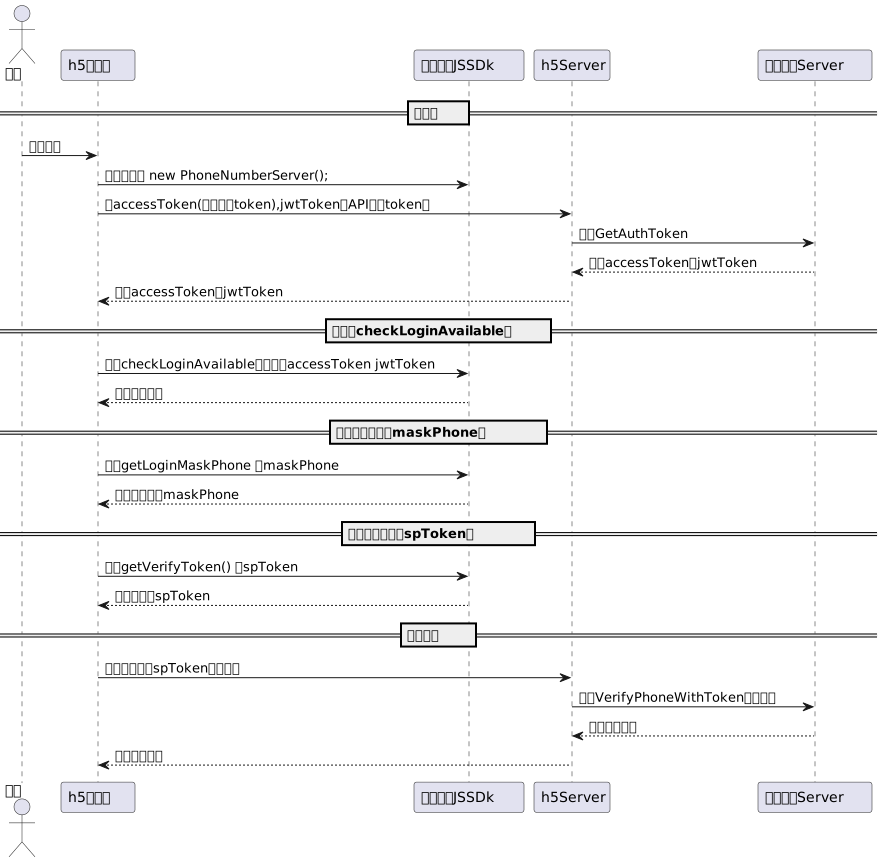
下载安装
npm install aliyun_numberauth_customization_web
接口
初始化实例
var phoneServer = new PhoneServerCustomization();
网络类型检查接口(非必要接口)
接口名
网络类型检查接口,客户可自行选择是否调用,对认证流程无阻碍。
调用示例
var netType =  phoneServer.getConnection();
// console.log(netType);
// netType 的值为 wifi cellular(流量) unknown(未知)
注:
此接口会判断当前用户的网络类型: wifi,cellular(流量),unknown(未知) 。
由于技术手段限制,前端无法准确的获取当前用户的网络类型,未使用流量的用户也无法通过一键登录完成认证。
提前获取到用户的网络类型,拦截掉使用WiFi网络的用户可以及时终止认证流程,节约资源,提升用户的认证体验。所以我们建议,认证前调用此接口,对netType为WiFi的用户及时提醒关闭WiFi或者提供其他认证方式,对于netType为unknown和cellular的用户继续一键登录流程。
一键登录
鉴权接口
接口名
调用示例
phoneServer.checkLoginAvailable({
        accessToken: 'xxxxxxx', // accessToken 服务端接口GetAuthToken返回
        jwtToken: 'xxxxxxxxx', // jwtToken  服务端接口GetAuthToken返回
        timeout: 2,
        callback: (res) => {
          if (res.code === 600000) {
            // 成功 调用获取掩码接口
            return;
          }

          // 失败
       }
});
获取掩码接口
- getLoginMaskPhone
tips: checkLoginAvailable成功(code为600000)调用此接口
调用示例
phoneServer.getLoginMaskPhone({
        timeout: 3, // 超时逻辑 从调用getLoginToken到获取到掩码的超时时间
        callback: (res) => {
          window.console.log(res);
          if (res.code === 600000) {
            // 成功 弹出授权页弹窗
            return;
          }

          // 失败
        }
      });
获取token接口
调用示例
phoneServer.getLoginToken({
        mask: '1234', // 用户输入的中间4位掩码
        timeout: 2, // 超时逻辑 从调用getLoginToken到获取到掩码的超时时间
        callback: (res) => {
          window.console.log(res);
          if (res.code === 600000) {
            // 成功 调用服务端接口 GetPhoneWithToken
            return;
          }

          // 失败
        }
      });
本机号码校验
鉴权接口
接口名
调用示例
phoneServer.checkAuthAvailable({
        accessToken: 'xxxxxxx', // accessToken 服务端接口GetAuthToken返回
        jwtToken: 'xxxxxxxxx', // jwtToken  服务端接口GetAuthToken返回
        timeout: 2,     // 默认2(秒)
        callback: (res) => {
          if (res.code === 600000) {
            // 成功 调用获取token接口
            return;
          }

          // 失败
       }
});
获取token接口
调用示例
phoneServer.getVerifyToken({
        timeout: 3, // 超时逻辑 从调用getLoginToken到获取到掩码的超时时间 默认3(秒)
        callback: (res) => {
          window.console.log(res);
          if (res.code === 600000) {
            // 成功 调用服务端接口 VerifyPhoneWithToken
            return;
          }

          // 失败
        }
      });
运营商协议
中国移动认证服务条款:https://wap.cmpassport.com/resources/html/contract.html
中国联通认证服务条款:https://hs.wosms.cn/protocol/protocol.html
中国电信天翼账号服务条款: https://e.189.cn/sdk/agreement/detail.do?hidetop=true
错误码
| 600000 | 成功的返回code |
| 600004 | 方案号不存在 |
| 600010 | 未知异常 |
| 600015 | 接口超时 |
| 600011 | 获取token失败 |
| 600025 | 接入方身份信息校验失败 |
| 600028 | 入参错误 |
| 600012 | 获取掩码失败 |
| 600013 | 调取获取掩码接口时需先鉴权成功 |
| 600014 | 未查询到掩码,请先调用getLoginMaskPhone接口获取掩码 |




