Anki MCP Server
A Model Context Protocol (MCP) server that enables LLMs to interact with Anki flashcard software through AnkiConnect.

Features
Tools
anki_check_connection - Check whether AnkiConnect is reachableanki_list_decks - List all available Anki decks, optionally with deck IDsanki_create_deck - Create a new Anki deckanki_list_tags - List all tags currently used in the collectionanki_add_note_tags - Add tags to one or more notesanki_remove_note_tags - Remove tags from one or more notesanki_create_note - Create a new noteanki_batch_create_notes - Create multiple notes at onceanki_search_notes - Search for notes using Anki query syntaxanki_get_note_info - Get detailed information about a noteanki_update_note - Update an existing note's fields and/or tagsanki_delete_note - Delete one or multiple notesanki_list_note_types - List all available note typesanki_create_note_type - Create a new note typeanki_get_note_type_info - Get detailed structure of a note typeanki_sync - Trigger AnkiWeb sync; requires {"confirm": true} because a full sync can merge or overwrite local and remote collections. Success means Anki accepted the request, not that AnkiWeb received the data; a blocking dialog in Anki can silently keep the sync queued
Legacy unprefixed tool names such as create_note and list_decks remain callable for existing clients, but new agent integrations should use the anki_* names.
Resources
anki://decks/all - Complete list of available decks with deck IDsanki://tags/all - Complete list of tagsanki://note-types/all - List of all available note typesanki://note-types/all-with-schemas - Detailed structure information for all note typesanki://note-types/{modelName} - Detailed structure information for a specific note type
Prerequisites
- Anki installed on your system
- AnkiConnect add-on installed in Anki
- Node.js 20.11 or newer
Configuration
Install via Desktop Extension (.mcpb)
This repository supports Anthropic Desktop Extensions (MCPB). The easiest way to use this server in Claude Desktop is by installing the packaged .mcpb bundle.
- Generate the
.mcpb file locally using the provided script:
npm run mcpb
- Open Claude Desktop Settings → Extensions and drag the generated
.mcpb file in, then click Install.
This validates manifest.json and outputs a .mcpb archive you can install as above. Learn more about Desktop Extensions in Anthropic's announcement: Desktop Extensions: One-click MCP server installation for Claude Desktop.
Usage with Claude Desktop
Add the server to your claude_desktop_config.json:
{
  "mcpServers": {
    "anki": {
      "command": "npx",
      "args": ["--yes", "anki-mcp-server"]
    }
  }
}
Using Custom AnkiConnect Port
If your AnkiConnect is running on a different port, you can specify it using the --port parameter:
{
  "mcpServers": {
    "anki": {
      "command": "npx",
      "args": ["--yes", "anki-mcp-server", "--port", "8080"]
    }
  }
}
Configuration for Cline
Add the server to your Cline MCP settings file inside VSCode's settings cline_mcp_settings.json
{
  "mcpServers": {
    "anki": {
      "command": "npx",
      "args": ["--yes", "anki-mcp-server"]
    }
  }
}
Using Custom AnkiConnect Port
For Cline, you can also specify a custom port:
{
  "mcpServers": {
    "anki": {
      "command": "npx",
      "args": ["--yes", "anki-mcp-server", "--port", "8080"]
    }
  }
}
Agent Skills (Claude Code)
Install the Anki skill to give Claude Code built-in knowledge of all Anki tools and workflows:
npx skills add nailuoGG/anki-mcp-server@anki
Once installed, Claude Code will automatically use the skill when you ask it to create flashcards, manage decks, or batch import notes.
Note: Do not use the .mcpb packaged version as the MCP server — it outputs Electron metadata to stdout which breaks the MCP stdio protocol. Use npx -y anki-mcp-server instead.
Development
Packaging a Desktop Extension (.mcpb)
Create a distributable Desktop Extension bundle for Claude Desktop:
npm run mcpb
This will build the project and generate a .mcpb archive from the current repository, validating manifest.json. Test by dragging it into Claude Desktop's Extensions settings. Reference: Desktop Extensions: One-click MCP server installation for Claude Desktop.
Publishing to MCP Registry
This server is automatically published to the MCP Registry when a new version is released. The publishing process includes:
- Automated CI/CD: GitHub Actions automatically publishes to both NPM and MCP Registry on successful releases
- Schema Validation: The
server.json file is validated against the MCP schema before publishing
- Version Synchronization: Versions are kept in sync between
package.json, manifest.json, and server.json
- Comprehensive Testing: Multi-version Node.js testing, linting, and validation before publishing
- Beta Support: Automated beta releases for testing new features
Manual Validation
You can validate the MCP server configuration locally:
npm run validate-mcp
This will download the latest MCP schema and validate your server.json file.
Manual Publishing
If you need to publish manually, you can use the MCP Publisher CLI:
curl -L "https://github.com/modelcontextprotocol/registry/releases/download/v1.1.0/mcp-publisher_1.1.0_$(uname -s | tr '[:upper:]' '[:lower:]')_$(uname -m | sed 's/x86_64/amd64/;s/aarch64/arm64/').tar.gz" | tar xz mcp-publisher
chmod +x mcp-publisher
sudo mv mcp-publisher /usr/local/bin/
mcp-publisher login github-oidc
mcp-publisher publish
Setup
npm install
npm run build
- For development with auto-rebuild:
npm run watch
Testing
Run the test suite:
npm test
This executes unit tests for MCP tool schemas, structured tool results, note creation, search/update/delete workflows, and error handling. These tests use mocked AnkiConnect clients; use MCP Inspector with a running Anki instance for manual integration checks.
MCP Evaluations
Read-only agent evaluation assets live in evals/. Load the fixture into a disposable Anki profile, then run the XML questions against the MCP server to verify that agents can discover decks, tags, note type schemas, resources, and structured tool results.
Debugging
Since MCP servers communicate over stdio, we recommend using the MCP Inspector:
npm run inspector
This provides a browser-based interface for:
- Monitoring MCP messages
- Testing tool invocations
- Viewing server logs
- Debugging communication issues
Example Usage
Create a new Anki deck called "Programming"
Create an Anki card in the "Programming" deck with:
Front: What is a closure in JavaScript?
Back: A closure is the combination of a function and the lexical environment within which that function was declared.
- Add a cloze deletion card:
Create a cloze card in the "Programming" deck with:
Text: In JavaScript, {{c1::const}} declares a block-scoped variable that cannot be {{c2::reassigned}}.
Delete note ID 1234567890
- Delete multiple notes at once:
Delete note IDs 1234567890, 9876543210, and 1122334455
Add tags "review" and "mcp" to note IDs 1234567890 and 9876543210
Contributing
- Fork the repository
- Create your feature branch
- Run tests:
npm test
- Submit a pull request
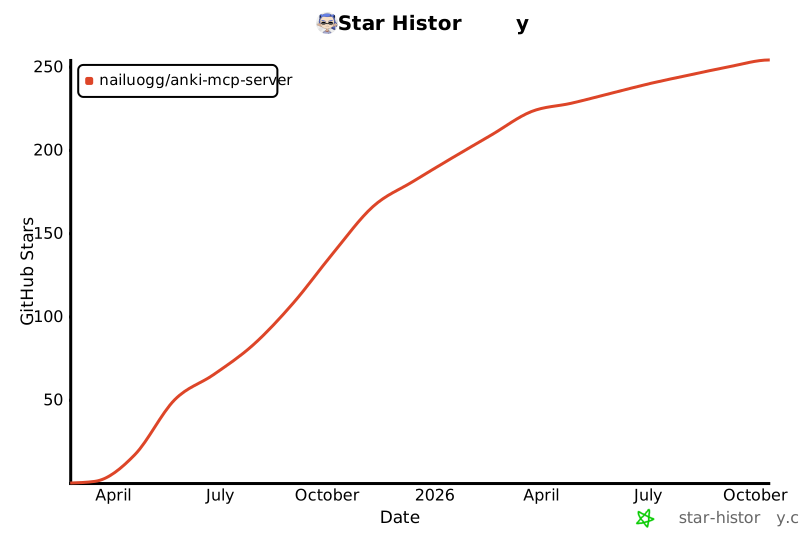
Star History
Credits
Icon courtesy of macOS Icons
License
MIT License - see LICENSE file for details



