Better Auth Studio
⚠️ Beta Version Notice
Better Auth Studio is currently in beta and in early development. You may encounter bugs or incomplete features. Please report any issues you find on our GitHub repository to help us improve the project. Your feedback is greatly appreciated!
A web-based studio interface for managing Better Auth applications. Better Auth Studio provides a comprehensive dashboard for managing users, organizations, teams, and more.
Demo Snapshot
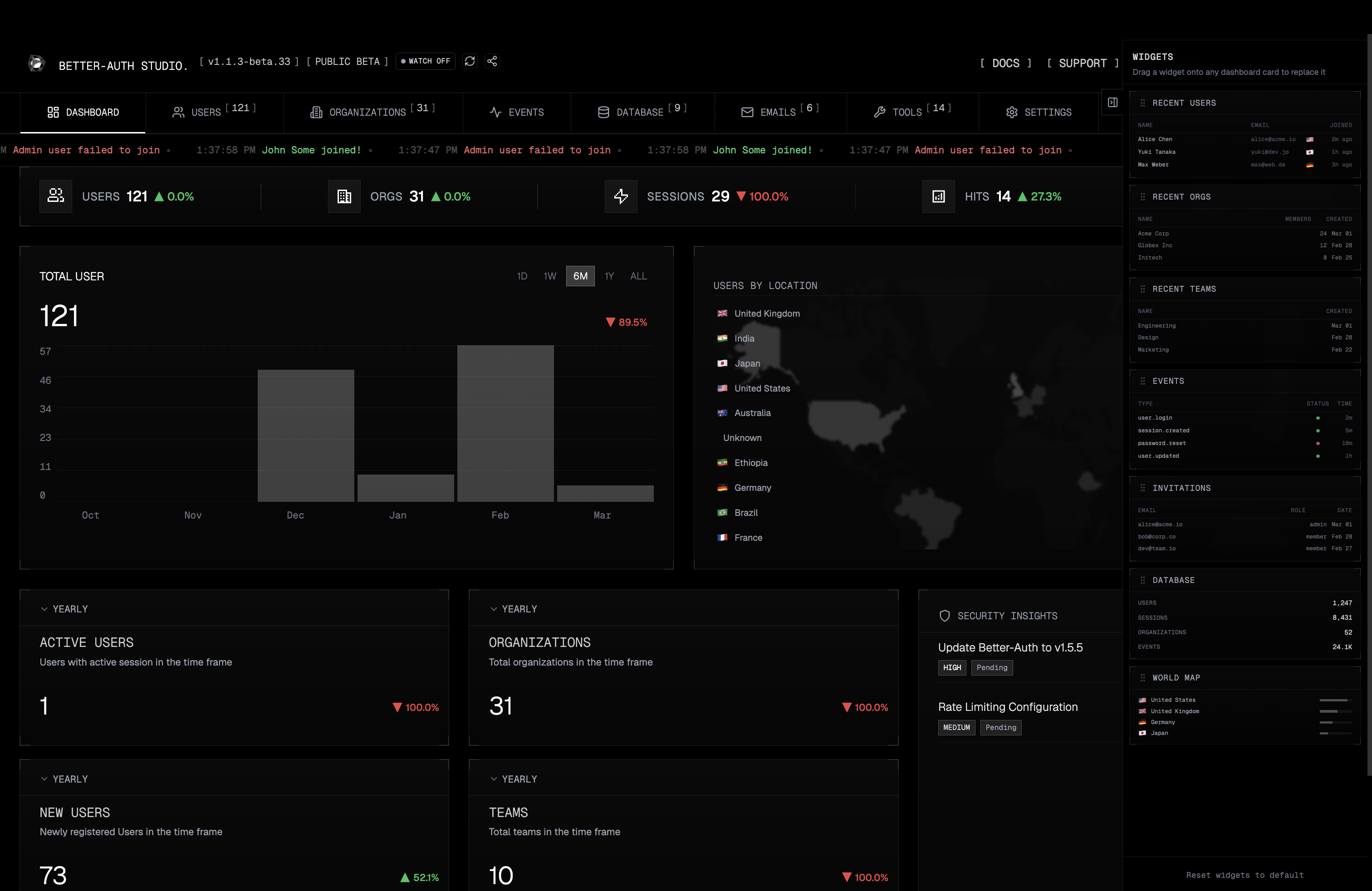
✨ Try Better Auth Studio Demo
You can try a live, demo version of Better Auth Studio here:
👉 https://bt-nextjs.vercel.app/admin
- Login email:
admin@user.com
- Password:
admin@user.com
This online demo lets you explore the admin studio UI. Please note this is a test environment.
🚀 Quick Start
Hosted Version
For the hosted version: better-auth.com
Installation
📖 Documentation
Recommended: Install as a dev dependency (for project-specific versions):
pnpm add -D better-auth-studio
Or install globally using pnpm:
pnpm add -g better-auth-studio
Or use pnpx to run it without installation:
pnpx better-auth-studio [cmd]
Basic Usage
-
Navigate to your Better Auth project directory
cd your-better-auth-project
-
Start the studio
If installed as dev dependency:
pnpm better-auth-studio start
Or with pnpx:
pnpx better-auth-studio start
-
Open your browser
- The studio will automatically open at
http://localhost:3000
- Or manually navigate to the URL shown in the terminal
📋 Prerequisites
Before using Better Auth Studio, ensure you have:
- Node.js (v18 or higher)
- A Better Auth project with a valid
auth.ts configuration file
- Database setup (Prisma, Drizzle, Kysely, or SQLite)
🔧 Configuration
Supported Database Adapters
Better Auth Studio automatically detects and works with:
- Prisma (
prismaAdapter)
- Drizzle (
drizzleAdapter)
- Kysely (
database: { db, type })
- SQLite (
new Database() from better-sqlite3)
- PostgreSQL (via Prisma, Drizzle, or Kysely)
- MySQL (via Prisma, Drizzle, or Kysely)
Example Configuration Files
Prisma Setup
import { betterAuth } from "better-auth";
import { prismaAdapter } from "better-auth/adapters/prisma";
import { PrismaClient } from "@prisma/client";
const prisma = new PrismaClient();
export const auth = betterAuth({
database: prismaAdapter(prisma, {
provider: "postgresql",
}),
});
Drizzle Setup
import { betterAuth } from "better-auth";
import { drizzleAdapter } from "better-auth/adapters/drizzle";
import { db } from "./database";
export const auth = betterAuth({
database: drizzleAdapter(db, {
provider: "pg",
}),
});
Kysely Setup
import { betterAuth } from "better-auth";
import { Kysely, PostgresDialect } from "kysely";
import { Pool } from "pg";
const db = new Kysely<any>({
dialect: new PostgresDialect({
pool: new Pool({
connectionString: process.env.DATABASE_URL,
}),
}),
});
export const auth = betterAuth({
database: {
db,
type: "postgres",
},
});
SQLite Setup
import { betterAuth } from "better-auth";
import Database from "better-sqlite3";
export const auth = betterAuth({
database: new Database("./better-auth.db"),
});
🎯 Features
📊 Dashboard
- Overview statistics - User, teams and organization counts data
👥 User Management
- View all users - Paginated list with search and filtering
- Create users - Add new users with email/password
- Edit users - Update user information, email verification status
- Delete users - Remove users from the system
- Bulk operations - Seed multiple test users
- User details - View user profiles, and accounts
- Last seen - When events are enabled, the studio injects an optional
lastSeenAt field on the user model and updates it on each sign-in or session creation. Run your database migration (e.g. prisma migrate dev, Drizzle push, or a Kysely migration) to add the lastSeenAt column to the user table.
🏢 Organization Management
- View organizations - List all organizations with pagination
- Create organizations - Add new organizations with custom slugs
- Edit organizations - Update organization details
- Delete organizations - Remove organizations
- Team management - Create and manage teams within organizations
- Member management - Add/remove members from teams
- Bulk seeding - Generate test organizations and teams
⚙️ Settings & Configuration
- Plugin status - Check which Better Auth plugins are enabled
- Database configuration - View current database adapter and settings
- Social providers - Configure OAuth providers (GitHub, Google, etc.)
- Email settings - Configure email verification and password reset
🛠️ Command Line Options
Start Studio
pnpx better-auth-studio start [options]
Options:
--port <number> - Specify port (default: 3002)--host <string> - Specify host (default: localhost)--no-open - Don't automatically open browser--config <path> - Path to auth config file (default: auto-detect)--watch - Watch for changes in auth config file and reload server automatically
3002 is just the standalone Studio default so it does not clash with apps that already use 3000. You can run Studio on 3000, 4000, or any other free port.
Examples:
pnpm better-auth-studio start --port 3001
pnpx better-auth-studio start --port 3001
pnpm better-auth-studio start --no-open
pnpm better-auth-studio start --config ./custom-auth.ts
pnpm better-auth-studio start --watch
pnpx better-auth-studio start --port 3001 --watch --config ./src/auth.ts
Using --config Option
Specify a custom path to your auth config file when it's in a non-standard location or auto-detection fails.
Example:
pnpm better-auth-studio start --config ./src/lib/auth.ts
pnpm better-auth-studio start --config /path/to/project/auth.ts
How it works: Studio automatically searches for config files in common locations (auth.ts, src/auth.ts, lib/auth.ts, etc.). Use --config to specify a custom path when needed.
Using --watch Option
Automatically reload the server when your auth.ts file changes. Perfect for development when iterating on your auth configuration.
Example:
pnpx better-auth-studio start --watch
How it works: Monitors your auth config file for changes, automatically restarts the server, and updates the browser UI via WebSocket - no manual refresh needed.
Other Commands
pnpx better-auth-studio --version
pnpx better-auth-studio --help
🏠 Self-Hosting (Beta)
⚠️ Beta Feature: Self-hosting is currently in beta. Please report any issues on GitHub.
Deploy Better Auth Studio alongside your application for production use.
Installation for Self-Hosting
Important: For self-hosting, install better-auth-studio as a regular dependency (not devDependency) since it's required at runtime in production:
pnpm add better-auth-studio
Note: The CLI usage (standalone studio) can be installed as a dev dependency, but self-hosting requires it in dependencies for production deployments.
Docker (Standalone Self-Host)
If you want to run Better Auth Studio in its own container, this repository includes a Docker setup for the standalone CLI server.
This mode is useful when:
- you want a separate admin container
- your Better Auth app already lives in its own repository
- you want Docker-managed
node_modules and package-manager cache volumes
Important: The standalone container still needs your Better Auth project mounted into it, because Studio loads your real auth.ts and studio.config.* files at runtime.
Build the image from this repository:
docker build -t better-auth-studio:self-host .
Run it with Docker Compose:
HOST_PROJECT_PATH=/absolute/path/to/your-better-auth-project \
CONFIG_PATH=./auth.ts \
docker compose -f docker/compose.yml up --build
If your auth config is not at the project root, pass it explicitly:
HOST_PROJECT_PATH=/absolute/path/to/your-better-auth-project \
CONFIG_PATH=./src/lib/auth.ts \
docker compose -f docker/compose.yml up --build
If you already used the older filename, docker/docker-compose.self-host.yml still works too.
What the container does:
- mounts your Better Auth project into
/workspace
- installs project dependencies into Docker volumes on first boot
- starts
better-auth-studio start --host 0.0.0.0 --port 3002 --no-open
Useful environment variables:
HOST_PROJECT_PATH - absolute path to your Better Auth project on the host machineCONFIG_PATH - optional auth config path inside the mounted project, for example ./src/lib/auth.tsPORT - studio port, defaults to 3002WATCH - set to true to enable watch modeAUTO_INSTALL - set to false if your container/project already has dependencies installedPROJECT_INSTALL_CMD - optional custom install command for non-standard setupsGEO_DB_PATH - optional GeoLite database path inside the mounted project
If you change the Studio port, make sure your Better Auth config also trusts that origin when needed. The examples usually include both http://localhost:3000 and http://localhost:3002 for that reason.
If you already embed Studio in your server with the framework adapters below, that remains the recommended production setup. The Docker flow is mainly for running the standalone Studio server in a containerized environment.
Setup
Step 1: Initialize configuration
pnpx better-auth-studio init
This creates a studio.config.ts file:
import type { StudioConfig } from "better-auth-studio";
import { auth } from "./lib/auth";

const config: StudioConfig = {
  auth,
  basePath: "/api/studio",
  metadata: {
    title: "Admin Dashboard",
    theme: "dark",
  },
  access: {
    roles: ["admin"],
    allowEmails: ["admin@example.com"],
    allowIpAddresses: ["127.0.0.1", "::1", "192.168.*"],
    blockIpAddresses: ["203.0.113.45"],
  },
};

export default config;
Next.js (App Router)
The init command automatically creates app/api/studio/[[...path]]/route.ts:
import { betterAuthStudio } from "better-auth-studio/nextjs";
import studioConfig from "@/studio.config";

const handler = betterAuthStudio(studioConfig);

export { handler as GET, handler as POST, handler as PUT, handler as DELETE, handler as PATCH };
Access at http://localhost:3000/api/studio
Express
Add the studio handler to your server:
import express from "express";
import { toNodeHandler } from "better-auth/node";
import { betterAuthStudio } from "better-auth-studio/express";
import { auth } from "./auth";
import studioConfig from "./studio.config";

const app = express();

app.use(express.json());
app.use("/api/studio", betterAuthStudio(studioConfig));
app.all("/api/auth/*", toNodeHandler(auth));

app.listen(3000);
Access at http://localhost:3000/api/studio
Cloudflare Workers
Use the Worker adapter when the Studio shell needs to run in a non-Node runtime. The adapter avoids Node-only imports, serves UI assets from Workers Assets or an asset map, and delegates Studio API routes to an edge-compatible handler.
import { betterAuthStudio } from "better-auth-studio/cloudflare-workers";
import { auth } from "./auth";
type Env = {
ASSETS: { fetch(request: Request): Promise<Response> | Response };
};
const studio = betterAuthStudio<Env>({
auth,
basePath: "/studio",
assets: (env) => env.ASSETS,
apiHandler: async (request) => {
return new Response(JSON.stringify({ error: "Not implemented" }), {
status: 501,
headers: { "Content-Type": "application/json" },
});
},
});
export default {
fetch(request: Request, env: Env, ctx: ExecutionContext) {
return studio(request, env, ctx);
},
};
Access at https://your-worker.example.com/studio
The built-in Studio API router still depends on Node-only modules, so Workers deployments should provide apiHandler for /api/* routes. Better Auth auth routes under /auth/* are delegated to auth.handler when available.
Configuration Options
auth | Yes | Your Better Auth instance |
basePath | Yes | URL path where studio is mounted |
access.allowEmails | No | Array of admin email addresses |
access.roles | No | Array of allowed user roles |
access.allowIpAddresses | No | IP allowlist for Studio requests. Supports exact IPs and wildcard patterns (example: 192.168.*) |
access.blockIpAddresses | No | IP blocklist for Studio requests. Supports exact IPs and wildcard patterns |
ipAddress | No | IP geolocation for Events/Sessions: provider ("ipinfo" | "ipapi"), apiToken, baseUrl, optional endpoint (ipinfo: "lite" | "lookup") |
lastSeenAt | No | Enable last-seen tracking: { enabled: true, columnName?: string } |
metadata | No | Custom branding (title, theme) |
📝 Development
Running from Source
git clone https://github.com/Kinfe123/better-auth-studio.git
cd better-auth-studio
pnpm install
pnpm build
pnpm dev
Contributing
- Fork the repository
- Create a feature branch
- Make your changes
- Add tests if applicable
- Submit a pull request
📄 License
MIT License - see LICENSE file for details.
🤝 Support
If you encounter any issues or have questions:
Search existing issues on GitHub
Create a new issue with detailed information



