






Security News
High-Severity RCE Vulnerability Disclosed in next-mdx-remote
HashiCorp disclosed a high-severity RCE in next-mdx-remote affecting versions 4.3.0 to 5.x when compiling untrusted MDX on the server.
By Sarah Gooding - Feb 12, 2026
bundle-stats
Advanced tools
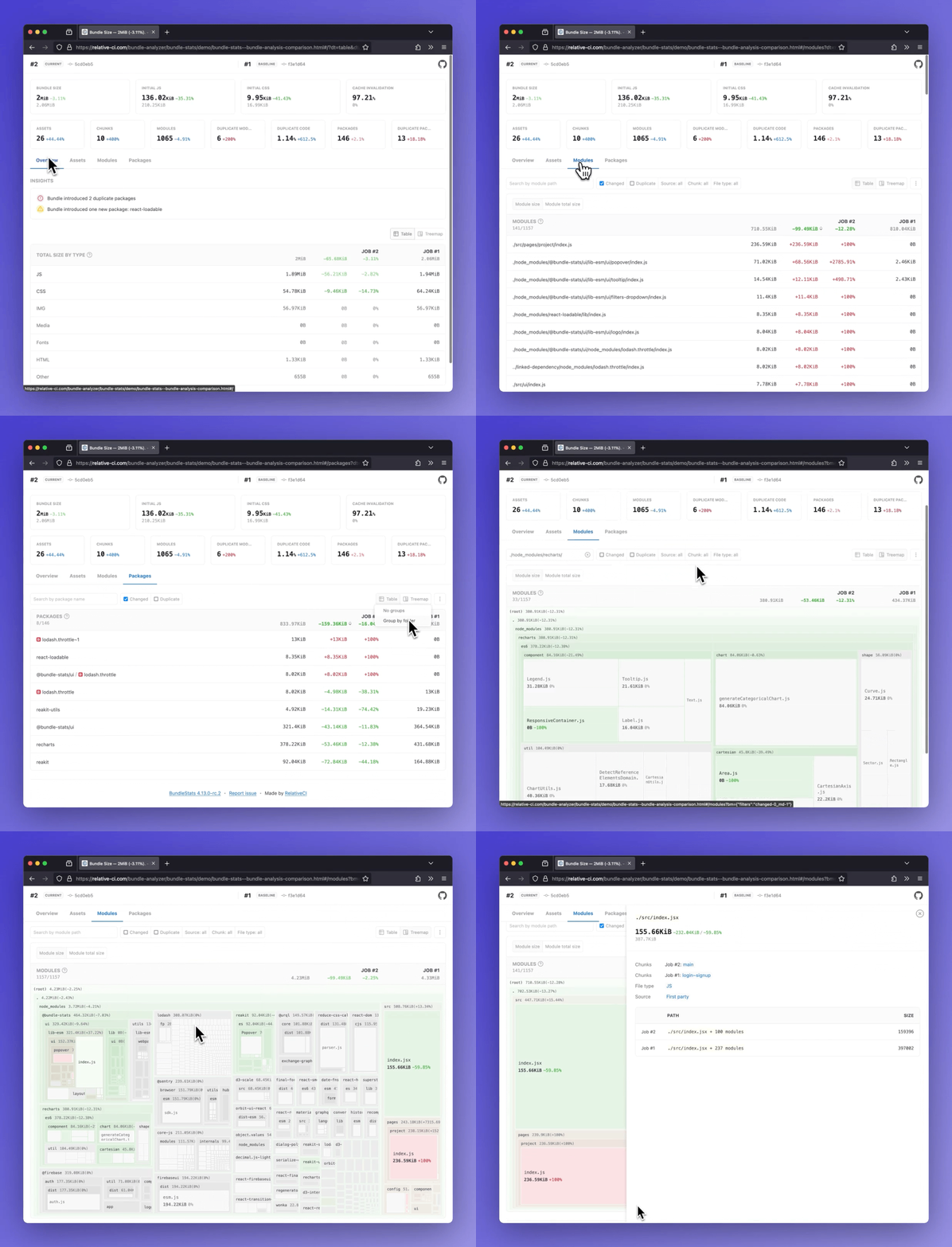
Demos: Bundle analysis comparison· Bundle analysis
Analyze bundle stats(bundle size, assets, modules, packages) and compare the results between different builds. Support for webpack/rspack and vite/rolldown/rollup using rollup-plugin-webpack-stats.





- Bundle size and totals by file type(css, js, img, etc)
- Insights: duplicate packages, new packages
- Initial JS/CSS, Cache invalidation, and other bundle metrics
- Assets report (entrypoint, initial, types, changed, delta)
- Modules report (changed, delta, chunks, duplicate count and percentage)
- Packages report (count, duplicate, changed, delta)
:star: Side by side comparison for multiple builds
npm install -g bundle-stats
or
yarn global add bundle-stats
npm install --dev bundle-stats
or
yarn add --dev bundle-stats
The CLI expects stats files that follow the webpack stats schema. Follow the guides below to learn how to export compatible output from webpack/rspack or from vite/rollup/rolldown.
You can customize the contents of the generated stats file by configuring the webpack stats options:
{
  stats: {
    // required
    assets: true,
    chunks: true,
    modules: true,
    // optional
    builtAt: true,
    hash: true
  }
}
To output the the webpack stats JSON file you can use:
--json option:npx webpack --mode production --json artifacts/webpack-stats.json
Guide & examples: How to output webpack stats using the CLI
webpack-stats-pluginGuide & examples: How to output webpack stats JSON file using webpack-stats-plugin
Guide & examples: How to output stats in Vite
$ bundle-stats -h
Usage: bundle-stats OPTIONS [WEBPACK_STATS_FILE]...

Options:
      --demo               Generate demo reports      [boolean] [default: false]
      --compare            Use local saved stats for comparison
                                                       [boolean] [default: true]
      --baseline           Save current stats as baseline
                                                      [boolean] [default: false]
      --baseline-filepath  Baseline filepath, default:
                           node_modules/.cache/bundle-stats/baseline.json
                                                                        [string]
      --html               Save HTML report            [boolean] [default: true]
      --json               Save JSON data             [boolean] [default: false]
  -d, --out-dir            Output directory                             [string]
  -h, --help               Show help                                   [boolean]
  -v, --version            Show version number                         [boolean]
$ bundle-stats --html --json __fixtures__/webpack-stats-0.json __fixtures__/webpack-stats-1.json
  ✔ Read Webpack stat files
  ✔ Read baseline data
  ↓ Write baseline data [skipped]
    → Not a baseline job (see --baseline).
  ✔ Gather data
  ✔ Generate reports
  ✔ Save reports

┌─────────────────────────────────────────────────┐
│                                                 │
│   Bundle size decreased with 3.06KB (-0.38%).   │
│                                                 │
└─────────────────────────────────────────────────┘

Artifacts saved:
- ./dist/bundle-stats.html
- ./dist/bundle-stats.json
In compare mode, the metrics are compared against an existing(node_modules/.cache/bundle-stats/baseline.json) Webpack stats file(baseline). To generate the baseline webpack stats, use --baseline option:
# Checkout to the branch/tag/commit where you want to generate the baseline
$ git checkout master

# Build your application
$ npm run build

# Run bundle-stats with --baseline option. This will save the baseline data on node_modules/.cache/bundle-stats/baseline.json
$ bundle-stats --baseline artifacts/webpack-stats.json
 ✔ Read Webpack stat files
 ↓ Read baseline data [skipped]
   → Missing baseline stats, see "--baseline" option.
 ✔ Write baseline data
 ✔ Process data
 ✔ Generate reports
 ✔ Save reports

┌─────────────────────────────────────────────────┐
│                                                 │
│   Bundle size decreased with 3.06KB (-0.38%).   │
│                                                 │
└─────────────────────────────────────────────────┘

Artifacts saved:
- ./dist/bundle-stats.html
# Checkout to the working branch/tag/commit
$ git checkout MY_FEATURE_BRANCH

# Build your application
$ npm run build

# Run bundle-stats - the report is going to compare the current data against the generated baseline
$ bundle-stats artifacts/webpack-stats.json
 ✔ Read Webpack stat files
 ✔ Read baseline data
 ↓ Write baseline data [skipped]
   → Not a baseline job (see --baseline).
 ✔ Process data
 ✔ Generate reports
 ✔ Save reports

┌─────────────────────────────────────────────────┐
│                                                 │
│   Bundle size decreased with 3.06KB (-0.38%).   │
│                                                 │
└─────────────────────────────────────────────────┘

Artifacts saved:
- ./dist/bundle-stats.html
The option can be disabled using --no-compare option.
Standalone web application to compare Webpack/Lighthouse/Browsertime stats.
Github Action that generates bundle-stats reports.
bundle-stats-webpack-plugin
Webpack plugin to generate bundle stats report for webpack/rspack.
gatsby-plugin-bundle-stats
Gatsby plugin for bundle-stats.
next-plugin-bundle-stats
Next.js plugin for bundle-stats.
rollup-plugin-bundle-stats
Rollup plugin to generate bundle stats report for vite/rolldown/rollup.
FAQs
In-depth bundle analyzer for webpack(bundle size, assets, modules, packages)
The npm package bundle-stats receives a total of 24,072 weekly downloads. As such, bundle-stats popularity was classified as popular.
We found that bundle-stats demonstrated a healthy version release cadence and project activity because the last version was released less than a year ago. It has 3 open source maintainers collaborating on the project.
Did you know?

Socket for GitHub automatically highlights issues in each pull request and monitors the health of all your open source dependencies. Discover the contents of your packages and block harmful activity before you install or update your dependencies.
Security News
HashiCorp disclosed a high-severity RCE in next-mdx-remote affecting versions 4.3.0 to 5.x when compiling untrusted MDX on the server.

Security News
Security researchers report widespread abuse of OpenClaw skills to deliver info-stealing malware, exposing a new supply chain risk as agent ecosystems scale.

Security News
Claude Opus 4.6 has uncovered more than 500 open source vulnerabilities, raising new considerations for disclosure, triage, and patching at scale.