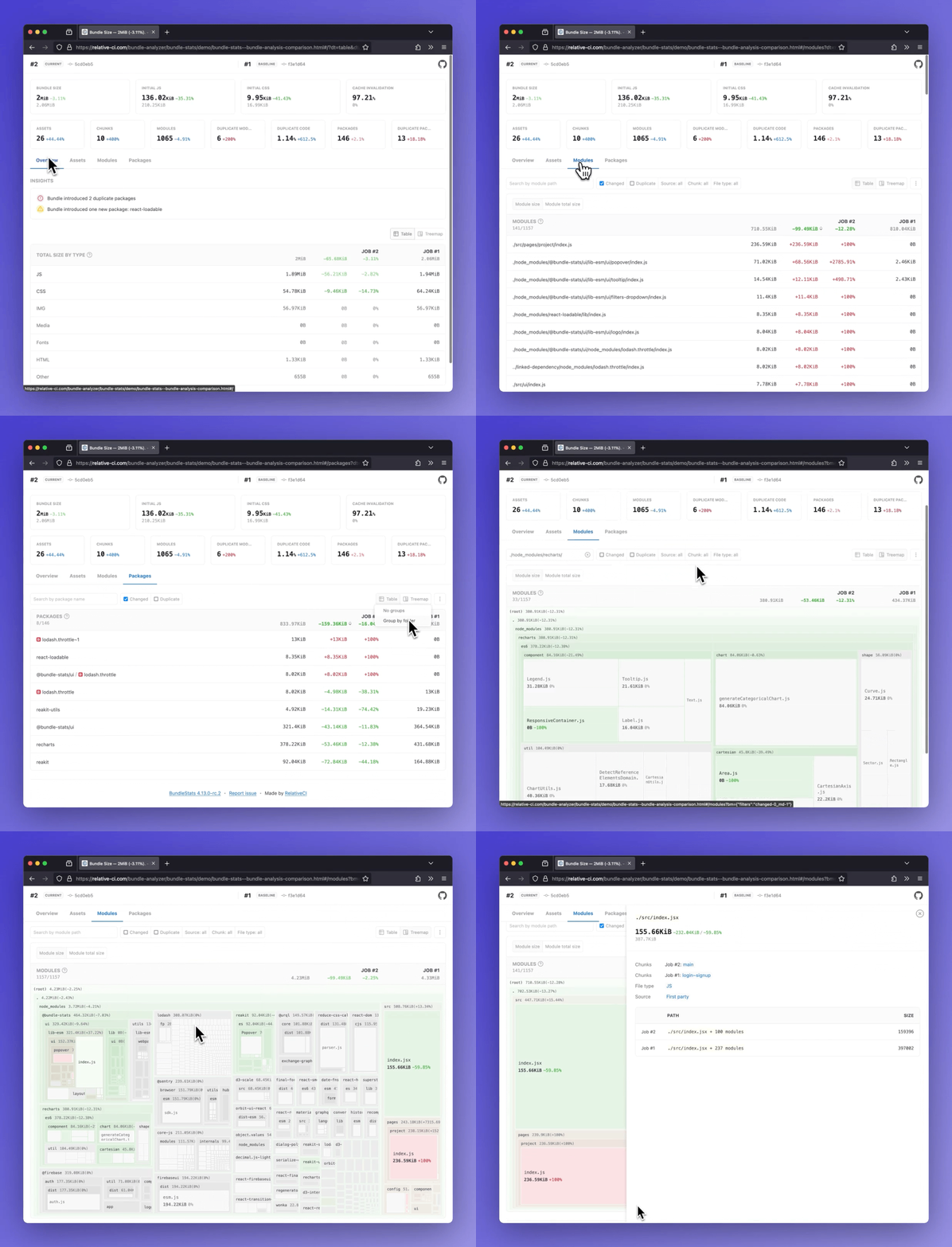
Demos:
Bundle analysis comparison·
Bundle analysis
BundleStats
Analyze bundle stats(bundle size, assets, modules, packages) and compare the results between different builds. Support for webpack/rspack and vite/rolldown/rollup using rollup-plugin-webpack-stats.






- Bundle size and totals by file type(css, js, img, etc)
- Insights: duplicate packages, new packages
- Initial JS/CSS, Cache invalidation, and other bundle metrics
- Assets report (entrypoint, initial, types, changed, delta)
- Modules report (changed, delta, chunks, duplicate count and percentage)
- Packages report (count, duplicate, changed, delta)
:star: Side by side comparison for multiple builds
Table of Contents
Install as global dependency
npm install -g bundle-stats
or
yarn global add bundle-stats
Install as dev dependency
npm install --dev bundle-stats
or
yarn add --dev bundle-stats
Output stats
The CLI expects stats files that follow the webpack stats schema. Follow the guides below to learn how to export compatible output from webpack/rspack or from vite/rollup/rolldown.
webpack/rspack stats
You can customize the contents of the generated stats file by configuring the webpack stats options:
{
stats: {
assets: true,
chunks: true,
modules: true,
builtAt: true,
hash: true
}
}
To output the the webpack stats JSON file you can use:
npx webpack --mode production --json artifacts/webpack-stats.json
Guide & examples: How to output webpack stats using the CLI
2. using webpack-stats-plugin
Guide & examples: How to output webpack stats JSON file using webpack-stats-plugin
Learn more
vite/rollup/rolldown stats
Guide & examples: How to output stats in Vite
Learn more
Usage
$ bundle-stats -h
Usage: bundle-stats OPTIONS [WEBPACK_STATS_FILE]...

Options:
      --demo               Generate demo reports      [boolean] [default: false]
      --compare            Use local saved stats for comparison
                                                       [boolean] [default: true]
      --baseline           Save current stats as baseline
                                                      [boolean] [default: false]
      --baseline-filepath  Baseline filepath, default:
                           node_modules/.cache/bundle-stats/baseline.json
                                                                        [string]
      --html               Save HTML report            [boolean] [default: true]
      --json               Save JSON data             [boolean] [default: false]
  -d, --out-dir            Output directory                             [string]
  -h, --help               Show help                                   [boolean]
  -v, --version            Show version number                         [boolean]
$ bundle-stats --html --json __fixtures__/webpack-stats-0.json __fixtures__/webpack-stats-1.json
  ✔ Read Webpack stat files
  ✔ Read baseline data
  ↓ Write baseline data [skipped]
    → Not a baseline job (see --baseline).
  ✔ Gather data
  ✔ Generate reports
  ✔ Save reports

┌─────────────────────────────────────────────────┐
│                                                 │
│   Bundle size decreased with 3.06KB (-0.38%).   │
│                                                 │
└─────────────────────────────────────────────────┘

Artifacts saved:
- ./dist/bundle-stats.html
- ./dist/bundle-stats.json
Compare mode
In compare mode, the metrics are compared against an existing(node_modules/.cache/bundle-stats/baseline.json) Webpack stats file(baseline). To generate the baseline webpack stats, use --baseline option:
# Checkout to the branch/tag/commit where you want to generate the baseline
$ git checkout master

# Build your application
$ npm run build

# Run bundle-stats with --baseline option. This will save the baseline data on node_modules/.cache/bundle-stats/baseline.json
$ bundle-stats --baseline artifacts/webpack-stats.json
 ✔ Read Webpack stat files
 ↓ Read baseline data [skipped]
   → Missing baseline stats, see "--baseline" option.
 ✔ Write baseline data
 ✔ Process data
 ✔ Generate reports
 ✔ Save reports

┌─────────────────────────────────────────────────┐
│                                                 │
│   Bundle size decreased with 3.06KB (-0.38%).   │
│                                                 │
└─────────────────────────────────────────────────┘

Artifacts saved:
- ./dist/bundle-stats.html
# Checkout to the working branch/tag/commit
$ git checkout MY_FEATURE_BRANCH

# Build your application
$ npm run build

# Run bundle-stats - the report is going to compare the current data against the generated baseline
$ bundle-stats artifacts/webpack-stats.json
 ✔ Read Webpack stat files
 ✔ Read baseline data
 ↓ Write baseline data [skipped]
   → Not a baseline job (see --baseline).
 ✔ Process data
 ✔ Generate reports
 ✔ Save reports

┌─────────────────────────────────────────────────┐
│                                                 │
│   Bundle size decreased with 3.06KB (-0.38%).   │
│                                                 │
└─────────────────────────────────────────────────┘

Artifacts saved:
- ./dist/bundle-stats.html
The option can be disabled using --no-compare option.
Framework specific plugins
Related projects
Automated bundle analysis, reviews and monitoring - Quickly identify and fix bundle regressions before shipping to production.
- :crystal_ball: In-depth bundle stats analysis for every build
- :chart_with_upwards_trend: Monitor bundle stats changes and identify opportunities for optimizations
- :bell: Quick feedback with rule based automated review flow, GitHub Pull Request comments, GitHub check reports, or Slack messages
- :wrench: Support for webpack, vite, rspack, rollup, rolldown
- :hammer: Support for all major CI services(CircleCI, GitHub Actions, Gitlab CI, Jenkins, Travis CI)
- :nut_and_bolt: Support for npm, yarn and pnpm; support for monorepos
- :two_hearts: Always free for Open Source
:rocket: Get started
Standalone web application to compare Webpack/Lighthouse/Browsertime stats.
Compare bundle stats
Github Action that generates bundle-stats reports.
Other packages


Webpack plugin to generate bundle stats report for webpack/rspack.


Gatsby plugin for bundle-stats.


Next.js plugin for bundle-stats.


Rollup plugin to generate bundle stats report for vite/rolldown/rollup.