🚀 Socket Launch Week Day 5:Introducing Repository Access Permissions and Custom Roles.Learn more →

card-flex - npm Package Compare versions
+112
| # :grey_question: how to fully customize your card | ||
| the generated card styling is default, you can fully customize your own card. we're using [chalk](https://github.com/chalk/chalk) and [boxen](https://github.com/sindresorhus/boxen). | ||
| # example 1 | ||
| if you want to change the styling, edit `build.js` file. | ||
| - for example if you want to change box color, you can change this line, \ | ||
| change the `gray` to `red` | ||
| ```diff | ||
| - fs.writeFileSync(path.join(__dirname, 'bin/output'), chalk.gray.bold(boxen(output, options))) | ||
| + fs.writeFileSync(path.join(__dirname, 'bin/output'), chalk.red.bold(boxen(output, options))) | ||
| ``` | ||
| to see the result, you can `build the project` and then `running it` using these steps: | ||
| ``` | ||
| npm run build | ||
| ``` | ||
| ``` | ||
| npm run dev | ||
| ``` | ||
| you will see the result | ||
| <p align="center"> | ||
| <img src="https://github-production-user-asset-6210df.s3.amazonaws.com/6134774/278927132-47f98bc5-ee25-452c-966e-b1c9d5e6535a.png"/> | ||
| </p> | ||
| # example 2 | ||
| you can add/remove the information section by modify the `build.js` file, \ | ||
| find this section | ||
| ```javascript | ||
| const data = { | ||
| name: chalk.green.bold(namecardData.fullname), | ||
| ... | ||
| } | ||
| ``` | ||
| for example, I would like to remove the `website/blog` url from my card. | ||
| - remove this following code | ||
| ```diff | ||
| - handle: chalk.white.bold(namecardData.website), | ||
| - const headingwebsite = `${data.handle}` | ||
| - headingwebsite + | ||
| ``` | ||
| to see the result, you can `build the project` and then `running it` using these steps: | ||
| ``` | ||
| npm run build | ||
| ``` | ||
| ``` | ||
| npm run dev | ||
| ``` | ||
| you will see the result | ||
| <p align="center"> | ||
| <img src="https://user-images.githubusercontent.com/6134774/278934176-68759557-2a13-4638-9575-f0532fc55cef.png"/> | ||
| </p> | ||
| # example 3 | ||
| another example is to add background color on the text. \ | ||
| we will try to add background color on the name section | ||
| - change this line of code | ||
| ```diff | ||
| - name: chalk.green.bold(namecardData.fullname), | ||
| + name: chalk.white.bgRed.bold(namecardData.fullname), | ||
| ``` | ||
| to see the result, you can `build the project` and then `running it` using these steps: | ||
| ``` | ||
| npm run build | ||
| ``` | ||
| ``` | ||
| npm run dev | ||
| ``` | ||
| you will see the result | ||
| <p align="center"> | ||
| <img src="https://user-images.githubusercontent.com/6134774/278935138-5abc6974-bc38-4128-85c2-b41ffafd5493.png"/> | ||
| </p> | ||
| # example 4 | ||
| change the box styling | ||
| - change this line of code | ||
| ```javascript | ||
| const options = { | ||
| padding: 2, | ||
| margin: 2, | ||
| borderStyle: 'round', | ||
| textAlignment: 'center' | ||
| } | ||
| ``` | ||
| into | ||
| ```javascript | ||
| const options = { | ||
| padding: 1, | ||
| margin: 1, | ||
| borderStyle: 'double', | ||
| textAlignment: 'center' | ||
| } | ||
| ``` | ||
| to see the result, you can `build the project` and then `running it` using these steps: | ||
| ``` | ||
| npm run build | ||
| ``` | ||
| ``` | ||
| npm run dev | ||
| ``` | ||
| you will see the result | ||
| <p align="center"> | ||
| <img src="https://user-images.githubusercontent.com/6134774/278935969-0213c78e-ee98-47b4-8788-30e3e3b84527.png"/> | ||
| </p> |
+1
-1
| { | ||
| "name": "card-flex", | ||
| "version": "2.0.0", | ||
| "version": "2.1.2", | ||
| "description": "it's time to flex your name-card.", | ||
@@ -5,0 +5,0 @@ "main": "src/index.js", |
+23
-4
| # card-flex | ||
| https://github.com/depapp/card-flex/assets/6134774/b2e6a840-4f04-45d5-a7e8-dfe25469c377 | ||
| | | | | | ||
| | -------- | -------- | -------- | | ||
| |  | 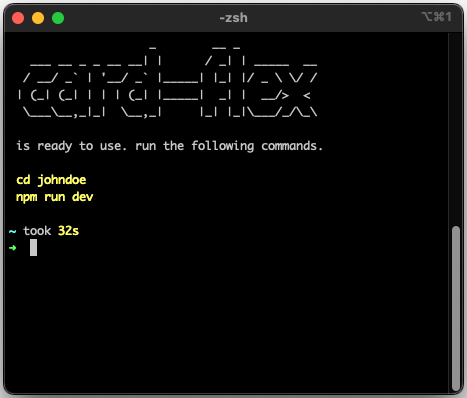 | 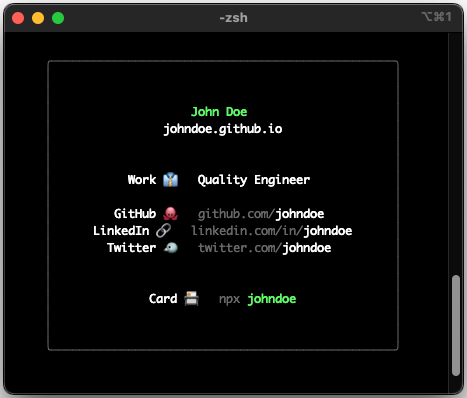 | | ||
| # :clipboard: description | ||
@@ -33,3 +36,3 @@ __card-flex__ is cli tools to generate cli-based name-card. | ||
| ## public on "npmjs" | ||
| next step we will make it public using [npmjs.com](https://www.npmjs.com), so people can access your cli-based name-card by using `npx <your-github-username>`. | ||
| next step we will make it public using [npmjs.com](https://www.npmjs.com), so people can access your cli-based name-card by using `npx <your-github-username>`. \ | ||
| if don't have an account, you need to register it first to [npmjs.com](https://www.npmjs.com/signup), don't forget to `use your github username as npmjs username` | ||
@@ -52,7 +55,14 @@ - open your terminal and login to your `npmjs` | ||
| # :busts_in_silhouette: contributors | ||
| <a href="https://github.com/depapp/card-flex/graphs/contributors"><img src="https://contrib.rocks/image?repo=depapp/card-flex" alt="All the amazing contributors of card-flex"></a> | ||
| --- | ||
| # :hammer_and_wrench: advance usage | ||
| you can fully customize your own card, [click here to learn more](/ADVANCE_USAGE.md) | ||
| --- | ||
| # :framed_picture: showcase | ||
| show me your-own card-flex by posting it on this [showcase your card](https://github.com/depapp/card-flex/discussions/categories/showcase-your-card) | ||
| --- | ||
| # :muscle: support me | ||
@@ -62,1 +72,10 @@ <a href="https://www.nihbuatjajan.com/depapp" target="_blank"><img src="https://d4xyvrfd64gfm.cloudfront.net/buttons/default-cta.png" alt="Nih buat jajan" style="height: 51px !important;" ></a> | ||
| <a href="https://saweria.co/depapp" target="_blank"><img src="https://github-production-user-asset-6210df.s3.amazonaws.com/6134774/278801090-c4efd5c9-c0a7-43dc-9ea1-c21bc1a55203.png" width="20%" height="20%"></a> | ||
| <a href="https://www.paypal.me/depapp" target="_blank"><img src="https://www.paypalobjects.com/digitalassets/c/website/marketing/apac/C2/logos-buttons/optimize/44_Yellow_PayPal_Pill_Button.png"></a> | ||
| --- | ||
| # :handshake: thanks to | ||
| this project was inspired by [Tierney Cyren](https://github.com/bnb) and [Okafor Irene](https://github.com/Irene-24) | ||
| --- |
No alert changes
Improved metrics
- Total package byte prevSize
19540
22.05%- Number of package files
15
7.14%- Number of lines in readme file
79
31.67%No dependency changes