Circular Natal Horoscope JS
By horoscope, we're talking about the astrological birth charts. Not horoscope readings or interpretations.
I'm hoping to avoid commonly used labels like "Western" or "Hellenistic", but these are very much the circular charts you see in eur-asian based astrology traditions and not the charts in Chinese or Vedic traditions.
Example Chart:
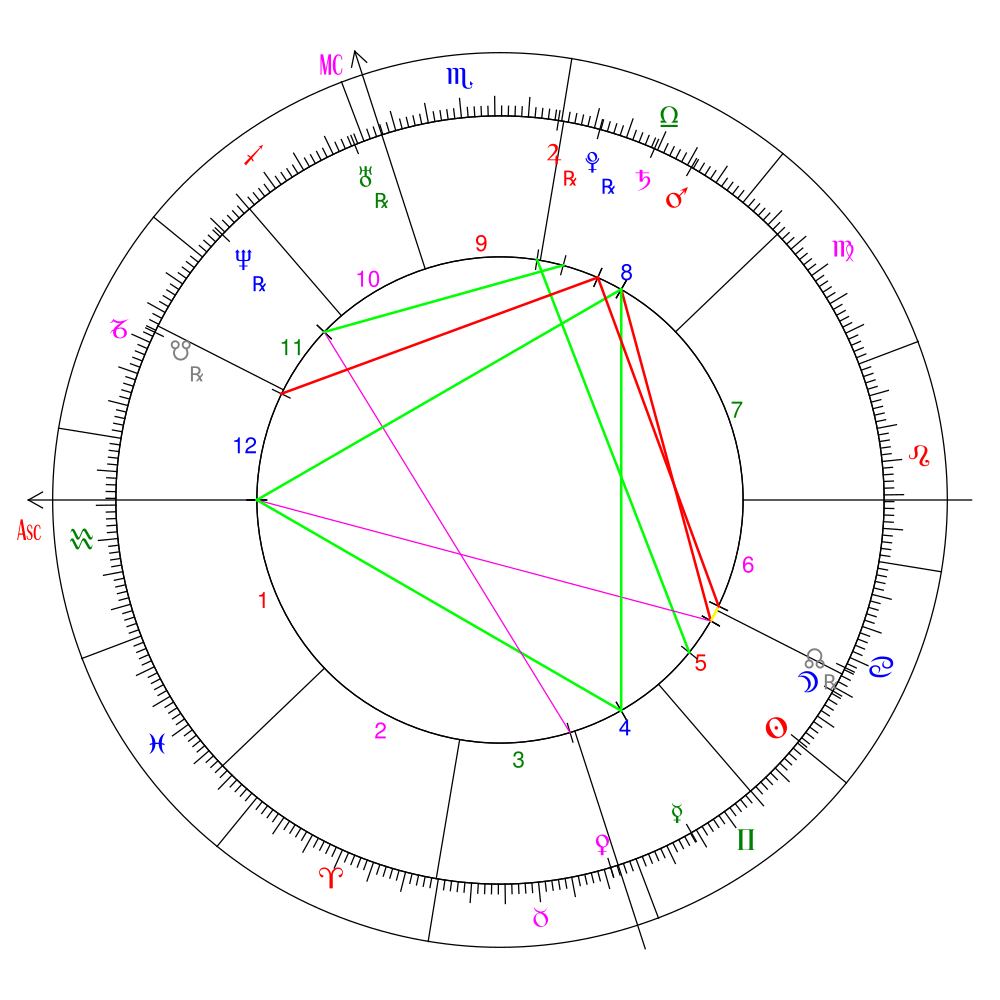
The goal is to provide a library which will allow someone to:
-
Enter a calendar date + time and latitude/longitude coordinates for a position on the planet Earth.
-
And receive Javascript results which can be used to interface with a separate frontend library (maybe this one https://github.com/Kibo/AstroChart or a custom one) for creating the actual charts.
This package now works with typescript projects!
Current Features
Given a date/time/point of origin...
- Allows user to switch between Tropical and Sidereal zodiacs when constructing calculations.
- Calculates the major angles (
ascendant and Midheaven (MC)) in relation to the point of origin
- Calculates the positions for all major bodies (
Sun, Moon, Mercury, Venus, Mars, Jupiter, Saturn, Uranus, Neptune, Pluto) in relation to the point of origin
- Calculates the positions of the north/south Lunar Nodes and Lilith in relation to the point of origin
- Notes whether a planet is in retrograde at the given date/time
- Provides the cusps of each house in relation to the point of origin within multiple house systems.~~ (Placidus, Koch, Topocentric, Regiomontanus, Campanus, Whole Sign, and Equal House added.)
- Provides the cusps of each astrological sign in relation to the point of origin
- Provides a configurable list containing all the computed major and minor aspects of all bodies / points / angles
- Provides a way to extend this library with other language and deliver language-specific labels and names within the results.
Future work
=> Positions of the lots (Fortune, Spirit, Eros, etc)
=> I'm open to requests for house systems. I'm currently stopped at 6 - we have 2 "modern" systems (Topocentric, Koch), 3 "medieval" systems (Placidus, Regiomontanus, Campanus), and 2 "ancient" systems (Whole Sign, Equal House). My formula resource "An Astrological House Formulary" by Michael P. Munkasey has many more house formulas I can implement if wanted. Hopefully I covered the most popular ones.
Implementation / Use
import { Origin, Horoscope } from "circular-natal-horoscope-js";
const origin = new Origin({
year: 2020,
month: 11,
date: 1,
hour: 16,
minute: 30,
latitude: 40.0,
longitude: -70.0,
});
- Configure your horoscope results
import { Origin, Horoscope } from "circular-natal-horoscope-js";
const horoscope = new Horoscope({
origin: new Origin({...}),
houseSystem: "whole-sign",
zodiac: "tropical",
aspectPoints: ['bodies', 'points', 'angles'],
aspectWithPoints: ['bodies', 'points', 'angles'],
aspectTypes: ["major", "minor"],
customOrbs: {},
language: 'en'
});
2b. (optional) Set custom orb degrees for aspects. Default orbs are found in ./src/constants.js
import { Origin, Horoscope } from "circular-natal-horoscope-js";


const customOrbs = {
      conjunction: 8,
      opposition: 8,
      trine: 8,
      square: 7,
      sextile: 6,
      quincunx: 5,
      quintile: 1,
      septile: 1,
      "semi-square": 1,
      "semi-sextile": 1,
    };


const horoscope = new Horoscope({
      origin: new Origin({...}),
      houseSystem: "whole-sign",
      zodiac: "tropical",
      aspectPoints: ['bodies', 'points', 'angles'],
      aspectWithPoints: ['bodies', 'points', 'angles'],
      aspectTypes: ["major", "minor"],
      customOrbs: customOrbs,
      language: 'en'
    });
import { Origin, Horoscope } from "circular-natal-horoscope-js";
const horoscope = new Horoscope({...})
horoscope.Angles = {
all: [...],
ascendant: {...},
midheaven: {...}
}
horoscope.Ascendant = {...}
horoscope.Aspects = {
all: [...],
points: {
ascendant: [...],
sun: [...],
moon: [...],
},
types: {
conjunction: [...],
opposition: [...]
}
}
horoscope.CelestialBodies = {
all: [...],
sun: {...},
moon: {...}
}
horoscope.CelestialPoints = {
all: [...],
northnode: {...},
}
horoscope.Houses = [
...12
]
horoscope.Midheaven = {
...
}
horoscope.SunSign = {
...
}
horoscope.ZodiacCusps = [
...12
]
Interpreting ChartPositions:
You'll frequently see a ChartPosition class in your results for house cusps, zodiac cusps, bodies, etc. This class should give you everything you need to orient and place the cusp / body onto your circular natal chart. It provides a set of points for the object to place it along the horizon or the ecliptic.
The horizon is typically understood to be the inner circle on the natal chart. The Ascendant is commonly located at 0 degrees along the horizon circle.
The ecliptic is understood to be the outer circle on the natal chart. The start of Aries is always at 0 degrees along this circle.
const mercury = {
...,
ChartPosition: {
Horizon: {
ArcDegrees: {degrees: 0, minutes: 0, seconds: 0}
ArcDegreesFormatted: "0° 0' 0''"
ArcDegreesFormatted30: "0° 0' 0''"
DecimalDegrees: 0
},
Ecliptic: {
ArcDegrees: {degrees: 180, minutes: 38, seconds: 2}
ArcDegreesFormatted: "180° 38' 2''"
ArcDegreesFormatted30: "0° 38' 2''"
DecimalDegrees: 180.634
}
}
}
Installation
If installing from source, clone this repo load the main file found at dist/index.js.
This package is also hosted on NPM
Install it with:
npm i circular-natal-horoscope-js --save

// or yarn

yarn add circular-natal-horoscope-js
Development
Install node modules
npm install

// or

yarn install
Then run
yarn start:dev
and any changes you make should be reflected in dist/demo.html if you open the file in a browser.
Run tests with
npm test

// or

yarn test
Building
This package uses webpack to produce a javascript bundle. If modifying this code, a new bundle can be built with the following command:
npm run build

// or

yarn run build
Demo
A small HTML implementation demo is provided.
To view, build the demo files locally with:
npm run build:demo
and then open demo/dist/demo.html in a browser.
Please Note: The demo chart is just used as an visual example of what the library can do and isnt part of the core library. The chart uses code from this repo: https://github.com/Kibo/AstroChart.
Adding new languages
You can see how English and Spanish tokens are implemented in src/utilities/language.js. Copy the tokens for 1 language and add it to a key matching the ISO language code you want. Then, when you generate the horoscope, pass this code into the constructor:
new Horoscope({ language: "es" });
and your language will appear in the results under the .label keys supplied within Sign, Aspect, Planet, House objects.
Publishing / Packaging
I recommend doing a github release first and then testing this package locally before publishing to npm!
You can test a package from a github release by adding the following to any project dependencies:
"git+https://github.com/0xStarcat/CircularNatalHoroscopeJS.git#<tag or commit>"
- update the version number in
package.json
- Build with
npm run build and commit to branch
- run
npm publish
Sources / Special Thanks
- All formula for astronomical and astrological calculations are cited in the codebase.
- Special thanks to Mivion for their javascript implementation of Moshier's ephemeris https://github.com/mivion/ephemeris
- and to xErik for their work converting it into a module https://github.com/xErik/ephemeris-moshier/
- and Moshier for creating and sharing their C implementation of an ephemeris
- "Astronomical Algorithims" by Jean Meeus
- "An Astrological House Formulary" by Michael P. Munkasey
- "Dividing the Heavens" by Leonard Williams




