

Security News
upm Launches as a Fast, Tiny Package Manager Written in TypeScript
upm uses Node.js to deliver fast npm installs in about 250 KB, with a JavaScript API and security defaults.
By Sarah Gooding - Sep 29, 2026
claude-console
Advanced tools
Local web dashboard to browse and resume your Claude Code sessions, with per-session cost and token data.



A local web dashboard for browsing and resuming your Claude Code sessions.
npx claude-console
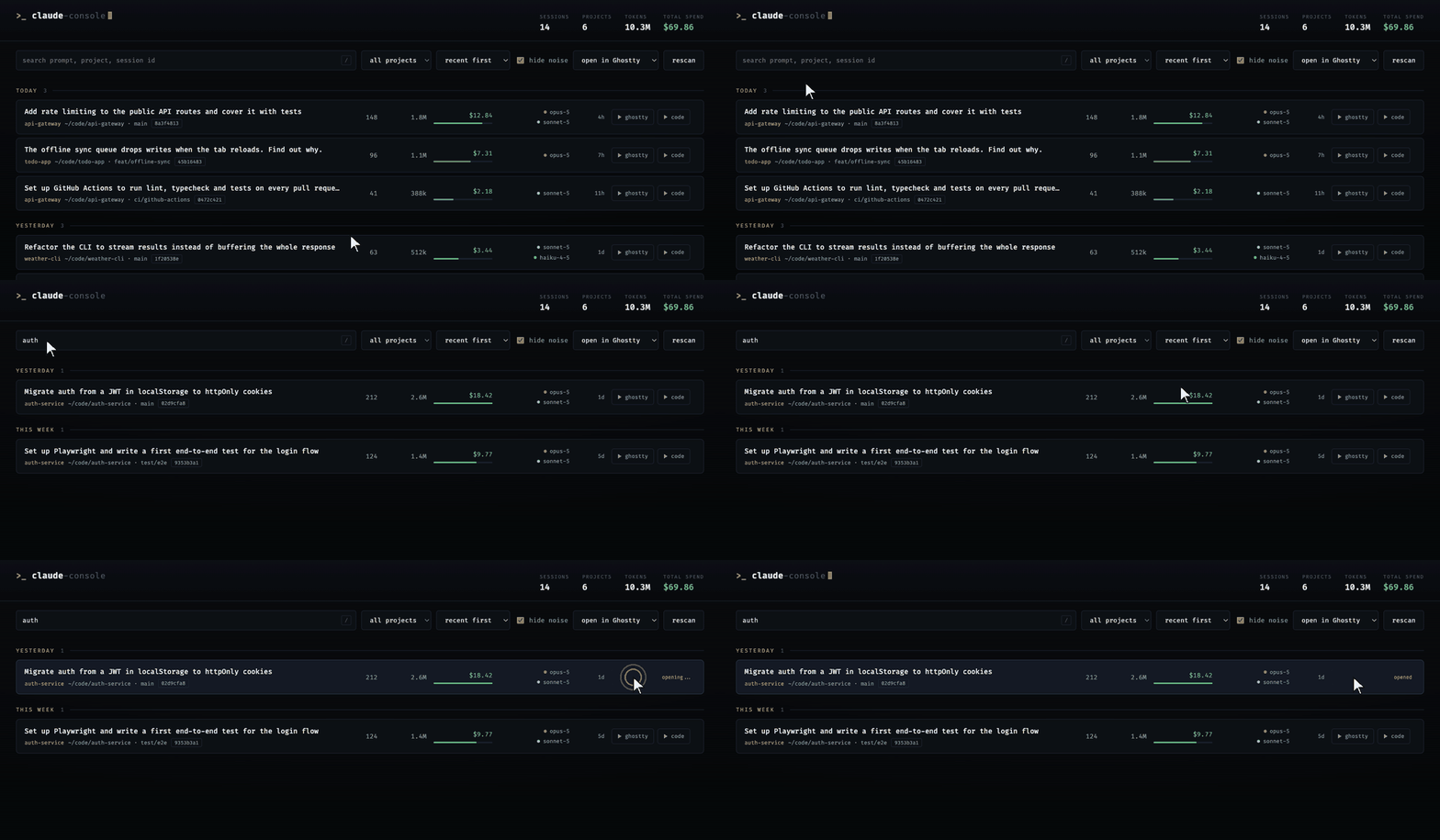
Claude Code keeps every session as a transcript on disk, but gives you no way to look back through them. This reads those transcripts and puts them in one list: the prompt you opened with, the project, the branch, how many messages, how many tokens, what it cost, and which models ran. Click a row and the session reopens in your terminal, already resumed.
Everything runs on your machine. There is no login and no API key, the server binds to
127.0.0.1, it has no dependencies, and it sends nothing anywhere.
Screenshots use a generated demo session set, not real data.
open and AppleScript)~/.claude/projects/-.npx claude-console
Then open http://127.0.0.1:5959. Use a different port with --port 6060 or
PORT=6060.
To run it from a clone instead:
git clone https://github.com/Sahilll15/claude-console.git
cd claude-console
node server.mjs
The first scan reads every transcript, roughly 8 seconds for 400 sessions. After that
the index is cached and the list is instant. Sessions created while the server is
running appear when you hit rescan.
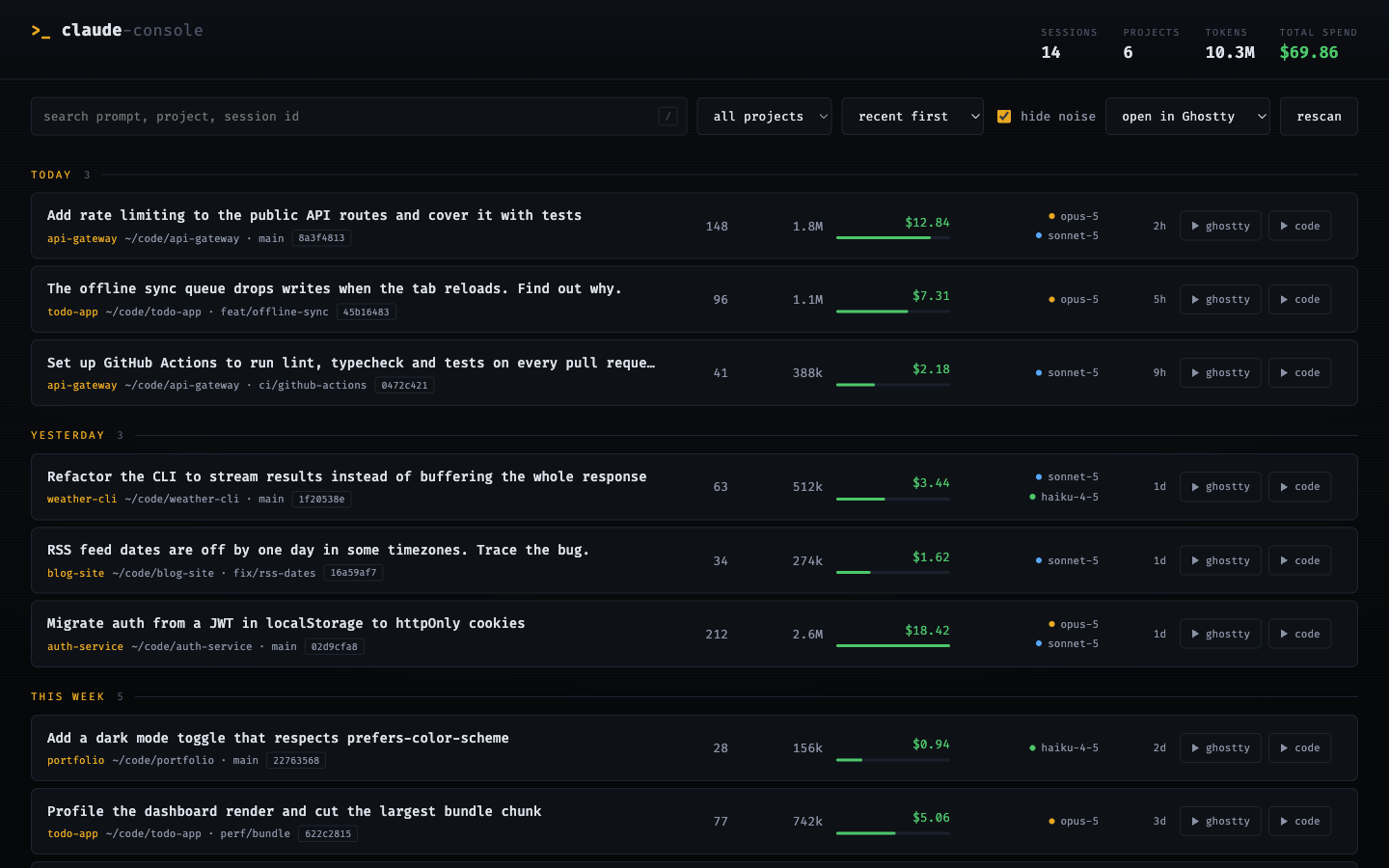
Each row starts with the first prompt you typed, so you can recognise a session by what you were trying to do. Under it are the project, working directory, git branch, and a short session id. To the right: message count, tokens, cost, the models used as a coloured dot per family, and time since the last activity.
The green bar under each cost is scaled against the most expensive session on screen, so the costly ones stand out without reading any numbers. Under the default sort, rows are grouped into today, yesterday, this week, this month, and earlier.
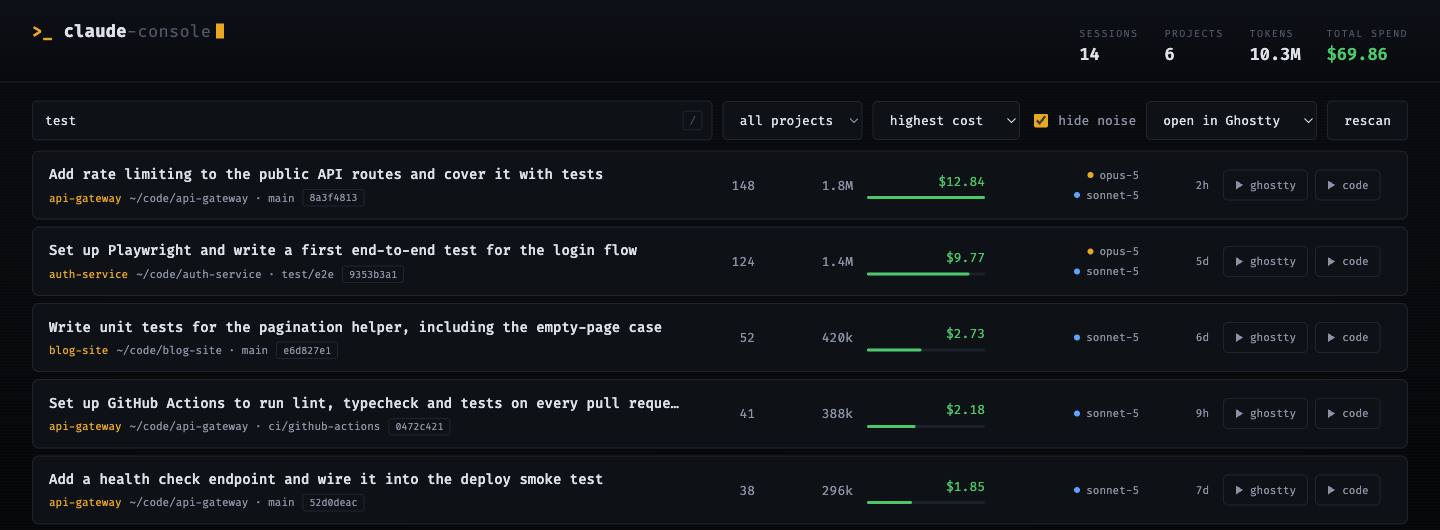
hide noise is on by default and drops empty and internal sessions. Untick it to see
everything./ to jump to the search box, Escape to clear it.Filters are written to the URL, so a view you like survives a reload and can be bookmarked.
claude --resume <id>. The toolbar dropdown picks which app it uses: it detects
Ghostty, iTerm2, and Terminal.app, and remembers your choice.code button opens the project in VS Code and copies the resume command to your
clipboard. VS Code cannot start a resumed CLI session itself, so paste it into the
integrated terminal.There is no login, no API key, and no account. Claude Code already writes every session to disk as it happens, and this reads those files. Nothing leaves your machine.
One folder per working directory, with the path flattened into the folder name, and one JSON Lines file per session, named by its session id:
~/.claude/projects/-Users-you-code-api-gateway/
    44c8347f-e96c-4952-a93a-805e9dd70f42.jsonl
Every line is one event. The ones the list is built from carry these fields:
cwd, gitBranch, timestamp, type, isMeta, sessionId, message{role, content}
server.mjs is a single dependency-free Node HTTP server. On the first request to
/api/sessions it walks ~/.claude/projects/*/*.jsonl and streams each file line by
line, pulling out the working directory, branch, first real user prompt, and message
count. Streaming rather than reading whole files matters here: a year of sessions can run
well past a gigabyte.
It scans every line instead of trusting the first, because the records are not uniform. A
transcript can open with a marker line that carries no cwd at all.
Cost and tokens are not in the transcripts. Those come from ccusage session --json,
which reads the same files, totals them per session, and gets merged in by session id.
That is why the columns show - without ccusage: it is a separate local tool, not a
service this talks to.
Point it at a different directory with CLAUDE_CONFIG_DIR:
CLAUDE_CONFIG_DIR=~/some-other-claude-dir npx claude-console
POST /api/open validates the session id against the index before launching anything,
then opens Terminal.app or iTerm2 through AppleScript, or Ghostty through
open -na Ghostty.app, running claude --resume <id> in that session's directory.
Which is the other reason nothing here needs credentials: the resumed session is Claude Code authenticating as itself, one level down. This never sees a token.
The frontend is one index.html with no build step.
The server binds to 127.0.0.1, so it is not reachable from your network. It has no
authentication of its own, on the assumption that anything running as you can already
read ~/.claude.
The practical consequence: while it runs, any local process can read
http://127.0.0.1:5959/api/sessions, and with it your prompts. On a single-user laptop
that grants nothing that reading the transcripts directly would not. On a shared machine,
stop the server when you are not using it.
Every push and pull request runs Snyk in CI, and again weekly to catch newly disclosed
issues in code that has not changed. Two checks: a dependency scan, and static analysis
over server.mjs and index.html. Both fail the build on high severity or above.
The dependency scan currently has nothing to find, since this ships zero dependencies. It is wired up so the first dependency added gets scanned automatically.
Running it yourself needs a Snyk account:
snyk auth
snyk code test
| What you see | Why |
|---|---|
Cost and tokens show - | ccusage is not on PATH. Install it with npm i -g ccusage. |
A row says (empty session) | The transcript has no user prompt, usually an aborted or tool-only run. hide noise hides these. |
Terminal opens but claude is not found | The binary is resolved once at startup. Restart the server after installing or moving Claude Code. |
Port 5959 is in use | Start it on another port with --port 6060. |
Save this as ~/Library/LaunchAgents/com.claude-console.plist, correcting the two paths
for your clone and your Node install, then run
launchctl load ~/Library/LaunchAgents/com.claude-console.plist.
<?xml version="1.0" encoding="UTF-8"?>
<!DOCTYPE plist PUBLIC "-//Apple//DTD PLIST 1.0//EN" "http://www.apple.com/DTDs/PropertyList-1.0.dtd">
<plist version="1.0">
<dict>
  <key>Label</key><string>com.claude-console</string>
  <key>ProgramArguments</key>
  <array>
    <string>/usr/local/bin/node</string>
    <string>/Users/YOU/claude-console/server.mjs</string>
  </array>
  <key>RunAtLoad</key><true/>
  <key>KeepAlive</key><true/>
</dict>
</plist>
MIT
FAQs
Local web dashboard to browse and resume your Claude Code sessions, with per-session cost and token data.
The npm package claude-console receives a total of 0 weekly downloads. As such, claude-console popularity was classified as not popular.
We found that claude-console demonstrated a healthy version release cadence and project activity because the last version was released less than a year ago. It has 1 open source maintainer collaborating on the project.
Security News
upm uses Node.js to deliver fast npm installs in about 250 KB, with a JavaScript API and security defaults.

Company News
Socket is joining the OpenJS Security Stewardship Program to fund Node.js vulnerability research, maintainer remediation, and security releases.

Security News
Two compromised GitHub Actions were re-enabled with malicious tags intact, exposing thousands of downstream repositories to Mini Shai-Hulud.