

Company News
AWS Security Hub Adds Socket for Supply Chain Security
Socket is now in the AWS Security Hub Extended plan. Adopt it through AWS, apply committed spend, and block malicious open source packages.
By Feross Aboukhadijeh - Aug 04, 2026
Codex 1UP equips your Codex CLI coding agent with powerful tools.
@openai/codex)rg, fd, fzf, jq, yq, ast-grep, bat, git, git-delta, gh (GitHub CLI)balanced / safe / yolocodex-1up update, tools, and skills commands for ongoing maintenance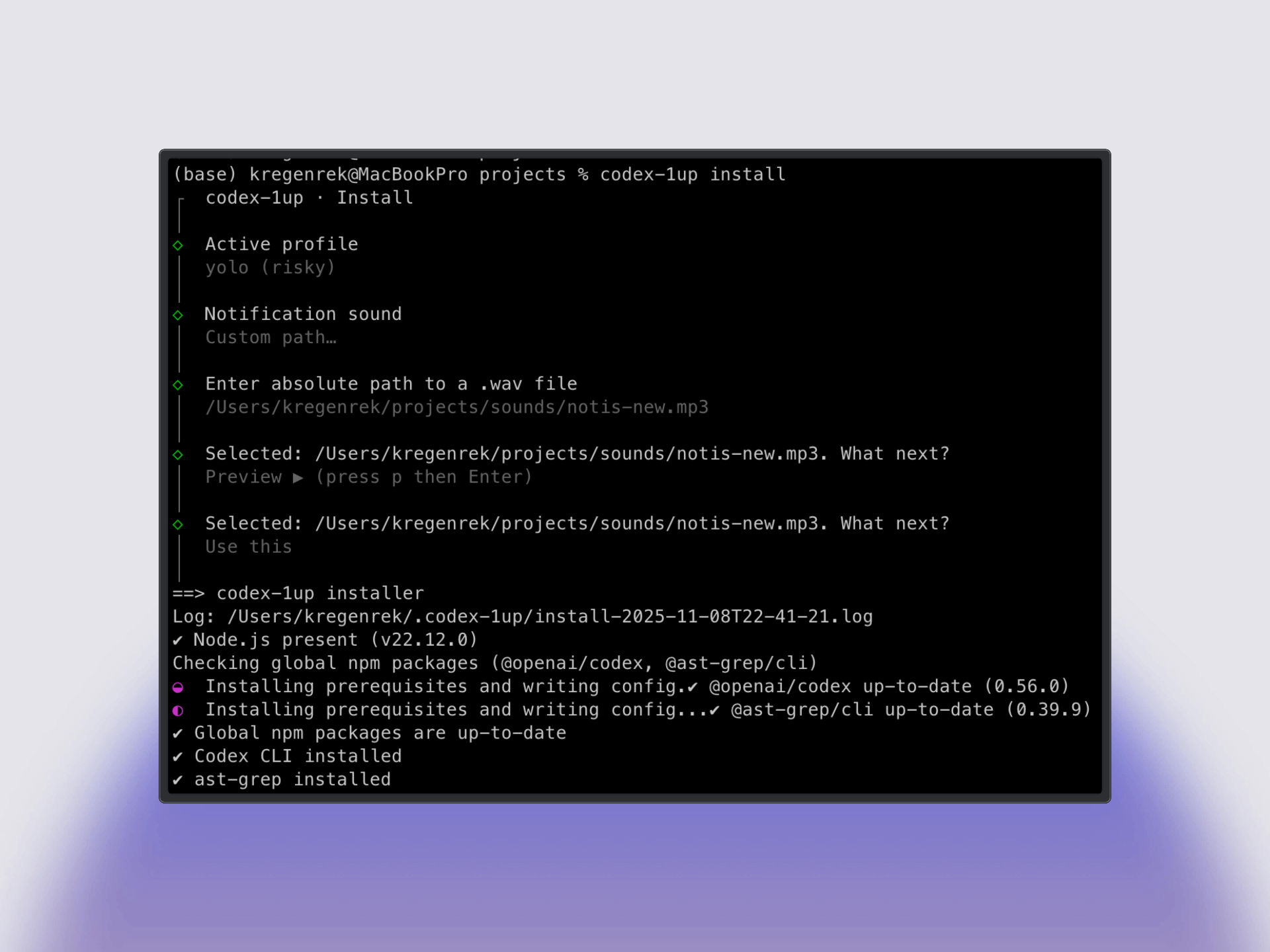
# Quick install (no global install needed)
npx -y codex-1up install
# Or install globally (recommended for repeated use)
npm install -g codex-1up
codex-1up install
# Or install via Homebrew (macOS/Linux)
brew install regenrek/tap/codex-1up
codex-1up install
codex to sign in and start using the agent! 🎉⚠️ Security Warning:
codex-1uphelps you set up Codex CLI, but use caution with theyoloprofile. Theyoloprofile grants full system access and can modify any file on your computer. If you're unsure what you're doing, use the defaultbalancedprofile or the standard Codex install. Always review changes before approving them.
| Component | Why it matters |
|---|---|
| @openai/codex | The coding agent that can read, edit, and run your project locally. |
| ast-grep | Syntax‑aware search/replace for safe, large‑scale refactors in TS/TSX. |
| fd | Fast file finder (gitignore‑aware). |
| ripgrep (rg) | Fast text search across code. |
| fzf | Fuzzy‑finder to select among many matches. |
| jq / yq | Reliable JSON/YAML processing on the command line. |
| bat | Better cat with syntax highlighting. |
| git | Version control CLI (required for many workflows). |
| git-delta | Better git diff output formatting. |
| gh | GitHub CLI for repo and PR workflows (installed/updated by codex-1up in the tools step). |
| ~/.codex/config.toml | Single template with multiple profiles. Active profile is chosen during install (default: balanced). See Codex config reference. |
| AGENTS.md | Minimal per‑repo rubric; installer can also create global ~/.codex/AGENTS.md. |
| ~/.codex/skills | Optional bundled Agent Skills (portable folders with SKILL.md + scripts/references). |
| ~/.codex/notify.sh | Notification hook script with customizable sounds for Codex events (default: noti_1.wav). |
| Profile | Model | Sandbox | Description |
|---|---|---|---|
| balanced (default) | gpt-5.3-codex | workspace-write | Approvals on-request; web search on. Standard for everyday use. |
| safe | gpt-5.3-codex | read-only | Approvals untrusted; web search off. Maximum security for critical repos. |
| yolo | gpt-5.3-codex | danger-full-access | Never ask for approvals; high reasoning; optimized for long autonomous sessions. ⚠️ Warning: Grants full system access. |
Switch profiles anytime: codex --profile <name> for a session, or codex-1up config set-profile <name> to persist.
You can keep a global guidance file at ~/.codex/AGENTS.md that Codex will use across projects. During install, you'll be prompted to create this; if you skip, you can create it later:
# Create the directory if needed and write the template there
mkdir -p ~/.codex
codex-1up agents --path ~/.codex
# This writes ~/.codex/AGENTS.md
See memory behavior with AGENTS.md in the official docs: Memory with AGENTS.md.
codex-1up can install bundled skills into ~/.codex/skills. During install you can choose None, pick specific skills, or install all. Skills are portable folders containing SKILL.md plus optional scripts and references.
# Primary install flow (interactive wizard by default)
codex-1up install

# Self-update codex-1up
codex-1up update

# Tool management
codex-1up tools list
codex-1up tools install rg,fd
codex-1up tools install all
codex-1up tools doctor

# Bundled skills
codex-1up skills list
codex-1up skills install debug-lldb
codex-1up skills install all
codex-1up skills refresh

# Configuration helpers
codex-1up config profiles
codex-1up config set-profile balanced
./bin/codex-1up doctor
./bin/codex-1up uninstall
Note: This project is idempotent—running it again will skip what's already installed. It won't remove packages on uninstall; it cleans up files under ~/.codex (backups are retained).
sudo access (or running as root) to install tools. If sudo is not available or fails, the installer will skip tool installations gracefully with a warning message.--shell auto|zsh|bash|fish : shell to configure aliases for--vscode EXT_ID : install a VS Code extension (e.g. openai.codex)--agents-md [PATH] : write a starter AGENTS.md to PATH (default: $PWD/AGENTS.md)--no-vscode : skip VS Code extension checks--install-node nvm|brew|skip : how to install Node.js if missing (default: skip)--codex-cli yes|no : install/upgrade Codex CLI (default: yes on macOS/Linux)--tools all|skip|<comma-separated> : install/update tools: rg, fd, fzf, jq, yq, ast-grep, bat, git, git-delta, gh (default: all on macOS/Linux)--profile balanced|safe|yolo|skip : profile to write (default: balanced)--profile-mode add|overwrite : profile merge strategy (default: add)--skills all|skip|<comma-separated> : install bundled skills into ~/.codex/skills (default: skip)--dry-run : print what would happen, change nothing--skip-confirmation : suppress interactive prompts--yes : non-interactive, accept safe defaults (CI). Most users don't need this.For contributors and advanced users:
git clone https://github.com/regenrek/codex-1up
cd codex-1up

# Use the wrapper to run the same flow as the global CLI
./bin/codex-1up install

# Or run the CLI package directly in dev
corepack enable && pnpm i && pnpm build
node ./bin/codex-1up.mjs install
MIT — see LICENSE.
FAQs
TypeScript CLI for codex-1up (citty-based)
The npm package codex-1up receives a total of 7 weekly downloads. As such, codex-1up popularity was classified as not popular.
We found that codex-1up demonstrated a healthy version release cadence and project activity because the last version was released less than a year ago. It has 1 open source maintainer collaborating on the project.
Did you know?

Socket for GitHub automatically highlights issues in each pull request and monitors the health of all your open source dependencies. Discover the contents of your packages and block harmful activity before you install or update your dependencies.
Company News
Socket is now in the AWS Security Hub Extended plan. Adopt it through AWS, apply committed spend, and block malicious open source packages.

Research
/Security News
Popular npm packages keyv and cacheable compromised.

Security News
A misconfiguration gave three Anthropic models internet access, and one, believing it was in a simulation, shipped a credential-stealing package to PyPI.