Coding Agent Harness

English | 简体中文 | 日本語 | 한국어 | Français | Español | Deutsch

An open-source, document-native, ready-to-use Agent Harness for keeping Codex, Claude Code, Gemini CLI, and other coding agents clear, transparent, and reviewable during long-running software work.

At A Glance
Coding Agent Harness is not another collection of chat prompts. It turns the durable facts that coding agents need into repository files: entry agreements, task plans, execution evidence, regression results, dashboards, and closeout records.
Requires Node.js 24 or newer.
The smallest loop is:
- A human states the goal, and the agent reads the repository Harness first.
- The agent follows Diagnose → Decide → Scaffold → Configure → Verify → Deliver.
- The CLI and Dashboard expose status, risk, migration plans, and review evidence.
- The next agent resumes from repository facts instead of previous chat memory.

What It Is
Coding Agent Harness is a project engineering framework for AI coding agents.
It adds working agreements, document structure, task lifecycle, regression evidence, and review loops directly into your repository so agents can read, execute, update, and verify the project from durable local facts.
Why It Exists
Generating a few thousand lines of code with AI is not the hard part. The hard part is keeping the agent oriented after days of work, preventing parallel agents from overwriting each other, and letting a new agent continue from repository facts instead of chat memory.
Coding Agent Harness turns those facts into part of the project.
Core Strengths
Open Source, Simple, Ready To Use
Harness runs as ordinary project files: Markdown, templates, check scripts, static dashboard snapshots, and an optional local dynamic Workbench. The core package has no third-party runtime dependencies and does not require a background service or database. When a human needs web actions, harness dev starts a temporary localhost-only workbench.
Give the installation prompt to your agent, and it can initialize, scan, migrate, and verify the target project.
Compatible With Coding Agents
Any agent that can read files, write files, and run commands can use this Harness. It works with Codex, Claude Code, Gemini CLI, Cursor-style agents, OpenClaw, and similar coding agents.
Recommended Models
This Harness is opinionated about model choice. For execution work, the project
recommends GPT 5.5 because strong instruction following matters more than raw
code generation breadth for task creation, evidence updates, review submission,
and closeout discipline.
Claude Opus models are recommended as review models. They can be useful for
reading plans, challenging implementation quality, and finding risks, but they
are not the preferred primary executor for this Harness because their
instruction following is weaker and they are less proactive about updating
Harness documentation and task materials.
Other model families are not recommended for operating this Harness, including
Gemini, Grok, DeepSeek, GLM, and similar models. They may be able to read and
write the files mechanically, but the project does not recommend relying on them
for Harness-governed task execution.
Document-Native And Transparent
Important project state stays visible in the repository:
- what the current task is
- why it matters
- how it should be executed
- where the evidence is
- whether regression passed
- what residual risks remain
- which tasks are complete and which still need work
Humans can read briefs, dashboards, and migration reports. Agents can read structured docs, task contracts, and check results.
Built For Long-Running Work
Harness covers the continuity layer of real development: task lifecycle, Brief, Execution Strategy, Visual Map, Progress Log, Review, Regression Evidence, Closeout, and Lessons.
It gives each agent step context, evidence, and a finish condition.
Reusable Presets For Task Families
A preset is a versioned, declarative task method package. It does not install a
new agent and it does not replace the Harness. It packages how your team wants a
repeatable kind of work to start: required inputs, shared references, artifacts,
review expectations, validation commands, evidence files, and the first files an
agent must read before coding.
Use presets when a group of tasks share the same workflow. For example, a backend
API change may always require a staging deploy runbook, interface smoke tests,
fixture data, PR checklist, and rollback notes. A frontend task may always need a
browser or Playwright regression path. Instead of re-explaining that chain in
every prompt and hoping the agent remembers it, put the chain in a preset and
create each task with harness new-task --preset <preset-id> ....
This is the difference between a Skill and a preset: a Skill helps an agent know
how to do something when it is invoked; a preset makes that method part of every
task created for that work family. Good presets turn repeated human operating
habits into task structure, so later agents inherit the same standards without a
long chat preamble.
Harness ships bundled presets, harness init seeds them into the target project,
and teams can add project-local presets under .coding-agent-harness/presets/.
This dotdir is a preset overlay exception: operational task state lives under
coding-agent-harness/, while preset packages keep their existing overlay root
so user and project preset precedence remains stable across upgrades.
The preset-creator Skill is for authoring these preset packages; the Harness
CLI is what checks, installs, lists, and applies them.
See Preset Development for how to
decide what belongs in a preset and how to validate one.
Default task and module templates come from the installed npm package at command
runtime. Target projects should not treat planning/**/_task-template or
planning/**/_module-template directories as active state; v2 structure
migration removes those generated legacy template directories when it finds
them.
Modules are registered in the root harness.yaml under modules.items.
harness module register creates only the module-owned brief.md and
module_plan.md, then regenerates planning/modules/Module-Registry.md as a
read-only view. Task execution files such as execution_strategy.md,
visual_map.md, review.md, and walkthrough.md are created under concrete
project or module task directories, including
planning/modules/<key>/tasks/<task-id>/.
Safe Migration For Existing Projects
Legacy project migration starts with a scan, a migration plan, a recommended migration mode, and user confirmation. Only then should the agent write files. Final status is proven with a dashboard and checks.
Good Fit
Coding Agent Harness is useful for:
- teams using coding agents on real software projects;
- projects that run for days, weeks, or many iterations;
- work involving multiple agents or multiple developers;
- repositories with historical task docs, regression records, or migration notes;
- teams that want AI development to be visible, reviewable, and reusable.
Quick Start
Install The Skills
If your agent supports Skills, inspect this repository's Skill entries with npx.
Because the repository has a root Skill plus nested Skills, use --full-depth
when you want to see or install preset-creator:
npx skills add FairladyZ625/coding-agent-harness --list --full-depth
npx skills add FairladyZ625/coding-agent-harness --skill coding-agent-harness
npx skills add FairladyZ625/coding-agent-harness --skill preset-creator --full-depth
Use the Skills separately:
coding-agent-harness: for installing, migrating, operating, and reviewing a Harness inside a target project.preset-creator: for authoring reusable Harness preset packages when a family of tasks shares a method, external references, artifacts, evidence requirements, or complex-task skeleton overlays. This Skill includes its own Complex Task skeleton reference, so an agent can build a correct preset without already knowing Harness internals.
Install a Skill into the global Codex skill directory:
npx skills add FairladyZ625/coding-agent-harness \
  --skill coding-agent-harness \
  --agent codex \
  --global \
  -y
For the Preset Creator Skill:
npx skills add FairladyZ625/coding-agent-harness \
  --skill preset-creator \
  --full-depth \
  --agent codex \
  --global \
  -y
The CLI is not automatically added to the target project's dependencies. Use npx when you need to run Harness commands. The first run downloads the package into the local npm cache; it does not write to the target project:
npx --yes coding-agent-harness init --locale zh-CN --capabilities core,dashboard .
npx --yes coding-agent-harness dev .
npx --yes coding-agent-harness check --profile target-project .
If you want to use harness as a long-lived system command, install it globally:
npm install -g coding-agent-harness
harness --help
The npm install seeds bundled presets into ~/.coding-agent-harness/presets/.
harness init also seeds those presets into the target project at
.coding-agent-harness/presets/, so agents can discover stable task methods
with harness preset list --json.
The .coding-agent-harness/presets/ location is intentionally retained for
preset overlays; it is not a legacy task-state directory.
Agents must not silently run a global install. They may run npm install -g coding-agent-harness only after the user explicitly approves changing the global npm environment. Without that approval, keep using npx --yes coding-agent-harness ....
Harness State Location
By default, harness init and harness migrate-structure --apply write active
Harness state under coding-agent-harness/ in the target project:
coding-agent-harness/harness.yaml
coding-agent-harness/planning/tasks/
coding-agent-harness/governance/
Checks and dashboards are not tied to that exact folder name. A project can keep
Harness state in a custom project-relative directory by placing harness.yaml
there and declaring the same path in structure.harnessRoot. For example:
version: 2
locale: zh-CN
capabilities:
  - core
  - dashboard
structure:
  harnessRoot: .project-control/harness-state
  planningRoot: .project-control/harness-state/planning
  tasksRoot: .project-control/harness-state/planning/tasks
  governanceRoot: .project-control/harness-state/governance
  generatedRoot: .project-control/harness-state/governance/generated
After that, these are equivalent when the manifest is unique under the project:
npx --yes coding-agent-harness status --json /path/to/project
npx --yes coding-agent-harness status --json /path/to/project/.project-control/harness-state
Commands For Humans
Initialize a Chinese Harness:
npx --yes coding-agent-harness init --locale zh-CN --capabilities core,dashboard .
Start the local dynamic Workbench:
npx --yes coding-agent-harness dev .
The Workbench includes a Presets view for checking, installing, seeding, and
uninstalling project or user presets. Static dashboards show the same preset
catalog as read-only evidence.
Generate a static Dashboard that can be opened offline:
npx --yes coding-agent-harness dashboard --out-dir tmp/harness-dashboard .
open tmp/harness-dashboard/index.html
Run target-project checks:
npx --yes coding-agent-harness check --profile target-project .
Prompt For Agents
Send this to the agent inside your target project:
Install and read Coding Agent Harness first:

npx skills add FairladyZ625/coding-agent-harness --skill coding-agent-harness

First check whether this environment has the harness command.

If it does not, do not silently install globally. Ask me first:
"This environment does not have the harness command. May I run npm install -g coding-agent-harness?
This changes the global npm environment and then lets you use harness directly.
If you do not approve, I will use npx --yes coding-agent-harness ... temporarily and will not write to project dependencies."

Only after I explicitly approve, run:
npm install -g coding-agent-harness
harness preset list --json

If I do not approve or do not respond, run CLI commands with:
npx --yes coding-agent-harness <command>

Set up Coding Agent Harness in the current project.
Use Chinese templates by default. If the project is clearly an English team or English documentation project, ask me before switching to English.

First diagnose the project structure, then give me an initialization plan.
If this is a microservice, multi-repo, split frontend/backend, or externally integrated project, proactively ask me whether I have external architecture docs, API docs, diagrams, meeting notes, links, source paths, or exported packets.
If the external material is large, create an external-source-packs index and digests first, then project stable conclusions into coding-agent-harness/context/{architecture,development,integrations}.
After confirmation, execute Diagnose → Decide → Scaffold → Configure → Verify → Deliver.
When initializing, run:
npx --yes coding-agent-harness init --locale zh-CN --capabilities core,dashboard .
npx --yes coding-agent-harness preset list --json .

After initialization, use the dynamic web UI for daily viewing and human confirmations:
npx --yes coding-agent-harness dev .

If you only need an offline evidence snapshot, generate a static dashboard:
npx --yes coding-agent-harness dashboard --out-dir tmp/harness-dashboard .

Do not overwrite existing business docs, historical tasks, regression records, or user changes.
When finished, report created files, check results, and recommended next steps.
If the target already has an older Harness, use this:
Install and read Coding Agent Harness first:

npx skills add FairladyZ625/coding-agent-harness --skill coding-agent-harness

First check whether this environment has the harness command.

If it does not, do not silently install globally. Ask me first:
"This environment does not have the harness command. May I run npm install -g coding-agent-harness?
This changes the global npm environment and then lets you use harness directly.
If you do not approve, I will use npx --yes coding-agent-harness ... temporarily and will not write to project dependencies."

Only after I explicitly approve, run:
npm install -g coding-agent-harness
harness preset list --json

If I do not approve or do not respond, run CLI commands with:
npx --yes coding-agent-harness <command>

This project already has an older Harness. Do not edit files yet.

First run a detailed scan and give me a migration plan:
1. Check git status, Harness status, task count, brief coverage, visual_map coverage, warnings/actions/residuals, strict status, and dashboard usability.
2. If this is a microservice, multi-repo, split frontend/backend, or externally integrated project, proactively ask me for external source material; when the material is large, create an external-source-packs index and digests before projecting facts into context/{architecture,development,integrations}.
3. Recommend the migration mode from project evidence:
   - baseline-preserve: safe adoption first; only add necessary structure and visibility.
   - status-aware-rewrite: rewrite current or reopened tasks from SSoT, Ledger, progress, review, and git evidence.
   - full-semantic-rewrite: rewrite task briefs / execution_strategy / visual_map so the old project becomes v1.0-readable.
4. Report the recommended mode, rationale, expected write scope, estimated token/time cost, risks, and whether subagents are needed.
5. Ask me the confirmation questions you need, then wait for my confirmation before writing files.

During the scan phase, run at least:
npx --yes coding-agent-harness status --json .
npx --yes coding-agent-harness migrate-plan --json --limit 1000 .
npx --yes coding-agent-harness migrate-structure --plan --json .

After I confirm the migration mode, apply the directory-structure changes
recommended by `migrate-structure --plan` when needed, then run the migration
rail and verify it. Do not treat `migrate-plan` mode `declared-capability` as a
failure; full-cutover verification rejects `legacy-compat` and accepts only
`declared-capability` or `v2-manifest` as candidate modes:
npx --yes coding-agent-harness migrate-structure --apply --json .
npx --yes coding-agent-harness check --profile target-project .
npx --yes coding-agent-harness migrate-run --locale zh-CN --session-dir /tmp/cah-migration-project --out-dir /tmp/cah-migration-project/dashboard .
npx --yes coding-agent-harness migrate-verify /tmp/cah-migration-project/session.json

Then create the controlled migration task with the bundled preset:
npx --yes coding-agent-harness new-task --budget complex --preset legacy-migration --from-session /tmp/cah-migration-project/session.json .

Do not skip the `legacy-migration` preset task. It records the migration session, evidence bundle, preset audit, and follow-up work queue in the project Harness. It does not automatically rewrite historical task bodies.

When the migration is complete, report the dynamic workbench URL or static dashboard HTML, session.json, normal/strict checks, migrate-plan summary, and whether full-cutover verification passes. If human review confirmation is required, expose that action in the local web workbench; static dashboards are read-only evidence snapshots.
Contributing
External contributors should start with CONTRIBUTING.md. It covers repository layout, pull request expectations, enforced TypeScript integrity checks, root package checks, Dashboard smoke tests, npm package dry runs, and GUI submodule validation. The detailed public workflow also lives in docs-release/guides/contributing.md.
If you want your coding agent to make a contribution, send it this prompt:
I want to contribute a focused change to FairladyZ625/coding-agent-harness.

Start from the latest main branch and create a new feature branch. Read README.md and CONTRIBUTING.md first. Before editing files, inspect the relevant code/docs and give me a short plan.

Keep the change scoped. Use only public repository files and do not rely on maintainer-local state, hidden workflows, credentials, generated dashboards, temporary files, or ignored local-only files.

Run the checks that match the change. For docs-only changes, run git diff --check. For root package changes, run npm install, npm run build:runtime, npm run typecheck, npm run typecheck:guards, npm test, npm run smoke:dashboard, npm run check, node run-dist.mjs harness.mjs check --profile target-project examples/minimal-project, npm run pack:dry-run, and git diff --check as relevant. If the change touches harness-gui, also run cd harness-gui && npm ci && npm run typecheck && npm test && npm run build. The source repository ignores `dist/`; npm install, prepare, prepack, and the root npm scripts regenerate it when needed. Use `npx --yes coding-agent-harness ...` only when validating the published npm package behavior, not current checkout changes.

When done, summarize what changed, list verification results, call out any skipped checks with reasons, and prepare the PR using the repository template.
Learn More
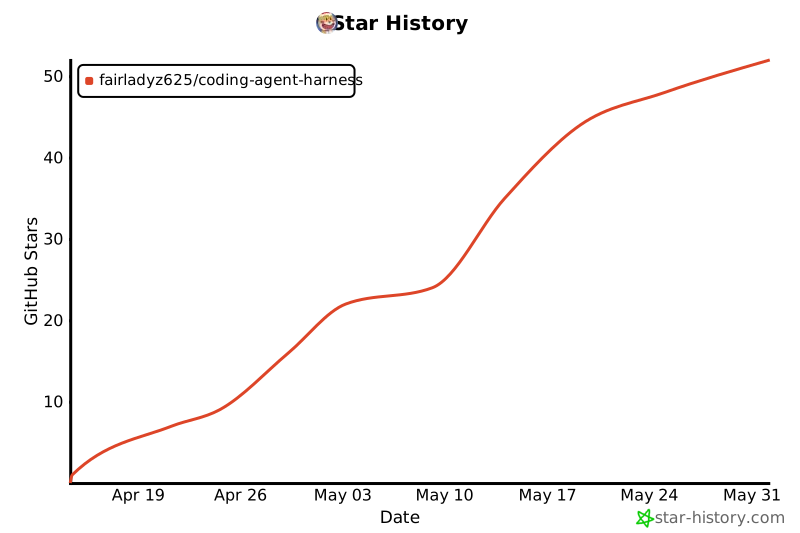
Star History
License
AGPL-3.0-or-later with an additional permission for Generated Harness
Materials.
See LICENSE and LICENSE-EXCEPTION.md.
The additional permission keeps files generated or installed into a target
project from becoming AGPL-covered solely because Coding Agent Harness created
or updated them.




