


Company News
AWS Security Hub Adds Socket for Supply Chain Security
Socket is now in the AWS Security Hub Extended plan. Adopt it through AWS, apply committed spend, and block malicious open source packages.
By Feross Aboukhadijeh - Aug 04, 2026
cool-workflow
Advanced tools
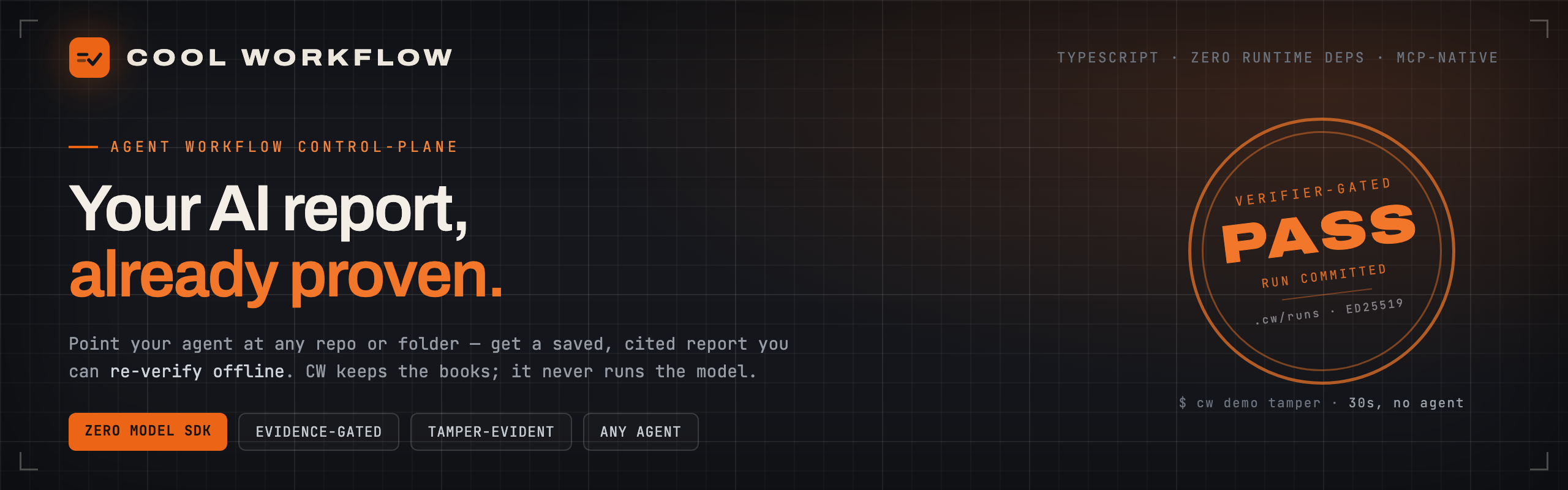
A workflow control plane and run-time you are able to check: it sends out jobs in TypeScript, makes certain of work against facts before it goes through, puts state into fixed records, orders jobs by time, runs jobs again and again, gets a group of agents






You may already use an AI coding agent — a tool like claude, codex, or
gemini that reads your code and answers questions about it. The answer comes
back as a chat message. Chat is easy to lose, and hard to check.
Cool Workflow (cw) is a small command-line tool that fixes that. Point it at
a repo — or any folder of docs — and:
.cw/. You can read them, compare them, and pick a run up again
later.unexplained state instead.file.ts:42. Click it and see for yourself.The model is fuel. CW is the black-box recorder, the dashboard, and the gearbox — never the engine. It never calls a model API, never holds your keys, and never uploads your code. Your agent spends the tokens; CW keeps the books — as plain JSON on your own disk.
npm install -g cool-workflow
brew tap coo1white/cool-workflow https://github.com/coo1white/cool-workflow
brew install coo1white/cool-workflow/cool-workflow
cw version
Upgrade later with brew update && brew upgrade cool-workflow.
You need: Node.js v18 or newer, and one agent CLI on your machine —
claude, codex, gemini, or opencode. CW finds them by itself. No agent
yet? Step 1 below still works — CW never runs a model itself.
Not sure what you have? cw doctor checks your setup and cw fix prints the
commands that put it right.
cw demo tamper
# → builds a real signed ledger, forges it three ways, catches all three offline
# → VERDICT: tamper-evidence holds ✓
This is CW's trust check working on itself: it makes a signed record, breaks it on purpose in three ways, and catches all three breaks.
Go to any project folder and run:
cw -q "How does auth work end-to-end here?"
Any question works — "how does X work", "is it safe to change Y", "what would
break if Z rotated". CW uses the current repo and the first agent it finds on
your PATH. Want a specific agent? Add a flag (-claude, -codex, -gemini,
-opencode, -deepseek). Note: the -gemini and -deepseek flags reach
their models through opencode, so those two need opencode installed and
its provider signed in. DeepSeek also has no auto-detect, so -deepseek is
the only way to get it. (A native gemini CLI found on your PATH is used
directly.) You can point CW at any folder, or at a repo on the web by
URL — CW clones it and reviews the copy:
cw -q "What are the security risks?" -dir /path/to/project
cw -q "Is it safe to swap this queue for Redis?" --link https://github.com/owner/repo
Not just code. Point CW at a folder of docs, notes, or papers and it reads them as sources for the same saved report:
cw quickstart research-synthesis --repo /path/to/papers \
  --question "What do these papers conclude?"
The command prints the path when it is done. Every finding has a clickable
file.ts:42 pointer:
cat .cw/runs/<run-id>/report.md
While it runs you get a calm live view — a small rolling window of tool calls that updates in place, not an endless wall of text — and a clean findings table at the end.
Most agent tools run a whole task as one long prompt, then hand you a chat message. When the work is long, parallel, or high-stakes, you cannot tell what happened or trust the result. CW treats that as a runtime problem — like an operating system keeping processes safe and visible — and rests on four commitments:
| Commitment | What it means for you |
|---|---|
| Model as fuel, not engine | CW never calls a model API. Your agent does all the model work, so you can swap agents freely, and your keys and code never leave your machine. |
| Evidence-gated decisions | Every accepted result records its basis, authority, rationale, and the option it beat. Missing evidence does not slip through — the result stops in a visible unexplained state. |
| Deterministic, local replay | Every step is plain JSON under .cw/runs/<id>/ — read it, diff it, resume it, replay it. No hidden database; the runtime never guesses success. |
| Vendor-neutral by design | One source-of-truth manifest generates every vendor adapter (Claude, Codex, …) over one shared CLI + MCP runtime, with a fail-closed drift check. No lock-in. |
What CW is not. CW is not the model — it never calls a model API and never
holds your keys; your agent does that work in its own process. It is not a CI
system or a build tool — it keeps and checks the record of agent work; it does
not take the place of your tests or your release pipeline. And it is not a big
framework to build on — it is a small set of commands over plain .cw/ files
on your own disk, not a library your code has to wrap itself around.
CW is a small TypeScript tool with zero runtime dependencies. It drives your agent over a repo — or any folder — in saved stages that you can replay, writing everything to disk as files you can open and read. It never imports a model SDK or stores an API key.
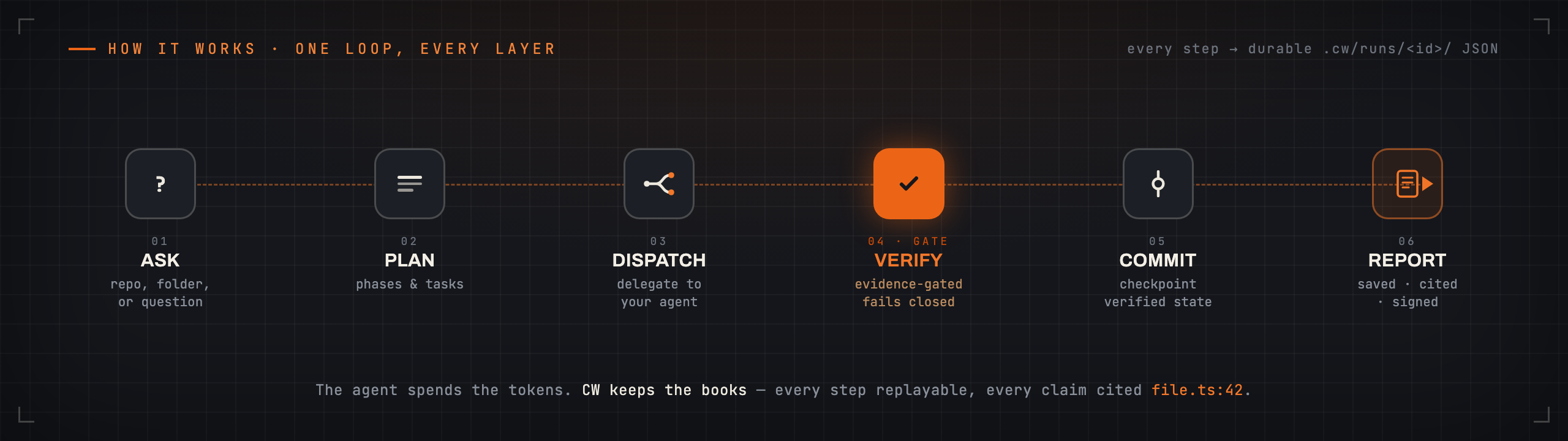
ask simple → run simple → verify simple → resume simple
| Workflow | What it produces |
|---|---|
architecture-review | Map a repo, rank risks, and back every claim with file:line evidence |
pr-review-fix-ci | Review a PR or branch, work out why CI fails, and propose + verify fixes |
research-synthesis | Answer a question over a local folder of files — your docs, notes, or papers |
release-cut | Run a gated, reviewed release with dry-run evidence |
Every app writes the same thing: a saved report you can check again offline,
with every claim tied to its source. These four are the main lanes;
cw app list shows all eight installed apps.
cw app list            # see everything installed
cw doctor              # check your setup    →    cw fix   shows the fix commands
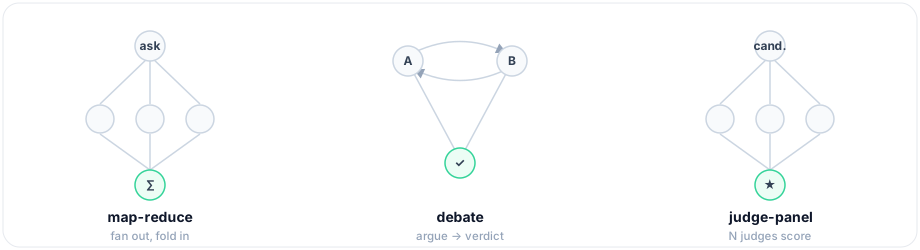
Multi-agent, when you need it. Fan work out across agents with built-in
topologies (ready-made team shapes), compose flows (a task can run a whole
child workflow with subWorkflow, or a loop() phase can go round until a
condition or a token budget says stop), and re-run fast — cw run <app> --drive --incremental reuses every step whose inputs did not change.
CW does not run the model — it keeps the books. Your agent signs its findings
(ed25519), and cw report verify-bundle checks — offline, with nothing
but the public key — that every signed finding is in the report unaltered.
Edit a finding, in the report or in the agent's own result, and the check
fails. CW holds no private key: the agent signs, CW only verifies.
cw demo tamper                                  # proves it in 30s — edits a signed result, watch it fail
cw -q "…" --bundle                              # seal a run into one portable file
cw report verify-bundle report.cwrun.json       # anyone can re-check it offline, with just the file
This proves the agent's signed findings reached you unaltered — not that nothing else was added, and not that nothing was left out. For exactly what is and is not proven, see the Trust Model.
CW offers the same runtime over MCP — a standard way for editors to call tools. Claude Desktop, Cursor, and VS Code call CW as a tool, so your agent can plan a run, drive it, and verify a report without leaving the editor. CLI and MCP share one registry and are parity-checked. See the Wiki.
The MCP server is scripts/mcp-server.js inside the installed package. After
npm install -g cool-workflow, its full path is:
<output of `npm root -g`>/cool-workflow/scripts/mcp-server.js
Put that path in the configs below where you see /path/from/npm-root-g/….
The simple way — as a plugin (this wires MCP for you):
/plugin marketplace add coo1white/cool-workflow
/plugin install cool-workflow@cool-workflow
Or add only the MCP server, one line in your terminal:
claude mcp add cool-workflow -- node "$(npm root -g)/cool-workflow/scripts/mcp-server.js"
Add this to claude_desktop_config.json
(macOS: ~/Library/Application Support/Claude/,
Windows: %APPDATA%\Claude\), then restart Claude Desktop:
{
  "mcpServers": {
    "cool-workflow": {
      "command": "node",
      "args": ["/path/from/npm-root-g/cool-workflow/scripts/mcp-server.js"]
    }
  }
}
Add the same mcpServers block to ~/.cursor/mcp.json
(or .cursor/mcp.json inside one project):
{
  "mcpServers": {
    "cool-workflow": {
      "command": "node",
      "args": ["/path/from/npm-root-g/cool-workflow/scripts/mcp-server.js"]
    }
  }
}
VS Code uses a servers key. Add this to .vscode/mcp.json in your project
(or run MCP: Add Server from the Command Palette):
{
  "servers": {
    "cool-workflow": {
      "type": "stdio",
      "command": "node",
      "args": ["/path/from/npm-root-g/cool-workflow/scripts/mcp-server.js"]
    }
  }
}
Once connected, your agent sees the cw_* tools — cw_plan, cw_status,
cw_report, and the rest — the same registry the CLI uses, parity-checked.
More on the MCP surface — parity, manifests, vendor targets — is on the wiki
page MCP And Manifests.
| Problem | Fix |
|---|---|
| No agent found | cw doctor — shows which agents are on your machine |
status: blocked | Set CW_AGENT_COMMAND=builtin:claude or pass -claude |
claude: command not found | Install Claude Code and run again |
| Where is my report? | <repo>/.cw/runs/<id>/report.md |
Missing required input: question | Add -q "<question>" — CW now prints this same Try: line for you |
| Run stopped before the end | cw quickstart <app> --resume --run <id> takes it to the end (cw run resume <id> --drive does the same) |
| What flags does a command take? | cw help doctor, cw help quickstart, cw help ledger now list a Flags block under the command |
What every top-level folder and file is for, one line each. Most of these places are fixed by a tool, a test, or the release chain — they are where they are for a reason.
| Place | What it is |
|---|---|
plugins/cool-workflow/ | The product itself: TypeScript source (src/), committed build (dist/), tests, scripts, man-page docs, manifests |
docs/ | Repo-level docs: wiki source, audits, benchmark notes, the v2 rebuild SPEC, architecture plans |
v2/conformance/ | Black-box conformance suite — pins the shipping CLI's observable behavior byte for byte; CI runs it on every PR |
eval/ | Eval cases for the four workflow skills (ci-triage, pr-review, design-qa, deploy-check) |
examples/ | Worked examples, e.g. a real published self-audit with line-cited findings |
scripts/bench/ | The benchmark runner (see docs/benchmark.md) |
Formula/ | Homebrew formula — brew only finds it at this exact path |
.cw-release/ | Append-only release trust records: gate markers, signed reviewer verdicts. Never edit or delete by hand |
.github/ | CI workflows: build/test matrix, conformance, CodeQL, gitleaks, release gate, npm publish |
.claude-plugin/, .agents/plugins/ | Plugin/marketplace manifests so LLM clients can discover CW |
AGENTS.md / CLAUDE.md / Codex.md | The binding rules for coding agents working ON this repo; the agents auto-load these from the root |
DIRECTION.md | Where the project goes — and, on purpose, does not go |
PROJECT_MEMORY.md | Long-term project memory: lessons that must outlive any one session |
ITERATION_LOG.md | Append-only development cycle log; the release gate reads it for the cadence check |
CHANGELOG.md / RELEASE.md | Release notes (each entry goes into the GitHub Release as-is) / the release runbook |
New here? Start with the Wiki → Getting Started · Mental Model · Glossary · Trust & Audit
Building on CW? See the Getting Started doc, Project Index, and CLI ↔ MCP Parity.
CW dogfoods its own release process — it runs its own tool on itself, and
every cut runs the release-cut workflow against this repo.
BSD-2-Clause. Built by COOLWHITE LLC.
FAQs
A workflow control plane and run-time you are able to check: it sends out jobs in TypeScript, makes certain of work against facts before it goes through, puts state into fixed records, orders jobs by time, runs jobs again and again, gets a group of agents
We found that cool-workflow demonstrated a healthy version release cadence and project activity because the last version was released less than a year ago. It has 1 open source maintainer collaborating on the project.
Did you know?

Socket for GitHub automatically highlights issues in each pull request and monitors the health of all your open source dependencies. Discover the contents of your packages and block harmful activity before you install or update your dependencies.
Company News
Socket is now in the AWS Security Hub Extended plan. Adopt it through AWS, apply committed spend, and block malicious open source packages.

Research
/Security News
Popular npm packages keyv and cacheable compromised.

Security News
A misconfiguration gave three Anthropic models internet access, and one, believing it was in a simulation, shipped a credential-stealing package to PyPI.