



Security News
RubyGems Adds Cooldown Feature to Bundler for Newly Published Gems
RubyGems and Bundler 4.0.13 introduced an opt-in cooldown feature that delays newly published gems during dependency resolution.
By Sarah Gooding - Jun 05, 2026
Note: Use
npx— do not runnpm i dashccdirectly, as it may cause peer dependency conflicts.
npx dashcc --install
Restart Claude Code. Done.
npx dashcc --uninstall
npx dashcc
Opens an interactive TUI to customize widgets, colors, layout, and more.
The default terminal width mode is now Responsive stable.
narrow terminals reserve 50% of the measured widthmedium terminals reserve 30%wide terminals reserve 20%That reserve is recalculated on every status line render, so the layout can shrink and expand cleanly between Claude Code turns instead of getting stuck in a compact state.
The default dashboard also compacts high-width widgets by priority:
Goal and Now summaries wrap by display width and clamp to 2 linesTemporary Claude UI notices such as update messages are rendered as their own auxiliary line instead of competing with the main dashboard row.
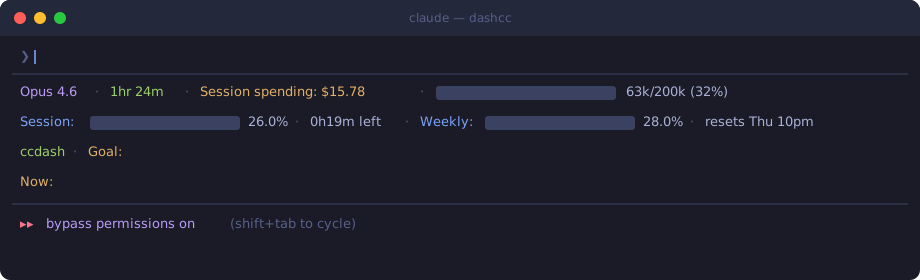
The default layout has 4 lines. Each line is fully customizable via the TUI.
Opus 4.6 · 1hr 24m · Session spending: $15.78 · [████████░░░░] 63k/200k (32%)
Session: [████░░░░] 26.0% · 0h19m left · Weekly: [██████░░░░] 28.0% · resets Thu 10pm
ccdash · Goal: Publish dashcc to npm
Now: Added --install and --uninstall CLI flags
Line 1 — Model, session duration, cost, and a context window progress bar.
Line 2 — API usage for the current block and the weekly quota, with countdown timers.
Line 3 — Project name and the session goal. The model writes the goal on its first response and updates it when the objective shifts.
Line 4 — What just happened. The model updates this after every response so you can glance at progress without scrolling.
You can change the width strategy in the TUI under Terminal Width, but Responsive stable is the recommended default for terminal usage.
| Category | Widgets |
|---|---|
| Model | Model, Version, Output Style |
| Git | Branch, Changes, Insertions, Deletions, Root Dir, Worktree |
| Tokens | Input, Output, Cached, Total |
| Speed | Input Speed, Output Speed, Total Speed |
| Context | Length, %, % Usable, Context Bar |
| Session | Clock, Cost, Name, ID, Status Summary, Skills |
| Timers | Block Timer, Block Reset, Weekly Reset |
| Usage | Session Usage, Weekly Usage |
| System | Working Dir, Terminal Width, Memory |
| Custom | Custom Text, Custom Command, Link |
| Layout | Separator, Flex Separator |
FAQs
A session dashboard status line for Claude Code CLI
We found that dashcc demonstrated a healthy version release cadence and project activity because the last version was released less than a year ago. It has 1 open source maintainer collaborating on the project.
Did you know?

Socket for GitHub automatically highlights issues in each pull request and monitors the health of all your open source dependencies. Discover the contents of your packages and block harmful activity before you install or update your dependencies.
Security News
RubyGems and Bundler 4.0.13 introduced an opt-in cooldown feature that delays newly published gems during dependency resolution.

Security News
pnpm 11.5 now recognizes npm staged publish approvals in release metadata, preventing those releases from being mistaken for lower-trust package publishes.

Security News
Federal audit finds NIST lacked a plan to clear the NVD backlog, wasted funds on duplicate work, and delayed use of CISA data.