

Security News
Ruby's Bundler 4.0.18 Extends Cooldown to bundle lock and bundle cache
The supply chain control that delays freshly published gems now covers lockfile generation and gem vendoring in Ruby projects.
By Sarah Gooding - Aug 06, 2026
A simple and lightweight advanced console styling and logging system.
This package is containing a simple utility to make your console more catchy. This can be used as a alternative of console.log();or can be sayed as the remastered one.
This is logie. While logie is discontinued. I will continue it here. And i have permissions to do it.
To provide a lightweight and simple environment, we only add those features. New feature will be added later only if its useful or important.
First you need to install the package.
npm i dilog
Afterwards, define the libraries to your code
const log = require('dilog');
Now you can start using it with
log.<info>('Hello! This is a info.');
log.info() - Log a certain information.log.warn() - Log a warning. Useful for displaying a small and not damagable issue.log.error() - Log a code error. Sometimes used for logging system crash.log.success() - Log a successfull task.log.event() - Log a certain event. Such as a user interaction.log.notice() - Display a user noticable log that can cause a certain misfunction.log.critical() - Display a user noticable log that can lead to a system crash.log.debug() - Log a normal information.Use <log>.<info>.bold() to bold your current log in the console.
More styling maybe added soon.
All console log will be writen to a log file soon.
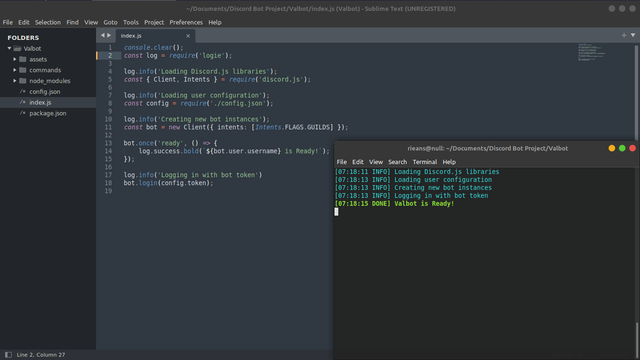
DiscordJS Bot Startup Logging.
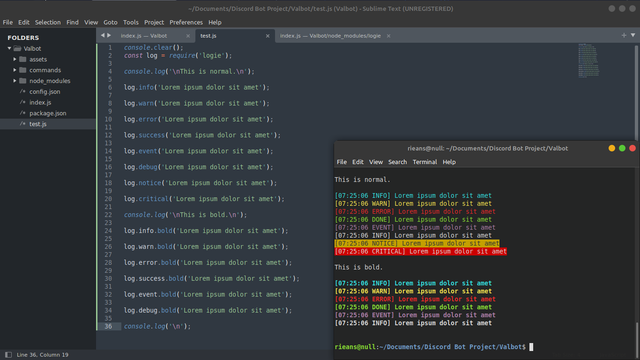
All Console Color Formatting.
You can join our Discord Server (Soon) to ask for a support and tell a suggestion or a bug.
FAQs
A simple console styling and logging system.
The npm package dilog receives a total of 2 weekly downloads. As such, dilog popularity was classified as not popular.
We found that dilog demonstrated a not healthy version release cadence and project activity because the last version was released a year ago. It has 1 open source maintainer collaborating on the project.
Did you know?

Socket for GitHub automatically highlights issues in each pull request and monitors the health of all your open source dependencies. Discover the contents of your packages and block harmful activity before you install or update your dependencies.
Security News
The supply chain control that delays freshly published gems now covers lockfile generation and gem vendoring in Ruby projects.

Security News
During a UK cyber test, a Mythos 5 agent used sockpuppets, social engineering, and prompt injection to try to get a maintainer to merge malware.

Company News
Socket is now in the AWS Security Hub Extended plan. Adopt it through AWS, apply committed spend, and block malicious open source packages.