directus-extension-polydoc
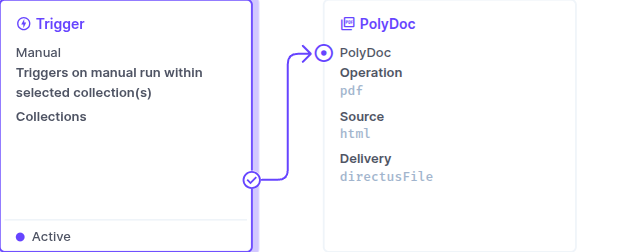
A Directus Flow operation for PolyDoc, a REST API that converts HTML or URLs to PDF, captures screenshots, and generates EU-compliant e-invoices (Factur-X / ZUGFeRD hybrid PDF/A-3).
One operation, three use cases:
- HTML/URL to PDF - layout, margins, page format, page ranges, bookmarks, accessible/tagged PDFs.
- Capture Screenshot - PNG / JPEG / WebP, full page, viewport and device-pixel-ratio control.
- Generate E-Invoice - Factur-X or ZUGFeRD, profiles from
minimum to extended.
Content can come from a URL, an inline HTML string, or a saved template (with Liquid templateData). By default the generated file is saved straight into Directus Files and the operation returns the new file's fileId, so a following operation can attach it to a record. You can also return it as base64, upload it to your cloud storage (presigned URL), or deliver it to a webhook.
Installation
This is a standard (non-sandboxed) API extension, so it installs on self-hosted Directus:
- Marketplace (self-hosted with
MARKETPLACE_TRUST=all): search for directus-extension-polydoc.
- Manual:
npm install directus-extension-polydoc into your project, or drop the built dist/ into your extensions/ directory, then restart Directus.
It is not installable on Directus Cloud (which only runs sandboxed extensions; the sandbox has no access to the Files service or binary responses).
Use it in a Flow
Add the PolyDoc operation to a Flow and pick an operation, a source, and a delivery mode.
- API Key: paste a key from dashboard.polydoc.tech, or leave it blank to read the
POLYDOC_API_KEY environment variable (recommended, keeps the key out of the flow definition). Sent as Authorization: Bearer <key>.
- Sandbox: run against sandbox quota (watermarked output) for testing.
- Delivery:
- Save to Directus File (default) returns
{ fileId, filename, contentType, sizeBytes }.
- Base64 returns
{ base64, ... }.
- Cloud Storage / Webhook return the PolyDoc JSON receipt.
Anything not in the UI?
Every operation has an Advanced (JSON) option that is deep-merged into the request body, so any API capability not surfaced as a control (pdf.watermark, pdf.pdfa, pdf.encryption, render.*, request.*) is still reachable. See the full request schema at docs.polydoc.tech.
Examples
examples/ holds three ready-to-load Flow definitions, one per angle (the Directus analog of the n8n template trio):
url-screenshot.flow.json - screenshot a URL and store the PNG.pdf-from-template.flow.json - render a saved template to a branded PDF.einvoice-from-record.flow.json - turn a new invoice record into a ZUGFeRD / Factur-X PDF.
Directus has no one-click Flow import, so examples/import.mjs (zero dependencies) POSTs a chosen example to your instance through the Flows API and wires it up:
DIRECTUS_URL=https://directus.example.com \
DIRECTUS_TOKEN=<admin static token> \
node examples/import.mjs pdf-from-template.flow.json
It prints the flow's admin URL when done. Open it, set your API key (or the POLYDOC_API_KEY env var), and run.
Development
npm install
npm run build
npm run validate
npm run lint
npm test
npm run scrub:check
Live smoke test against the real API (uses sandbox quota):
POLYDOC_API_KEY=api_xxx POLYDOC_TEMPLATE_ID=jlE-whg npm run test:integration
License
MIT




