


Company News
AWS Security Hub Adds Socket for Supply Chain Security
Socket is now in the AWS Security Hub Extended plan. Adopt it through AWS, apply committed spend, and block malicious open source packages.
By Feross Aboukhadijeh - Aug 04, 2026
draw2agent
Advanced tools
Draw on your website, let your AI agent see it. Visual context for code generation via MCP.

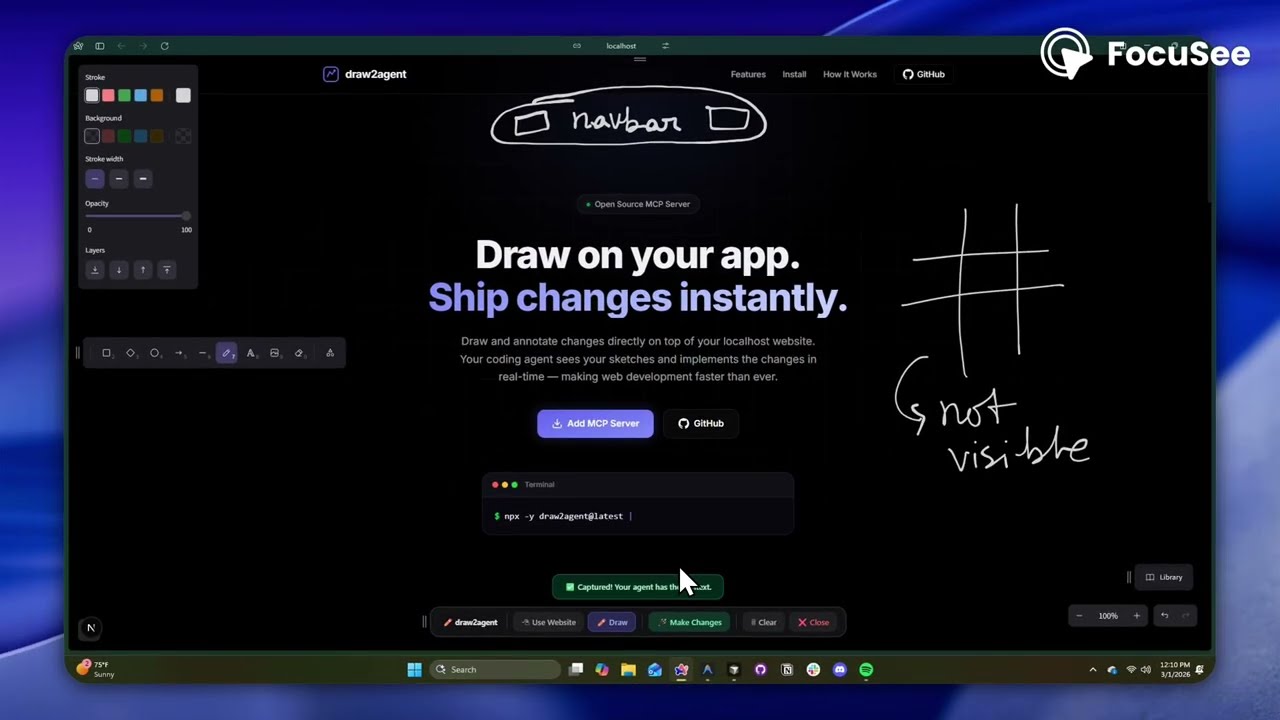
Draw on your website. Your AI agent sees it.
draw2agent is an MCP server that lets you draw annotations directly on top of your local dev page. When you submit, your IDE agent receives a screenshot, structured DOM data, and annotation context to make precise code edits.
👉 Try it out at: draw2agent.vercel.app
Cursor (~/.cursor/mcp.json):
{
  "mcpServers": {
    "draw2agent": {
      "command": "npx",
      "args": ["-y", "draw2agent@latest"]
    }
  }
}
Tell your agent:
"Use draw2agent to fix the navbar"
Your Dev Page (proxied)
├── Your original page content
└── Excalidraw overlay (transparent, on top)
    ├── Draw mode: annotate directly on the page
    ├── Select mode: interact with the page normally (Esc)
    └── Submit: screenshot + DOM + annotations → agent
The MCP server exposes the following tools:
| Tool | Description |
|---|---|
launch_canvas | Opens your dev page with the drawing overlay |
launch_ipad_canvas | Serves the page on your LAN and returns a QR code for drawing from iPad/mobile |
launch_scratch | Opens a standalone Excalidraw whiteboard for freehand sketching |
get_drawing_state | Returns screenshot, DOM nodes, and annotations for the current state |
launch_canvasThe core tool — proxies your localhost dev server and injects an Excalidraw overlay. Draw annotations directly on your running app, then submit to send visual context to your agent. The tool blocks until you submit.
launch_ipad_canvasSame as launch_canvas, but serves the proxy on your computer's local network (LAN) address. Automatically opens a new browser tab on your computer with a QR code. Scan it from your iPad or phone — connected to the same Wi-Fi network — to draw annotations with touch. Perfect for whiteboard-style feedback sessions. No internet tunnel required, so it's fast and reliable.
launch_scratchOpens a blank Excalidraw whiteboard — no target URL needed. Sketch UI mockups, wireframes, or diagrams from scratch. Your agent receives the drawing and implements the design.
get_drawing_stateReturns the last captured drawing state (screenshot, DOM nodes, annotations) without launching a new session. Useful for re-fetching context.
Publishing to npm is automated via GitHub Actions (.github/workflows/publish.yml).
To cut a release, just bump the version and push to main:
npm version patch   # or minor / major — updates package.json
git push origin main
When package.json's version changes on main, the workflow builds the
server + overlay and publishes the new version to npm. You can also trigger it
manually from the Actions tab (e.g. to publish the current version).
The workflow authenticates with npm via OIDC — no NPM_TOKEN secret needed.
Configure the trusted publisher once:
zero-abddraw2agentpublish.ymlThis also satisfies npm's 2FA requirement, so publishing works even with
account 2FA enabled. (Alternative: create an npm Granular Access Token with
publish rights, add it as the NPM_TOKEN repo secret, and set
NODE_AUTH_TOKEN: ${{ secrets.NPM_TOKEN }} on the publish step instead.)
MIT
FAQs
Draw on your website, let your AI agent see it. Visual context for code generation via MCP.
We found that draw2agent demonstrated a healthy version release cadence and project activity because the last version was released less than a year ago. It has 1 open source maintainer collaborating on the project.
Did you know?

Socket for GitHub automatically highlights issues in each pull request and monitors the health of all your open source dependencies. Discover the contents of your packages and block harmful activity before you install or update your dependencies.
Company News
Socket is now in the AWS Security Hub Extended plan. Adopt it through AWS, apply committed spend, and block malicious open source packages.

Research
/Security News
Popular npm packages keyv and cacheable compromised.

Security News
A misconfiguration gave three Anthropic models internet access, and one, believing it was in a simulation, shipped a credential-stealing package to PyPI.