dsh-bilibili-summary
English | 中文
Bilibili video understanding for DeepSeek Harness: sign in once by QR code, pull a video's AI/CC subtitle track, and summarize it into a self-contained HTML report. When a video has no subtitle track at all, the plugin downloads the audio and transcribes it locally instead.
Bilibili hides AI subtitles from signed-out clients, so the plugin signs in through the official passport QR flow and stores the cookie jar locally. The login code is rendered by the plugin itself and never sent to a third-party image service.
What it adds
bilibili_subtitles | Extract the AI/CC subtitle track as a timestamped transcript; validates before returning, supports bilingual merge, and renders Markdown, text, SRT, ASS, LRC, or JSON |
bilibili_video_info | Metadata (title, UP, duration, description, stats, parts), the subtitle tracks the platform lists, Bilibili's own AI summary, and — when a video has no track — the comment section's long, well-liked "课代表" comments as a fallback source |
bilibili_transcribe | Last resort: download the DASH audio (retrying across every candidate stream) and transcribe it locally with faster-whisper |
bilibili_series | List one UP's recent uploads, their collections (合集/系列), or the videos inside one collection, to plan batch work |
bilibili_login | QR sign-in (start / poll / status / logout) |
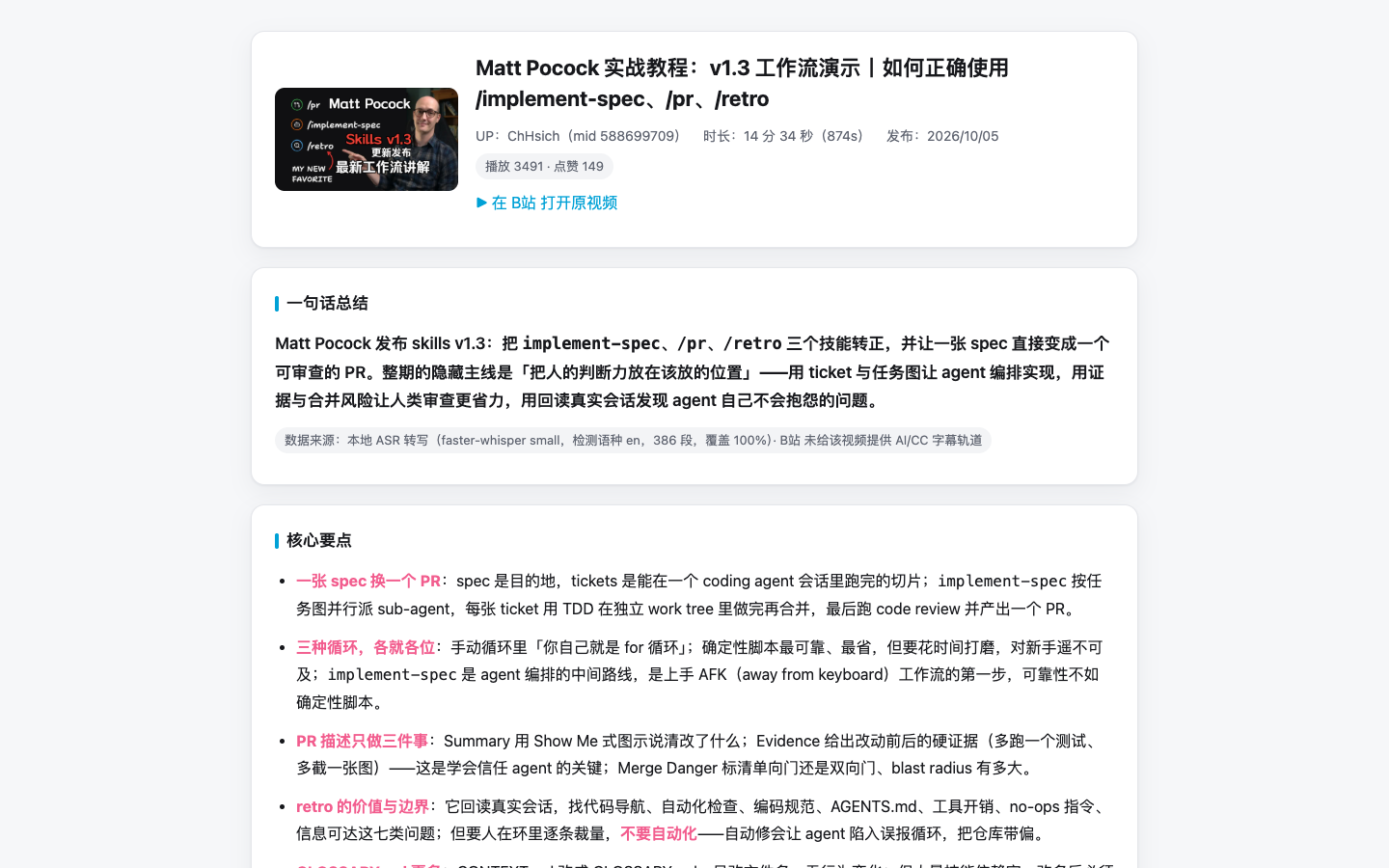
A real report: info card, one-line summary, key points, and a clickable timeline that jumps back into the player.
Plus the bilibili-summary skill, which turns a transcript into a Chinese HTML report using a bundled template (info card → one-line summary → key points → clickable timeline → glossary → background annotations → quotes → action list → collapsible full script).
Install
dsh plugin --profile <profile> add dsh-bilibili-summary
From a checkout:
cd dsh-zcode-plugins
mkdir -p dist
(cd packages/bilibili-summary && npm pack --pack-destination ../../dist)
dsh plugin --profile <profile> add ./dist/dsh-bilibili-summary-0.1.0.tgz
Keep dist/ after installing: the profile records the tarball path.
Sign in
Ask the agent to summarize a Bilibili link; when the subtitle call reports that it is not signed in, it runs:
bilibili_login { action: "start" }   # returns a QR PNG path to show you
bilibili_login { action: "poll" }    # waits for the scan, saves the cookies
Scan with the Bilibili mobile app (「我的」→「扫一扫」). The cookies land in $DSH_HOME/bilibili-cookies.json (mode 0600). Alternatively, skip the QR flow and put a session cookie in $DSH_HOME/.env:
BILIBILI_SESSDATA=your_sessdata_value
bilibili_login { action: "status" } reports which account is stored; { action: "logout" } deletes the file.
How the subtitles are actually fetched
The obvious-looking route is the wrong one. x/player/v2 still carries a subtitle.subtitles field, but under load it answers with an unrelated or truncated body — summarizing it silently would put someone else's words in your report.
The route the web player itself uses is x/v2/subtitle/web/view, which answers in protobuf, and the paths it returns are not fetchable as-is:
x/web-interface/view maps the BV id to aid/cid.x/v2/subtitle/web/view?oid=<cid>&pid=<aid>&type=1&…, WBI-signed, returns protobuf. The plugin walks the wire format directly (no generated schema, so new fields do not break it) and pulls out lan, lan_doc, and subtitle_url.- Each
//subtitle.bilibili.com/<path> is XOR-decoded and rewritten to //aisubtitle.hdslb.com/<path>?auth_key=…, exactly as the player's own F/U helpers do. Those two key pairs are transcribed from bfs/static/player/main/core.*.js, and a unit test pins the transform so a wrong character cannot slip through again.
- The resulting JSON's
body[] becomes the transcript.
Because the service can still answer with a short body under rate limiting, bilibili_subtitles validates before returning and retries with growing backoff, re-requesting the track each time.
What "validated" means
Coverage alone cannot tell a real transcript from a convincing fake — the legacy route returned a complete, correctly sized transcript of a different video. The plugin therefore scores three signals and reports a verdict:
strong | a title keyword appears in the transcript and coverage ≥ 50 % | use it |
weak | coverage ≥ 70 % but no title keyword matched (common with clickbait titles or an English title over Chinese speech) | use it, but say the match is weak |
fail | too few segments, coverage < 50 %, or coverage > 200 % (a transcript longer than the video is someone else's) | refuse it and fall back |
Keyword matching covers CJK fragments (2–4 characters) and Latin tokens (3+ characters, stop-words removed), so implement-spec, React, or 海绵宝宝 all count.
Fallback chain
bilibili_subtitles — the real track.bilibili_video_info — Bilibili's own AI summary, plus the video description.bilibili_video_info with comments — long (≥ 200 chars), well-liked (≥ 3) comments; the "课代表" summary a viewer wrote by hand. Fetched automatically when the video has no track at all.bilibili_transcribe — local ASR.
Human-uploaded (CC) tracks are preferred over machine-generated ones for the same language, and every step that used a fallback marks the source in the report.
Bilingual tracks and formats
bilibili_subtitles can merge a second track under each line — the way bilingual subtitle tools work:
bilibili_subtitles({ url: "BV1TXHY6aETi", lang: "ai-zh", bilingual: "ai-en", format: "srt", out: "bilingual.srt" })
Output formats: markdown, text, srt, ass, lrc, json.
Background annotations in the report
A transcript is full of names that mean nothing without context. The skill requires the report to annotate them: people and teams, products and libraries, organisations, jargon and abbreviations, and the events being referenced. Each note is one or two sentences — what it is, and why the video mentions it — with a source link whenever the fact came from a web search, and an explicit (未能核实) when it could not be confirmed. Each marker shows the note on hover (a CSS-only popup, so it works offline and in any viewer), and clicking the number jumps to the full list at the end for reading straight through or printing. The popup and the appendix are generated from the same text, so they cannot drift apart.
Audio fallback
Videos whose subtitles are burned into the picture have no track to extract. bilibili_transcribe covers those:
- resolve the best DASH audio stream through
x/player/wbi/playurl;
- download and resample it to 16 kHz mono WAV with ffmpeg;
- transcribe with faster-whisper in a private virtualenv under
$DSH_HOME/bilibili-asr/venv — built from the system Python on first use, because the harness Python runtime cannot load pip-installed native extensions on macOS (signature mismatch);
- shape the result exactly like a subtitle track, marked as machine transcription.
The first run pays for the virtualenv and the model download; later runs only pay for transcription. Point asrPython at an existing interpreter with faster-whisper to skip the bootstrap.
Configure
Every field is optional. Row config in a profile patch layer:
- id: bilibili-summary
  name: 'dsh-bilibili-summary'
  config:
    cookieFile: ~/.dsh/bilibili-cookies.json
    sessdata: ''
    language: ai-zh
    retries: 6
    retryBaseDelayMs: 8000
    timeoutMs: 20000
    ffmpegPath: ''
    asrPython: ''
    asrVenv: ''
    asrModel: small
    asrModelDir: ''
    asrLanguage: auto
cookieFile | $DSH_HOME/bilibili-cookies.json | Where the session is stored |
sessdata | '' | Explicit SESSDATA; overrides the file |
language | ai-zh | Preferred subtitle track |
retries | 6 | Subtitle attempts before giving up |
retryBaseDelayMs | 8000 | First backoff; each attempt adds 3 s |
timeoutMs | 20000 | Per-request timeout |
ffmpegPath | autodetect | ffmpeg binary for the audio fallback |
asrPython | '' | Python with faster-whisper; empty means use or build the venv |
asrVenv | $DSH_HOME/bilibili-asr/venv | Virtualenv used for the fallback |
asrModel | small | faster-whisper model size |
asrModelDir | $DSH_HOME/bilibili-asr/models | Model cache |
asrLanguage | auto | Spoken language for the fallback |
BILIBILI_SESSDATA and BILIBILI_COOKIE_FILE in the environment or $DSH_HOME/.env work too.
Usage
bilibili_video_info({ url: "https://www.bilibili.com/video/BV1puH46qE5x/" })
bilibili_subtitles({ url: "BV1c3HL6qEyq", out: "bilibili/BV1c3HL6qEyq/transcript.md" })
bilibili_subtitles({ url: "BV1TXHY6aETi", lang: "ai-zh", bilingual: "ai-en", format: "srt", out: "bilibili/BV1TXHY6aETi/bilingual.srt" })
bilibili_transcribe({ url: "BV1puH46qE5x", language: "zh", out: "bilibili/BV1puH46qE5x/transcript.md" })
bilibili_series({ url: "https://space.bilibili.com/588699709", kind: "collections" })
Both transcript tools return the video record, the chosen track (or ASR model), coverage stats, a merged timeline with player deep links, the plain transcript, and the raw segments.
Limitations
- Chinese-first: the default track is
ai-zh; other languages work through lang.
- Transcription quality tracks the chosen model;
small is a speed/accuracy compromise, and machine output has no punctuation and can mis-hear homophones.
- Bilibili rate-limits aggressively; a failed extraction is usually temporary.
- Multi-part videos are summarized one part at a time through the
page argument.
License
MIT. See LICENSE and NOTICE.



