
 LinuxDo
Security News
Deno Goes the Way of the Dinosaur
Cloudflare is acquiring Deno’s team, which will provide another year of bug fixes and security updates before ending support for the runtime.
By Sarah Gooding - Oct 16, 2026
dsh-emotion-pet
Advanced tools
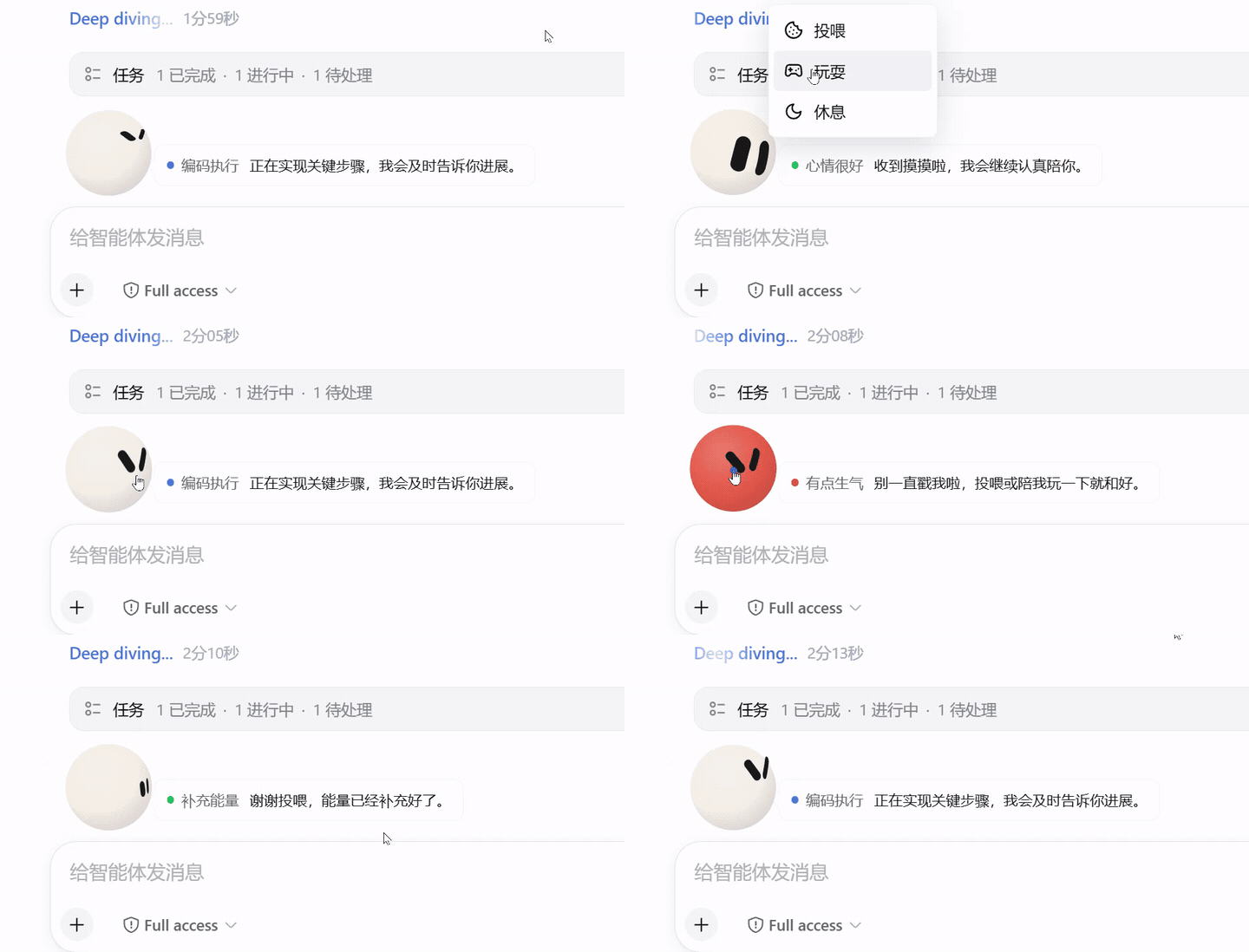
点击预览可打开完整效果视频。
Emotion Pet 是一个陪伴 DeepSeek Harness Web 会话的动态宠物插件,可停留在输入框左上方,也可缩小后跟随对话运行状态。它完整集成了 Emotion Ball 的 32 个表情,会根据 Agent 当前状态展示接收任务、思考、检索、编码、回复、等待确认、完成和错误等表情,并通过视线、弹跳、自旋和彩带等动画陪伴任务过程。
本插件采用了 Emotion Ball 的 SVG 表情、表情配置和动画引擎,并针对 DeepSeek Harness 的会话状态与输入区域进行了集成。
Deep diving... 状态行dsh 命令;桌面版可以从系统托盘打开 Open DSH Terminalweb将插件安装到默认 Web Profile:
dsh plugin --profile web add dsh-emotion-pet
启动 DeepSeek Harness Web:
dsh --profile web
终端显示 dsh web: 地址后,在浏览器中打开该地址。宠物会出现在会话输入框正上方。
DSH Desktop 的 Electron 窗口加载的是本机 DeepSeek Harness Web 界面,并沿用相同的插件系统,因此 Emotion Pet 不需要桌面端专用版本。当前插件可在 Desktop 的兼容模式和高级模式中使用。
推荐从 DSH Desktop 系统托盘选择 Open DSH Terminal。该终端会显示当前激活的 Profile,以下命令默认安装到这个 Profile:
dsh plugin add dsh-emotion-pet
如果电脑已经另行安装了 dsh,也可以在普通系统终端中显式指定 Desktop Profile:
dsh plugin --profile desktop add dsh-emotion-pet
如果托盘中选择的是其他自定义 Profile,请将 desktop 替换成终端欢迎信息中显示的实际名称。各 Profile 的插件不会自动同步,安装到 web Profile 不代表已经安装到 Desktop 当前使用的 Profile。
安装、更新或移除插件后,需要从托盘选择 退出,再重新启动 DSH Desktop。仅关闭窗口通常只是把应用隐藏到托盘,不会重新加载插件。
Emotion Pet 的形状、颜色、“跟随表情”和“随对话”设置保存在浏览器 localStorage 中。Desktop 默认使用随机本地端口,重启后 origin 可能变化;如需稳定保留这些设置,建议在 DSH Desktop 设置中配置一个未占用的固定端口:
dsh-desktop:
  port: 43189
端口可以替换为其他 1 到 65535 之间的未占用端口。修改端口后 Desktop 会重启,服务仍只监听本机 127.0.0.1。
Deep diving... 左侧,专注展示会话状态且不跟随鼠标,任务结束后自动回到输入区更新到 npm 上的最新版本:
dsh plugin --profile web update dsh-emotion-pet --latest
在 DSH Desktop 内置终端中,可更新当前激活 Profile:
dsh plugin update dsh-emotion-pet --latest
更新后重启 Web Profile,并在浏览器中刷新页面:
dsh web
如果浏览器仍显示旧版本,可使用 Ctrl + F5 强制刷新。
dsh plugin --profile web remove dsh-emotion-pet
在 DSH Desktop 内置终端中,可从当前激活 Profile 移除:
dsh plugin remove dsh-emotion-pet
重启对应 Profile 后,插件会从 Web 界面移除。
确认插件已经加入当前 Profile:
dsh --profile web --dump-config
输出中应包含 dsh-emotion-pet。然后重启 Profile,并强制刷新浏览器页面。
在 DSH Desktop 中,请先确认托盘当前选择的 Profile 与安装目标一致,并从托盘完整退出后重新启动。若命令行找不到 dsh,应使用托盘中的 Open DSH Terminal,因为 Desktop 的私有命令不会写入系统全局 PATH。
首次冷启动可能需要一些时间。保持启动命令所在的终端窗口开启,等待服务完成初始化后再次刷新终端显示的 dsh web: 地址。
本插件的表情、表情配置数据和 SVG 动画引擎来自 sam70361/emotion-ball,原项目版权归 sam70361 所有。
Emotion Ball 使用仅供个人学习、研究和非商业技术交流的许可,并非 MIT 许可。本插件保留了原项目的 LICENSE、LICENSE-COMMERCIAL.md 和版权声明。商业使用前必须联系原作者取得商业授权,具体条款以随包提供的许可文件和原项目说明为准。
FAQs
Emotion Ball pet dock for the DeepSeek Harness Web composer
The npm package dsh-emotion-pet receives a total of 0 weekly downloads. As such, dsh-emotion-pet popularity was classified as not popular.
We found that dsh-emotion-pet demonstrated a healthy version release cadence and project activity because the last version was released less than a year ago. It has 1 open source maintainer collaborating on the project.
Security News
Cloudflare is acquiring Deno’s team, which will provide another year of bug fixes and security updates before ending support for the runtime.

Security News
Anthropic’s free OSS Scanner uses Mythos and other Claude models to find open source vulnerabilities and send maintainers reports with proposed fixes.

Security News
On Front Lines’ Early Adopters: CISO podcast, Andrew Becherer shares lessons from Datadog, weighs the long-term costs of AI-built tools, and explains how founders can actually gain a CISO’s trust.