

Security News
vlt 1.5.0 Adds Agent Skills Management
vlt 1.5.0 links skills from JavaScript dependencies to coding agents, with lockfile versioning and Socket data to filter out known malicious packages.
By Sarah Gooding - Oct 21, 2026
dsh-kanban
Advanced tools
Smoothly Kanban (思磨力看板): external DeepSeek Harness plugin — a cross-session, workspace-scoped kanban board for plans and todos, persisted to a git-trackable KANBAN.json. Model-facing tools (board_list/board_add/board_update/board_remove) plus a sidebar '思
English | 简体中文

Smoothly Kanban(思磨力看板)is an external DeepSeek Harness plugin: a cross-session, cross-branch, persistent plan / todo kanban board.
When you chat with an agent (in dsh, Codex, Claude Code, …) you produce lots of plans and todos — and the pain is that once you switch to another branch or open a new session, those plans and todos become invisible: they still live in the long conversation, but you can't find them or remember them.
dsh-kanban sinks plans and todos into a KANBAN.json file at the workspace root (git-trackable, human-editable, survives sessions) and gives you two ways to maintain it:
board_list / board_add / board_update / board_remove) so the model records plan steps and todos while talking.The same KANBAN.json is shared by the model tools and the Web page, so what the model writes, the page shows; what you check off on the page, the model reads next time.
A system-prompt guidance section tells the model to actually use the board on its own — record plans/todos as they appear, move cards as work progresses, without waiting to be asked:
board_adds
one card per step;board_updates cards to in_progress / done;board_lists first to
pick up the durable record;todo_write: todo_write is the transient in-turn task
list; the board is the durable cross-session record — anything the user should
still see after switching branches belongs on the board.Verified with a real model (user only said "build a Markdown-to-HTML tool and make a plan", no mention of the board): the model proactively
board_list'd,board_add'd all 7 plan steps, thenboard_update'd each to done as it went.
What makes the model "proactively" use the board? Two mechanisms, both in dsh's system prompt and visible to the user:
ctx.systemPrompt.section): a fixed guidance
section telling the model what the board is, when to record, and how it
differs from todo_write. Updated with plugin releases.ctx.systemPrompt.context): on every
prompt assembly, the plugin reads the current session's workspace
KANBAN.json and injects an "open items" summary (todo + in_progress)
into the model's context — so the model sees the board immediately, without
having to remember to board_list. With no session / no cwd / an empty
board it contributes nothing.Trade-offs of the auto-injection (stated openly):
| Aspect | Notes |
|---|---|
| ✅ Pro | The model always sees the current workspace's open items — no "remember to check"; cross-session continuity is guaranteed by the system, not the model's diligence |
| ⚠️ Cost 1 | Every request carries the board summary, adding fixed token overhead (grows with the board) |
| ⚠️ Cost 2 | Board changes alter the request prefix, which can affect KV-cache reuse. To limit this, only open items are injected (todo + in_progress) — done cards churn would worsen prefix instability |
| ⚠️ Trade-off | "System pushes" vs "model queries" — injection guarantees visibility at the price of per-request overhead |
The full "make the model use it" mechanism:
ctx.systemPrompt.section): what the board is,
when to record, how it differs from todo_write, and the
card-completeness contract — every card needs a rationale (why at
creation); a done card must carry all three what/why/rejected fields.ctx.systemPrompt.context): open items
are pushed into the model's context (see above); cards missing fields are
flagged (缺:…) so the model fills them when it picks the work up.in_progress cards — the
board stays an honest cross-session hand-off./kanban/counts route; the workspace follows the current session, then the
most recent one, and the badge subscribes to workspace-list changes so it
appears as soon as data is ready); the board panel auto-refreshes every
15s while shown, so model/other-session writes appear without a manual
refresh.Data-safety commitment: the plugin only writes board/note files (plus,
on a shell with no skill registry, the ~/.agents/skills/kanban-use/SKILL.md
copy described below); there is no startup, scheduled, or install-time cleanup.
Cards are removed only by an explicit board_remove / the Web delete button
(which requires a confirmation Modal — no accidental one-click loss); excess
done cards (beyond 100, oldest first) are archived (moved to
.agents/notes/archive.json), never deleted. All board data lives inside your
workspace directory (git-trackable, hand-editable).
| Tool | Purpose |
|---|---|
board_list | Read the current workspace board (all cards with status, tags, timestamps). Call it before any update to get real ids. |
board_add | Add a card (title + rationale/why expected on every card — a title-only card is incomplete and flagged 缺; rejected/gave-up when a decision was made; summary/what filled at completion; optional description, status, tags). |
board_update | Update a card by id (status / title / summary / rationale / rejected / description / tags). |
board_remove | Remove a card by id. |
note_add | Write an Agent Note (full replication of the DSH repo discipline) to .agents/notes/implemented/<class>/<date>-<topic>.md. |
note_list | List existing Agent Notes in the current workspace. |
The board is scoped to the current session's working directory (cwd): every session under the same project directory shares one KANBAN.json — that's what makes it survive across sessions and branches.
note_add's output format, classes, and "non-trivial change" definition are
replicated from the deepseek-harness repo (no re-inventing the wheel):
| Item | Upstream source |
|---|---|
| Note classes | scripts/agent-note-tree.ts → AGENT_NOTE_CLASSES |
| Note format | scripts/verify-agent-note-format.ts |
| Non-trivial definition | .agents/notes/README.md → "When to write one" (root AGENTS.md only points at it) |
src/note-spec.ts fixes the
default classes, format template, and definition — works out of the box;.agents/notes/overrides.json;Why not
importdsh directly:verify-agent-note-format.tsis a dsh repo internal script — not published, not installable, unreachable from an external plugin. The spec is fixed as constants and synced via "input-box overrides + plugin releases".
src/note-spec.ts states it is replicated from
deepseek-harness (upstream commit ddefc45fbc7f8e46dd73185e68295696d1297887);pnpm check:spec (scripts/check-note-spec.mjs) reads the
local dsh checkout's spec constants (classes from agent-note-tree.ts, format
from verify-agent-note-format.ts, note-scope rule from
.agents/notes/README.md + the AGENTS.md pointer to it) and
diffs them against the plugin defaults — when upstream changes, one run reports
the difference and tells you to update src/note-spec.ts and bump
NOTE_SPEC_VERSION;dsh plugin update dsh-kanban delivers the new defaults (if the user had
custom overrides, the update warning explains they get reset).check:spec needs the local dsh source path — it is a dev-time tool (not
shipped, not part of the user-facing test chain).
/kanban command/kanban shows the current workspace board; /kanban done <card-id> marks a card done quickly.
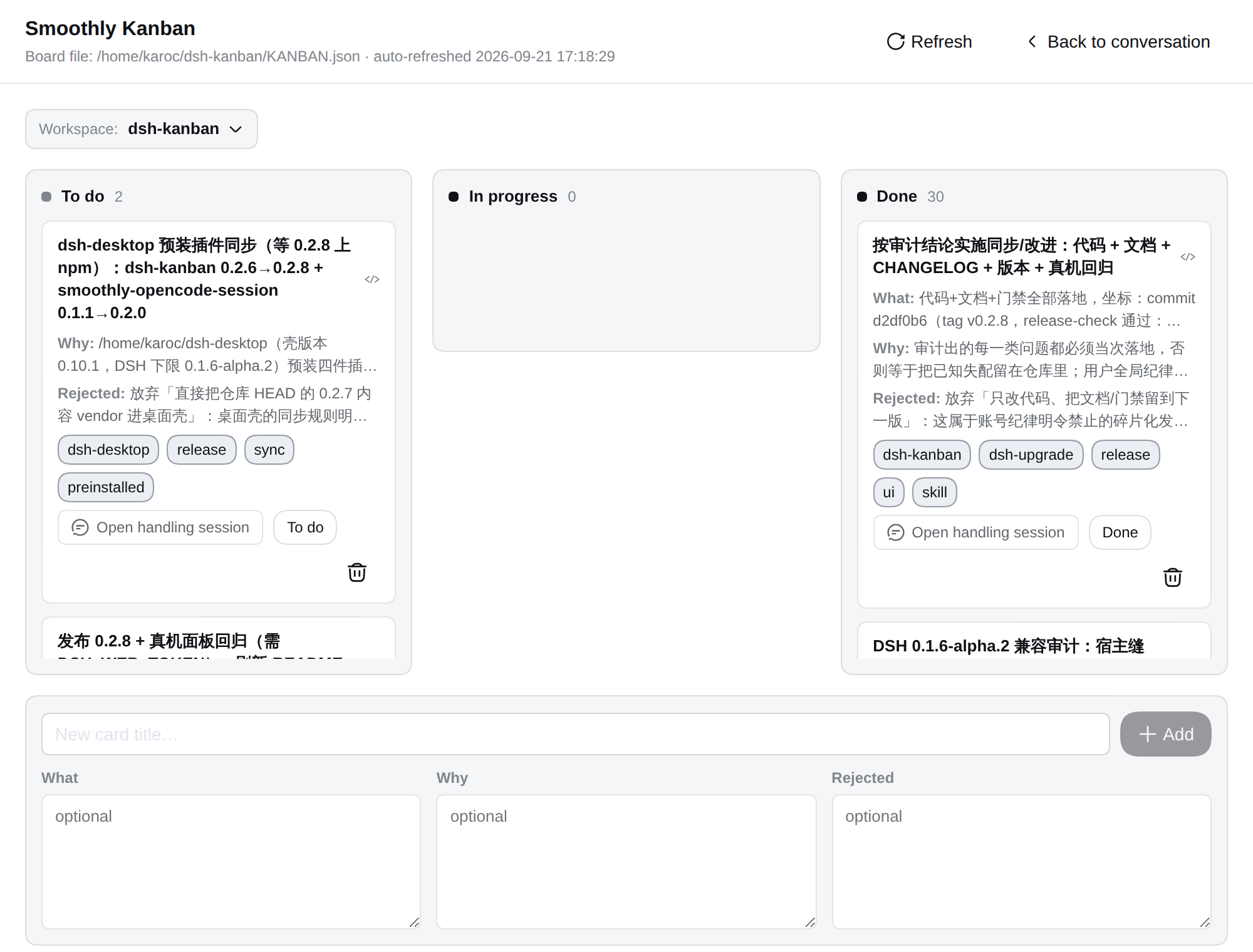
sidebar.panellist) with an open-item count badge on the glyph (number
when there are todo/in_progress cards, "99+" cap);main slot's occupant for that panel id: selecting the entry
renders it in the centre column (the Conversation steps aside, exactly like
the built-in Plugins page), and 「返回会话」/“Back to conversation” returns;...) for the rest — cards
stay compact and scannable;KANBAN.json through the host-registered
/kanban/api and /kanban/counts webServer routes (GET read, POST
add/update/remove) — independent of built-in dsh RPC, so official upgrades
don't touch it.<workspace root>/KANBAN.json
{
  "version": 1,
  "cards": [
    { "id": "card-xxxx", "title": "implement kanban tools", "description": "…", "status": "todo", "tags": ["dsh"], "createdAt": 1234567890, "updatedAt": 1234567890 }
  ]
}
The file shape is validated: a missing file reads as an empty board; a structurally broken file fails loud instead of being silently repaired (so a hand edit gone wrong never loses data quietly).
Prereq: a DeepSeek Harness with the dsh CLI, plus pnpm. This is an installable bundle — loaded by dsh, not imported as a library.
dsh plugin --profile web add /home/karoc/dsh-kanban
dsh plugin --profile web add dsh-kanban
dsh plugin --profile web add github:karoc/dsh-kanban#<sha>
Git installs run the package prepare script to build the bundle; pnpm ≥ 10 asks you to allowlist the build once in the profile's pnpm-workspace.yaml (allowBuilds), then re-run add.
You must restart dsh web after installing for both the host tools and the Web page to load.
dsh plugin --profile web update dsh-kanban
dsh plugin --profile web remove dsh-kanban   # removes dependency + bundle layer; entry disappears after restart
dsh web; the sidebar's global panels section shows the 「思磨力看板」 entry.board_add (e.g. "put xxx on the board"); it writes the current workspace's KANBAN.json.Cards are the board's cross-session memory: the next session reads them without asking you. The plugin therefore enforces a completeness contract on every surface the model sees (same rule everywhere, missingCardFields in board-core.ts):
rationale (为什么) — why it exists and why now. A title-only card is incomplete and is flagged:
⚠️缺:… after the card line, plus a summary line when any card is incomplete),(缺:…) on open items, so a resuming session can fill them),missing: … in the English UI, 缺字段:… in Chinese — humans see it too).done card must be self-explanatory: summary (做了什么) + rationale + rejected (放弃了什么) all present, so the completed work is an honest hand-off.The kanban-use skill (skills/kanban-use/SKILL.md) is the deep manual for this discipline — field semantics, good/bad card examples, the create → advance → close flow, a close checklist, and templates. The system-prompt guidance points the model at it. Delivery has two paths, and neither asks the user for an extra step. Preferred (DSH ≥ 0.1.6, i.e. ctx.skills exists): the host half registers the packaged skills/kanban-use/SKILL.md straight into the shell's skill registry (ctx.skills.register, source: 'runtime'), so the skill version IS the plugin version — there is no stale copy, and a frontmatter DSH cannot parse cannot silently hide it; by DSH's precedence (project > runtime > user) a copy in ~/.agents/skills cannot shadow it, while a project-level .agents/skills (or .dsh/skills) copy still wins — the documented way to customize. Fallback (an older shell, or a profile without the skill service): copy install — the skill ships inside the npm package (the tarball includes skills/kanban-use/SKILL.md and scripts/install-skill.mjs) and the host half checks ~/.agents/skills/kanban-use/SKILL.md on every dsh web start. A skill-version fingerprint in the skill's frontmatter (bumped on content changes) drives that copy policy: missing → copies the shipped file in; identical → no-op; same or newer version but different content → your local copy is kept (that is your own edit of the current version) with a hint; older version (or a copy with no fingerprint) → synced over (that is stale package content from a previous install, the upgrade path). So dsh plugin add/update dsh-kanban + the required restart is all it takes, on any machine. The manual commands still exist for repo checkouts and forced syncs:
pnpm install:skill            # symlinks skills/kanban-use → ~/.agents/skills/kanban-use
node scripts/install-skill.mjs --copy   # materialize/overwrite a copy (works inside the installed package too)
The skill is maintained in this repository alongside the plugin — the release/dev gates (pnpm check:cards → scripts/check-card-discipline.mjs) assert that the skill's field semantics and tool names stay consistent with the plugin's schema, and scripts/audit-cards.mjs <workspace> [--fail] reports incomplete cards in any workspace's KANBAN.json.
cordis.patch.yml        # bundle layer: mounts this package (host tools + client half)
package.json            # dsh.bundle (patch) + dsh.client (web) + exports["./client"]
tsdown.config.ts        # self-contained build: node half + module-table client bundle
src/board-core.ts       # KANBAN.json domain: read/write, validation, card CRUD,
                        #   missingCardFields completeness rule (shared)
src/index.ts            # host half: 4 model tools + /kanban/api webServer route
src/client/index.ts     # client apply: global panel (sidebar glyph + 'main' occupant)
src/client/BoardPage.tsx       # three-column board component (+ missing-field hints)
src/client/KanbanSurface.tsx   # panel glyph + the 'main' panel wrapper
src/client/workspace-pick.ts   # current-session + most-recently-active workspace derivations (pure, unit-tested)
src/client/board-counts.ts     # /kanban/counts poll behind the glyph badge
src/client/locales.ts          # zh/en copy
src/client/styles.ts           # --dsw-alias-* design-token styles
src/skill-register.ts          # host half: kanban-use served through ctx.skills (DSH ≥ 0.1.6)
src/skill-sync.ts              # host half: copy fallback for shells without the skill service
skills/kanban-use/SKILL.md     # the kanban-use skill (ships in the npm tarball)
scripts/check-card-discipline.mjs # dev gate: guidance/schema/skill agree on completeness
scripts/check-tokens.mjs         # dev gate: every --dsw-alias-* token exists in the installed DSH theme
scripts/check-client-wiring.mjs  # dev gate: panel id/key wiring survived the edit
scripts/audit-cards.mjs          # KANBAN.json completeness audit ([workspace] [--fail])
scripts/install-skill.mjs        # symlink/copy the skill into ~/.agents/skills (shipped too)
scripts/verify-skill-sync.mjs    # copy-fallback three-state verification (part of pnpm test)
scripts/verify-skill-runtime.mjs # runtime skill registration vs a real registry (part of pnpm test)
docs/screenshots/board-page.png  # Web board page screenshot (README figure)
dsh's official updates only touch the bundled in-repo packages. An external bundle is installed into the user profile via dsh plugin and is never touched by official upgrades (same pattern as dsh-model-reasoning). The plugin only uses dsh's externally stable capability surface: tool registration (ctx.tools), webServer route registration, system-prompt guidance (ctx.systemPrompt.section / .context), the command registry (ctx.commands), the skill registry (ctx.skills), and the Web global-panel slots (sidebar.panellist + main).
KANBAN.json file is plain, so any tool can read it later).KANBAN.md render view can come later.pnpm install # build deps (tsdown, react)
pnpm bundle # emits lib/index.js + lib/client.js
src/client/ is the browser plugin; the client bundle keeps @deepseek-ai/* + react external (resolved from the loader module table at runtime) and inlines everything else.--dsw-alias-* design tokens, namespaced with the kb- prefix; pnpm check:tokens fails on any token the installed DSH theme does not define (an unknown custom property renders as nothing, silently).sidebar.panellist draws the sidebar row, the keyed main slot hosts the page. pnpm check:wiring pins that wiring; the live-GUI scripts verify it in a browser.pnpm test # tsc --noEmit typecheck + 20 KANBAN.json domain unit tests
# + 13 workspace-pick/current-session derivation tests
# + token-drift gate (with negative control) + panel-wiring gate
# + host tool smoke + skill runtime registration vs a real registry
pnpm typecheck # typecheck only (tsc --noEmit)
pnpm verify # 4 board tools registered + board_add persisted end-to-end
pnpm accept # GUI acceptance against a running dsh web (http://127.0.0.1:3080):
# sidebar global-panel row → board rendered in the centre column
# (opaque, row marked selected) → add / move / delete
node scripts/capture-board-page.mjs # refresh the README figure from the live GUI
# (captures the board panel only — never the session sidebar)
Since DSH 0.1.2-alpha.2 the Web GUI protects its index with a browser-session
cookie ("dsh web authentication required"); the live-GUI scripts authenticate
themselves through the /?token= handshake. Point them at the token dsh web
printed on launch via DSH_WEB_TOKEN, or pass the full launch URL (including
?token=...) as DSH_GUI_URL; on instances where auth is off they run
unchanged.
Since DSH 0.1.3-alpha.1 the composer input is a contenteditable div (0.1.2 used
<textarea>); the live-GUI scripts match both (textarea, [contenteditable="true"]),
so the same scripts run against either version.
External plugins get no compile-time typechecking by default (tsdown only
transpiles); tsc --noEmit in pnpm test catches "used-but-not-imported"
mistakes that would otherwise crash at runtime (a missing IconCheckOutline16
import once took down the whole board page).
Since DSH 0.1.6-alpha.2 the client SessionListState no longer carries
current; the board derives the current session from main-view retention
(retainedBy.mainView), the same predicate the shell's own sidebar, session
binding, and Settings use — and still reads current when an older shell
provides it.
Since DSH 0.1.7-alpha.1 icons carry their stroke weight in the name
(*Regular = 1 px, *Medium = 1.3 px) and the size-suffixed names are gone;
the board imports the *Regular variants, with every rendered size unchanged
(the artwork defaults still carry the old sizes). The client half therefore
requires DSH ≥ 0.1.7 since 0.2.9 — 0.2.8 is the release for 0.1.2–0.1.6. That
floor is also declared, since 0.2.10, as an optional
@deepseek-ai/dsh-client-ui-slots peer dependency, range >=0.1.7-rc.1 (the
prerelease floor is load-bearing: a plain >=0.1.7 does not match a
0.1.7-rc.N runtime). The peer gate itself shipped with DSH 0.1.7-rc.1:
from there on the loader evaluates every @deepseek-ai/dsh* peer against the
running runtime and skips an incompatible bundle with the exact
dsh plugin allow-version remedy (dsh plugin add refuses it outright) — so a
future plugin floor is enforced up front instead of failing later at render
time. Runtimes older than the gate — everything up to and including
0.1.7-alpha.2, hence all of 0.1.2–0.1.6 — do not evaluate peers at all: there
the plugin still loads and the client half is what breaks on render, which is
why 0.2.8 remains the release for those.
scripts/verify-model-board.mjs additionally verifies a real model call: it sends
the GUI agent an instruction to use board_add/board_list, then confirms the card
lands in KANBAN.json at the session cwd and is visible on the board page (the
model-writes ↔ Web-sees round trip).
FAQs
Smoothly Kanban (思磨力看板): external DeepSeek Harness plugin — a cross-session, workspace-scoped kanban board for plans and todos, persisted to a git-trackable KANBAN.json. Model-facing tools (board_list/board_add/board_update/board_remove) plus a sidebar '思
The npm package dsh-kanban receives a total of 120 weekly downloads. As such, dsh-kanban popularity was classified as not popular.
We found that dsh-kanban demonstrated a healthy version release cadence and project activity because the last version was released less than a year ago. It has 1 open source maintainer collaborating on the project.
Security News
vlt 1.5.0 links skills from JavaScript dependencies to coding agents, with lockfile versioning and Socket data to filter out known malicious packages.

Security News
Rust 1.100 will add opt-in dependency cooldowns to Cargo, giving security scanners and maintainers time to catch malicious crate releases.

Security News
Cloudflare is acquiring Deno’s team, which will provide another year of bug fixes and security updates before ending support for the runtime.