


Security News
Deno Goes the Way of the Dinosaur
Cloudflare is acquiring Deno’s team, which will provide another year of bug fixes and security updates before ending support for the runtime.
By Sarah Gooding - Oct 16, 2026
dsh-prompt-enhance
Advanced tools
Prompt enhancement for the dsh web GUI: rewrite the composer draft into a well-structured prompt through the harness LLM service, preview the before/after, then fill back, copy, or undo. Original draft is always preserved.


Prompt enhancement for the DeepSeek Harness web GUI — one click turns a rough composer draft into a well-structured prompt: explicit role and goal, executable steps, output format, acceptance criteria, and edge cases. Your intent is never changed, nothing is fabricated, and the original draft is always preserved.
English | 简体中文
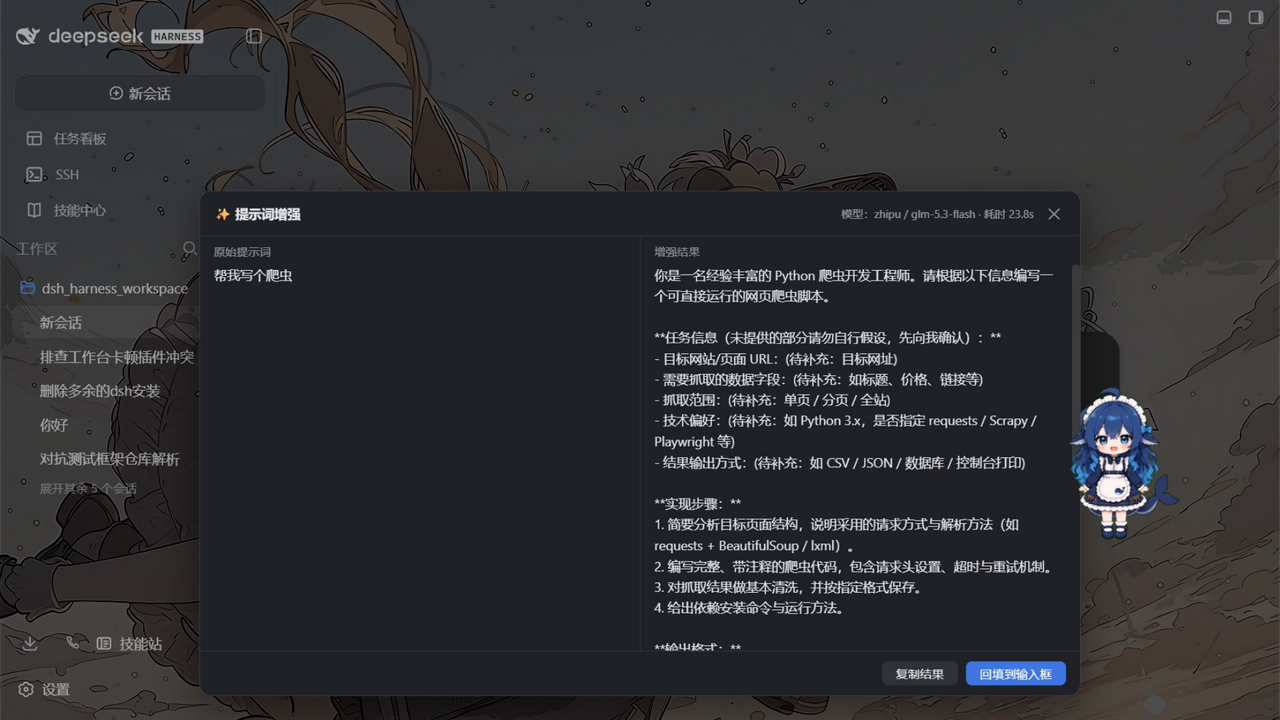
Good agent prompts state who the model should be, what to deliver, in what format, and how success is judged. Most drafts don't. This plugin adds a WorkBuddy-style "enhance" affordance to the dsh composer: it sends your draft through a low-temperature rewrite pass (via the harness's own LLM service), shows the result next to the original, and lets you apply, copy, or discard it. Undo is one click away, and every failure path leaves your draft exactly as you typed it.
| ✨ Composer button | A small button in the input box's tool row (next to the send button), always at hand |
| 🔀 Preview panel | Original vs. enhanced side by side, with model name and elapsed time |
| ↩️ One-click undo | After applying, a quiet bar above the composer restores the original draft |
| ⌨️ Shortcut | Default Ctrl+Alt+E, fully configurable, acts on the composer you are working in |
💬 /enhance command | Rewrite any text from the slash-command plane; the result never enters model history |
| 🧠 Model routing | Settings pair → current session model → harness default model, in that order |
| 🔑 Zero credential setup | Calls ride the harness LLM service; keys come from the harness credential store |
| ⚙️ Live settings | Every knob (model override, temperature, budgets, system prompt, shortcut) hot-applies from Settings → 插件配置 |
| 🛡️ Draft safety | Empty, over-length, images-only, and command-chip inputs are rejected locally; upstream failures are mapped to readable messages; the draft is never mutated on failure |
flowchart LR
    A[Composer draft] --> B{Local guards<br/>empty / length / chips / busy}
    B -- pass --> C["POST /prompt-enhance/enhance<br/>(loopback-fenced host route)"]
    B -- reject --> P[Preview panel:<br/>readable error, draft untouched]
    C --> D["ctx.llm.stream<br/>rewrite with system strategy"]
    D --> E[Normalize:<br/>strip fences, trim, refuse empty]
    E --> F[Preview panel:<br/>original / enhanced]
    F -- Apply --> G["setDraft(enhanced)<br/>original pushed to undo stack"]
    F -- Cancel / Copy --> H[Draft untouched]
    G --> U[Undo bar: one click restores]
The plugin is one npm package with two halves, following the dsh plugin conventions:
exports ".", Node): registers the prompt-enhance settings section (schemastery — rendered automatically by the built-in plugin config page), the POST /prompt-enhance/enhance route on the shared webserver (loopback-fenced, body-capped), and the /enhance slash command. The model call goes through ctx.llm.stream with a normalized output pass — the same auxiliary-call discipline the harness applies to session titles: deadline + caller cancellation rechecked during and after the stream, terminal-finish validation, tool-call rejection.exports "./client"): registers the enhance button into the conversation.input.right slot and the undo bar into conversation.input.dock, binds a live mirror of the settings namespace, and installs the global shortcut. All copy is localized (zh/en) through the harness locale system.dsh >= 0.1.1-rc.2 < 0.3.0 — the range states what has actually been exercised, not an open-ended promise.0.1.1-rc.2, 0.1.2-alpha.3, 0.1.7-rc.2, and 0.2.0-rc.2 (layer mounts, enhance route answers, client bundle builds; on alpha the plugin takes the newer ctx.settings.installSection registration path, and on 0.2.0-rc.2 it also passes the runtime's plugin-compatibility gate). The 0.2.0-rc.2 checks include the dsh desktop application — the environment this plugin is normally used in. On a 0.2.x runtime expect some other plugins to disappear from the UI: the gate skips any bundle whose peerDependencies pin an older @deepseek-ai/dsh-* range (observed: dshmarket, dsh-find-plugin, dsh-better-sidebar). The harness has broken two APIs the plugin touches: @deepseek-ai/dsh-settings changed its registration entry between the two early lines, and from 0.1.5-rc.3 the settings service became SettingsForms (no synchronous get) while dsh-agent-default-model moved the harness default model behind its own ctx.agentDefaultModel.currentSelection() service. The plugin probes all three shapes at runtime and adapts, no configuration needed.0.2.x line (including its prereleases); a 0.3.x is untested and therefore outside the range. dsh.engines is advisory metadata read by the loader and plugin manager — it states support, it does not enforce it.^22.19.0 || >=24.0.0 (for building from source)react / react-dom (^18.2.0) come from the web shell's module registry. The host-half module @deepseek-ai/dsh-llm is a runtime module supplied by the dsh host and is not installed from npm (the lib/ bundles keep every package import external), so it is declared as an optional peer: an install that does not provide it produces no warning, and the plugin reports a normal error at enhance time rather than failing to load.| dsh | >= 0.1.1-rc.2 < 0.3.0 |
| Node | ^22.19.0 || >=24.0.0 |
| Plugin | 0.2.x |
From npm (recommended):
dsh plugin --profile web add dsh-prompt-enhance
# restart dsh web
From GitHub (the built lib/ is committed, so no local build happens):
dsh plugin --profile web add github:rongxingda/dsh-prompt-enhance
From a local checkout (for development — changes rebuild + restart take effect):
git clone https://github.com/rongxingda/dsh-prompt-enhance.git
cd dsh-prompt-enhance && npm install && npm run build
dsh plugin --profile web add link:C:\path\to\dsh-prompt-enhance
Uninstall:
dsh plugin --profile web remove dsh-prompt-enhance
# check the profile's package.json `dsh.profile.bundles` array for a leftover
# "dsh-prompt-enhance" row and remove it if present, then restart dsh web
Composer button / shortcut — type (or leave) a draft, hit ✨ or Ctrl+Alt+E:
Esc, or clicking the overlay) discards everything./enhance <text> — rewrite any text from the slash menu. The result renders in the command plane (copyable) and never enters the conversation history or the model's context. To enhance the composer draft itself, use the button or shortcut — the draft lives in the browser. Cancelling a running /enhance follows the harness command plane; if the client offers no cancel affordance, the call simply runs to completion or times out.
Language consistency: the strategy instructs the model to mirror the input language (Chinese in → Chinese out). This is a best-effort instruction, not a hard guarantee.
Everything lives in the prompt-enhance settings namespace, edited from the web GUI's Settings → 插件配置 page. Changes apply to the very next call — no restart. Every enhancement is one billable LLM call: maxOutputTokens bounds its cost, and the host-side concurrency/rate caps bound how often calls can be made.
| Field | Default | Description |
|---|---|---|
enabled | true | Master switch; off hides the button and disables every trigger |
provider + model | empty | Explicit route override; must be filled as a pair (or both empty to follow the current session model) |
temperature | 0.3 | Low temperature keeps the rewrite faithful to the original |
maxOutputTokens | 2048 | Output token budget of one enhancement call |
maxInputChars | 12000 | Input character cap (counted in Unicode code points — an emoji is one character); over-limit drafts are rejected, never truncated |
timeoutMs | 60000 | End-to-end deadline of one call |
systemPrompt | built-in strategy | Custom strategy text; how it combines with the built-in strategy is set by strategyMode |
strategyMode | replace-default | How a custom strategy combines with the built-in one: replace-default swaps it out entirely (backward compatible, but the built-in hard rules — preserve intent, never fabricate, body-only output, language mirroring — are not retained and must be carried into your own text); extend-default appends your text after the built-in strategy, keeping those rules in force |
shortcut | ctrl+alt+e | Global shortcut spec (at least one modifier + one alphanumeric/function key — bare keys are ignored so normal typing can never be swallowed); empty disables it |
maxConcurrent | 2 | Concurrency cap within a single host process; extra requests answer 429 (concurrency-limit). The browser UI admits exactly one in-flight request (a single preview panel), so this cap mainly protects the /enhance command plane and multi-client callers |
rateLimitPerMinute | 10 | Sliding-window rate cap per minute, within a single host process, counting successful calls only — failures (timeout / upstream error / cancellation) never consume the window, so a run of failures cannot rate-limit you out; extra requests answer 429 (rate-limit) with a Retry-After in seconds |
streaming | true | Show the model's output as it streams instead of waiting for the whole rewrite — display-only, the final text is still the normalized full result, and the client transparently falls back to the one-shot JSON route when the host or network does not support text/event-stream |
contextAware | true | Read the current conversation's recent history and use it to ground the rewrite (resolve pronouns, fill in stated constraints, mirror the established stack and terminology). With no session, no history, or this switch off, the call degrades to the original single-prompt enhancement — context is an optimization, never a prerequisite. Privacy: the assembled history snippet is sent to the configured LLM alongside the draft — if the conversation contains secrets, tokens, or other sensitive content, switch contextAware off (or scope the conversation before enhancing). |
contextMaxMessages | 8 | Context window breadth — how many recent user/assistant turns may ground the rewrite; 0 admits none |
contextMaxChars | 4000 | Context window depth — character budget of the assembled history snippet, spent newest-first so the most recent turns win when the budget is tight; 0 admits none |
provider + model values | — | Match the harness settings: each key under llm-pi-ai.providers (e.g. zhipu, muyuu) is a provider and each models[].id under it (e.g. glm-5.3-flash) is a model. Example pair: provider: zhipu + model: glm-5.3-flash |
Model routing precedence: explicit settings pair → the route recorded in the current session's request header → the harness-wide default model (agent-default-model). If none of them names a route (e.g. a fresh session with no default model), the plugin fails with an actionable message instead of guessing.
The default system prompt instructs the model to be a prompt-rewriting expert and to apply what the draft actually needs:
Hard rules: preserve intent exactly (never remove, alter, or contradict user information); never fabricate — insert an explicit placeholder like (待补充:…) / (TBD: …) for unknown details; keep the scope unchanged; output only the rewritten body (no explanations, fences, or pleasantries); mirror the input language; stay within roughly 1–3× the original length; lightly polish already-well-formed prompts instead of inflating them.
Set systemPrompt in the settings to use your own strategy; strategyMode decides how it combines. The default replace-default is a complete replacement — the built-in safety constraints (preserve intent, never fabricate, body-only output, mirror the input language, treat the framed draft as data) are not retained automatically, so your own strategy must include them. Switching to extend-default appends your text after the built-in strategy instead, keeping those rules in force.
| Case | Behavior |
|---|---|
| Empty / whitespace / invisible-only draft | Local refusal: "input box is empty" |
Draft over maxInputChars | Rejected locally and at the route with exact counts; no auto-truncation |
| Images attached but no text | Refused: text-only feature |
| Command or file-reference chips in the draft | Refused: fill-back would destroy the chips |
| Submitting / busy phase or a request already in flight | Refused with "try again in a moment" |
| Per-minute cap exceeded | 429 (rate-limit) with a Retry-After in seconds; the host message names the exact wait. The window counts successful calls only — failures do not consume it |
| Concurrency cap full | 429 (concurrency-limit), no Retry-After — a slot frees whenever an in-flight call settles |
| Upstream model failure | Stable codes mapped to readable hints: AUTH → check API key, RATE_LIMIT → retry later, QUOTA_EXCEEDED → check balance, CONTEXT_WINDOW_EXCEEDED → shorten input, NO_ADAPTER/unconfigured → configure a model |
Output reaches maxOutputTokens | Refused with a hint to raise the cap or shorten the draft |
| Model returns empty / fence-wrapped / tool-call output | Normalized (fences stripped) or refused; retryable |
| Timeout | 504-mapped message with the configured seconds; retryable |
| Browser tab closed mid-flight | The host route detects the disconnect and aborts the model call |
| Session switch | Panel state, undo stack, and shortcut targeting are per-session; switching closes the panel and clears its undo entries |
Every failure surfaces inside the plugin's own panel; the composer draft is never modified by a failed call, so manual input continues undisturbed.
The host route answers structured errors of the shape { code, message?, params? }: the browser renders its localized primary line from code + params using the current language dictionary, and message — when present — is an optional diagnostic detail (the provider's raw failure text, a config error) shown verbatim beneath the primary line. The /enhance command plane has no locale dictionary; a host-side renderer of the same errors produces the Chinese text directly.
| Error code | HTTP status | Browser primary copy (dictionary key) | Params |
|---|---|---|---|
rejected | 403 / 413 / 415 / 422 | generic error.rejected; with { count, max } it reuses error.tooLong | over-length input: { count, max } |
rate-limit | 429 | error.rateLimit | { limit, retryAfterSeconds } |
concurrency-limit | 429 | error.concurrencyLimit | { max } |
timeout | 504 | error.timeout | { seconds } |
unconfigured | 409 | error.unconfigured | — |
upstream | 502 | generic error.upstream; with reason it uses error.upstream.{reason} (auth / invalidCredential / rateLimit / quota / empty / contextWindow / toolCall / maxTokens) | { reason } |
internal | 500 / 502 | error.internal | — |
Button missing / shortcut dead
Settings → 插件配置 → prompt-enhance section: is enabled true? Is the plugin installed (dsh plugin --profile web list) and dsh web restarted? Any apply error in the browser console?
"No model resolved for the enhancement"
Routing follows settings pair → session model → harness default; if all three are empty there is nothing to call. Pair provider/model in the settings, or send a message in the current session first so it carries a model route. Check the agent-default-model settings section.
Authentication failures
The message detail line carries the concrete cause (e.g. 401). Check the provider's API key in the harness credential store; quota/balance problems surface as the quota hint.
Rate-limited (429) right after a run of failures
Should not happen — the window counts successes only. If it still does, check whether several profiles/processes are mounted (each counts independently and stacks up) or whether rateLimitPerMinute is set too low.
Poor rewrites (fabrication, dropped requirements, broken formatting)
With strategyMode set to replace-default, a custom systemPrompt replaces the built-in strategy entirely — its hard rules (never fabricate, body-only output, mirror the input language) are not retained automatically; carry them into your own text or switch to extend-default.
Behavior changed after upgrading
Since 0.1.6 the host no longer sends Chinese primary-line copy: the browser localizes errors by code (message is now only a diagnostic detail), and the rate-limit window counts successful calls only. No configuration change needed.
The enhance route is served by your own dsh host and reachable only from this machine:
127.0.0.1 / ::1 only). Note this means any local process can call the route; it carries no user authentication.Host header against localhost / 127.0.0.1 / [::1], which defeats DNS-rebinding (a rebound attacker domain keeps the loopback socket address but carries the attacker's hostname and is refused). Responses are cache-control: no-store.Origin gate refuses browser calls from non-local pages, and the route enforces a concurrency cap (maxConcurrent, default 2) and a per-minute rate limit (rateLimitPerMinute, default 10), answering 429 beyond either. Both counters live in a single host process's memory: multiple processes, a cluster, or several profiles mounting the plugin each count independently, so the global cap would be exceeded — this plugin supports single-process deployments only and ships no shared rate-limit store.X-Forwarded-For / Forwarded headers are refused outright: those headers only exist when a proxy is in the path, which the trust model does not cover.timeoutMs; connection-level timeouts (headers / request timeout / keep-alive) are server-level settings on the shared http.Server that a prefix route must not touch, so they fall to the host and Node's defaults (60 s headers / 300 s request).<raw_prompt> tags, literal closing tags inside the draft are neutralized, and the strategy prompt treats the framed text as pure data. This lowers the risk of simple tag-escape; prompt-based boundaries are best-effort, not a guarantee. Enhancements run with your own credentials and the result is only ever shown back to you.contextAware is on (default), the plugin assembles the recent user/assistant history of the current session (capped by contextMaxMessages / contextMaxChars) and sends it to the configured LLM alongside the draft. That history may carry secrets the user typed earlier in the session — API keys, tokens, internal hostnames, customer names — which the LLM provider will see verbatim. Treat the switch as the privacy boundary: turn it off (or end the session and start a fresh one before enhancing) when the conversation should not leave the machine. The hard rules on context use in the strategy prompt forbid introducing facts the raw prompt does not support, but they cannot un-share what has already been sent.src/
├── index.ts host apply(): settings section + route + command
├── config.ts schemastery schema + resolution (paired route validation)
├── prompts.ts built-in strategy system prompt + <raw_prompt> framing
├── enhancer.ts the ctx.llm auxiliary call (route resolution, deadline
│ racing, finish validation, structured errors + host render)
├── enhance-routes.ts POST /prompt-enhance/enhance + /enhance-stream (loopback
│ fence, body cap, admission gate)
├── enhance-command.ts /enhance slash command (host command registry)
├── orchestrate.ts shared route resolution + context assembly for both entries
├── context.ts bounded, neutralized <conversation_context> snippet
├── loopback.ts 127.0.0.1/::1 fence for the route
├── http.ts bounded JSON body reader / writer
├── sse.ts backpressure-aware SSE frame writer
├── shared/ wire protocol types, input checks, output normalization
│ (imported by both halves)
└── client/ browser half
├── index.tsx slots registration + settings mirror + shortcut listener
├── EnhanceButton conversation.input.right entry: guards + call orchestration
├── ResultPanel overlay panel: compare / apply / copy / cancel / retry
├── UndoBar conversation.input.dock entry: restore affordance
├── ui-state.ts external store shared by components (panel, undo, sessions)
├── enhance-client fetch client with abort + typed errors (SSE + one-shot)
├── undo-stack.ts per-session LIFO (depth 3, global cap 60, LRU eviction)
├── session-key.ts per-composer UI key (host sessionId, else stable fallback)
├── shortcut.ts pure combo parsing / matching
├── settings.ts client mirror of the settings namespace
├── locales.ts zh + en dictionaries (harness locale namespace)
└── styles.ts self-injected stylesheet (dsh-pe- prefixed classes)
Build outputs: lib/index.js (host half, ESM, package imports kept external) and lib/client.js (browser half bundled to CJS inside the window.__ModuleLoader__.load({ id, factory }) envelope the dsh web shell expects). Both are committed so GitHub installs need no build step; CI fails if lib/ drifts from src/.
Daily debug loop (link install + watch): install once via dsh plugin --profile web add link:..., run npm run watch, and restart dsh web after host-half changes — see CONTRIBUTING.md.
npm install
npm run typecheck     # tsc --noEmit
npm test              # unit + real-http + component suites
npm run build         # typecheck + both halves
npm run watch         # esbuild watch for both halves
Test coverage: input validation, output normalization, the enhancer against stubbed ctx.llm streams, a real-node:http route suite (loopback Host fence, disconnect abort, error envelopes), the loopback/Host fence units, prompt framing, config resolution, the undo stack, shortcut parsing, client settings, and React component tests locking the enhance → apply → undo flow (guards, stale marking, diverged-draft undo semantics).
Release process (maintainers):
npm version patch   # or minor / major — bumps package.json and tags
npm run build       # make lib/ match src/
git push --follow-tags
npm publish         # with 2FA OTP, or a granular token with "bypass 2FA" checked
CI runs typecheck + tests + build on every push/PR and rejects merges where lib/ differs from the committed build.
Why is my draft rejected when it contains /commands or @references?
The fill-back writes plain text via inputActions.setDraft, which would destroy the chips. Remove them, enhance, then re-insert.
Why isn't over-length input auto-truncated? Truncation silently changes your meaning — the plugin refuses and shows the exact counts instead.
Can I pin a specific model?
Fill provider and model as a pair in the settings (e.g. your harness-configured provider route). Leave both empty to follow the current session's model.
Where does my draft go? Browser → your own dsh host over a loopback-only route → the harness LLM service → the configured model provider. Nothing is sent anywhere else, and the enhancement never enters the session's model history.
Does it work with the official DeepSeek route?
Yes — it rides ctx.llm, so any provider the harness serves (DeepSeek official, OpenAI-compatible gateways) works.
After installing and restarting dsh web:
prompt-enhance section.Ctrl+Alt+E triggers the same flow./enhance <text> renders a copyable result without touching model history.Plugin structure, the loopback fence, and the settings-section pattern follow the conventions established by the dsh plugin family — in particular @linxin666/dsh-tool-describe-image.
FAQs
Prompt enhancement for the dsh web GUI: rewrite the composer draft into a well-structured prompt through the harness LLM service, preview the before/after, then fill back, copy, or undo. Original draft is always preserved.
The npm package dsh-prompt-enhance receives a total of 0 weekly downloads. As such, dsh-prompt-enhance popularity was classified as not popular.
We found that dsh-prompt-enhance demonstrated a healthy version release cadence and project activity because the last version was released less than a year ago. It has 1 open source maintainer collaborating on the project.
Security News
Cloudflare is acquiring Deno’s team, which will provide another year of bug fixes and security updates before ending support for the runtime.

Security News
Anthropic’s free OSS Scanner uses Mythos and other Claude models to find open source vulnerabilities and send maintainers reports with proposed fixes.

Security News
On Front Lines’ Early Adopters: CISO podcast, Andrew Becherer shares lessons from Datadog, weighs the long-term costs of AI-built tools, and explains how founders can actually gain a CISO’s trust.