

Security News
Deno Goes the Way of the Dinosaur
Cloudflare is acquiring Deno’s team, which will provide another year of bug fixes and security updates before ending support for the runtime.
By Sarah Gooding - Oct 16, 2026
dsh-qingagent
Advanced tools
AI writing assistant plugin for DeepSeek Harness — draft and revise documents in chat, typeset on a rice-paper panel, review every edit before it lands. DeepSeek Harness × 青简写作桥:对话里起草改稿,右侧宣纸预览逐条审阅后落稿。

在 DeepSeek Harness 里使用青简
基于 DSH 规范开发的插件,一行命令即可完成安装 / 卸载,让你在 DSH 里使用青简撰写文档并校对审阅。


青简主仓 · 官网 qingagent.com · 需求广场 · English
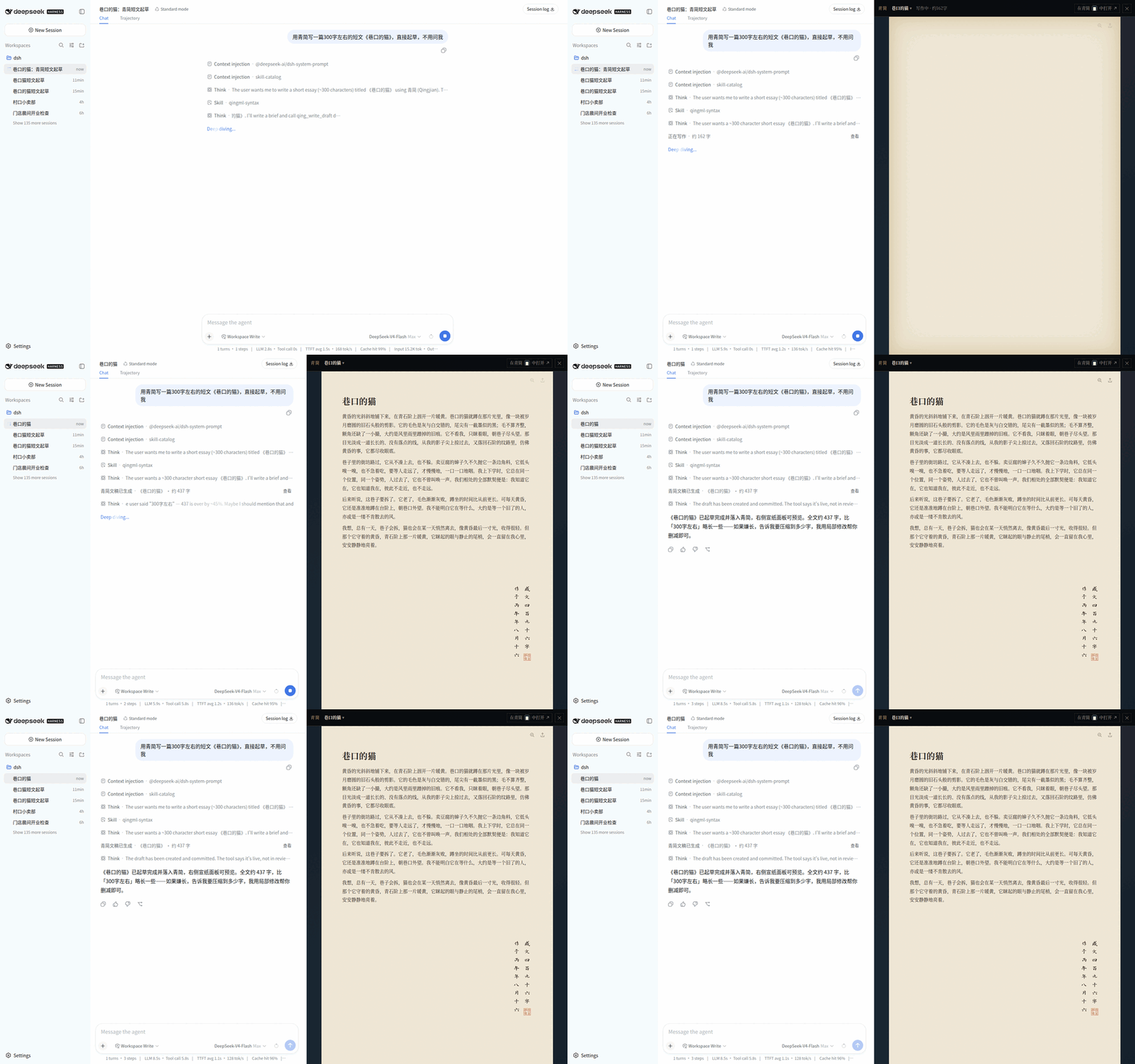
DeepSeek Harness(DSH)是 DeepSeek 开源的「一切皆插件」Agent 框架。装上 dsh-qingagent 之后,DSH 就多了一支笔:
你在对话里说清楚要写什么,Agent 调用青简引擎起草、局部修改、提交审阅;浏览器右侧同步长出一块宣纸面板——与青简桌面端同源的纸面渲染,宋体、暖纸、直角,公式、Mermaid、draw.io、表格、脚注、印章落款一应俱全。
聊天只留摘要,文稿才是真身。
qing_list_docs / qing_focus_doc 切换右侧预览;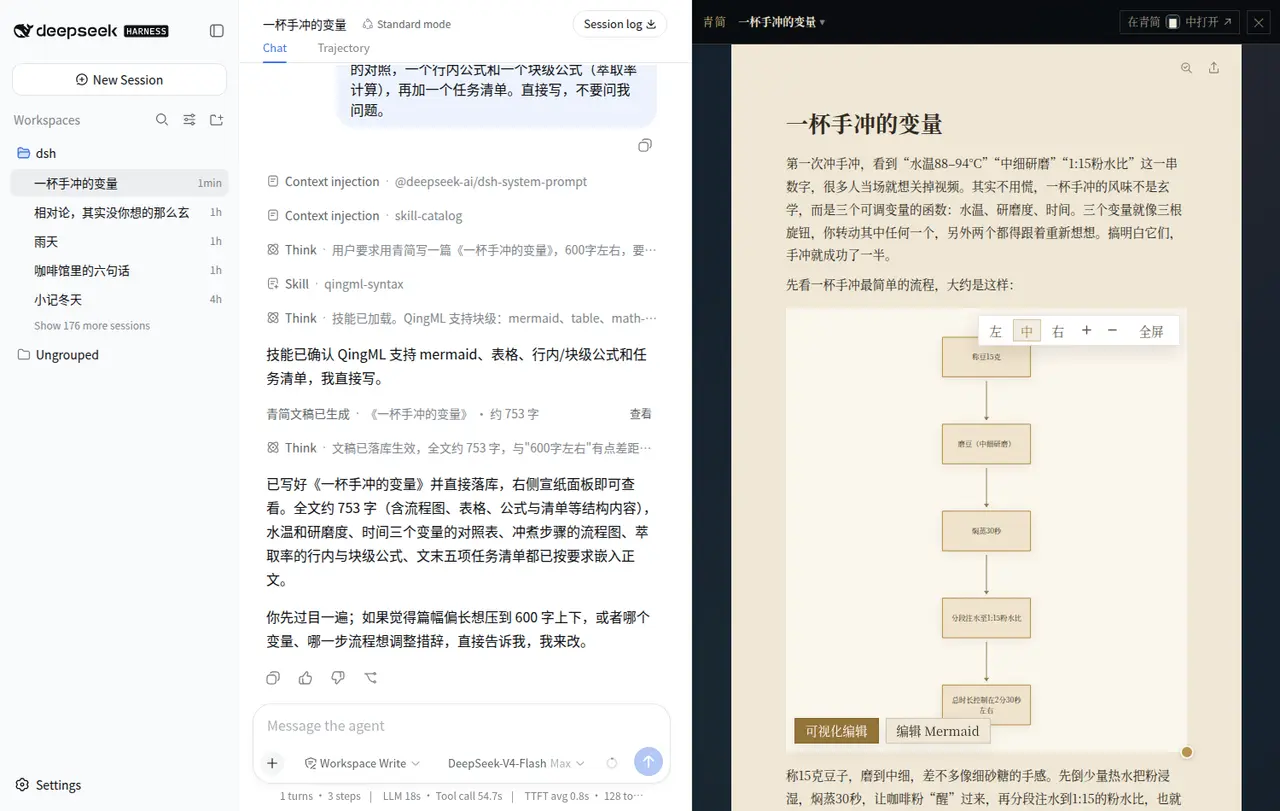 | 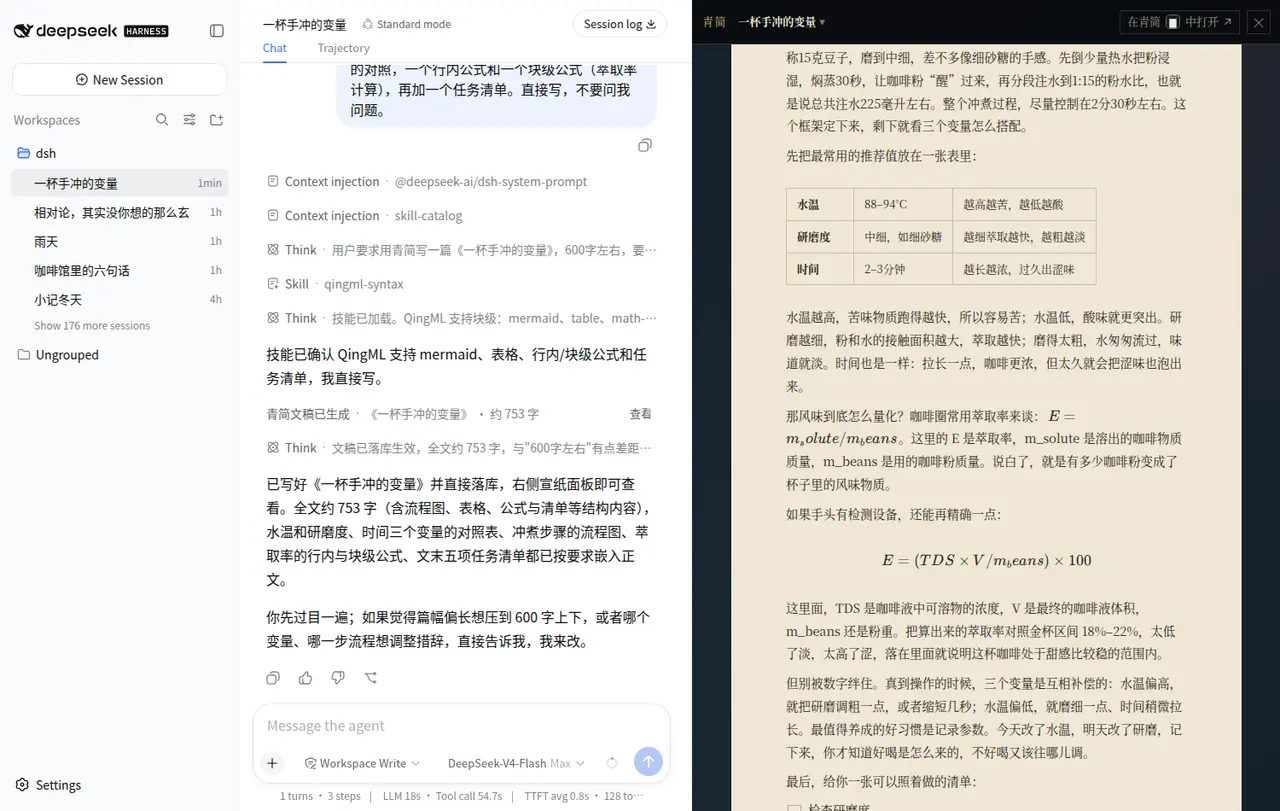 |
| 左边聊,右边成稿——一句话交代要求,Agent 调用青简工具落库,右侧宣纸面板同步长出正文;Mermaid 流程图带「可视化编辑 / 编辑 Mermaid」按钮,drawio 工程图双击即开 | 完整排版能力——表格、行内公式与块级公式(KaTeX)、任务清单、代码块,与青简桌面端同一套渲染 |
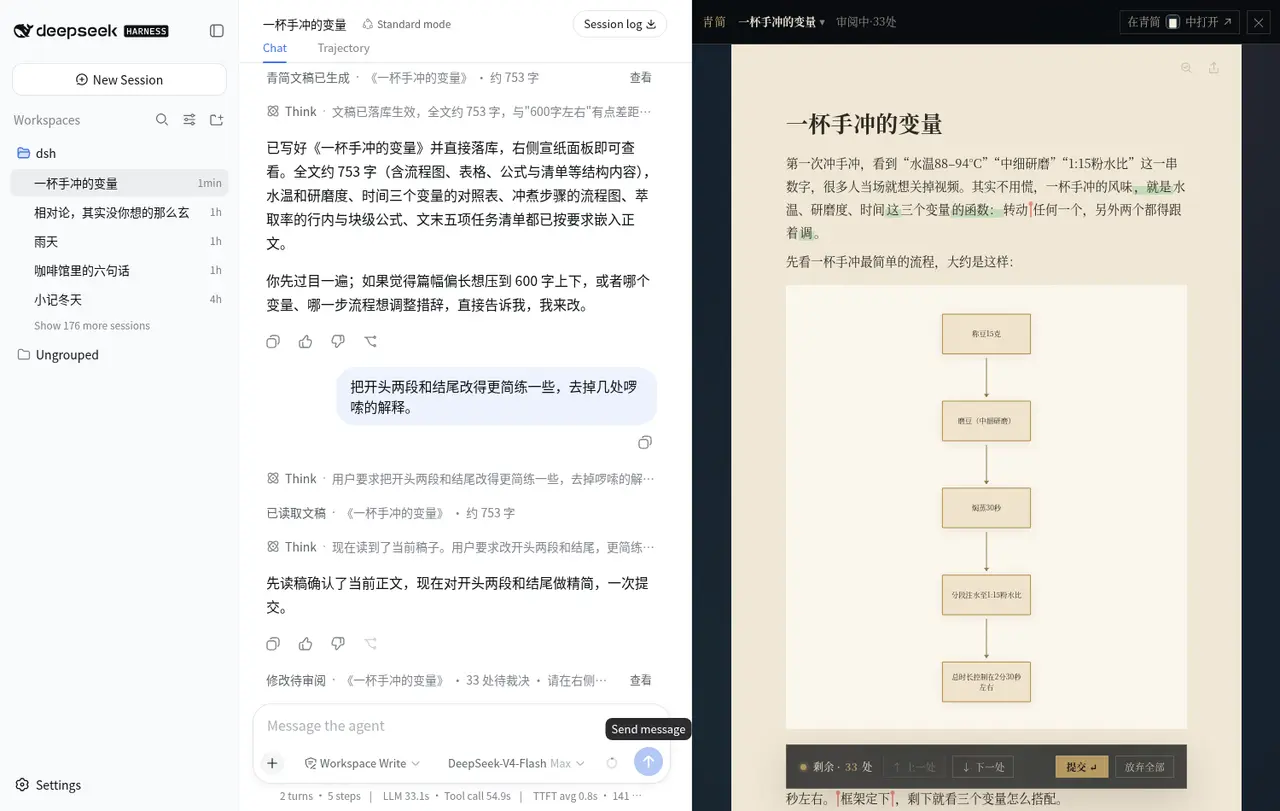 | 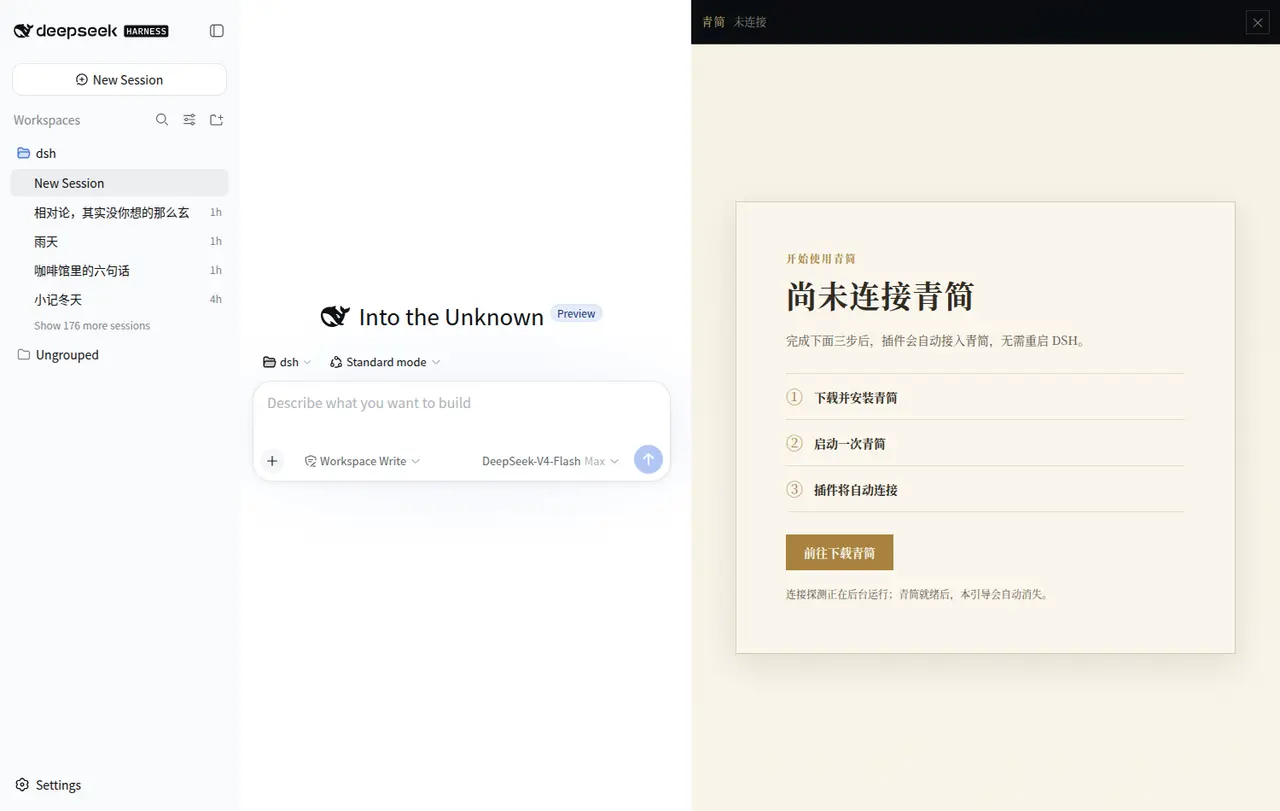 |
| 审阅态逐条裁决——顶栏显示「审阅中 · N 处」,正文标出增删,底部工具条上一处 / 下一处 / 提交 / 放弃全部 | 三态引导卡——未装、已装未启动、握手失败各给对应指引;青简起来后自动恢复,不用重启 DSH |
本插件是 青简 QingAgent 的 DSH 前端,不是独立产品。
因为插件本身的复杂度——纸面渲染与文稿引擎深度耦合、文档与版本存在本机数据库——目前必须先安装青简桌面客户端,插件才能工作。 客户端承载文稿引擎与本机库;插件负责把它接进 DSH 的对话与界面。
这也带来一个好处:DSH 里写的稿子,回到青简客户端还能继续改,反过来也一样——同一本机库,不是两份拷贝。
① 启动 DeepSeek Harness(需 Node.js 20+)
npx @deepseek-ai/dsh web
② 安装青简插件
npx @deepseek-ai/dsh plugin --profile web add github:void2anything/dsh-qingagent
装完重启 dsh web 即生效。
也可以从 npm 安装:
add dsh-qingagent@<版本号> --config.minimum-release-age=0。 直接add dsh-qingagent@latest可能装到旧版本——这是 pnpm v11 默认的 24 小时发布观察期(供应链防护), 上面的 GitHub 方式与带--config.minimum-release-age=0的精确版本方式都不受影响。
③ 下载并启动一次青简客户端
到 qingagent.com 或 青简 Releases 下载安装,启动一次——引擎随之常驻,凭证写入 ~/.qingagent/instance.json,插件即自动连接。
青简未安装或未启动时,面板会显示引导卡:未安装给下载指引;已安装未启动给一键「启动青简」;握手失败直接说明原因(比如 instance.json 损坏)。青简起来后插件自动恢复,不用重启 DSH。
要求:DSH 以 0.1.0-rc.6 为基线(peer 依赖 ^0.1.0-rc.6),profile 需已组合 storage hub、storage-domain 及一个 KV 后端(通常是 @deepseek-ai/dsh-storage-json)。
官方支持的组合:Windows 上运行 dsh + Windows 青简桌面客户端,同机同用户。
插件实现里也包含 macOS 的客户端检测(mdfind 与 Applications 目录回退),但未做完整验证,遇到问题欢迎提 issue。
WSL / 跨系统组合不受支持:插件从当前系统的用户目录读取 ~/.qingagent/instance.json,dsh 跑在 WSL、客户端装在 Windows 时读不到该文件,也就连不上引擎。
| 工具 | 参数 | 作用 |
|---|---|---|
qing_write_draft | qingml 必填;title? requirements? docRef? | 把主模型已写好的完整 QingML 全文直接提交。字数要求只返回是否达标和差距,工具不内部重写;省略 docRef 为新建,给了本会话 docRef 即整篇重构(须用户明确授权) |
qing_edit_draft | docRef?;ops[] 必填 | 对已有文稿原子提交一组结构化局部编辑;审阅进行中拒绝再次编辑 |
qing_read_draft | docRef?;mode 默认 outline | 分级读取:outline 概要 / full 全文 / base 已提交基线 / lines 带行号 Markdown / blocks 块 ID 清单 |
qing_review_commit | docRef?;action: accept_all | reject_all | 全量接受或拒绝待审稿;代码硬性限制每回合最多一次 |
qing_list_docs | scope: session | library | 列本会话绑定稿;library 列青简全库最近文稿(最多 50 篇) |
qing_focus_doc | docRef 必填 | 切换右侧纸面;未绑定时可按引擎 ID 或唯一精确标题从文库收养 |
qing_edit_draft 的八种操作:
kind | 语义 |
|---|---|
strReplace | old → new,可指定第 nth 个命中 |
markText | 给命中文本加 / 去行内标记:bold italic strike underline code highlight(color) textColor(color) link(href,title?);支持 all、isRegex、withinRef |
insertAfterLine | 在已提交 Markdown 的第 N 行后插入 |
insertAfterBlock | 在顶层块后插块;清单项后插同深度兄弟项 |
appendSection | 追加章节 |
deleteBlock | 删除整个顶层块 |
deleteListItem | 删除清单 / 任务项,末项删除后引擎清理父清单 |
setTitle | 改元数据标题,不动正文 |
请求级
opId幂等只施加于deleteBlock、deleteListItem、insertAfterBlock三类结构性操作;所有 proposal 另带随机clientMutationId。
青简 web 编辑器源码直接编译进插件(vendor/qingagent submodule),观感与桌面端同源:
DocumentSnapshotView 接补丁集合,底部 PatchNav 支持前后跳转、全部拒绝与结算;结算后仅在有拒绝项时回流一条结构化【审核结果】消息;AnnotationGroup,装饰进 PM 并用青简原生轮播渲染;正文补丁审阅期间批注自动隐藏;qingjian://open?engineSessionId=<id> 拉起桌面客户端。来源归属:本插件的所有外部写入固定标注 x-qa-client: deepseek,在青简客户端里显示为「DeepSeek Harness」来源。
~/.qingagent/instance.json,要求 schemaVersion=2,校验 port / pid / version / attachProtocolVersion / token / startedAt;engineUrl 端口,直连 http://127.0.0.1:<instance.port>(青简桌面端口默认 21823,被占则随机);online / offline / starting / handshake-failed,各带细分原因;/reg:64 视图);macOS 用 mdfind 查 bundle id,回退 /Applications/青简.app 与用户 Applications 目录;探测结果缓存 30 秒。启动端点只接受检测器解析并 stat 过的路径,不接受浏览器提交的可执行文件路径。
autoLaunch配合engineCommand时,等待引擎就绪的预算是 20 秒。
| 字段 | 默认值 | 说明 |
|---|---|---|
engineUrl | http://127.0.0.1:8080 | 仅作回退:读不到 instance.json 时使用;实例存在时以其端口为权威 |
engineCommand / engineCwd | 未设置 | 可选启动命令与工作目录,仅 autoLaunch 时执行 |
autoLaunch | false | 离线时 detached 拉起引擎;卸载插件不会杀掉用户的引擎 |
workspaceProjection | true | 保留字段,当前无运行时效果 |
instance.json 与其中的 token 只由 Node host 读取,健康检查、external API、导出请求的 Bearer 由 host 添加;下发给浏览器的桥载荷只含引擎状态、绑定、文稿与选段,不含 token。/qingagent-bridge/* 与 /drawio 在进入业务逻辑前拒绝非回环地址(认可 IPv4 / IPv6 / IPv4-mapped loopback)。dshSessionId + engineSessionId 绑定校验;focus 的 adopt:true 是显式收养例外,会先探测引擎文稿再加入本会话。@scope,机械提取的 qingdoc.css 走 [data-qingagent-doc-panel] 选择器前缀重写——两条路都不泄漏到宿主界面。qingmlParse,标签白名单显式枚举,链接与图片各有白名单校验,最终还要通过 Zod schema 才能进入 ProseMirror;script / style 直接丢弃。SAMEORIGIN;iframe 消息校验 event.source 与同源 origin。绑定数据存于 @deepseek-ai/dsh-storage-domain 的 dsh_qingagent v1 domain。
插件默认开启匿名使用统计,事件由 DSH 的 Node 进程发送到自托管 Umami:https://t.qingagent.com/api/send。服务端会像普通网站服务一样看到请求 IP;插件不发送正文、标题、字数原值、用户消息、会话 ID、文稿引用、文件路径、工作区 / profile 名或错误堆栈。
每条事件的公共属性仅有:随机生成并存于独立 dsh_qingagent_telemetry 存储域的匿名 device_id、pluginVersion、可取得时的 dshVersion、platform、arch、nodeVersion、locale。事件属性如下,所有计数只发分桶、不发原值:
| 事件 | 属性 |
|---|---|
plugin_activated | 首次运行、装机龄分桶、引擎状态、是否写过 / 编辑过 / 审阅过 |
panel_opened | 打开来源(工具卡 / 手动 / 自动) |
draft_created | 字数分桶、块数分桶 |
draft_edited | 操作数分桶、去重后的操作类型、结果(已提交 / 待审) |
edit_rejected | 拒绝原因枚举 |
review_settled | 提交 / 放弃、补丁数分桶、是否发生 409 重试 |
engine_unreachable | 连接状态原因枚举;仅状态翻转时发送 |
update_clicked / feedback_clicked | 前后版本号 / 反馈目标枚举 |
doc_missing_shown | 无额外属性 |
当前采集项以本节为准,变更时会同步更新。
设置以下任一环境变量即可完全关闭,不会创建匿名 ID,也不会发送事件:
DSH_QINGAGENT_TELEMETRY_DISABLED=1
# 或尊重青简全局开关
QINGAGENT_TELEMETRY_DISABLED=1
git clone --recursive https://github.com/void2anything/dsh-qingagent.git
cd dsh-qingagent
npm install
npm run check   # CSS 钉扎校验 + 类型 + 测试 + 构建

# POSIX shell
npx @deepseek-ai/dsh plugin --profile web add link:$(pwd)
# Windows PowerShell
npx @deepseek-ai/dsh plugin --profile web add link:${PWD}
忘了
--recursive就补git submodule update --init。构建脚本使用 POSIX 工具(rm -rf等),Windows 上建议在 Git Bash / WSL 里执行开发构建。
package.json 中的 dsh.bundle.patch 会合并仓内 cordis.patch.yml;不要同时保留手写挂载与 bundle 挂载,以免双重注册。
纸面渲染直接复用青简 apps/web 的源码与 CSS,构建期从 QING_ROOT 读取:
vendor/qingagent(submodule,钉在校验过的 commit);QING_ROOT=/path/to/qingagent 可覆盖(本地开发指向自己的青简工作树);QINGAGENT_DRAWIO_ROOT 可单独覆盖。CSS 按「文件 + 行段」机械提取(scripts/extract-qingdoc-css.mjs),npm run check:qingdoc-css 做字节级比对,并被 check 与 prepack 依赖:升级 submodule 后必须先跑它——行号漂移会导致提取切坏、构建残缺。校验红灯 = 禁止发布;修好钉扎(对齐新行号)后再走全检。
npm run check   # 全检:CSS 钉扎 + typecheck + vitest + build
npm test        # 仅单测
契约测试锁住:纸面 800px 版心、宋体、直角与暖纸色板只作用于面板根;CSS 提取与钉扎行段一致;bridge 回环与会话隔离;QingML XSS 白名单;审阅态拦截与 401 token 重读等。
扫码加入用户微信群,反馈问题、提需求、看更新:
Apache-2.0(本仓)。vendor/qingagent submodule 为 青简,MIT。
FAQs
AI writing assistant plugin for DeepSeek Harness — draft and revise documents in chat, typeset on a rice-paper panel, review every edit before it lands. DeepSeek Harness × 青简写作桥:对话里起草改稿,右侧宣纸预览逐条审阅后落稿。
The npm package dsh-qingagent receives a total of 149 weekly downloads. As such, dsh-qingagent popularity was classified as not popular.
We found that dsh-qingagent demonstrated a healthy version release cadence and project activity because the last version was released less than a year ago. It has 1 open source maintainer collaborating on the project.
Security News
Cloudflare is acquiring Deno’s team, which will provide another year of bug fixes and security updates before ending support for the runtime.

Security News
Anthropic’s free OSS Scanner uses Mythos and other Claude models to find open source vulnerabilities and send maintainers reports with proposed fixes.

Security News
On Front Lines’ Early Adopters: CISO podcast, Andrew Becherer shares lessons from Datadog, weighs the long-term costs of AI-built tools, and explains how founders can actually gain a CISO’s trust.