


Security News
Deno Goes the Way of the Dinosaur
Cloudflare is acquiring Deno’s team, which will provide another year of bug fixes and security updates before ending support for the runtime.
By Sarah Gooding - Oct 16, 2026
dsh-timed-goal
Advanced tools
DSH web plugin: schedule an automatic /goal execution from inside a conversation, with both a /timed-goal command and a Web UI (per-conversation input control + settings section). Configure an absolute datetime (year/month/day/hour/minute/second) plus a p
在任意 DSH 对话中配置定时任务,到点后自动通过
/goal执行你预设的提示词——支持斜杠命令与完整的 Web 界面。

DSH(DeepSeek Harness) Web 插件:在任意对话中配置一次性(或每日重复)任务——一个绝对时间加上要执行的提示词。到点时,插件把对话权限固定为任务配置的等级(full access / workspace write,默认 full access)并创建一个已设置的 goal,让预设提示词以 /goal 语义自动执行。
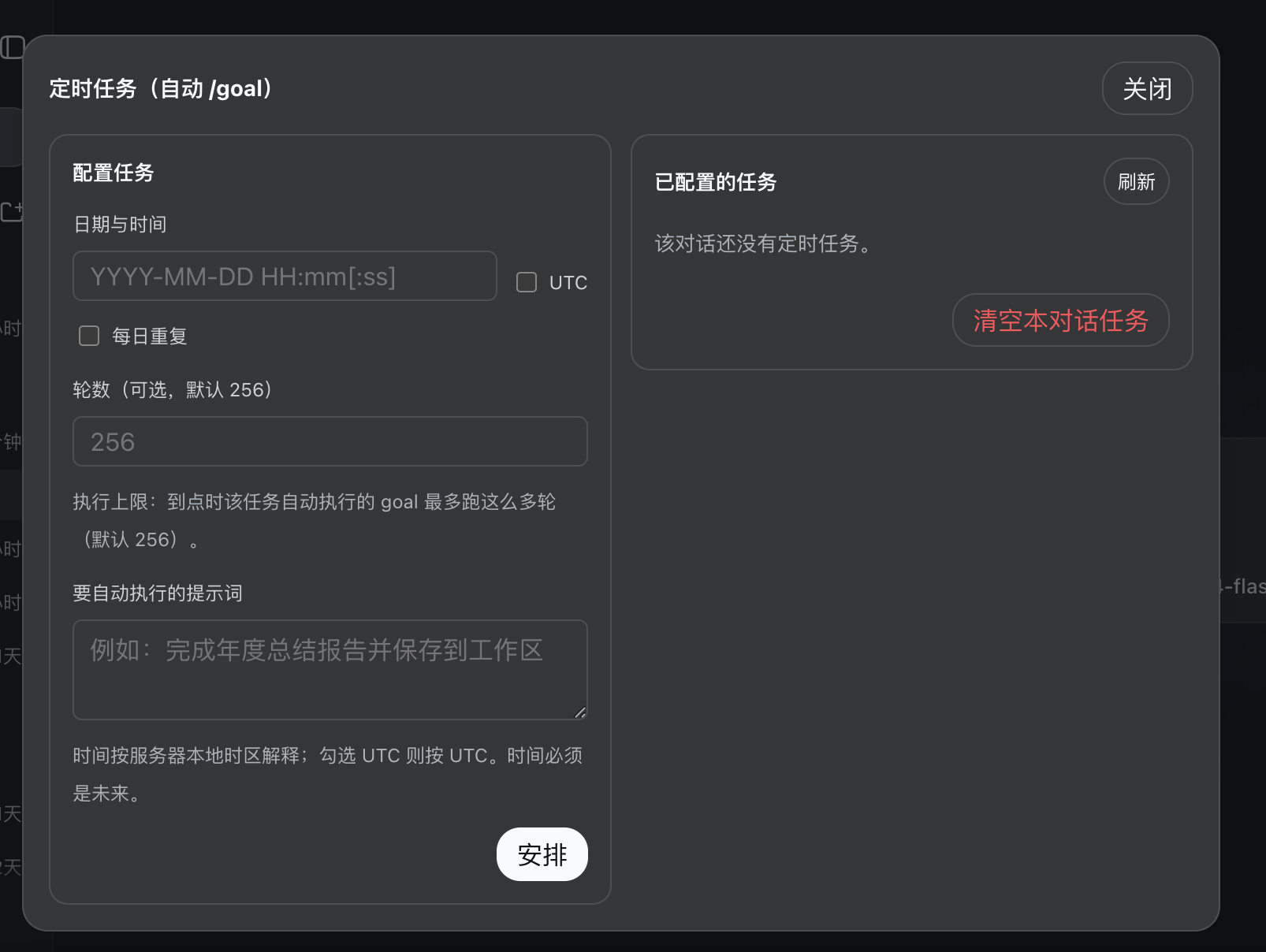
danger-full-access)并创建 goal,由平台 goal 轮次驱动自动运行你的提示词,无需人工干预。--rounds <n> 或界面字段;默认跟随宿主,通常为 256)。/timed-goal 命令族。入口控件(⏱ 定时)位于每个对话的输入框工具行——在所有会话状态下都可见,包括没有对话记录的全新空白对话(会话头部在有内容前会被整体隐藏,因此入口放在始终可见的输入区)。
点击后,配置面板以浏览器页内居中模态框呈现——与「选择工作区」弹窗同款的系统级对话框(官方 Modal 组件,portal 渲染到页面根节点,不随触发按钮定位;半透明幕布;按 Esc、点幕布或「关闭」收起),左右分栏:
待触发 / 已触发 / 失败、触发时间、每日徽标、轮数、权限说明),每行带编辑 / 删除,另有手动刷新与清空按钮。设置页的「定时任务」卡片(settings.section)是只读总览:跨所有会话查看全部已安排任务(含所属会话、状态、时间),每行提供「跳转」按钮直接进入任务所在的对话,以及「删除」按钮删除任意任务(新增/编辑请在对话内通过「⏱ 定时」面板操作)。
dsh web)。dsh plugin --profile web add dsh-timed-goal
然后重启 dsh web 进程(宿主端插件代码在启动时加载),并验证:
dsh --profile web --dump-config | grep timed-goal
重启后,任意对话输入框工具行会出现 ⏱ 定时 控件,设置页出现「定时任务」卡片。
本地源码目录安装(例如开发调试):
dsh plugin --profile web add file:/绝对/路径/dsh-timed-goal
dsh plugin --profile web remove dsh-timed-goal
# 然后重启 dsh web
已配置任务保存在 $DSH_HOME/plugins/dsh-timed-goal/jobs.json(默认 ~/.dsh/plugins/dsh-timed-goal/jobs.json)。若打算重装,请先备份该文件。
在任意对话内发送(完整帮助见 /timed-goal help):
/timed-goal add 2026-09-01 09:30:00 --rounds 32 把当前时间发送到我的邮箱
/timed-goal 2026-09-01 09:30 --daily 每天早上提醒我喝水
/timed-goal list
/timed-goal remove tg-xxxxxxxx
/timed-goal clear
add 可省略:/timed-goal <时间> <提示词...> 直接可用。YYYY-MM-DD HH:mm[:ss](服务器本地时间)或 YYYY-MM-DD HH:mm[:ss]Z(UTC)。--daily:任务每天在此时刻重复执行。--rounds <n>:限制触发 goal 的自主轮次。⏱ 定时 → 居中模态框打开。$DSH_HOME/plugins/dsh-timed-goal/jobs.json),任务在 web 重启后依然生效。danger-full-access,也可以选择 workspace write),并以你的提示词创建 goal——由 goal 轮次驱动自动执行。GOAL_ALREADY_EXISTS 冲突)后自动顺延到次日;其他失败以 5 秒退避在 30 分钟宽限窗口内重试,之后标记为「失败」——可编辑后重试。/timed-goal/jobs —— GET(列表)、POST(创建)、PATCH /timed-goal/jobs/<id>(编辑)、DELETE /timed-goal/jobs/<id>(删除)、DELETE /timed-goal/jobs(清空全部,或带 ?sessionId=… 仅清空某会话)。插件默认以 full access(danger-full-access)执行定时任务——其意义就是在你自己的 DSH 实例中无人值守地自主执行;需要更克制的场景可为单个任务选择 workspace write(仅可写工作区,超出范围需审批)。旧版本安排的任务没有权限字段,升级后仍按 full access 原样触发。请只安排你信任的提示词。
git clone https://github.com/gfds2005/dsh-timed-goal.git
cd dsh-timed-goal
npm test   # 单元 + 集成测试
祝使用愉快!⏱
FAQs
DSH web plugin: schedule an automatic /goal execution from inside a conversation, with both a /timed-goal command and a Web UI (per-conversation input control + settings section). Configure an absolute datetime (year/month/day/hour/minute/second) plus a p
We found that dsh-timed-goal demonstrated a healthy version release cadence and project activity because the last version was released less than a year ago. It has 1 open source maintainer collaborating on the project.
Security News
Cloudflare is acquiring Deno’s team, which will provide another year of bug fixes and security updates before ending support for the runtime.

Security News
Anthropic’s free OSS Scanner uses Mythos and other Claude models to find open source vulnerabilities and send maintainers reports with proposed fixes.

Security News
On Front Lines’ Early Adopters: CISO podcast, Andrew Becherer shares lessons from Datadog, weighs the long-term costs of AI-built tools, and explains how founders can actually gain a CISO’s trust.