


Security News
Deno Goes the Way of the Dinosaur
Cloudflare is acquiring Deno’s team, which will provide another year of bug fixes and security updates before ending support for the runtime.
By Sarah Gooding - Oct 16, 2026
dsh-ui-spec
Advanced tools
DeepSeek Harness plugin that turns UI screenshots into implementation-grade web specs using OCR, deterministic geometry, scene graphs, assets, and render comparison.
English | 简体中文


Turn UI screenshots into implementation-oriented structured specifications that help a text-only DeepSeek model recreate responsive web interfaces. The plugin uses Windows native OCR and supplies layout, visual-detail, interaction, and browser-verification constraints.
This example comes from the Desktop/8 test. The page on the right was implemented autonomously from the plugin output.
| Reference | DeepSeek implementation |
|---|---|
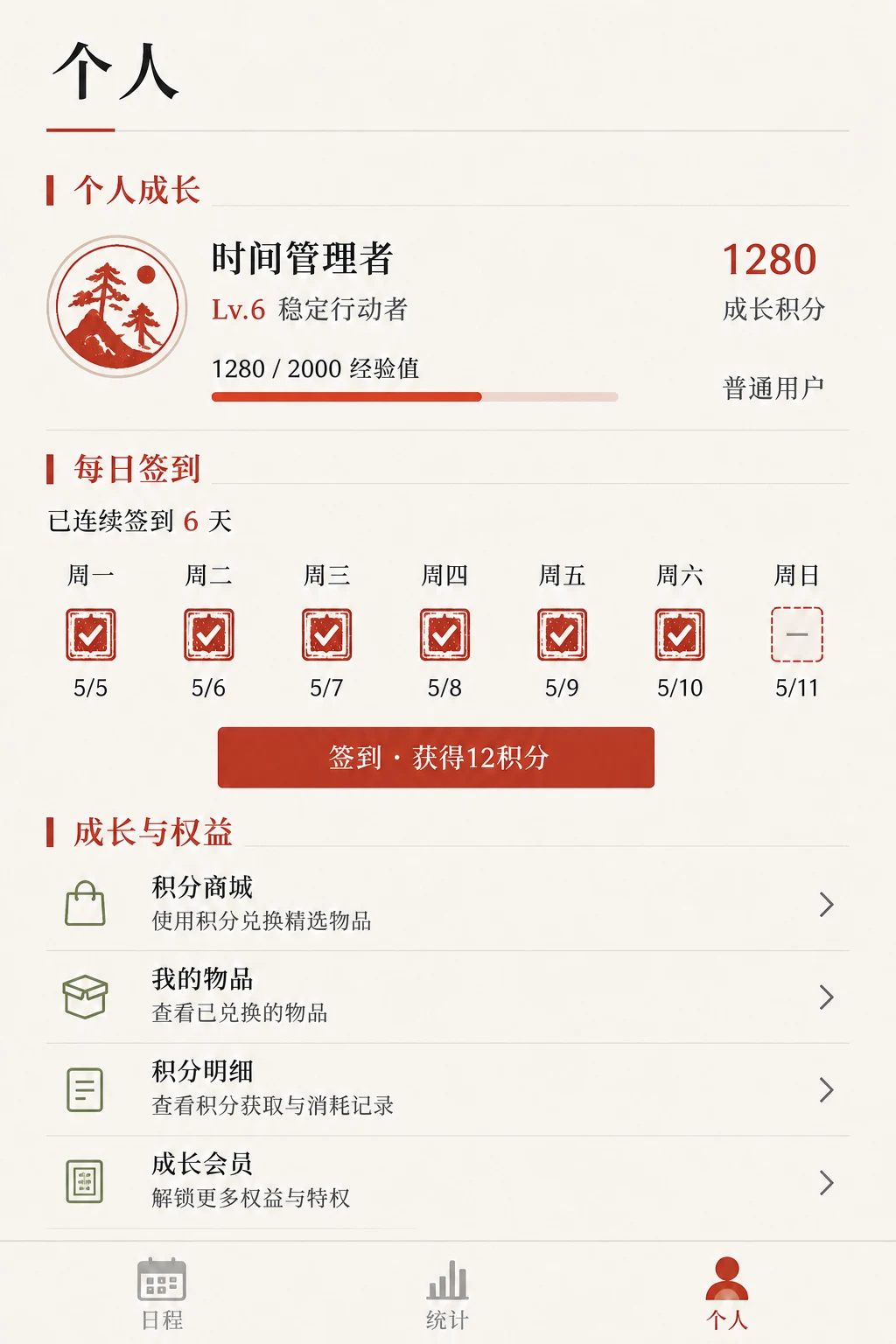 | 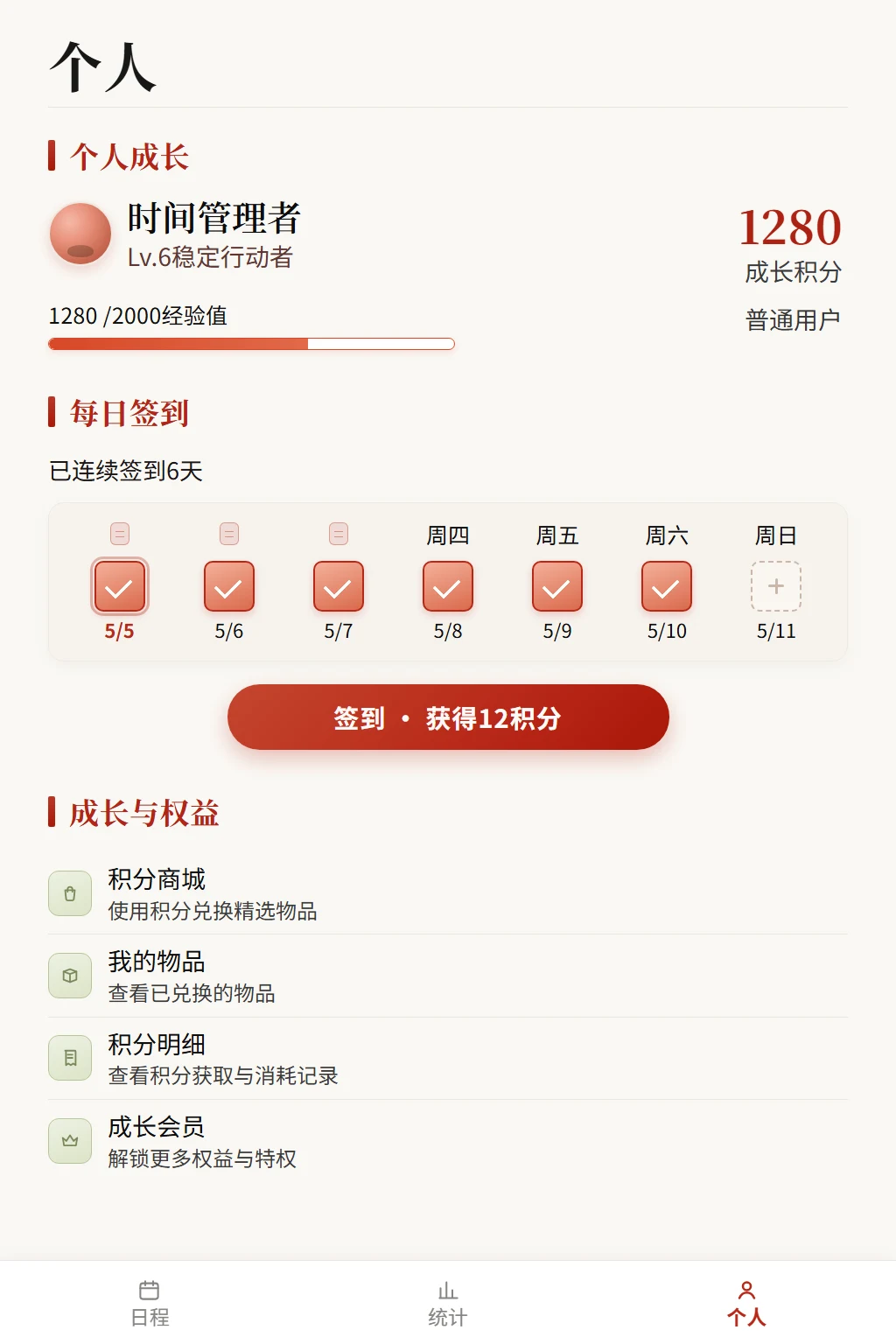 |
Install from npm:
dsh plugin --profile web add dsh-ui-spec
Installing the current GitHub version with pnpm 11 requires allowing its source-package build script. Add this to the DSH profile's pnpm-workspace.yaml:
allowBuilds:
  "dsh-ui-spec@git+https://github.com/yumimanji/dsh-ui-spec.git": true
Then install:
dsh plugin --profile web add github:yumimanji/dsh-ui-spec
Use the npm release when the DSH profile cannot configure allowBuilds.
Ask the model in DSH:
Use ui-spec to analyze the two images in the current directory and recreate them as responsive web interfaces. After implementation, validate the pages with manage_ui_browser and close only the browser session created by that tool.
For one image:
Use ui-spec to analyze C:\path\to\reference.png and implement the responsive web UI.
ERR_PNPM_UNEXPECTED_STORE means the DSH profile's existing node_modules uses a different pnpm store. Rebuild that profile's dependencies, then retry installation:
cd $env:USERPROFILE\.dsh\profiles\web
Rename-Item node_modules node_modules.store-mismatch-backup
pnpm install
dsh plugin --profile web add dsh-ui-spec
Remove the backup only after DSH starts normally.
FAQs
DeepSeek Harness plugin that turns UI screenshots into implementation-grade web specs using OCR, deterministic geometry, scene graphs, assets, and render comparison.
We found that dsh-ui-spec demonstrated a healthy version release cadence and project activity because the last version was released less than a year ago. It has 1 open source maintainer collaborating on the project.
Security News
Cloudflare is acquiring Deno’s team, which will provide another year of bug fixes and security updates before ending support for the runtime.

Security News
Anthropic’s free OSS Scanner uses Mythos and other Claude models to find open source vulnerabilities and send maintainers reports with proposed fixes.

Security News
On Front Lines’ Early Adopters: CISO podcast, Andrew Becherer shares lessons from Datadog, weighs the long-term costs of AI-built tools, and explains how founders can actually gain a CISO’s trust.