

Security News
vlt 1.5.0 Adds Agent Skills Management
vlt 1.5.0 links skills from JavaScript dependencies to coding agents, with lockfile versioning and Socket data to filter out known malicious packages.
By Sarah Gooding - Oct 21, 2026
dsh-visual-plugin
Advanced tools
Local-first visual media plugin for DeepSeek Harness: local video preprocessing, native vision, copyable image history, and video playback.






A local-first visual media plugin for DeepSeek Harness.
Validate, transcode, and extract video keyframes locally; understand images and
videos with DSH's current vision model, view image history, and play videos in the right panel.
A plugin for DeepSeek Harness.
Video preprocessing and plugin-owned media storage stay on the machine running DSH. Images and extracted keyframes are sent through DSH to your selected model; whether inference runs locally depends on your DSH model configuration.
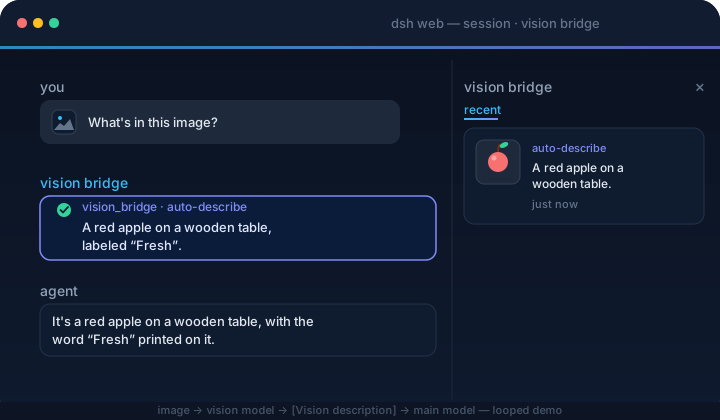
image → DSH native attachment → current image-capable model → final answer
→ /vision-bridge/recent → panel thumbnail + copyable description
video → container validation → H.264/yuv420p normalization → PySceneDetect
→ timestamped keyframes → DSH native image attachments → current model answers
The plugin never rewrites model messages or calls a private vision endpoint. Select an image-capable model in DSH before sending images or asking about a video.
Plugin 0.4.x targets DSH 0.2.0-rc.2; keep plugin 0.3.2 for DSH 0.1.x. No exact-version risk exemption is needed.
Image features work without these tools. Video support requires FFmpeg/FFprobe >= 6.1 from the same major release, an FFmpeg build with libx264, and PySceneDetect >= 0.7.1 < 0.8.
Install the tools on the machine and under the user account that runs dsh web. The commands ffmpeg, ffprobe, and scenedetect must be available on that process's PATH, from any directory. If DSH runs in Docker, WSL, or on a remote server, install the dependencies inside that environment.
Install Homebrew first if needed, and follow its post-install instructions to add brew to your PATH. Then install FFmpeg, which includes FFprobe, and uv:
brew install ffmpeg uv
Install the official FFmpeg and uv packages:
sudo pacman -Syu ffmpeg uv
Open PowerShell and confirm WinGet is available with winget --version. If it is missing, install or update App Installer using the instructions in that link. On Windows x64, install FFmpeg (including FFprobe) and uv:
winget install --id Gyan.FFmpeg --exact
winget install --id astral-sh.uv --exact
Close and reopen PowerShell before continuing so the new PATH takes effect. If WinGet is unavailable, use a Windows build linked from the FFmpeg download page, extract it to a permanent directory such as C:\Tools\ffmpeg, and add the directory containing ffmpeg.exe and ffprobe.exe (usually bin) to your user Path in Environment Variables. Install uv using its official Windows instructions.
Run the following in your terminal or PowerShell:
uv tool install --python 3.12 "scenedetect>=0.7.1,<0.8"
uv tool update-shell
This installs PySceneDetect as a persistent command in an isolated environment for the current user. uv downloads Python 3.12 if needed; the standard scenedetect package includes its OpenCV dependencies. You do not need to activate a virtual environment before starting DSH. See the uv tool guide and PySceneDetect installation guide.
Close and reopen your terminal after uv tool update-shell. In the same environment you will use to start DSH, run:
ffmpeg -version
ffprobe -version
ffmpeg -hide_banner -encoders
scenedetect version
Confirm FFmpeg and FFprobe are both >= 6.1 and have the same major version, the encoder list includes libx264, and PySceneDetect is >= 0.7.1 < 0.8.
If a command is missing, locate it with command -v ffmpeg ffprobe scenedetect on macOS/Arch, or Get-Command ffmpeg, ffprobe, scenedetect in PowerShell. For PySceneDetect, uv tool dir --bin shows the directory that must be on PATH. Services and containers must also receive this PATH; restart the DSH process after changing it.
The plugin never downloads these tools or runs installers. The settings card reports video dependency issues while image features remain available.
dsh plugin --profile web add dsh-visual-plugin # or: github:jyh20030112/dsh-visual-plugin
When developing this checkout against a local DeepSeek Harness source tree, install the local package instead:
cd /absolute/path/to/dsh-visual-plugin
npm run bootstrap
dsh plugin --profile web add link:/absolute/path/to/dsh-visual-plugin
bootstrap requires an installed, built dsh-v0.2.0-rc.2 Harness checkout and automatically finds a sibling or ancestor-adjacent checkout.
For another layout, set its location explicitly:
HARNESS=/absolute/path/to/deepseek-harness npm run bootstrap
Restart dsh web from the environment where the dependency checks passed, then:
Open Settings → Plugins, then the dsh-visual-plugin detail page and its Visual Media configuration. Use Sidebar to show or hide the right panel and adjust advanced video settings. Changes apply immediately, persist in the current profile across restarts, and recover valid archived video preferences without overwriting new settings during upgrades.
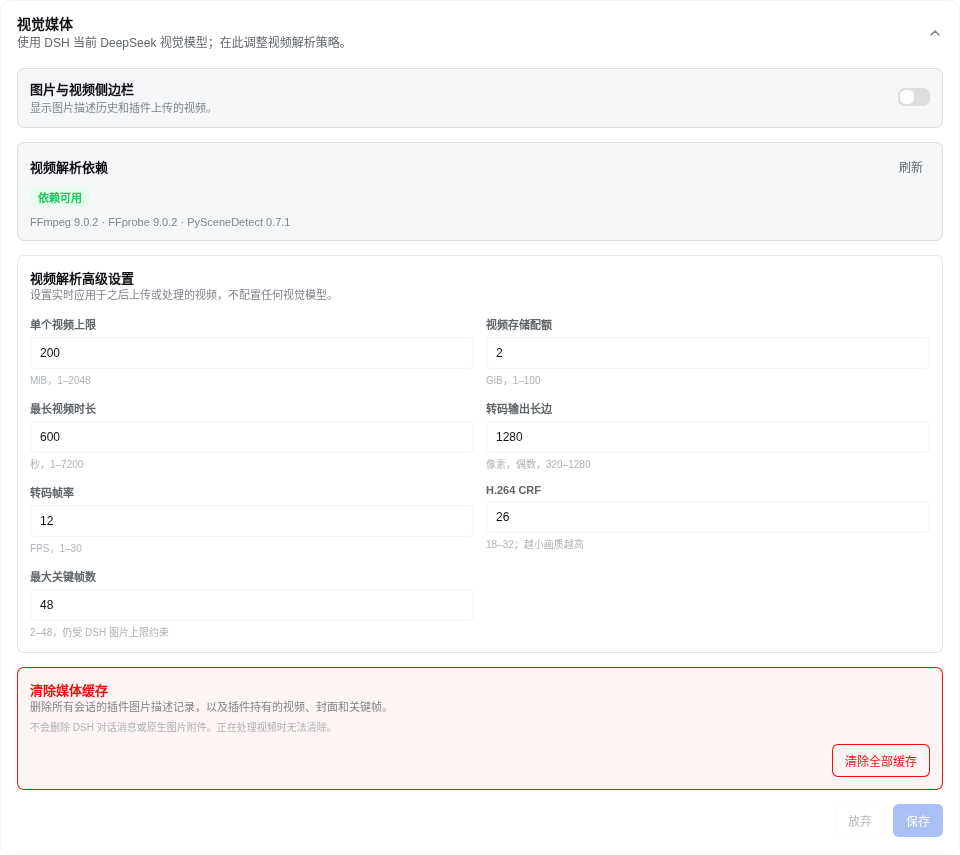
Select an image-capable model in DSH; there is no separate vision-model configuration in this plugin.
Send an image. The current model answers natively, and the image panel records the thumbnail and final answer for copying.
Upload a video from Upload video beside the composer. Once processing finishes, select Videos in the right panel to play it; Ask in chat stages a draft and never submits automatically.
Image and keyframe understanding use the image-capable model currently selected in DSH. Model providers, endpoints, and credentials are managed by DSH rather than this plugin.
dsh plugin --profile web remove dsh-visual-plugin
Restart dsh web. The command forwards to pnpm remove inside the profile, and the bundle layer list reconciles to drop the plugin automatically.
src/
  index.ts      native image history, video_describe tool, settings, and HTTP routes
  config.ts     advanced video-processing settings and runtime policy
  video/        upload, container probing, transcoding, scene detection, keyframes, and HTTP Range playback
  client/       image/video panel, upload controls, advanced settings, locales, and CSS
cordis.patch.yml  bundle patch layer
npm run bootstrap && npm run typecheck && npm run build # needs a local harness checkout
Prebuilt lib/ is committed, so consumers never build.
ci.yml verifies artifacts and the pack contents on every push/PR. release.yml (tag v*) checks the version, packs, creates a GitHub Release, and publishes to npm.
FAQs
Local-first visual media plugin for DeepSeek Harness: local video preprocessing, native vision, copyable image history, and video playback.
The npm package dsh-visual-plugin receives a total of 40 weekly downloads. As such, dsh-visual-plugin popularity was classified as not popular.
We found that dsh-visual-plugin demonstrated a healthy version release cadence and project activity because the last version was released less than a year ago. It has 1 open source maintainer collaborating on the project.
Security News
vlt 1.5.0 links skills from JavaScript dependencies to coding agents, with lockfile versioning and Socket data to filter out known malicious packages.

Security News
Rust 1.100 will add opt-in dependency cooldowns to Cargo, giving security scanners and maintainers time to catch malicious crate releases.

Security News
Cloudflare is acquiring Deno’s team, which will provide another year of bug fixes and security updates before ending support for the runtime.