Font Lab



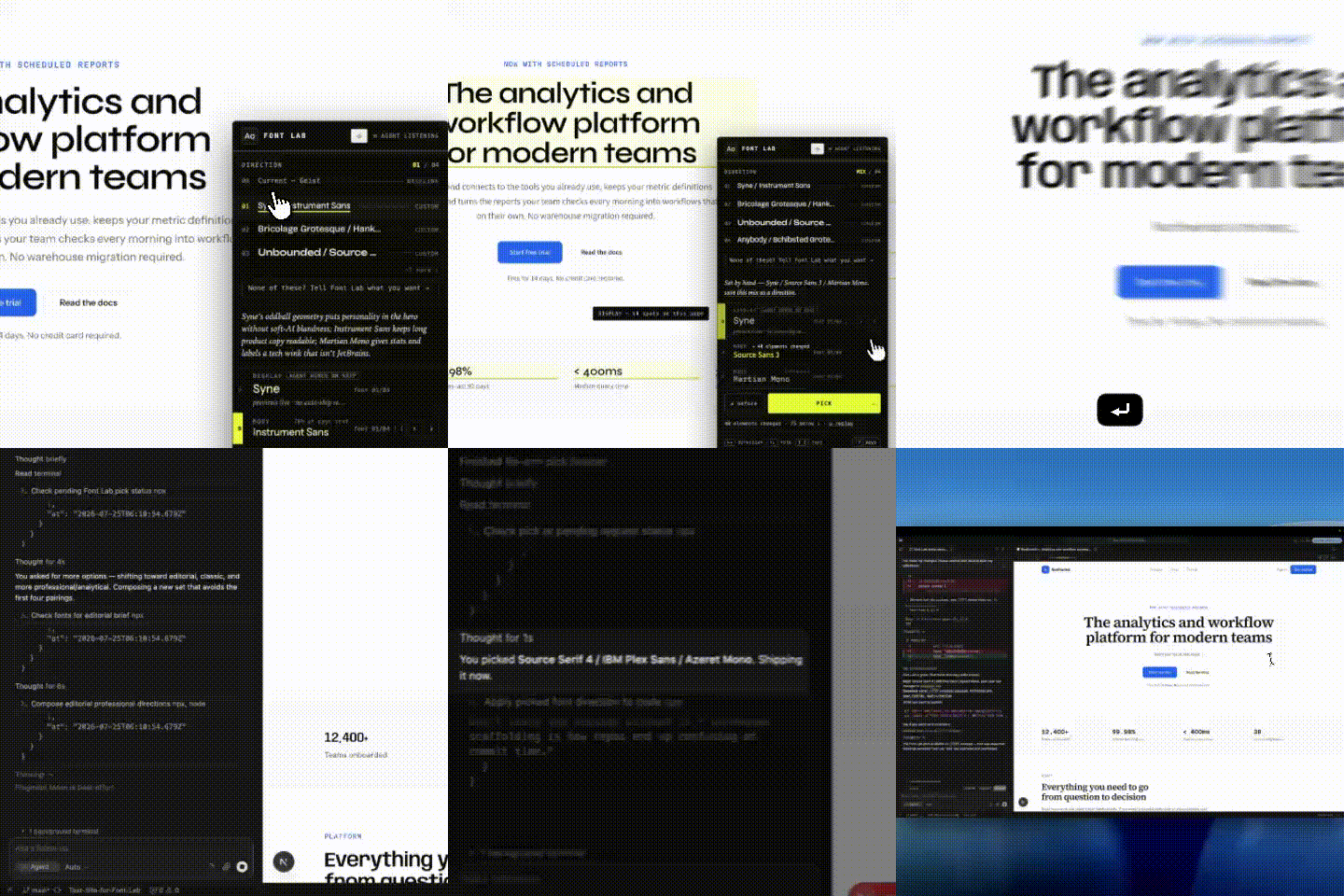
Watch the full demo →
A decision surface for typography — on any stack with a CSS seam. AI removed the labor of
implementing fonts but deleted the moment of choice — and taste only happens at the moment of
choice. Font Lab puts it back: it asks what you're going for, hands you a small set of tailored,
distinctive font directions rendered live on your own running site (or as screenshots), lets
a human pick, then ships the exact code for your stack — next/font + Tailwind on Next.js,
self-hosted @font-face (Tailwind @theme, v3 utility overrides, or your own font vars) on
Vite / Astro / Remix / SvelteKit / TanStack / plain CSS — reversibly. The human keeps
the taste decision; the agent does the typing.
It installs as an agent skill + MCP server (npx font-lab install), so you can just say
"pick better fonts for this site" and the agent drives the whole loop. Works headless (screenshots
in chat, on web or phone) or live (a flip/mix/compare panel on your real site).
What makes the options good (v2):
- It asks first.
font_lab_start returns a design brief — framing questions (what feeling?
how bold a departure? brand to evoke or avoid?) the agent asks before proposing fonts, so the
result is tailored to you, not a generic default.
- It reaches past the defaults. A built-in anti-generic rubric steers off the overexposed
AI-default faces (Inter, Geist, Space Grotesk, …) toward distinctive, designed type — and the
menu is rejected if it's all generic.
- It's not limited to a 41-font catalog. A dynamic shippability gate admits any of ~1,500
Google fonts on demand — plus a curated bench of distinctive open-foundry faces (Cabinet
Grotesk, General Sans, Clash Display, …) — verifying each can ship with preview == ship, or
flagging an honest "may render slightly differently" when it can't. The catalog is a floor, not
a ceiling.
Published from CI with npm provenance —
every release is cryptographically traceable to this repo and commit.
Install (one command)
Inside your project (any framework) — or just ask your agent "install Font Lab":
npx font-lab install
This does two things, idempotently and reversibly (the familiar npx <tool> install
pattern):
- Skill → copies the
font-lab skill into ~/.claude/skills/font-lab, so the agent
discovers it every session. You just say "pick new fonts" and it reaches for Font Lab.
On Claude Code it also wires a turn-start hook (when font-lab is installed in the
project): an undelivered pick surfaces in the agent's context on your next message,
whatever you type.
- MCP server → registers
font-lab so the agent has the font_lab_* tools. The
registration is pinned against version drift: project-scoped configs run the project's
own install (node node_modules/font-lab/mcp.mjs — so npm install IS the MCP upgrade),
and global configs use npx -y font-lab@latest (re-resolves per session instead of
freezing at the npx cache's first answer). (A newly registered MCP server is picked up on
the next session/MCP reload — until then, and any time the server drops, every tool also
runs one-shot as npx font-lab run <tool> '<json-args>': the same tool table, the same
JSON out. npx font-lab run lists them.)
npx font-lab uninstall
Upgrading
Do not use bare npm install font-lab@latest to upgrade. It updates the npm package but
leaves the panel code in app/_fontlab/ stamped at the old version — you'll see a "stale version"
warning. Font Lab's version lives in four places (the npm package, the panel stamp, the MCP
registration, the running :7777 endpoint), and they update independently.
Use the single upgrade command instead:
npx font-lab upgrade
It does everything in one pass: installs the new package, re-stamps the panel from the new template
(keeping your existing directions), re-pins the MCP registration, and shuts down a stale :7777
endpoint. The only manual step left — and it's a hard gate: reload your agent session so the
MCP server restarts. Until then the old server keeps running, and font_lab_init refuses on the
version skew (a skewed init is how broken half-panels used to ship — a 0.11 MCP stamping into a
0.13 project produced a panel importing files that were never written → Next 500 → white page).
After upgrading, font_lab_status confirms all four copies are in sync — and
font_lab_healthcheck proves the page actually serves before anyone is told to open it.
Works across agents, not just Claude Code. With no --host, install auto-detects which
agents you have and wires them all — writing each one's MCP config in the right place and format,
plus a skill (Claude) or an AGENTS.md protocol block (everyone else):
| Claude Code | project .mcp.json | ~/.claude/skills/font-lab + turn-start hook |
| Cursor | project .cursor/mcp.json (migrates off the old global ~/.cursor/mcp.json) | AGENTS.md + .cursor/rules/font-lab.mdc |
| Codex | ~/.codex/config.toml | AGENTS.md |
| Windsurf | ~/.codeium/windsurf/mcp_config.json | AGENTS.md |
| VS Code | .vscode/mcp.json (servers) | AGENTS.md |
| Gemini CLI | ~/.gemini/settings.json | AGENTS.md |
npx font-lab install --host cursor,codex
Useful flags: --host <list|all> (default: auto-detect), --project <dir> (target a project
other than the cwd), --no-mcp / --no-skill (do only one half), --local (register the MCP
server as node <checkout>/mcp.mjs for testing an unpublished clone), --dry-run (print the
plan, write nothing). uninstall cleans every host.
How the agent picks fonts (the loop)
Once installed, just ask "use Font Lab to pick fonts." The agent runs a consistent loop:
- Start & intake —
font_lab_start({ projectDir }) analyzes the project and returns the
design brief; the agent asks you the framing questions first.
- Compose for your brief — it composes tailored directions (display + body + mono, each with
a rationale), reaching past the overexposed defaults. Any of ~1,500 Google fonts is fair game;
font_lab_check_fonts confirms a face ships before it's offered. font_lab_curate is the
no-brief fallback.
- Choose — headless (
font_lab_screenshot_directions → pick from images, works anywhere) or
live (the flip/mix/compare panel on your real site). On the live path the agent verifies
before inviting: font_lab_init self-checks its stamp and refuses on version skew, then
font_lab_healthcheck proves the page serves (homepage 200, scaffold complete, :7777 up,
CSP clear — with a paste-ready dev-only patch when a strict CSP would silently block the
panel) before you're ever told to open the site. You always make the pick.
- Ship —
font_lab_apply writes the exact next/font + Tailwind code, reversibly
(font_lab_undo).
- Finish — click done ✓ in the panel (or just say so) and the agent runs
font_lab_finish: the dev-panel scaffolding comes out of the project (your applied fonts and
copy edits stay), and you get a git-verified commit plan — exactly which files are yours
to commit, with ready-to-run git add / git commit commands. Nothing of Font Lab's lingers:
the panel dirs and .font-lab/ state are self-ignoring (a nested .gitignore), so
git status shows your product diff and nothing else, the whole session long.
Every direction is gated for preview == ship: guaranteed (byte-for-byte), or best-effort
with an honest "may render slightly differently once applied" note so you decide with eyes open.
Your pick always reaches the agent — delivery is layered, not a timing gamble:
an armed agent (font_lab_wait, or serve --once parked in the background) gets it in
seconds; on Claude Code a turn-start hook surfaces it on your next message; and as the
always-on floor, an unapplied pick rides every font_lab_* tool result as
pendingHumanPick — with its ship scope (what auto-ships, what the agent wires, which
island routes need a human call) — until an apply lands. Miss every window and you can
still just say "apply my font pick."
The choosing moment: Headless vs Live
This is the heart of Font Lab. The human always makes the taste decision — Font Lab's job
is to hand you a curated, controlled menu (never a 1,500-font dump), rendered on your own
site, and ship exactly what you pick. There are two ways to present that menu. They are the
same loop and the same catalog — only the surface differs.
1. Headless — the default, works everywhere
The agent screenshots your real site in each direction and shows you the images right in the
chat. You pick one by name (on a phone: just tap it). The agent ships it.
- Works in every surface: Claude Code on the web, the iPhone/desktop apps, any MCP agent.
- No dev server for anyone to babysit: if none is reachable, the tool starts your project's
own dev command itself (bound to 127.0.0.1, health-checked, stopped after the capture) — this
is what makes the loop run unattended in cloud/container sessions.
- Two images per direction: a chat-sized
heroShot JPEG (what the agent shows you, phone-
friendly) and the full-page PNG for detail.
- The screenshots are driven through the real preview engine, so what you see is what ships
(same
next/font + Tailwind, same metric-matched fallback). The menu is always the set your
agent composed for your brief — with none composed, the tool refuses rather than silently
photographing a generic starter menu.
Tools: font_lab_compose_directions({ projectDir, directions, brief }) (persists the menu) →
font_lab_screenshot_directions({ projectDir }) → show the hero shots → the human picks →
font_lab_select({ projectDir, directionId }) → font_lab_apply → font_lab_verify.
2. Live — the full UI, when you want to drive
A real dev-panel on your running site: flip with ← →, mix a heading from one direction with a
body from another ([ ]), toggle before/after (B), snap between your two finalists (space), save a hand-mix as a direction (S), and
see each face across multiple routes. This is the richest way to choose — and it needs a browser
you can click in, so it runs locally: a Mac/Linux terminal, or the integrated terminal in
VS Code / Cursor / the Claude Code IDE extension.
Get the exact commands anytime with font_lab_live_instructions({ projectDir }).
How an agent should offer this
Default to Headless. Present the screenshots first — it works no matter where the user is.
Then tell them the full live UI exists: "Want to flip, mix, and compare these yourself? I can
give you a one-time command to open the full editor locally." Give them the option; never
auto-pick. Curated and controlled, with a clear path to expand — that's how Font Lab rolls.
| Where it runs | anywhere (web, phone, any agent) | local terminal / IDE / Cursor |
| You interact with | screenshots in chat | a live panel on your site |
| Mix roles, before/after, multi-route | pick a whole direction | yes — the complete UX |
| Fidelity | preview == ship | preview == ship |
| Who decides | the human | the human |
Status: M1 + M2 + M3 PASS.
- M1 (
cli/run-m1.sh, 16/16): arrow-flip, live display+body+mono swap, Pick →
selection.json, re-pick appends to picks.log.jsonl.
- M2 (
cli/run-m2.sh, 19/19): selection.json → real next/font + Tailwind edits
that build and render the picked fonts, applied idempotently and
reversibly (backup-first undo, byte-identical restore). The link nobody else closes.
- M6 (
cli/run-m6.sh, M1 16/16 + M6 17/17): the choosing moment polished, driven in
a real browser. Mixed picks (heading from one direction, body from another), before/
after, pin-two-to-compare, more-like-this, refined keyboard UX, and multi-route
flipping — the working pairing persists across routes (/, /dense, /form) via
sessionStorage, because a face reads differently on a hero vs. a dense page vs. a form. A
mixed pick ships end to end (verified: Fraunces/Figtree/JetBrains Mono → real next/font).
- M5 (
cli/run-m5.sh, 26/26): the MCP server + skill so an agent drives the whole
loop (analyze → curate or compose → preview → read the pick → apply). The agent gets the
curated default for free and can take the wheel — composing its own directions from the
catalog (option 3) — but only from catalog fonts, so preview == ship still holds. The human
always makes the final pick. Verified over real stdio (initialize / tools-list / tools-call).
- M4 (
cli/run-m4.sh, 96/96): the parity catalog + curator. A 41-font catalog of
variable Google fonts, each gated on verified capsize coverage (checked by importing
the metrics) and single-woff2 variable parity. A deterministic, LLM-free curator
turns the analysis into ~5 directions — moving off the current fonts, rankable by vibe,
reproducible. Evidence in cli/out/m4-report.json.
- M3 (
cli/run-m3.sh, 60/60): the real analyzer reads framework, App vs Pages
Router, Tailwind v3 vs v4, current fonts per role, and font wiring — and feeds both the
codegen branch selection and the panel's before/after. Verified on the in-repo fixtures
and the real jack-mcgovern.com site, where it correctly reads Bricolage Grotesque / Hanken Grotesk on <body> and codegen adopts those project variables to ship a
building, reversible swap. Out-of-branch projects (v3 / Pages / hardcoded) are refused
with a clear reason.
Evidence in cli/out/{m1,m2,m3}-report.json (+ cli/out/jack-applied.* — the actual code
Font Lab generated for the real site). Runs on Next 16 + Tailwind v4 + Turbopack.
Dogfood note — what jack-mcgovern.com taught us (M3)
Applied into the real site, Font Lab builds and renders: body fonts swap
Hanken Grotesk → Libre Franklin everywhere they show. The headings keep rendering the body
font both before and after — because the site's own @layer base { h1,h2,h3 { font-family: var(--font-display) } } never resolves (Tailwind v4's @theme inline doesn't emit
--font-display as a :root variable; only the font-display utility derefs it). Font
Lab preserved that behavior faithfully rather than silently "fixing" it — exactly the
honesty the WYSIWYG promise requires: we swap the families through the project's own wiring
and change nothing else.
That dogfood turned into a feature. The analyzer now ships coverage diagnostics so the
tool detects this class of problem instead of being surprised by it:
- Dead roles. Under
@theme inline, Tailwind v4 doesn't publish --font-* as a :root
variable — only the generated font-* utilities deref it. A site that hand-writes
font-family: var(--font-display) (a very common pattern) therefore has silently broken
display wiring. analyze flags it: ⚠ dead display — swap invisible until rewired.
- Other subsystems. Fonts declared with their own next/font in another route/component
(jack's
/gus uses --font-fraunces/--font-dm-sans) are reported, so the agent/user
knows a global swap's true scope (full per-route flipping is M6).
What this audit feeds since v2.0 (see docs/RFC-ROLES-AND-COVERAGE.md): the preview no
longer depends on the wiring at all — the panel censuses the RENDERED page and paints
voice clusters, so dead chains and islands preview fine. The wiring audit is ship-scope
honesty: it tells the pick (and the shipping agent) which roles have a paved auto-apply
seam and which need agent wiring, and after apply the receipt (font_lab_verify) measures
convergence on pixels — by verification, which is stronger than by construction.
Run it
cd cli && pnpm install
bash cli/run-m1.sh
run-m1.sh builds the parity catalog, starts the fixture dev server, and drives the loop
with a headless browser, asserting the pick lands on disk. Verdict + assertions in
cli/out/m1-report.json.
Use it by hand
node cli/analyze.mjs --project <your-project>
node cli/curate.mjs --project <your-project>
node cli/curate.mjs --project <your-project> --vibe editorial
node cli/gen-catalog.mjs
cd examples/sample-next-site && pnpm dev
node cli/font-lab.mjs --project examples/sample-next-site
Then open the dev site: a panel (bottom-right) shows the current state + the curated
directions, swapping live on your real content. Keys (M6):
← → — flip direction · ↑ ↓ — focus a role · [ ] — swap just that role (mixed
picks: heading from one direction, body from another)B — before/after (hold to peek) · space — snap back to the last direction you viewed (tap repeatedly to compare finalists) · S — save a hand-mix as a direction · X — inspect (hover the page to identify text; on by default) · ⇧X — map every role at once · J — jump to the focused role on the page · double-click any words — retype them in place (saves to source, reversibly)Enter or Pick — write the selection
The working pairing follows you across routes (/, /dense, /form) so you can judge a face
on a hero, a dense page, and a form — "your real site" is more than one screen.
Run it on your own project (font-lab init)
One command makes any live-panel project (Next.js App Router + Tailwind v4 + CSS-variable
fonts) previewable — it self-hosts the parity bundles, drops in the dev panel, and mounts it
dev-only in your layout. On any other framework (Vite / Astro / Remix / SvelteKit /
TanStack / Tailwind v3 / var-wired plain CSS): skip init — the choosing moment is the
portable preview (node cli/preview.mjs --project <dir>, a self-contained HTML sheet with
verified screenshots), and apply ships the pick via self-hosted @font-face through your
stack's own seam. analyze's ships line names the exact path for your project.
node cli/init.mjs --project <your-project>
cd <your-project> && <your dev command>
node cli/font-lab.mjs --project <your-project>
node cli/init.mjs --project <your-project> --undo
The panel censuses the rendered page into voice clusters (heading / body / label, keyed
by rendered style + structure + provenance) and previews by painting clusters through one
injected stylesheet — so the flip reaches every heading on every route, including dead
variable chains, inline-style brand islands, and system-stack mono that variable overrides
could never touch. A role with no auto-ship seam still previews; it's badged agent wires on
ship, and the pick records the exact scope. After apply, close the loop with the receipt:
font_lab_verify re-renders the site and measures per-voice convergence — anything unreached
comes back as a ready-to-execute agent work order. Proven end to end on the real
jack-mcgovern.com (one keystroke repainted 100% of heading/body/label text on / and the
/fontlab island; repo restored byte-identical — cli/panel-paint-test.mjs).
Fix a dead role (font-lab rewire)
If analyze flags a role as dead (declared but not actually rendered — a heading rule that
reads var(--font-display) under @theme inline), rewire points those raw usages at the
published leaf var so the font renders. Reversible.
node cli/rewire.mjs --project <your-project>
node cli/undo.mjs --project <your-project>
Proven on the real jack-mcgovern.com: headings rendered Hanken Grotesk (body font) before →
Bricolage Grotesque after, build-verified, then reverted.
Let an agent drive it (the easy way)
Register the server once with Claude Code (user scope = available in every project):
cd Font-Lab/cli && pnpm install
claude mcp add font-lab -s user -- node "$(pwd)/mcp.mjs"
Then, in any supported project, just tell Claude:
"Use Font Lab to pick fonts for this site."
Claude runs the whole setup — analyze → init (installs the panel + self-hosts the fonts) →
rewire if headings are dead → starts your dev server + the pick endpoint. Your only job:
open the site, flip/mix/compare in the panel, and hit Pick. Claude reads your pick and
ships it (apply), reversibly.
Prefer not to use the CLI? A ready-to-use .mcp.json is committed at the repo
root (loads automatically when you open this repo), or copy the entry into another project's
.mcp.json with an absolute path:
{ "mcpServers": { "font-lab": { "command": "node", "args": ["/abs/path/to/cli/mcp.mjs"] } } }
The 13 tools (start, analyze, list_catalog, check_fonts, curate, compose_directions,
init, uninit, prepare_preview, read_pick, apply, rewire_dead_roles, undo — all
font_lab_*) and the loop are described in ../skill/font-lab/SKILL.md.
The agent starts from a brief and composes its own tailored directions — reaching past the
overexposed defaults to any shippable font the gate admits — but the human always makes the
pick, and every face must clear the preview == ship gate. Proven end to end over MCP on the
real jack-mcgovern.com.
Ship the pick (M2)
node cli/apply.mjs --project <your-project>
node cli/undo.mjs --project <your-project>
apply edits app/layout.tsx (ts-morph: merges the next/font import, rewrites the
font consts in a fenced block, merges the <html> className) and app/globals.css
(a fenced @theme block), backing up every touched file first. Re-running is idempotent;
undo restores byte-for-byte. Run font-lab --apply to ship a pick the moment it's made.
Pieces
analyzer.mjs | the analyzer (M3): pure, read-only audit of a project — framework, router, Tailwind version, current fonts per role, and wiring. Traces the CSS custom-property graph from --font-* back to the next/font const that feeds it. Coverage diagnostics: flags dead roles (a swap that won't be visible) and other font subsystems (routes a global swap won't reach) |
analyze.mjs | thin CLI around the analyzer (--project, --json) |
catalog.mjs | the catalog (M4): ~41 variable Google fonts as parity bundles — each with a verified capsize slug, a discovered css2 latin query, role suitability, and vibe tags. Pure data; the parity asset |
curator.mjs | the curator (M4): ~12 hand-authored directions + a deterministic curate(analysis, {vibe, count}) that returns ~5, moving off the current fonts. No runtime LLM |
curate.mjs | thin CLI to preview the directions for a project (--project, --vibe, --count, --json) |
catalog-build.mjs | reusable generateCatalog(projectDir, directions, meta) — self-hosts fonts + computes parity fallbacks + writes the generated module. Built from curated OR agent-composed directions |
gen-catalog.mjs | CLI: analyzer → curator → generateCatalog, bakes the real current/target/directions into app/_fontlab/catalog.generated.ts |
engine.mjs | the engine facade (M5): the stable API the MCP wraps — analyze, listCatalog, curate, composeDirections (option 3, catalog-gated), preparePreview, readSelection, apply, undo |
mcp.mjs | the MCP server (M5): dependency-free JSON-RPC/stdio server exposing the engine as 8 agent tools, descriptions tuned for discoverability |
init.mjs | the installer: scaffolds the panel + parity bundles into a real project and mounts it dev-only in the layout; --undo restores byte-for-byte. The last mile to "your own running site" |
.mcp.json (repo root) | ready-to-use MCP registration — open the repo in an MCP client and the font-lab server loads |
templates/font-lab-panel.tsx | the portable dev panel init installs — same UX as the fixture's, but swaps through the analyzer's wiring so it's honest on any site |
../skill/font-lab/SKILL.md | the skill manifest — how an agent drives the loop and the rules (human picks; catalog-only; be honest about coverage) |
font-lab.mjs | the CLI: the localhost write-back endpoint (POST /select → .font-lab/selection.json + picks.log.jsonl); --apply ships on pick |
codegen.mjs | the ship engine (M2+M3): applySelection / undo — analyzer-gated branch selection, ts-morph + fenced markers, backup-first. Handles both the role-var path and the adopt-existing-variable path (real sites) |
commit-plan.mjs | the commit moment: folds Font Lab's edit ledger against real git status into the two-pile plan (ship vs scaffold/hooks/not-yours) with ready-to-run commands — what font_lab_finish and font_lab_status.commitPlan return |
apply.mjs / undo.mjs / rewire.mjs | thin CLI wrappers around the ship engine (rewire fixes dead roles) |
loop-test.mjs / apply-test.mjs / m3-test.mjs / m4-test.mjs / m5-test.mjs / m6-test.mjs | headless e2e of the loop (M1), ship engine (M2), analyzer + branch selection (M3), catalog + curator (M4), engine + MCP over stdio (M5), and the polished panel — mixed picks / pin / multi-route — in a real browser (M6) |
run-m1.sh … run-m6.sh | loop test; apply+build+render+idempotency/reversibility; analyzer+codegen; catalog+curator; engine+MCP; mixed-picks/pin/multi-route in a browser |
The contract it writes
.font-lab/selection.json follows the schema in
../docs/ARCHITECTURE.md: direction, roles (display/body/mono with
family/source/weights), replaces (current fonts), and target (framework/router/Tailwind
version/wiring). picks.log.jsonl appends every pick — the taste-memory stream the roadmap
starts capturing at M1.




