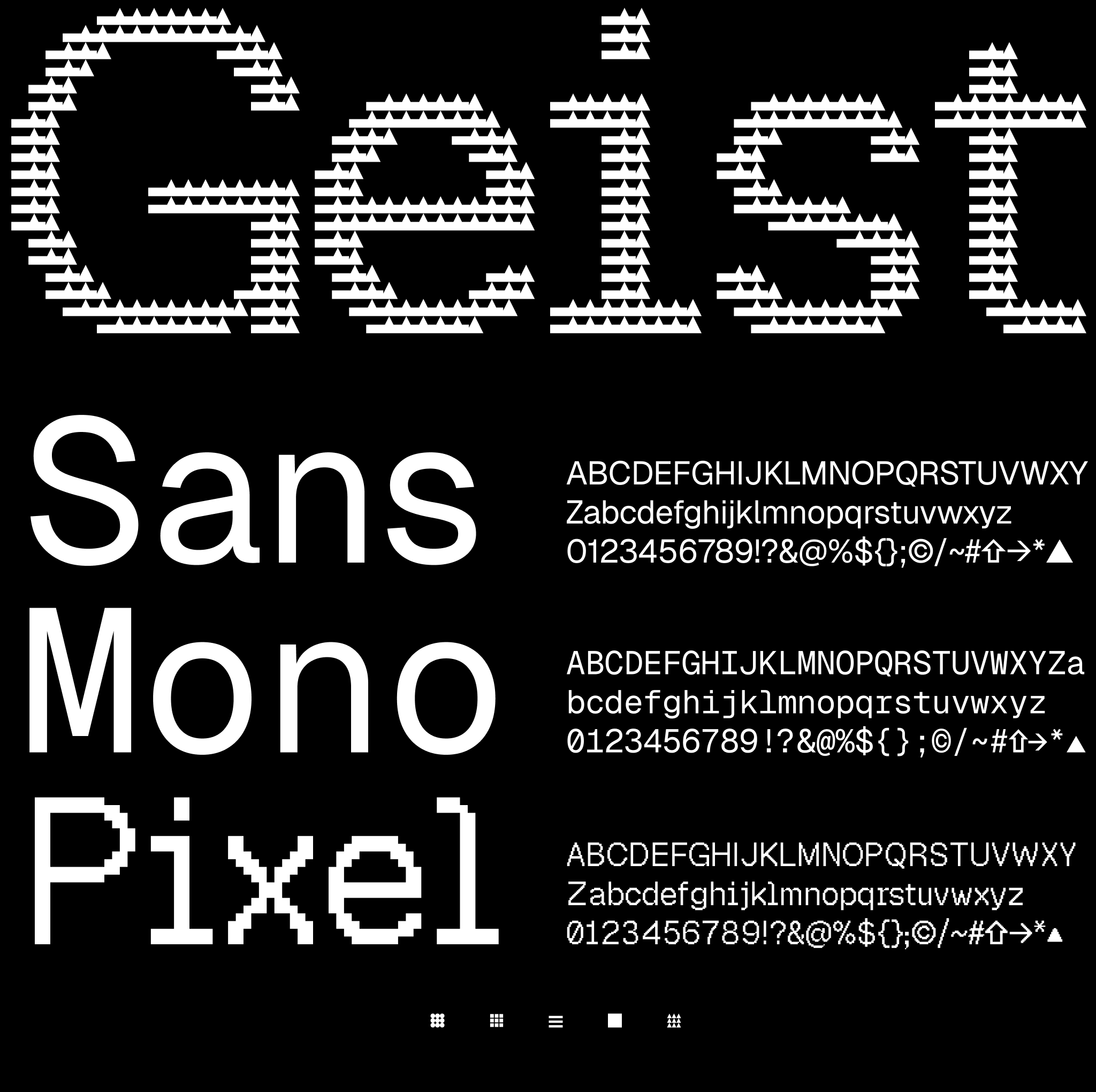
Geist Sans, Geist Mono & Geist Pixel
Geist is a new font family created by Vercel in collaboration with Basement Studio.
Geist Sans is a sans-serif typeface designed for legibility and simplicity. It is modern, geometric, and based on the principles of classic Swiss typography. It is designed to be used in body copy, headlines, logos, posters, and other large display sizes.
Geist Mono is a monospaced typeface, crafted to be the perfect partner to Geist Sans. It is designed to be used in code editors, diagrams, terminals, and other text-based interfaces where code is rendered.
Geist Pixel is a display typeface family featuring five unique pixel-based variants, each with a distinct visual style. It is designed for decorative use in headlines, logos, and other display contexts where a pixelated aesthetic is desired.
Installation
npm install geist
Using with Next.js
GeistSans is exported from geist/font/sans, GeistMono can be found in geist/font/mono, and Geist Pixel variants are available from geist/font/pixel. All are NextFontWithVariable instances. You can learn more by reading the next/font docs.
Geist Pixel Variants
Geist Pixel includes five distinct variants, each exported separately:
GeistPixelSquare | --font-geist-pixel-square | Square pixel shapes |
GeistPixelGrid | --font-geist-pixel-grid | Grid-based pixel pattern |
GeistPixelCircle | --font-geist-pixel-circle | Circular pixel shapes |
GeistPixelTriangle | --font-geist-pixel-triangle | Triangular pixel shapes |
GeistPixelLine | --font-geist-pixel-line | Line-based pixel pattern |
import {
  GeistPixelSquare,
  GeistPixelGrid,
  GeistPixelCircle,
  GeistPixelTriangle,
  GeistPixelLine,
} from "geist/font/pixel";
App Router
In app/layout.js:
import { GeistSans } from "geist/font/sans";

export default function RootLayout({ children }) {
  return (
    <html lang="en" className={GeistSans.className}>
      <body>{children}</body>
    </html>
  );
}
Pages Router
In pages/_app.js:
import { GeistSans } from "geist/font/sans";

export default function MyApp({ Component, pageProps }) {
  return (
    <main className={GeistSans.className}>
      <Component {...pageProps} />
    </main>
  );
}
If you're using a version of Next.js that's older than 15, then in next.config.js or next.config.mjs add:
/** @type {import('next').NextConfig} */
const nextConfig = {
  reactStrictMode: true,
+  transpilePackages: ["geist"],
};

export default nextConfig;
This is required to fix errors like:
TypeError: next_font_local__WEBPACK_IMPORTED_MODULE_0___default(...) is not a functionSyntaxError: Cannot use import statement outside a module
With Tailwind CSS
All Geist fonts can be used through CSS variables.
GeistSans: --font-geist-sansGeistMono: --font-geist-monoGeistPixelSquare: --font-geist-pixel-squareGeistPixelGrid: --font-geist-pixel-gridGeistPixelCircle: --font-geist-pixel-circleGeistPixelTriangle: --font-geist-pixel-triangleGeistPixelLine: --font-geist-pixel-line
In app/layout.js:
import { GeistSans } from "geist/font/sans";
import { GeistMono } from "geist/font/mono";
import { GeistPixelSquare } from "geist/font/pixel";

export default function RootLayout({ children }) {
  return (
    <html
      lang="en"
      className={`${GeistSans.variable} ${GeistMono.variable} ${GeistPixelSquare.variable}`}
    >
      <body>{children}</body>
    </html>
  );
}
Tailwind CSS V4
Then in tailwind.css:
@theme {
--font-sans: var(--font-geist-sans);
--font-mono: var(--font-geist-mono);
--font-pixel-square: var(--font-geist-pixel-square);
--font-pixel-grid: var(--font-geist-pixel-grid);
--font-pixel-circle: var(--font-geist-pixel-circle);
--font-pixel-triangle: var(--font-geist-pixel-triangle);
--font-pixel-line: var(--font-geist-pixel-line);
}
Tailwind CSS V3
Then in tailwind.config.js:
module.exports = {
  theme: {
    extend: {
      fontFamily: {
        sans: ["var(--font-geist-sans)"],
        mono: ["var(--font-geist-mono)"],
        "pixel-square": ["var(--font-geist-pixel-square)"],
        "pixel-grid": ["var(--font-geist-pixel-grid)"],
        "pixel-circle": ["var(--font-geist-pixel-circle)"],
        "pixel-triangle": ["var(--font-geist-pixel-triangle)"],
        "pixel-line": ["var(--font-geist-pixel-line)"],
      },
    },
  },
};
License
The Geist font family is free and open sourced under the SIL Open Font License.
Inspiration
Geist has been influenced and inspired by the following typefaces: Inter, Univers, SF Mono, SF Pro, Suisse International, ABC Diatype Mono, and ABC Diatype. We thank the creators of these typefaces for their craft.





