


Product
Rust Support in Socket Is Now Generally Available
Socket’s Rust and Cargo support is now generally available, providing dependency analysis and supply chain visibility for Rust projects.
By Trevor Norris - Jan 19, 2026
generate-project
Advanced tools
Scaffold out complete code projects from the command line, or use this generator as a plugin in other generators to provide baseline functionality.

Scaffold out complete code projects from the command line, or use this generator as a plugin in other generators to provide baseline functionality.



(TOC generated by verb using markdown-toc)
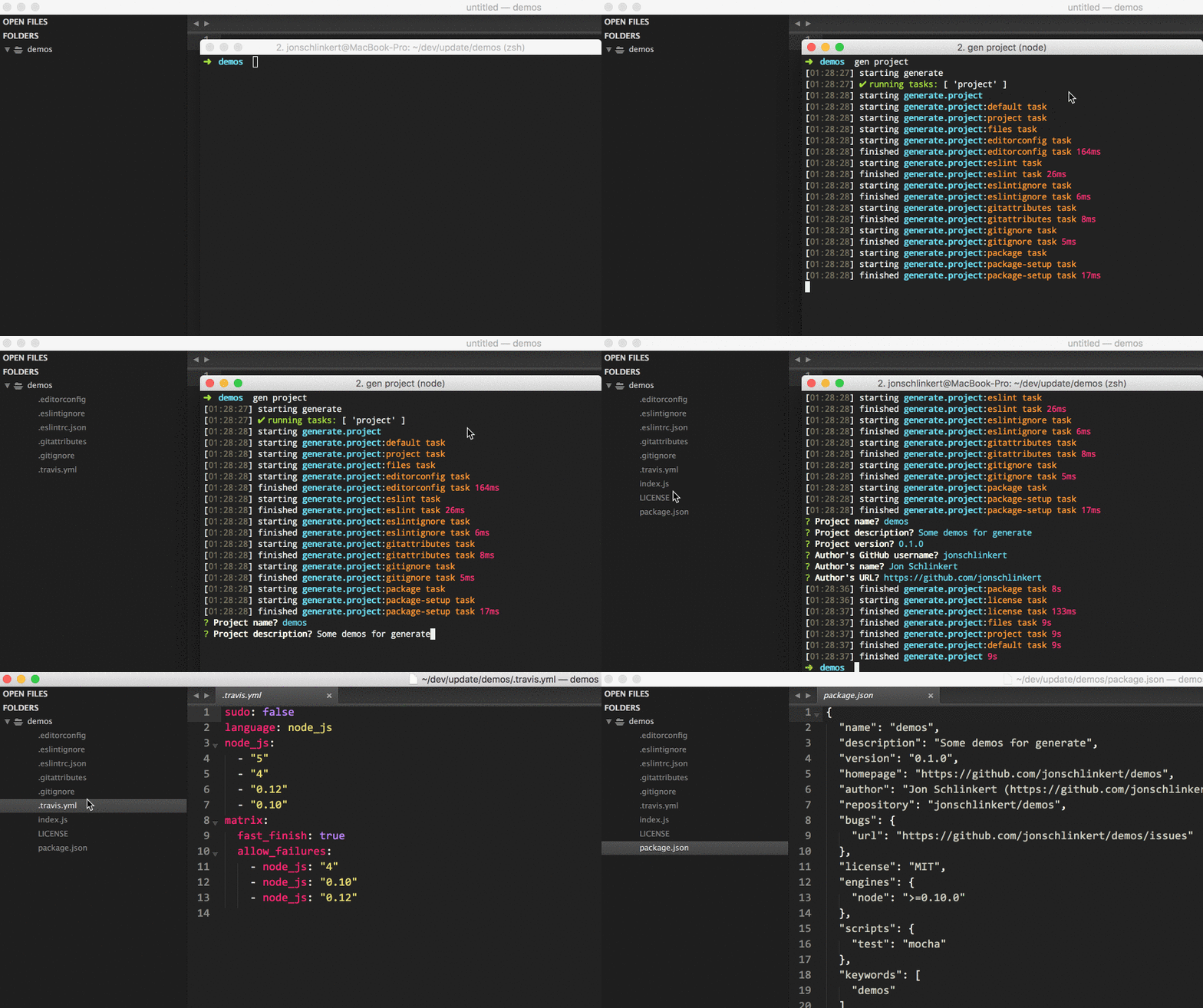
Generate is a command line tool and developer framework for scaffolding out new GitHub projects using generators and tasks.
Answers to prompts and the user's environment can be used to determine the templates, directories, files and contents to build. Support for gulp, base and assemble plugins, and much more.
For more information:
Installing the CLI
To run the project generator from the command line, you'll need to install Generate globally first. You can do that now with the following command:
$ npm install --global generate
This adds the gen command to your system path, allowing it to be run from any directory.
Install generate-project
Install this module with the following command:
$ npm install --global generate-project
Run this generator's default task with the following command:
$ gen project
What will happen?
Running $ gen project will run the generator's default task, which will:
Conflict detection
In the case that a file already exists on the file system, you will be prompted for feedback before overwrite any files.
You can set the destination to a new directory if you want to avoid the prompts, or avoid accidentally overwriting files with unintentional answers.
What you should see in the terminal
If completed successfully, you should see both starting and finished events in the terminal, like the following:
[00:44:21] starting ...
...
[00:44:22] finished ✔
If you do not see one or both of those events, please let us know about it.
To see a general help menu and available commands for Generate's CLI, run:
$ gen help
All available tasks.
Generates the necessary files for a basic node.js project.
Example
$ gen project
Prompts for commonly used data. This task isn't necessary needed, it's more of a convenience for asking questions up front, instead of as files are generated. The actual messages for questions can be found in the common-questions library.
Example
$ gen project:prompt
Verify that the current working directory is empty before generating any files. This task is automatically run by the default task, but you'll need to call it directly with any other task. This task is from generate-defaults.
Example
$ gen project:is-empty
Runs the default task on all registered micro-generators. See the generated files.
Example
$ gen project:files
Generate a basic index.js file. This task is used for composition with other tasks.
Example
$ gen project:index
Generate the dotfiles from registered micro-generators. See the generated files.
Example
$ gen project:dotfiles
Generate the main project files from registered micro-generators. See the generated files.
Example
$ gen project:rootfiles
Scaffold out basic project for a gulp plugin. See the generated files.
Example
$ gen project:gulp
Scaffold out a project for a base plugin. See the generated files.
Example
$ gen project:base
Scaffold out a minimal code project. See the generated files.
Example
$ gen project:min
# or
$ gen project:minimal
Scaffold out a basic generate generator project.
Example
$ gen project:generator
Scaffold out a basic template helper project.
Example
$ gen project:helper
Scaffold out an assemble middleware project.
Example
$ gen project:middleware
Visit Generate's documentation for tasks.
The following files trees are automatically generated by a task in verbfile.js.
(See Generate's customization docs to learn how to override individual templates.)
Files generated by each task (e.g. dest files). See the Generate customization docs to learn how to override individual templates.
Note that diffs are base on comparisons against the files generated by the default task. Additionally, some tasks generate the same files, but with different contents (for example, the contents of index.js differs based on the task).
Files generated by the default task:
 .
 ├── .editorconfig
 ├── .eslintrc.json
 ├── .gitattributes
 ├── .gitignore
 ├── .travis.yml
 ├── index.js
 ├── contributing.md
 ├── LICENSE
 ├── package.json
 └── README.md
Files generated by the minimal task:
 .
-├── .editorconfig
-├── .eslintrc.json
-├── .gitattributes
 ├── .gitignore
-├── .travis.yml
-├── index.js
-├── contributing.md
 ├── LICENSE
 ├── package.json
 └── README.md
Files generated by the gulp task:
 .
 ├── .editorconfig
 ├── .eslintrc.json
 ├── .gitattributes
 ├── .gitignore
 ├── .travis.yml
 ├── index.js
+├── gulpfile.js
 ├── contributing.md
 ├── LICENSE
 ├── package.json
 └── README.md
Files generated by the base task:
 .
 ├── .editorconfig
 ├── .eslintrc.json
 ├── .gitattributes
 ├── .gitignore
 ├── .travis.yml
 ├── index.js
 ├── contributing.md
 ├── LICENSE
 ├── package.json
 └── README.md
Files generated by the generator task:
 .
 ├── .editorconfig
 ├── .eslintrc.json
 ├── .gitattributes
 ├── .gitignore
 ├── .travis.yml
-├── index.js
+├── generator.js
 ├── contributing.md
 ├── LICENSE
 ├── package.json
 └── README.md
Files generated by the helper task:
 .
 ├── .editorconfig
 ├── .eslintrc.json
 ├── .gitattributes
 ├── .gitignore
 ├── .travis.yml
 ├── contributing.md
 ├── LICENSE
 ├── package.json
 ├── README.md
 └── index.js
Files generated by the files task:
 .
 ├── .editorconfig
 ├── .eslintrc.json
 ├── .gitattributes
 ├── .gitignore
 ├── .travis.yml
-├── index.js
 ├── contributing.md
 ├── LICENSE
 ├── package.json
 └── README.md
Files generated by the rootfiles task:
 .
-├── .editorconfig
-├── .eslintrc.json
-├── .gitattributes
-├── .gitignore
-├── .travis.yml
-├── index.js
 ├── contributing.md
 ├── LICENSE
 ├── package.json
 └── README.md
Files generated by the dotfiles task:
 .
 ├── .editorconfig
 ├── .eslintrc.json
 ├── .gitattributes
 ├── .gitignore
 └── .travis.yml
-├── index.js
-├── contributing.md
-├── LICENSE
-├── package.json
-└── README.md
Files generated by the index task:
 .
-├── .editorconfig
-├── .eslintrc.json
-├── .gitattributes
-├── .gitignore
-├── .travis.yml
 └── index.js
-├── contributing.md
-├── LICENSE
-├── package.json
-└── README.md
The following trees represent the source files or templates that are used by each task. You'll see that most of the tasks use at least one "micro-generator" to generate a specific file.
Source files and/or libraries used by the default task:
 .
 ├─┬ node_modules
 │ ├─┬ generate-editorconfig
 │ │ └─┬ templates
 │ │   └── _editorconfig
 │ ├─┬ generate-eslint
 │ │ └─┬ templates
 │ │   └── _eslintrc.json
 │ ├─┬ generate-gitattributes
 │ │ └─┬ templates
 │ │   └── _gitattributes
 │ ├─┬ generate-gitignore
 │ │ └─┬ templates
 │ │   └── Minimal.gitignore
 │ ├─┬ generate-travis
 │ │ └─┬ templates
 │ │   └── _travis.yml
 │ ├─┬ generate-contributing
 │ │ └─┬ templates
 │ │   └── contributing.md
 │ ├─┬ generate-license
 │ │ └─┬ templates
 │ │   └── mit.tmpl
 │ ├─┬ generate-package
 │ │ └─┬ templates
 │ │   └── $package.json
 │ └─┬ generate-readme
 │   └─┬ templates
 │     └── node.md
 └─┬ templates
   └── index.js
Source files and/or libraries used by the minimal task:
 .
 └─┬ node_modules
   ├─┬ generate-gitignore
   │ └─┬ templates
   │   └── Node.gitignore
   ├─┬ generate-license
   │ └─┬ templates
   │   └── mit.tmpl
   ├─┬ generate-package
   │ └─┬ templates
   │   └── $package.json
   └─┬ generate-readme
     └─┬ templates
       └── node.md
Source files and/or libraries used by the gulp task:
 .
 ├─┬ node_modules
 │ ├─┬ generate-editorconfig
 │ │ └─┬ templates
 │ │   └── _editorconfig
 │ ├─┬ generate-eslint
 │ │ └─┬ templates
 │ │   └── _eslintrc.json
 │ ├─┬ generate-gitattributes
 │ │ └─┬ templates
 │ │   └── _gitattributes
 │ ├─┬ generate-gitignore
 │ │ └─┬ templates
 │ │   └── Minimal.gitignore
 │ ├─┬ generate-travis
 │ │ └─┬ templates
 │ │   └── _travis.yml
 │ ├─┬ generate-contributing
 │ │ └─┬ templates
 │ │   └── contributing.md
 │ ├─┬ generate-license
 │ │ └─┬ templates
 │ │   └── mit.tmpl
 │ ├─┬ generate-package
 │ │ └─┬ templates
 │ │   └── $package.json
 │ └─┬ generate-readme
 │   └─┬ templates
 │     └── node.md
 └─┬ templates
   └─┬ gulp
     ├── plugin.js
     └── gulpfile.js
Source files and/or libraries used by the base task:
 .
 ├─┬ node_modules
 │ ├─┬ generate-editorconfig
 │ │ └─┬ templates
 │ │   └── _editorconfig
 │ ├─┬ generate-eslint
 │ │ └─┬ templates
 │ │   └── _eslintrc.json
 │ ├─┬ generate-gitattributes
 │ │ └─┬ templates
 │ │   └── _gitattributes
 │ ├─┬ generate-gitignore
 │ │ └─┬ templates
 │ │   └── Minimal.gitignore
 │ ├─┬ generate-travis
 │ │ └─┬ templates
 │ │   └── _travis.yml
 │ ├─┬ generate-contributing
 │ │ └─┬ templates
 │ │   └── contributing.md
 │ ├─┬ generate-license
 │ │ └─┬ templates
 │ │   └── mit.tmpl
 │ ├─┬ generate-package
 │ │ └─┬ templates
 │ │   └── $package.json
 │ └─┬ generate-readme
 │   └─┬ templates
 │     └── node.md
 └─┬ templates
   └─┬ base
     └── plugin.js
Source files and/or libraries used by the generator task:
 .
 ├─┬ node_modules
 │ ├─┬ generate-editorconfig
 │ │ └─┬ templates
 │ │   └── _editorconfig
 │ ├─┬ generate-eslint
 │ │ └─┬ templates
 │ │   └── _eslintrc.json
 │ ├─┬ generate-gitattributes
 │ │ └─┬ templates
 │ │   └── _gitattributes
 │ ├─┬ generate-gitignore
 │ │ └─┬ templates
 │ │   └── Minimal.gitignore
 │ ├─┬ generate-travis
 │ │ └─┬ templates
 │ │   └── _travis.yml
 │ ├─┬ generate-contributing
 │ │ └─┬ templates
 │ │   └── contributing.md
 │ ├─┬ generate-license
 │ │ └─┬ templates
 │ │   └── mit.tmpl
 │ ├─┬ generate-package
 │ │ └─┬ templates
 │ │   └── $package.json
 │ └─┬ generate-readme
 │   └─┬ templates
 │     └── node.md
 └─┬ templates
   └─┬ generator
     └── generator.js
Source files and/or libraries used by the helper task:
 .
 ├─┬ node_modules
 │ ├─┬ generate-editorconfig
 │ │ └─┬ templates
 │ │   └── _editorconfig
 │ ├─┬ generate-eslint
 │ │ └─┬ templates
 │ │   └── _eslintrc.json
 │ ├─┬ generate-gitattributes
 │ │ └─┬ templates
 │ │   └── _gitattributes
 │ ├─┬ generate-gitignore
 │ │ └─┬ templates
 │ │   └── Minimal.gitignore
 │ ├─┬ generate-travis
 │ │ └─┬ templates
 │ │   └── _travis.yml
 │ ├─┬ generate-contributing
 │ │ └─┬ templates
 │ │   └── contributing.md
 │ ├─┬ generate-license
 │ │ └─┬ templates
 │ │   └── mit.tmpl
 │ ├─┬ generate-package
 │ │ └─┬ templates
 │ │   └── $package.json
 │ └─┬ generate-readme
 │   └─┬ templates
 │     └── node.md
 └─┬ templates
   └─┬ helper
     └── index.js
Source files and/or libraries used by the files task:
 .
 └─┬ node_modules
   ├─┬ generate-editorconfig
   │ └─┬ templates
   │   └── _editorconfig
   ├─┬ generate-eslint
   │ └─┬ templates
   │   └── _eslintrc.json
   ├─┬ generate-gitattributes
   │ └─┬ templates
   │   └── _gitattributes
   ├─┬ generate-gitignore
   │ └─┬ templates
   │   └── Minimal.gitignore
   ├─┬ generate-travis
   │ └─┬ templates
   │   └── _travis.yml
   ├─┬ generate-contributing
   │ └─┬ templates
   │   └── contributing.md
   ├─┬ generate-license
   │ └─┬ templates
   │   └── mit.tmpl
   ├─┬ generate-package
   │ └─┬ templates
   │   └── $package.json
   └─┬ generate-readme
     └─┬ templates
       └── node.md
Source files and/or libraries used by the rootfiles task:
 .
 └─┬ node_modules
   ├─┬ generate-contributing
   │ └─┬ templates
   │   └── contributing.md
   ├─┬ generate-license
   │ └─┬ templates
   │   └── mit.tmpl
   ├─┬ generate-package
   │ └─┬ templates
   │   └── $package.json
   └─┬ generate-readme
     └─┬ templates
       └── node.md
Source files and/or libraries used by the dotfiles task:
 .
 └─┬ node_modules
   ├─┬ generate-editorconfig
   │ └─┬ templates
   │   └── _editorconfig
   ├─┬ generate-eslint
   │ └─┬ templates
   │   └── _eslintrc.json
   ├─┬ generate-gitattributes
   │ └─┬ templates
   │   └── _gitattributes
   ├─┬ generate-gitignore
   │ └─┬ templates
   │   └── Minimal.gitignore
   └─┬ generate-travis
     └─┬ templates
       └── _travis.yml
Source files and/or libraries used by the index task:
 .
 └─┬ templates
   └── index.js
It's never too early to begin running unit tests. When you're ready to get started, the following command will ensure the project's dependencies are installed then run all of the unit tests:
$ npm install && test
If you're tests are passing and you're ready to publish your project to npm, you can do that now with the following command:
Are you sure you're ready?!
$ npm publish
Are you using Generate in your project? Have you published a generator and want to share your project with the world?
Here are some suggestions!
@generatejs or use the #generatejs hashtaggenerate-projectgeneratejs tag in questions)generategenerator to package.json.Pull requests and stars are always welcome. For bugs and feature requests, please create an issue.
Please read the contributing guide for avice on opening issues, pull requests, and coding standards.
Install dev dependencies:
$ npm install -d && npm test
Jon Schlinkert
Copyright © 2016, Jon Schlinkert. Released under the MIT license.
This file was generated by verb-generate-readme, v0.1.30, on September 19, 2016.
FAQs
Scaffold out complete code projects from the command line, or use this generator as a plugin in other generators to provide baseline functionality.
The npm package generate-project receives a total of 1 weekly downloads. As such, generate-project popularity was classified as not popular.
We found that generate-project demonstrated a not healthy version release cadence and project activity because the last version was released a year ago. It has 1 open source maintainer collaborating on the project.
Did you know?

Socket for GitHub automatically highlights issues in each pull request and monitors the health of all your open source dependencies. Discover the contents of your packages and block harmful activity before you install or update your dependencies.
Product
Socket’s Rust and Cargo support is now generally available, providing dependency analysis and supply chain visibility for Rust projects.

Security News
Chrome 144 introduces the Temporal API, a modern approach to date and time handling designed to fix long-standing issues with JavaScript’s Date object.

Research
Five coordinated Chrome extensions enable session hijacking and block security controls across enterprise HR and ERP platforms.